Call on the critical ones
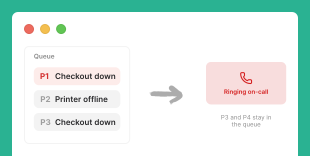
When a P1 or high-priority ticket is raised, ITOC360 rings the on-call agent by phone or SMS instead of leaving it to wait in the queue.
IT Service Management
ITOC360 connects your service desk to a live on-call layer, so a high-priority ticket triggers a real phone call, every incident keeps a ticket in sync, and nothing critical sits waiting in the queue, whichever ITSM platform your teams run.
IT service management teams run on tickets, but a P1 raised at the wrong hour can still sit unread behind fifty routine requests. ITOC360 puts a real on-call layer behind the queue: critical tickets ring a phone, and every incident keeps a ticket as the system of record.
When a P1 or high-priority ticket is raised, ITOC360 rings the on-call agent by phone or SMS instead of leaving it to wait in the queue.
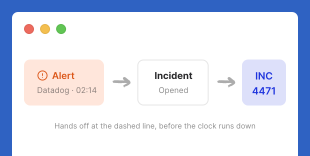
Incidents from your monitoring stack open a ticket in your service desk automatically, so the system of record exists the moment response starts.
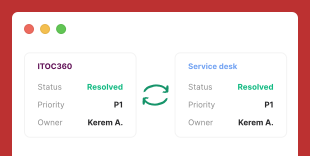
Status, notes, and priority stay aligned in both directions. Resolve in ITOC360 and the ticket closes in your service desk, and the other way around.
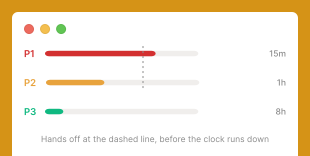
Priority-based escalation sends P1 straight to a call and lower tiers to the queue, then hands off automatically if no one acknowledges before the SLA clock runs down.
Every notification, acknowledgment, and escalation hop is timestamped against the ticket, ready for SLA reporting and post-incident review.
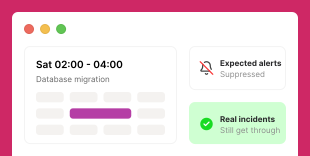
Suppress notifications for planned changes and maintenance so agents are not paged for expected, scheduled work.
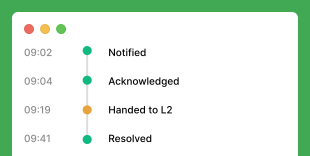
ITOC360 sits between your service desk and your on-call team. The direction runs both ways: tickets can trigger a call, and incidents can open a ticket.
A request or incident is created in your service desk, by a customer, an agent, or an automation rule.
ITOC360 reads the ticket priority and matches it to an escalation policy.
A P1 calls the on-call agent by phone, then SMS, then the next tier if no one acknowledges. Lower priorities stay in the queue.
Notes, status, and priority sync both ways, and every step is logged against the ticket through resolution.
ITOC360 fits the ITSM platform your teams already run. Jira Service Management and ServiceNow are two of the service desks it connects to, alongside the monitoring and communication tools that feed your tickets. For anything without a native connector, a webhook or the API bridges it. 50+ native integrations and growing.
View All IntegrationsYes. Map ticket priority to an escalation policy so a P1 or Critical ticket in your service desk calls the on-call agent by phone or SMS immediately, while lower-priority tickets stay in the queue.
Yes. Bidirectional integrations keep state, notes, and priority aligned both ways, so resolving an incident in ITOC360 closes the ticket in your ITSM platform, and updating the ticket updates the incident. ITOC360 can also open a ticket automatically when a monitoring alert becomes an incident, and keep it in sync through resolution.
ITOC360 connects to common service desk platforms such as Jira Service Management and ServiceNow, and the native library keeps expanding. For any tool without a native connector yet, a standard webhook or the REST API connects it, so you are not tied to a fixed list of vendors.
Free to start, no card, and no agent to deploy on your service desk.