AI-First Incident Management
Every alert from
reaches the right engineer.
One AI-first platform for on-call, escalation and incident response. 70% less alert noise for IT operations and SRE teams that can't afford a missed page.


Trusted by SREs and infrastructure leaders








AI Incident Management for SRE and DevOps Teams
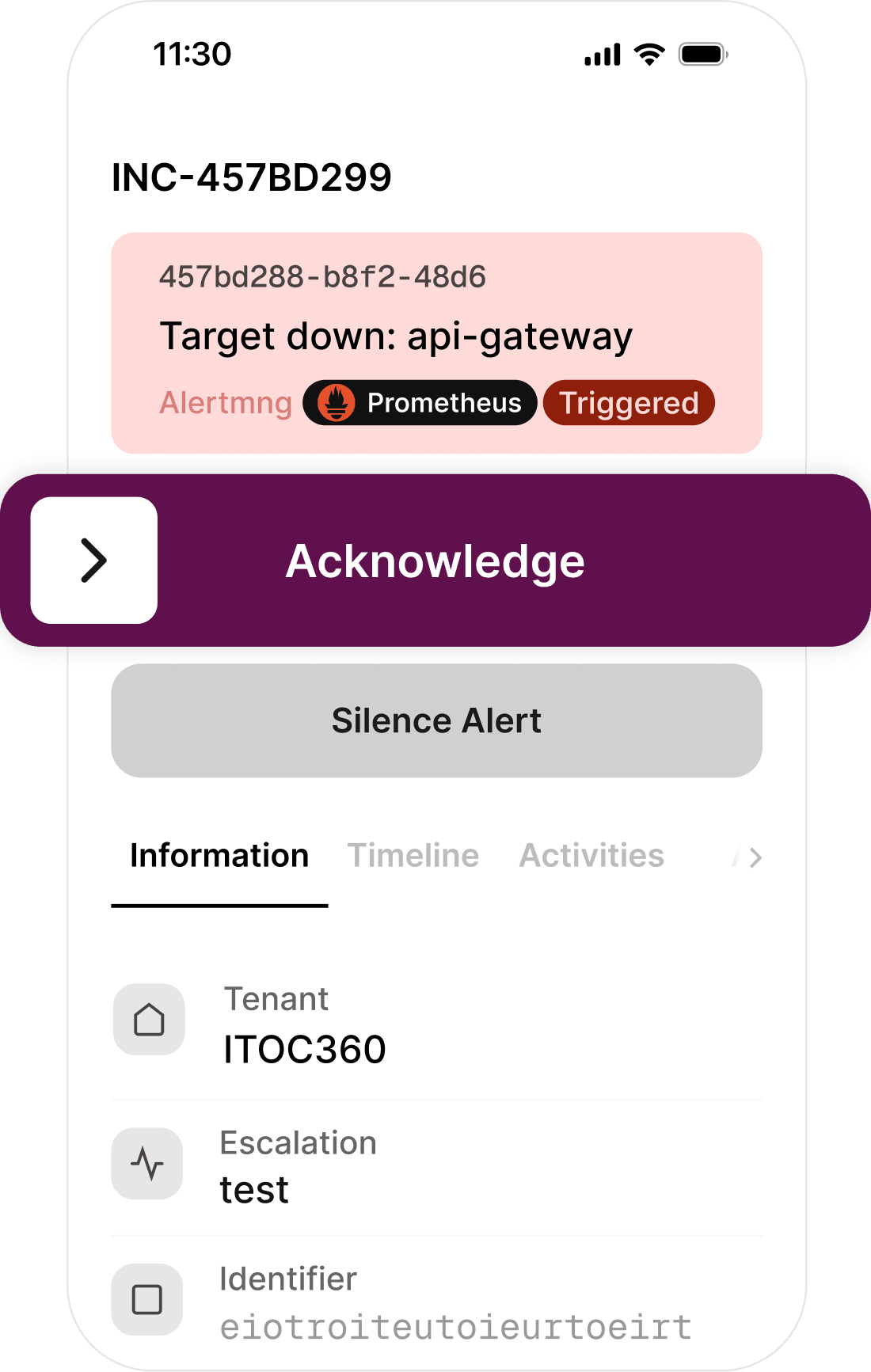
ITOC360 collects alerts from your monitoring tools, groups duplicates with AI and routes each incident to the right on-call engineer.

Coming from Opsgenie or PagerDuty?
Bring everything with you.
Schedules, escalation policies, integrations and routing rules import automatically. Our team runs the migration with you and stays on the call for your first week of live rotations.
Import
Schedules, policies and alert sources, mapped from your export.
We do it with you
A named engineer through cutover, not a docs link.
Run both in parallel
Keep your old tool live until you trust the new one.
Connect your entire toolchain.
ITOC360 integrates with your monitoring, alerting, ticketing and communication tools out of the box — no custom glue code required. 50+ native integrations and growing.
View All IntegrationsTrusted by modern engineering teams
Here is what SRE managers and directors of infrastructure say about ITOC360.

"Mobile App Makes Incident Response Easy Anywhere"
"I can see the incident, acknowledge it and follow what’s happening without having to find a laptop first. It’s much better than just getting a push notification and then having to switch to another system."
"Automatic Escalations That Keep Incidents Moving"
"I don’t have to rely on someone noticing a Slack message. If the primary person doesn’t acknowledge the incident, it moves through the escalation policy automatically."
"Clear Incident Timelines That Make Postmortems Easy"
"Who was notified, when did they acknowledge it, who took over, and what happened afterwards — which saves us from reconstructing everything from Slack messages and tickets when we do a postmortem."
"Unified On-Call, Escalations, and Incident Management"
"We had monitoring in one place, on-call somewhere else, and a lot of the incident communication happening in Slack. Having schedules, escalations and incidents in one workflow has made things much easier."

Easier from the first day
Six things teams tell us make the difference after they switch — from the first evaluation to the renewal they no longer dread.
Accessibility
Built for everyone, not just engineers. Intuitive enough for any team to start using on day one.
Setup & Onboarding
Replace weeks of complex onboarding with a fast, out-of-the-box setup that works instantly.
Flexibility
Ditch rigid structures for highly customizable alert rules and adaptable team workflows.
Pricing Transparency
Enjoy completely transparent, predictable pricing with all core features included and zero hidden fees.
Interface & Value
Get a modern, constantly evolving UI with 4x the capability at half the cost of legacy tools.
Contract Buyout
Switch risk-free without double-paying. We’ll cover the remaining cost of your current contract.
Frequently asked questions
What is incident management software?
Incident management software helps engineering teams detect, route and resolve service disruptions. ITOC360 adds AI correlation and automated escalation to reduce noise and speed up response.
How does AI Incident Management work for SRE and DevOps teams?
ITOC360 collects alerts from your monitoring tools, groups duplicates with AI and routes each incident to the right on-call engineer. If no one acknowledges, automated escalation moves it forward. Your team responds from Slack, Microsoft Teams or the mobile app, with every step recorded on one timeline. One platform for startups running their first rotation and enterprise teams managing hundreds of services.
How does alert correlation work in ITOC360?
ITOC360 aggregates alerts based on labels, resources, and timestamps using machine learning models to prevent duplicate notifications and group alert storms into a single actionable incident.
Can I configure custom overrides for holidays?
Yes. You can define custom shift overrides, holiday rotations, and backup schedules directly within the timezone-aware calendar settings.
What channels can ITOC360 use to notify engineers?
ITOC360 supports instant notifications through voice phone calls, SMS, push alerts, Slack, Microsoft Teams, email, and custom Webhooks.
How long does it take to set up ITOC360?
Most teams are fully onboarded within a single day. Connect your monitoring tools, define escalation policies, and start receiving intelligent alerts in minutes — not weeks.
Does ITOC360 integrate with my existing tools?
Yes. ITOC360 offers native integrations with 50+ monitoring, ticketing, and communication platforms including Datadog, PagerDuty, Jira, Slack, Microsoft Teams, and more.
How much does ITOC360 cost?
ITOC360 has a free forever plan with SMS and voice alerts. Paid plans include all core features with no hidden fees. See pricing.
How is ITOC360 different from PagerDuty and Opsgenie?
AI correlation, SMS and voice alerts and transparent pricing are included, with no costly add-ons. Schedules and escalation policies import automatically.
Ready to respond faster?
Join engineering teams that resolve incidents 10x faster with ITOC360.