Route by Service, Team, or Severity
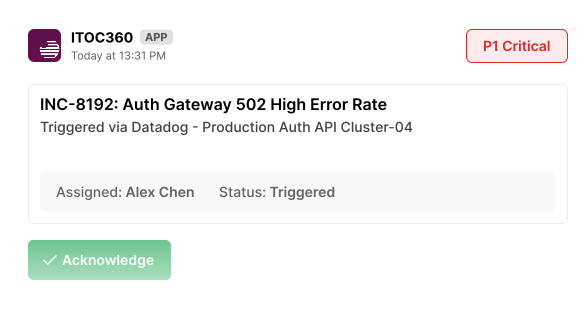
Alerts go to specific channels that own them, so channels stay worth reading. Alert templates control what appears in the message, so responders see actionable summaries, not raw JSON payloads.
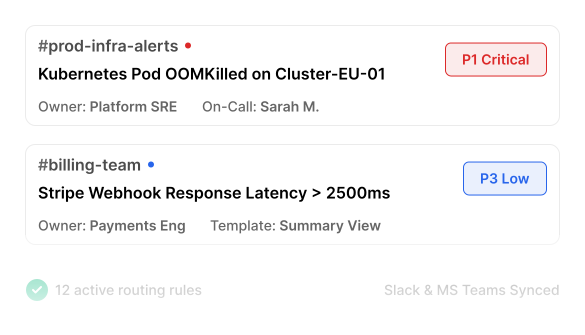
ITOC360 delivers alerts to Slack, Microsoft Teams, WhatsApp, and Telegram alongside SMS, voice, push, and email — so notifications reach people where they're already looking.
Trusted by SREs and infrastructure leaders








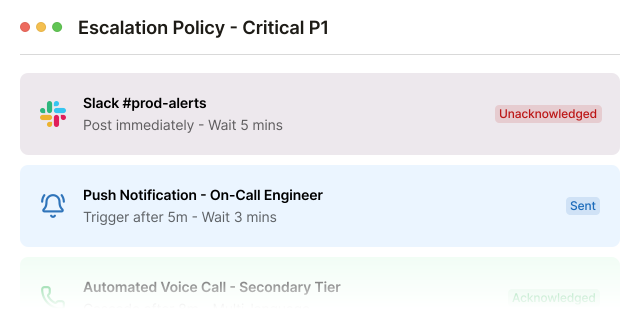
Use chat as a low-friction first step: post to Slack or Teams first. If no one acknowledges within 5 minutes, automatically cascade to mobile push, SMS, and finally automated voice calls until someone takes ownership.
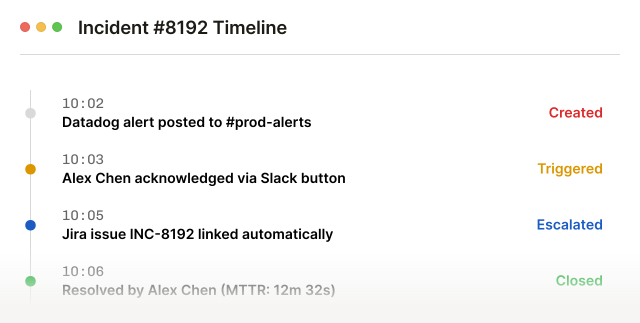
Every message, acknowledgement, escalation hop, and action taken in the channel is captured with a timestamp. When the incident closes, the record of what happened and when is already assembled — so the post-incident review starts from facts rather than scrollback.
You shouldn’t have to choose between fixing this and honouring a renewal you already signed. Run ITOC360 alongside your current tool at no cost until your contract ends.
The alternative is waiting for a renewal date to make a decision you have already made.
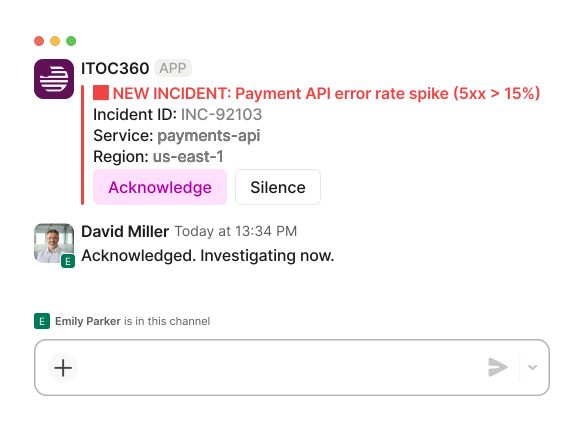
Trigger incident runbooks, acknowledge pages, update stakeholders, and record postmortem timelines directly from Slack and Teams threads.
Alerts go to specific channels that own them, so channels stay worth reading. Alert templates control what appears in the message, so responders see actionable summaries, not raw JSON payloads.
Acknowledge, escalate, reassign, or resolve directly from the message. Alert actions run from chat too — create the Jira or ServiceNow ticket, notify stakeholders, trigger a runbook — so the response happens in the same window as the conversation about it.
ITOC360 integrates with your monitoring, alerting, ticketing and communication tools out of the box — no custom glue code required. 50+ native integrations and growing.
View All IntegrationsHere is what SRE managers and directors of infrastructure say about ITOC360.

"Mobile App Makes Incident Response Easy Anywhere"
"I can see the incident, acknowledge it and follow what’s happening without having to find a laptop first. It’s much better than just getting a push notification and then having to switch to another system."
"Automatic Escalations That Keep Incidents Moving"
"I don’t have to rely on someone noticing a Slack message. If the primary person doesn’t acknowledge the incident, it moves through the escalation policy automatically."
"Clear Incident Timelines That Make Postmortems Easy"
"Who was notified, when did they acknowledge it, who took over, and what happened afterwards — which saves us from reconstructing everything from Slack messages and tickets when we do a postmortem."
"Unified On-Call, Escalations, and Incident Management"
"We had monitoring in one place, on-call somewhere else, and a lot of the incident communication happening in Slack. Having schedules, escalations and incidents in one workflow has made things much easier."







Six things teams tell us make the difference after they switch — from the first evaluation to the renewal they no longer dread.
Built for everyone, not just engineers. Intuitive enough for any team to start using on day one.
Replace weeks of complex onboarding with a fast, out-of-the-box setup that works instantly.
Ditch rigid structures for highly customizable alert rules and adaptable team workflows.
Enjoy completely transparent, predictable pricing with all core features included and zero hidden fees.
Get a modern, constantly evolving UI with 4x the capability at half the cost of legacy tools.
Switch risk-free without double-paying. We’ll cover the remaining cost of your current contract.
ITOC360 integrates via official Slack and Teams apps using granular OAuth scopes. The bot only listens in designated incident response channels and does not read private messages.
Yes. You can attach automated webhook triggers, AWS Lambda functions, or Jenkins/GitHub Actions runbooks to interactive action buttons in the alert message.
When an incident is resolved, ITOC360 automatically collates all bot commands, reactions, status updates, and user notes posted in the thread into an exportable incident timeline document.
Join engineering teams that resolve incidents 10x faster with ITOC360.