ITIL 5 Incident Management: What Changed and How to Run It
ITIL 5 incident management is the practice of minimizing the negative impact of incidents by restoring normal service operation as quickly as possible. That purpose is unchanged from ITIL 4. What changed in ITIL (Version 5) is the context around it: incident management now sits inside a single Product and Service Lifecycle, is tied more explicitly to monitoring and observability, and has to account for AI that detects, triages, and sometimes acts on incidents.
Quick answer: In ITIL (Version 5), incident management keeps its ITIL 4 name and purpose, but moves from the Service Value Chain into the new Product and Service Lifecycle, where it operates in the Operate and Support activities alongside monitoring, problem management, and the service desk. To run it well: detect and correlate alerts, log and classify, prioritize by impact and urgency, escalate to the right on-call responder, restore service, communicate, close, and feed every major incident into problem management.
If you're new to the underlying discipline, start with what IT service management is. For the framework-level differences between ITIL 4 and ITIL 5, see what changed in ITIL 5. This guide is narrower: it covers only incident management, and how to actually run it under ITIL 5.
Key facts at a glance
Official name | "ITIL"; "ITIL (Version 5)" only distinguishes it from earlier versions |
Launched | January 2026, by PeopleCert |
Practice purpose | Minimize the negative impact of incidents by restoring normal service as quickly as possible |
Practice group | Product and service management practices (22 of the 34 practices) |
Lifecycle position | Operate and Support activities of the Product and Service Lifecycle |
Closest related practices | Monitoring and event management, service desk, problem management, service request management |
Certification route | ITIL Monitor, Support and Fulfil (Version 5), part of the Practice Manager designation |
Official Practice Guide | Expected in the second half of 2026 |
What Changed for Incident Management in ITIL 5?
The practice itself changed little; its surroundings changed a lot. ITIL (Version 5) keeps all 34 ITIL 4 management practices by name, including incident management, but reorganizes them and places them in a new lifecycle model. According to ITSM.tools' analysis of the ITIL Foundation (Version 5) publication, the Official Practice Guides are expected to differ significantly for some practices when they arrive in the second half of 2026.
Area | ITIL 4 | ITIL (Version 5) | What it means for incident teams |
|---|---|---|---|
Scope | Service management | Digital product and service management | Incidents are tied to the product they affect, not just a service catalog entry |
Operating model | Service Value Chain | Product and Service Lifecycle (Discover, Design, Acquire, Build, Transition, Operate, Deliver, Support) | Incident work lives in Operate and Support, with explicit hand-offs to Build and Transition for fixes |
Practice grouping | General, service, and technical management practices | Product and service management practices (22) and general management practices (12) | Technical practices like infrastructure and platform management now sit beside incident management |
Monitoring | Monitoring and event management | Same practice, explicitly connected to observability | Detection quality becomes part of incident management, not a separate tooling concern |
AI | Not a core theme | AI Capability Model and a dedicated AI Governance module | AI triage, correlation, and auto-remediation need defined oversight |
Guiding principles | Seven principles | Same seven principles | "Optimize and automate" still governs automation decisions |
Certification focus | Foundation tested detailed practice workflows | Foundation no longer tests step-by-step workflows; depth moves to Practice Manager modules | Practitioners need the Monitor, Support and Fulfil module for incident depth |
Three changes matter most in day-to-day operations:
Incident management is now explicitly lifecycle-connected. ITIL 5 positions it within the Operate and Support activities and links it directly to monitoring, problem management, and continual improvement rather than treating it as an isolated process (Dion Training).
Observability is now part of the vocabulary. Monitoring and event management is connected to observability, reflecting how cloud-native and distributed systems are actually monitored. Poor detection is now an incident management problem, not just a tooling one.
AI needs governance, not just adoption. The ITIL AI Governance (Version 5) module is the only extension module in the ITIL 5 scheme. For incident teams, that means deciding in advance what AI may do on its own during an incident. (See AI guardrails below.)
Where Does Incident Management Sit in ITIL 5?
Incident management sits in the Operate and Support activities of the ITIL 5 Product and Service Lifecycle, and it depends on four neighboring practices to work. Monitoring and event management detects the problem, the service desk receives user reports, incident management restores service, and problem management removes the cause. Fixes then flow back through change enablement and deployment in the Build and Transition activities.
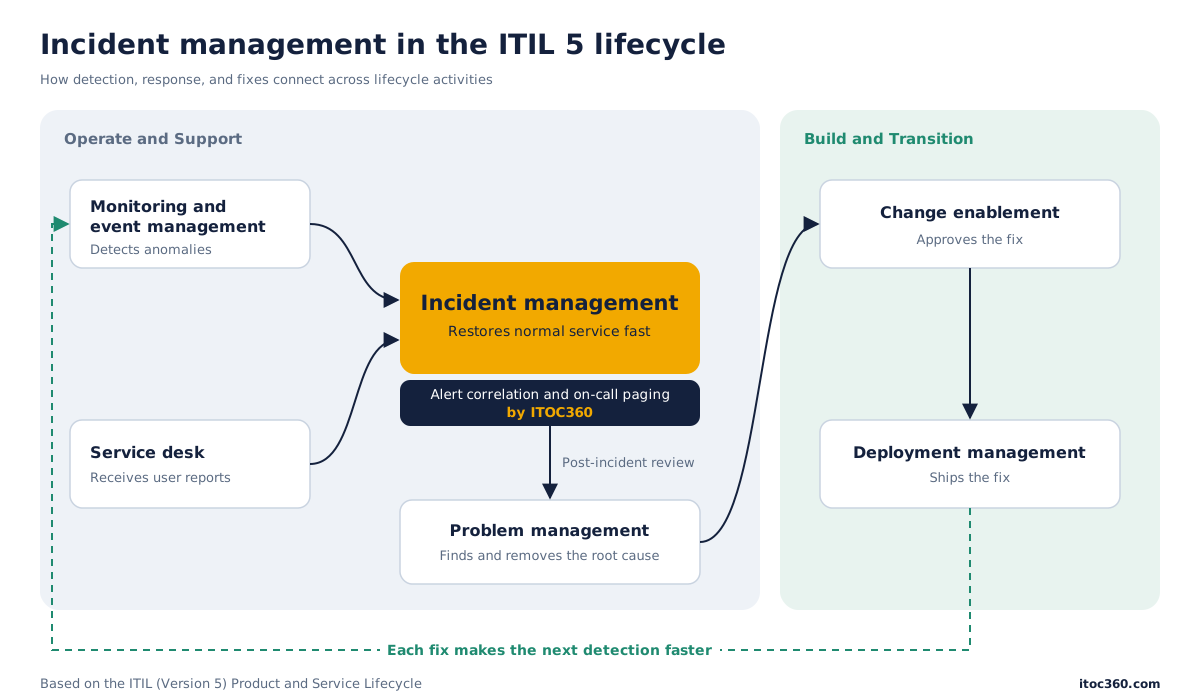
The dotted line is the point of ITIL 5's lifecycle view: every fix should make the next detection faster or the next incident less likely.
The Monitor, Support and Fulfil bundle
ITIL 5 groups the five practices incident responders use most into one Practice Manager module. The official ITIL page lists Monitor, Support and Fulfil (MSF) as covering:
Practice | Role during an incident |
|---|---|
Monitoring and event management | Detects anomalies and turns events into alerts |
Incident management | Coordinates restoration of service |
Service desk | Receives user reports and communicates status |
Problem management | Finds and removes root causes after restoration |
Service request management | Keeps routine requests separate from incidents |
To earn the ITIL Practice Manager (Version 5) designation, a practitioner completes ITIL Foundation, one Practice Manager module such as MSF, and ITIL Transformation. For most on-call and SRE leads, MSF is the relevant module.
How to Run ITIL 5 Incident Management: Step by Step
An ITIL 5-aligned incident process has nine steps, from detection to learning. ITIL doesn't prescribe these exact steps. It describes practices, not procedures, and the Foundation (Version 5) exam no longer tests step-by-step workflows. The sequence below is how mature operations teams implement the practice in 2026.
1. Detect
Incidents are detected by monitoring, reported by users through the service desk, or raised by other teams. In ITIL 5 terms, detection belongs to monitoring and event management, but its quality decides how fast incident management can start. Aim to detect service-impacting failures from monitoring before users report them.
2. Correlate and deduplicate
One failure often fires dozens of alerts across services. Group related alerts into a single incident before paging anyone. Without this step, responders triage noise instead of the actual problem. This is where AI-assisted incident management software earns its place.
3. Log and categorize
Record every incident with a timestamp, affected product or service, symptoms, and source. Categorize it (for example: availability, performance, security, data). Consistent categories are what later make problem management and trend reporting possible.
4. Prioritize by impact and urgency
Assign priority from two inputs: impact (how many users or how much revenue is affected) and urgency (how fast the damage grows). Map the result to a severity level such as SEV1–SEV4. See the severity matrix below and our guide to SEV1 incidents.
5. Escalate to the right responder
Route the incident to the on-call owner of the affected service, not to a general queue. Use an escalation policy that defines who gets paged, by which channel (voice, SMS, Slack, Teams, email), and when it escalates if nobody acknowledges. For SEV1 and SEV2, declare a major incident and assign an incident commander.
6. Diagnose and restore
The goal is restoration, not root cause. Apply a known workaround, roll back a change, fail over, or scale. Responders should follow a runbook where one exists. Record every action with a timestamp; the timeline becomes the post-incident review.
7. Communicate
Post status updates on a fixed cadence (for example, every 30 minutes for SEV1) to stakeholders and, if customers are affected, to a status page. The service desk handles inbound user questions so responders can keep working.
8. Resolve and close
Confirm service is restored, ideally with the same monitoring signal that detected the incident. Close the incident only after the affected users or service owner confirm. Record the resolution and link any workaround to the knowledge base.
9. Review and hand off to problem management
Run a blameless post-incident review for every SEV1 and SEV2. Capture the timeline, contributing factors, and action items. Open a problem record for the root cause, so the fix flows through change enablement and deployment. This is the step most teams skip, and the one ITIL 5's lifecycle model makes explicit.
Roles, Severity, and KPIs
Incident management roles
A working ITIL 5 incident process needs five roles. Small teams combine them; the responsibilities still have to be covered.
Role | Responsibility |
|---|---|
Practice owner | Owns the incident process, policies, and KPIs across the organization |
Incident commander | Leads a major incident: coordinates responders, makes calls, owns the timeline |
On-call responder | First technical owner of the affected service; diagnoses and restores |
Communications lead | Sends stakeholder and status-page updates on a fixed cadence |
Service desk agent | Logs user reports, links them to the incident, answers users |
Severity matrix (impact × urgency)
Priority is set from impact and urgency. The matrix below is a common starting point; tune the thresholds to your business.
Severity | Typical impact | Example | Acknowledge within | Update cadence |
|---|---|---|---|---|
SEV1 | Critical service down for most users, or data loss or breach | Checkout API returning errors for all customers | 5 min | Every 30 min |
SEV2 | Major function degraded for many users | Search latency 10× normal | 15 min | Every 60 min |
SEV3 | Minor function impaired, workaround exists | Export to CSV failing for one region | 1 hour | Daily |
SEV4 | Cosmetic or single-user issue | UI label misaligned | Next business day | On resolution |
For definitions and escalation rules per level, see what a SEV1 incident is.
KPIs that prove the practice works
Track a small set of metrics monthly, split by severity:
MTTA (mean time to acknowledge): time from alert to a human owning the incident
MTTR (mean time to resolve): time from detection to confirmed restoration
Monitoring-detected rate: share of incidents detected by monitoring before any user report
Alert-to-incident ratio: alerts fired per actionable incident; a falling ratio means correlation is working
Repeat incident rate: incidents with the same cause within 90 days, a direct test of problem management
Post-incident review completion: share of SEV1 and SEV2 incidents with a finished review and assigned actions
Across 14 engineering teams on ITOC360 over Q2 2026, correlating alerts before paging reduced pages per incident from 8.4 to 1.2.
AI in ITIL 5 Incident Management
ITIL 5 treats AI as a set of capabilities that need governance, not as a feature to switch on. The Foundation publication introduces the ITIL AI Capability Model, the "6C" model of creation, curation, clarification, cognition, communication, and coordination (ITSM.tools). Mapped to incident work, it gives a practical way to decide what AI may do on its own.
Capability | Incident use case | Suggested autonomy |
|---|---|---|
Creation | Drafting status updates and post-incident review summaries | AI drafts, human approves before sending |
Curation | Grouping related alerts into one incident; surfacing similar past incidents | Autonomous, with audit log |
Clarification | Summarizing a noisy alert stream into a plain-language incident description | Autonomous |
Cognition | Suggesting likely cause or severity | Recommend only; responder decides |
Communication | Paging on-call engineers, notifying stakeholders | Autonomous within the escalation policy |
Coordination | Running a remediation script, rolling back a deployment | Human approval, except pre-approved low-risk runbooks |
PeopleCert's own experts are blunt about the limit. ITIL's senior director David Cannon has said that organizations cannot give AI carte blanche. Where governance, roles, and configuration data are weak, AI accelerates instability instead of reducing it.
Five guardrails for AI in incident response
Write down decision authority. List which actions AI may take alone (correlate, summarize, page) and which need a human (remediate, communicate externally).
Keep a human accountable for every incident. AI can recommend severity; a named responder owns the decision.
Log every AI action in the incident timeline. Post-incident reviews must be able to see what the AI did and why.
Measure AI like any other practice. Track false-positive correlation, wrong severity suggestions, and time saved per incident.
Fix the data first. AI triage is only as good as service ownership and configuration data; stale ownership means wrong pages.
This is where a dedicated orchestration layer fits next to a core ITSM platform. ITOC360, for example, uses machine learning to correlate related alerts into a single incident and routes it through a defined on-call escalation policy, which covers the curation and communication capabilities while leaving remediation decisions with the responder.
Moving Your Incident Process From ITIL 4 to ITIL 5
You don't need to rebuild an ITIL 4 incident process to align with ITIL 5. PeopleCert positions Version 5 as an evolution, and the practice keeps its name and purpose. Use this checklist to close the gaps that matter.
Map each incident step to a lifecycle activity (Operate, Support) and name the hand-off to Build and Transition for fixes.
Tag every incident with the affected product, not just a service.
Measure the monitoring-detected rate; set a target for catching incidents before users do.
Add alert correlation before paging, and track the alert-to-incident ratio.
Publish a severity matrix with acknowledgment and update targets per level.
Write an AI decision-authority policy covering what AI may do without a human.
Make post-incident reviews mandatory for SEV1 and SEV2, and link each one to a problem record.
Review the official Practice Guide when PeopleCert releases it, and adjust terminology.
Common mistakes
Treating ITIL 5 as a certification exercise. Renaming documents doesn't change MTTA. Change the detection and hand-offs.
Paging on every alert. Without correlation, responders spend the first minutes of every incident deduplicating noise.
Confusing incidents with problems. Incident management restores service; problem management removes causes. Closing an incident is not the end of the work.
Routing to queues instead of owners. An incident sitting in a shared queue has no acknowledgment clock running.
Letting AI act without an audit trail. If the post-incident review can't see what automation did, you can't improve it.
Frequently asked questions
What is incident management in ITIL 5?
The practice of minimizing the negative impact of incidents by restoring normal service operation as quickly as possible. In ITIL (Version 5), it sits in the Operate and Support activities of the Product and Service Lifecycle.
Did incident management change from ITIL 4 to ITIL 5?
Its name and purpose did not. Its context did: it now belongs to the product and service management practice group, connects explicitly to observability, and must account for AI governance. Revised Official Practice Guides are expected in the second half of 2026.
Is it called ITIL 5 or ITIL (Version 5)?
The official name is simply "ITIL." "ITIL (Version 5)" distinguishes it from earlier versions; "ITIL 5" is the common shorthand.
Which ITIL 5 certification covers incident management?
ITIL Monitor, Support and Fulfil (Version 5), which also covers service desk, problem management, service request management, and monitoring and event management. It counts toward the ITIL Practice Manager designation.
What is the difference between an incident and a problem in ITIL 5?
An incident is an unplanned interruption or degradation of a service. A problem is the underlying cause of one or more incidents. Incident management restores service; problem management prevents recurrence.
What are the steps of the ITIL incident management process?
Detect, correlate, log and categorize, prioritize, escalate, diagnose and restore, communicate, resolve and close, then review and hand off to problem management.
Can AI run incident management under ITIL 5?
AI can correlate alerts, summarize, and page responders. ITIL 5's AI governance guidance keeps humans accountable for decisions such as remediation and external communication.
What KPIs should an ITIL 5 incident process track?
MTTA, MTTR, monitoring-detected rate, alert-to-incident ratio, repeat incident rate, and post-incident review completion, all split by severity.
Final Thoughts
ITIL 5 didn't reinvent incident management; it put it back in context. The practice now lives inside a lifecycle that starts with detection and ends with a fix shipped through change. The teams that benefit most won't be the ones that rename their runbooks, but the ones that detect earlier, page less, and close the loop into problem management every time.
Related Reading
Sources
PeopleCert / ITIL — New ITIL explained (Version 5)
PeopleCert / ITIL — ITIL (Version 5): Managing AI risks and rewards
PeopleCert — ITIL AI Governance (Version 5)
PeopleCert — ITIL Foundation (Version 5)
ITSM.tools, Stephen Mann — 20 important changes from ITIL 4
ITSM.tools — ITIL Version 5 management practices explained
Dion Training — ITIL 5 practice guide