What Is ITSM? Definition, AI Trends, KPIs & How to Choose a Tool (2026 Guide)
What Is ITSM?
ITSM (IT Service Management) is the practice of designing, delivering, managing, and continuously improving the IT services an organization provides to its employees, customers, and partners. Instead of treating IT as a collection of servers, tickets, and fixes, ITSM treats IT as a service — something with defined offerings, owners, processes, and measurable outcomes.
Last updated: September 2026
Quick answer: ITSM is how organizations plan, deliver, support, and improve technology services in a structured, repeatable way — typically through processes like incident, problem, change, and request management, supported by an ITSM tool or platform.
What Does ITSM Stand For?
ITSM stands for Information Technology Service Management. The term deliberately emphasizes service — the idea that IT's job isn't just to keep systems running, but to deliver something of measurable value to the people who depend on it, with clear expectations around quality, speed, and reliability. (Wikipedia's overview offers a useful academic framing of the term's origins.)
Why Does ITSM Matter in 2026?
Every business now runs on technology, so when a system slows down, access breaks, or a request goes unanswered, the business feels it immediately. ITSM turns IT support from reactive firefighting into a structured, predictable discipline.
According to Grand View Research, the global ITSM market was valued at roughly $13.5 billion in 2024 and is projected to reach $29.9 billion by 2030 — a 14.4% annual growth rate, driven largely by cloud adoption and AI-powered automation.
Organizations invest in ITSM to:
Resolve incidents faster and reduce downtime
Standardize how requests, incidents, and changes are handled
Gain visibility into IT performance, costs, and risk
Align technology delivery with business outcomes
Improve the day-to-day experience of employees and customers
What Are the Core ITSM Processes?
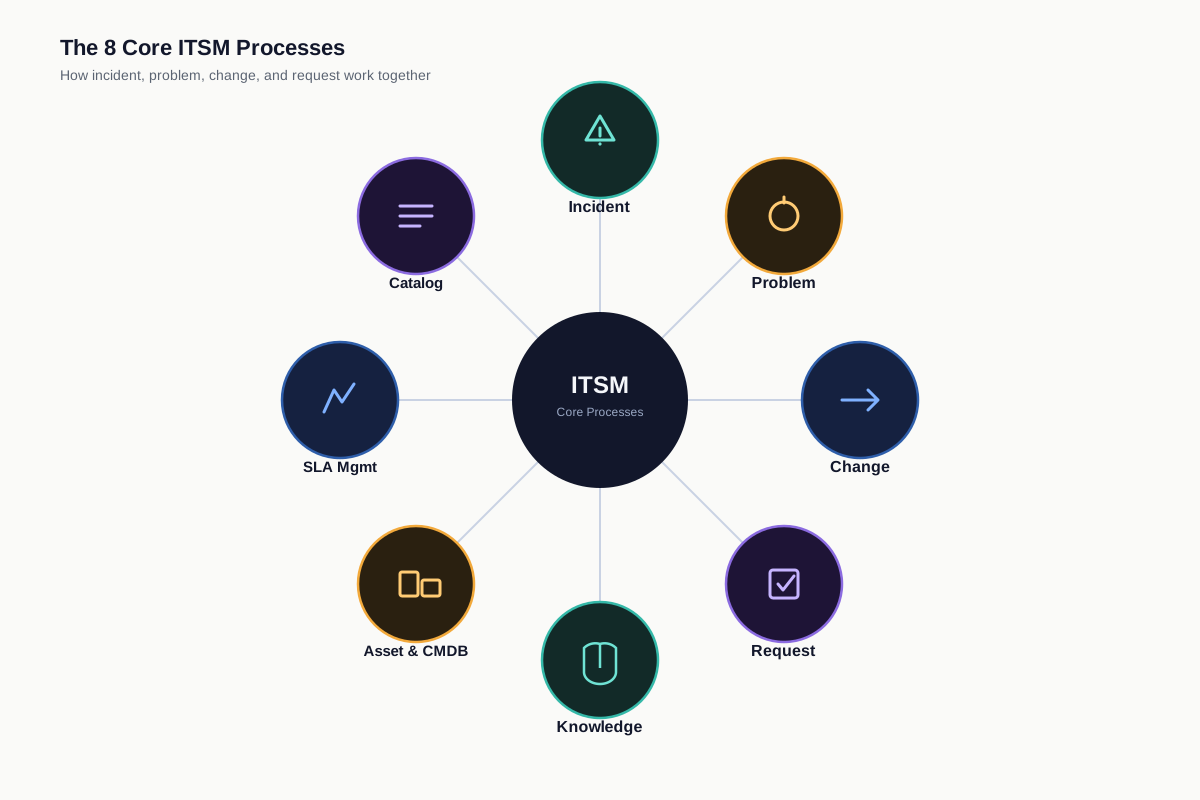
Most ITSM frameworks — and every major ITSM tool — are built around the same core set of processes.
Process | What It Does |
|---|---|
Restores normal service as fast as possible after an unplanned disruption — this is also the area where AI-native orchestration tools like ITOC360 are increasingly used alongside a core ITSM platform, to cut alert noise and auto-route incidents to the right on-call engineer | |
Problem Management | Investigates root causes so incidents don't keep recurring |
Change Management | Controls how updates, patches, and deployments are approved and rolled out |
Request Fulfillment | Handles routine user requests (access, hardware, software) via self-service |
Knowledge Management | Captures solutions and documentation for faster resolution and self-service |
Asset & Configuration Management | Tracks IT assets and how they relate to each other (often via a CMDB) |
Service Level Management | Defines and monitors SLAs for response time, resolution time, and uptime |
Service Catalog | A self-service list of available IT services employees can browse and request |
What's the Difference Between ITSM and ITIL?
This is the single most common point of confusion, so it's worth being precise:
ITSM is the overall discipline of managing IT as a service.
ITIL (IT Infrastructure Library) is the most widely adopted framework of best practices for how to actually run ITSM.
ITIL is a guide for doing ITSM well — not the only one. Several other frameworks exist, each with a different emphasis:
Framework | Best For |
|---|---|
ITIL (Version 5) | Broad, process-based best practices; the industry default |
International certification standard for service management systems | |
IT governance, risk, and compliance alignment | |
VeriSM | Flexible, outcome-based approach for organizations blending multiple frameworks |
Six Sigma / Lean IT | Process efficiency and continuous improvement |
Many organizations don't adopt one framework wholesale — they borrow the parts of ITIL, COBIT, or ISO 20000 that fit their size and maturity.
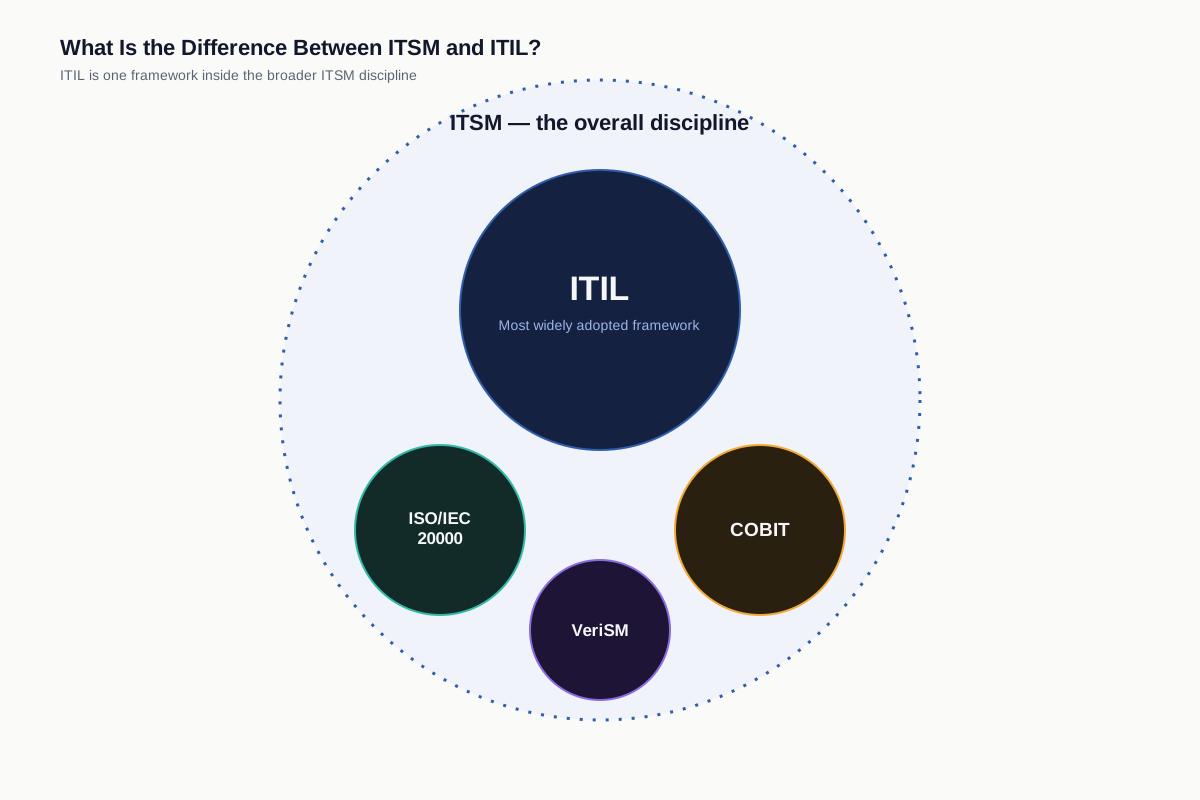
For the full comparison, including what ITIL 5 changes, see ITSM vs ITIL.
Is ITSM the Same as a Help Desk or Service Desk?
Not quite:
A help desk is reactive — it logs and resolves individual issues as they arrive.
A service desk is the single point of contact for all IT-related requests and communication, feeding into broader ITSM processes.
ITSM is the umbrella discipline both operate within.
What's the Difference Between ITSM and DevOps?
ITSM and DevOps aren't competitors — they optimize for different things. ITSM focuses on structured, governed, stable service delivery; DevOps focuses on speed and continuous software delivery. Increasingly, organizations blend the two: DevOps ships changes fast, while ITSM's change and incident processes keep that speed from creating instability.
What Is ESM (Enterprise Service Management)?
Enterprise Service Management (ESM) applies ITSM's principles — ticketing, workflows, self-service catalogs, SLAs — to departments outside IT, such as HR, Facilities, Legal, and Finance. Instead of a new employee submitting a laptop request through IT and a separate paper form through HR, ESM puts both requests through the same structured service experience.
This is one of the fastest-growing extensions of ITSM: many platforms now market themselves as unified "ITSM + ESM" or, more recently, as convergence platforms that also pull in IT operations and incident data — a sign that the boundaries between service management, operations, and incident response are blurring.
How Is AI Changing ITSM?
AI is the biggest shift in ITSM since ITIL itself, and it's now a core evaluation criterion, not an add-on. The most common AI-driven capabilities in modern ITSM platforms include:
AI-powered ticket triage and routing — automatically classifying and assigning incoming tickets
Virtual agents / AI chat support — resolving common requests without human involvement
Predictive incident detection — flagging likely outages before they impact users
Auto-generated knowledge base articles and summaries — turning resolved tickets into reusable knowledge
AI-assisted change risk assessment — scoring the risk of a proposed change before approval
Natural-language reporting — letting IT leaders ask questions about service data in plain English
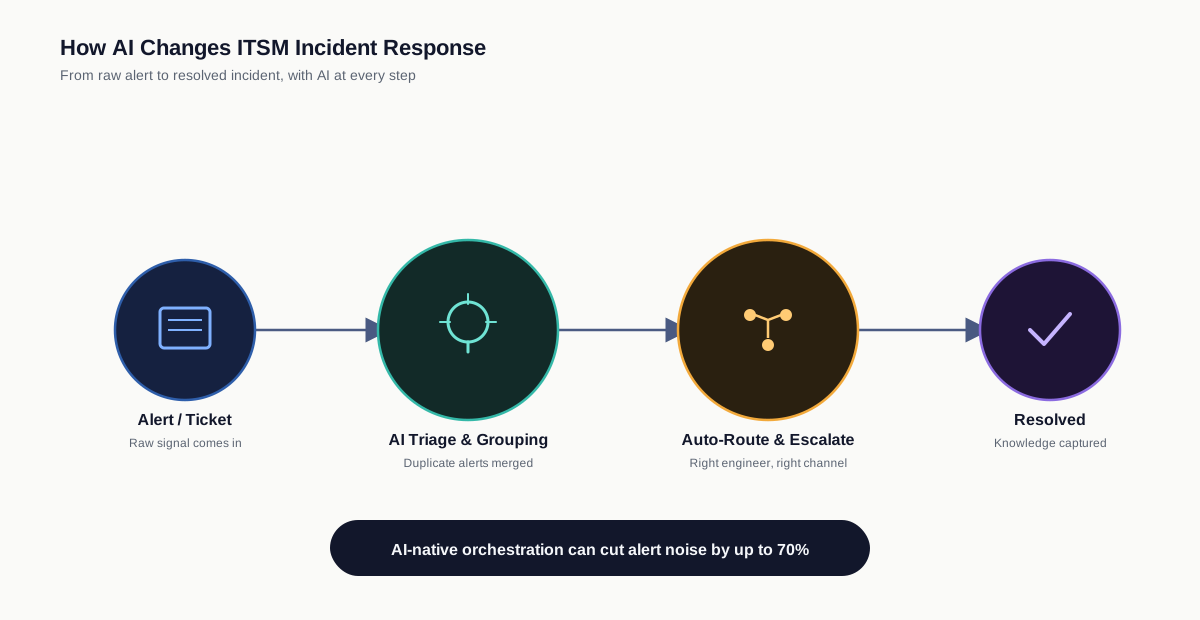
When evaluating an ITSM platform, it's worth asking not just "does it have AI?" but for concrete metrics from existing customers: deflection rate, resolution accuracy, and how the AI performs on your organization's own data, not a vendor demo.
Incident response specifically is a good example of this shift. Many organizations keep their existing ITSM platform for ticketing, requests, and change management, but layer a dedicated AI-driven incident orchestration tool on top for the moment something actually breaks. ITOC360, for instance, uses machine learning to group related alerts into a single actionable incident instead of flooding on-call engineers with duplicate notifications, then auto-routes and escalates through voice, SMS, Slack, Teams, or email based on custom escalation policies — cutting alert noise by up to 70% in practice. It's a useful illustration of where ITSM is heading: less about a single monolithic tool, and more about specialized, AI-native components connected to the core service management system of record.
What Are the Benefits of ITSM?
Benefit | Why It Matters |
|---|---|
Faster incident resolution | Defined workflows and escalation paths reduce downtime |
Fewer repeat problems | Root-cause analysis prevents recurring issues |
Lower change risk | Structured approvals catch problems before deployment |
Better employee/customer experience | Self-service and clear SLAs set the right expectations |
Improved cost control | Asset visibility reduces waste and license sprawl |
Stronger compliance | Standardized processes support audit and regulatory needs |
Data-driven decisions | Reporting reveals real performance trends, not guesses |
How Do You Measure ITSM Success? (Key KPIs)
A common gap in ITSM guides is how to know if it's working. These are the metrics IT teams typically track:
MTTR (Mean Time to Resolve) — average time from ticket creation to resolution
MTTA (Mean Time to Acknowledge) — how quickly a new incident gets a first response
First Contact Resolution Rate — the percentage of issues resolved without escalation
SLA Compliance Rate — the percentage of tickets resolved within agreed timeframes
Self-Service Deflection Rate — the share of requests resolved without opening a ticket
CSAT (Customer/Employee Satisfaction) — direct feedback after ticket closure
Ticket Backlog / Aging — how many open tickets are exceeding target resolution time
Change Success Rate — the percentage of changes implemented without causing an incident
Tracking these consistently — not just implementing processes — is what separates mature ITSM programs from ones that stall after rollout.
How Long Does ITSM Implementation Take?
A common myth is that ITSM implementation always takes six months to a year. In practice, timelines vary widely based on scope:
Weeks 1–2 — Define scope: Pick the 1–2 highest-pain processes (usually incident and request management) rather than implementing everything at once.
Weeks 2–4 — Configure the platform: Set up ticket categories, SLAs, and a basic service catalog.
Weeks 4–6 — Build the knowledge base: Document common issues and self-service articles before go-live.
Weeks 6–8 — Pilot with one team: Test workflows with a small group before rolling out company-wide.
Ongoing — Expand and refine: Add problem, change, and asset management, and use KPI data to continuously improve.
Modern, configuration-first ITSM tools can compress this into weeks rather than months — the bottleneck is usually process design and change management within the organization, not the software itself.
How Do You Choose the Right ITSM Tool?
There's no single "best" ITSM platform — the right choice depends on company size, complexity, and existing tech stack.
Consideration | What to Check |
|---|---|
Core modules | Incident, problem, change, and request management out of the box |
AI maturity | Real triage/resolution metrics from reference customers, not just a feature list |
Self-service & catalog | A portal employees actually want to use |
Integrations | Identity, monitoring, and communication tools you already run |
Total cost of ownership | License cost plus implementation, training, and admin overhead |
Scalability | Room to grow from a single team to enterprise-wide use |
Time to value | How fast you can realistically go live, not the vendor's best-case pitch |
As a general pattern in the market: organizations with complex compliance and customization needs often end up managing more overhead and longer implementation timelines; teams that prioritize speed and AI-native automation tend to get to value faster with less admin burden. The right fit depends on your team's size and how much internal effort you can dedicate to configuration and maintenance — not on brand recognition.
ITSM Best Practices for 2026
Start with your biggest pain point, not full ITIL coverage on day one.
Keep workflows only as complex as they need to be — over-engineering slows teams down.
Build the knowledge base early; it reduces ticket volume before you even measure it.
Set SLAs based on real capacity data, not aspirational targets.
Evaluate AI features on your own data and use case, not vendor demos.
Review KPIs monthly and treat ITSM as a continuous improvement cycle, not a one-time project.
If extending to ESM, start with one non-IT department (usually HR or Facilities) before scaling further.
Frequently asked questions
What does ITSM stand for?
ITSM stands for Information Technology Service Management — the practice of managing IT as a structured, measurable service.
Is ITSM the same as ITIL?
No. ITSM is the overall discipline; ITIL is the most widely used framework for implementing it. Other frameworks include ISO/IEC 20000, COBIT, and VeriSM.
What is an example of ITSM?
A company using a ticketing system to log, route, and resolve IT incidents — backed by a self-service portal for common requests like password resets — is a basic real-world example.
What are the core ITSM processes?
Incident, problem, change, request fulfillment, knowledge, asset/configuration, and service level management are considered the core processes.
Is ITSM only for large enterprises?
No. Small and mid-sized businesses use ITSM too — usually starting with a service desk and one or two core workflows before expanding.
What's the difference between ITSM and ESM?
ITSM focuses on IT services specifically; ESM applies the same service-management approach (tickets, workflows, self-service) to non-IT departments like HR, Facilities, and Legal.
How is AI used in ITSM?
AI is used for ticket triage and routing, virtual agent support, predictive incident detection, auto-generated knowledge articles, and change risk scoring.
Do I need one tool for all of ITSM, or can I combine tools?
Many teams run a core ITSM platform for ticketing, requests, and change management, and pair it with a specialized tool for a specific process — most commonly incident response. Platforms like ITOC360 focus specifically on AI-powered alert orchestration and on-call escalation, integrating with an existing ITSM/ticketing system rather than replacing it.
What ITSM certifications exist?
The most recognized is ITIL Foundation (and higher ITIL levels). Several vendors also offer their own platform-specific certifications, which are useful if your organization has standardized on a particular tool.
Final Thoughts
ITSM is what turns IT support from reactive scrambling into a structured, measurable, continuously improving service. In 2026, that means going beyond the classic incident-and-change processes to account for AI-driven automation, enterprise-wide service management, and clear KPIs that prove ITSM is actually working — not just running.