ITIL 5 Problem Management: What Changed and How to Run It (2026)
ITIL 5 problem management is the practice of reducing how often incidents happen and how much damage they do, by finding their actual and potential causes and managing workarounds and known errors. The definition in the ITIL (Version 5) glossary is the same as in ITIL 4. What changed is everything around it: problem management now sits in the Product and Service Lifecycle, belongs to the product and service management practice group, and has to account for AI that can spot patterns faster than any problem manager.
Quick answer: In ITIL (Version 5), problem management keeps its ITIL 4 purpose and its three phases (problem identification, problem control and error control). It moves into the product and service management practice group, works alongside incident management in the Operate and Support activities, and hands permanent fixes to change enablement and deployment. To run it well: detect problems from incident trends and major incidents, analyse causes, publish workarounds as known errors, and push permanent fixes through change.
If you need the basic difference first, read incident management vs problem management. For the framework-level changes between versions, see ITSM vs ITIL, including ITIL 4 vs ITIL 5. For how incidents are handled before they reach problem management, see ITIL 5 incident management. This guide covers only problem management, and how to run it under ITIL 5.
Key facts at a glance
Official name | "ITIL"; "ITIL (Version 5)" only distinguishes it from earlier versions |
Launched | January 2026, by PeopleCert |
Practice purpose | Reduce the likelihood and impact of incidents by identifying their causes and managing workarounds and known errors |
Practice group | Product and service management practices (22 of the 34 practices) |
Three phases | Problem identification, problem control, error control |
Lifecycle position | Operate and Support activities, with fixes handed to Build and Transition |
Closest related practices | Incident management, monitoring and event management, change enablement, knowledge management |
Certification route | ITIL Monitor, Support and Fulfil (Version 5), part of the Practice Manager designation |
Official Practice Guide | Expected in the second half of 2026; not yet published as of October 13, 2026 |
What Changed for Problem Management in ITIL 5?
The practice did not change; its position did. ITIL (Version 5) keeps all 34 ITIL 4 practices, including problem management, with the same glossary definition. According to ITSM.tools' list of the ITIL (Version 5) management practices, what changed is the grouping and the operating model around them.
Area | ITIL 4 | ITIL (Version 5) | What it means for problem teams |
|---|---|---|---|
Purpose | Reduce likelihood and impact of incidents; manage workarounds and known errors | Same | No need to rewrite your problem policy |
Practice group | Service management practices (17) | Product and service management practices (22) | Problems belong to a product, not only to a service catalog entry |
Operating model | Service Value Chain | Product and Service Lifecycle | Fixes have an explicit route into Build and Transition |
Detection inputs | Incident records, events | Same, with monitoring explicitly linked to observability | Telemetry becomes a first-class source for proactive problems |
AI | Not a core theme | AI Capability Model and a dedicated AI Governance module | AI-suggested causes need defined oversight |
Certification | Single-practice "ITIL Practitioner" courses existed alongside bundles | Only bundled Practice Manager modules; problem management sits in Monitor, Support and Fulfil | Practitioners learn problem management together with incident management and the service desk |
Practice guide | ITIL 4 Practice Guide | Revised Official Practice Guide expected in the second half of 2026 | Expect terminology updates; the core process stays |
Three changes matter most in daily work:
Problems now compete with features. Because problem management is a product and service management practice, a permanent fix lands in the same backlog as new features. The problem manager has to make the business case to the product owner, not just log a ticket for an infrastructure team.
The hand-off to change is explicit. The lifecycle model draws a direct line from Support to Build and Transition. A known error is not closed when the cause is found, but when the fix has been deployed through change enablement and the related incidents stop.
AI changes proactive problem management the most. Spotting the same pattern across thousands of incidents used to be a monthly trend report. AI can now do it continuously, which is why ITIL 5's AI governance guidance matters here (see the AI section below).
Where Does Problem Management Sit in ITIL 5?
Problem management works in the Operate and Support activities of the ITIL 5 Product and Service Lifecycle, next to incident management, and hands its permanent fixes to the Build and Transition activities. Two inputs start it: incidents (reactive) and monitoring trends (proactive). Two outputs end it: a known error with a workaround for the service desk, and a deployed fix that stops the incidents.
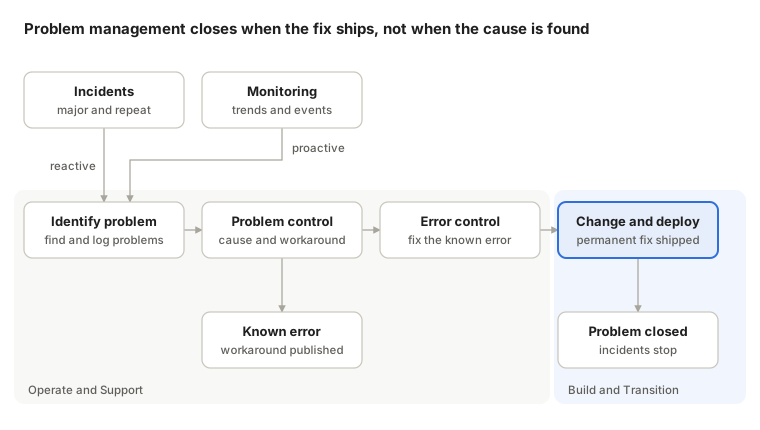
The right-hand box is the point ITIL 5's lifecycle view makes explicit. A problem is solved only when the fix has crossed into Build and Transition and shipped, not when the team has written down the cause.
ITIL 5 groups the practices problem managers work with most into the Monitor, Support and Fulfil (MSF) Practice Manager module: service desk, incident management, problem management, service request management, and monitoring and event management.
How to Run ITIL 5 Problem Management: The Three Phases
ITIL describes problem management in three phases. ITIL (Version 5) keeps them; the Foundation exam no longer tests detailed workflows, so treat the steps below as how mature operations teams implement the phases in 2026.
Phase | Starts when | Key activities | Output |
|---|---|---|---|
Problem identification | A major incident closes, incidents repeat, or a trend appears in monitoring | Log a problem record, link the related incidents, set priority by risk | A prioritized problem record |
Problem control | The problem is prioritized for analysis | Investigate causes, document a workaround | A known error with a workaround |
Error control | A known error exists | Decide on a permanent fix, raise a change, verify the result | A deployed fix, or an accepted risk |
1. Problem identification
Most problems come from five sources: a major incident, the same incident repeating, a trend in incident data, a warning pattern in monitoring, and known issues reported by suppliers or found in testing. Log each one as a problem record and link every related incident to it, so the impact is visible in one place.
Prioritize by risk, not by noise. A problem behind three SEV1 incidents a quarter ranks above one behind fifty low-impact tickets.
A practical rule: open a problem record automatically for every SEV1 and SEV2 (see our incident severity levels guide). The blameless post-incident review is often the first analysis step, so link the review to the problem record.
2. Problem control
This is the analysis phase. The goal is to understand the causes well enough to stop or reduce the incidents, not to find a single "root" at any cost. Complex failures usually have several contributing causes.
Choose the analysis technique by problem type: 5 Whys for simple linear failures, fishbone diagrams for many possible factors, fault tree analysis for safety-critical systems, and timeline analysis for incidents across several teams. Our root cause analysis guide explains each technique.
When a cause is understood but not yet fixed, document a workaround and publish the problem as a known error. The service desk and on-call engineers can then restore service faster the next time it happens.
3. Error control
Error control manages known errors until they are fixed or deliberately accepted. For each known error, decide:
Fix it: raise a change, prioritize it in the product backlog and deploy it through change enablement.
Live with it: if the fix costs more than the impact, accept the risk formally and keep the workaround up to date.
Revisit it: reassess the decision when the impact grows or the cost of the fix falls.
Close the problem only when the fix is deployed and the linked incidents have stopped for an agreed period, for example 30 days. Track follow-up work the way you track postmortem action items, with an owner and a due date for each.
Reactive vs Proactive Problem Management
Reactive problem management starts after incidents have happened. Proactive problem management looks for causes before they produce incidents. Most teams do only the first; ITIL 5's link between monitoring and observability makes the second far easier.
Reactive | Proactive | |
|---|---|---|
Trigger | A major incident or repeated incidents | Trends in monitoring, near misses, known issues from suppliers or testing |
Typical question | Why did checkout fail three times this month? | Why is database latency creeping up every Monday? |
Main data source | Incident records and post-incident reviews | Metrics, events, logs and alert history |
Business value | Stops recurring outages | Prevents outages customers never see |
Common failure | Only the loudest incidents get analyzed | Too many weak signals, no prioritization |
A good balance for most teams is to keep reactive analysis mandatory for every SEV1 and SEV2, and to reserve fixed capacity, such as one day per sprint, for proactive reviews of alert and incident trends. Alert history is the cheapest proactive input you already own: the same alert firing every week without an incident is a problem waiting to happen.
Known Errors, Workarounds and the Known Error Database
Three terms do most of the work in problem management, and teams often mix them up.
Term | What it is | Example |
|---|---|---|
Problem | A cause, or potential cause, of one or more incidents | Checkout fails when the payment provider's API slows down |
Workaround | A way to reduce or remove the impact of an incident or problem without a full fix | Switch checkout to the backup payment provider |
Known error | A problem that has been analyzed but not yet resolved | The cause is a missing timeout on payment calls; the fix is scheduled for next sprint |
A known error database (KEDB) is simply where known errors and their workarounds live, so anyone handling an incident can find them in seconds. ITIL does not require a separate database; many teams keep known errors in their ITSM tool or knowledge base, which ties them closely to knowledge management, one of the general management practices in ITIL 5.
What makes a KEDB useful:
Searchable by symptom, not by cause. The on-call engineer at 3 AM knows the error message, not the root cause.
A workaround that has been tested. An untested workaround is a guess written down.
A link from every matching incident. It shows how often the known error still hurts and justifies the permanent fix.
A review date. Known errors older than a set age, such as 90 days, should be fixed, accepted formally, or closed.
The best place for a workaround is the moment of the incident itself. When an alert matches a known error, the responder should see the workaround next to the alert, not in a separate wiki. Attaching runbooks to alerts is covered in our guide to what a runbook is.
Roles and KPIs
Problem management roles
Small teams combine these roles; the responsibilities still need an owner. The product owner row is the one ITIL 5's product focus adds.
Role | Responsibility |
|---|---|
Practice owner | Owns the problem policy, prioritization rules and KPIs across the organization |
Problem manager | Runs the problem backlog, chairs reviews, keeps known errors current |
Problem analyst | Subject-matter engineer who investigates causes and designs the fix |
Product owner | Decides when a permanent fix enters the backlog against new features |
Incident responders and service desk | Link incidents to problems and use published workarounds |
KPIs that prove the practice works
Count problems closed and you reward busywork. Measure whether incidents actually stop:
Repeat incident rate: incidents with the same cause within 90 days. The single best test of problem management.
Major incident coverage: share of SEV1 and SEV2 incidents with a linked problem record.
Time to known error: time from logging a problem to publishing a tested workaround.
Known error age: how long known errors stay open; flag anything past 90 days.
Fix rate through change: share of closed problems resolved by a deployed change rather than closed as accepted risk.
Proactive share: share of problems opened from trends and monitoring, not from incidents.
Across 42 engineering and IT operations teams on ITOC360 in Q3 2026, enforcing problem record links reduced average repeat incidents from 14.2 down to 3.8 per month within 60 days of deployment.
For how these connect to response metrics, see MTTA, MTTR and MTTD and our guide to incident management KPIs.
AI in ITIL 5 Problem Management
Problem management is where AI helps most and where it can mislead most. Spotting patterns across thousands of incidents is exactly what models do well; declaring a root cause is exactly what they should not do alone. ITIL 5's AI Capability Model, the "6C" model of creation, curation, clarification, cognition, communication and coordination (ITSM.tools' analysis of the ITIL Foundation (Version 5) publication), gives a practical way to split the work.
Capability | Problem management use case | Suggested autonomy |
|---|---|---|
Creation | Drafting problem records and known-error articles from incident timelines | AI drafts, problem manager approves |
Curation | Linking similar incidents to an existing problem; surfacing past known errors | Autonomous, with audit log |
Clarification | Summarizing dozens of linked incidents into one problem statement | Autonomous |
Cognition | Suggesting likely causes and trends | Recommend only; analysts decide |
Communication | Notifying product owners about growing problem impact | Autonomous within agreed thresholds |
Coordination | Raising a change for a permanent fix | Human approval always |
ITIL's own experts warn against handing AI open authority. Senior director David Cannon has said organizations cannot give AI carte blanche; where configuration data and ownership are weak, AI amplifies the mess instead of fixing it.
Three guardrails for AI in problem management:
Treat AI-suggested causes as hypotheses. Record them in the problem, and record whether analysis confirmed or rejected them.
Keep the evidence trail. Every incident AI links to a problem must stay visible, so reviewers can check the grouping.
Measure AI accuracy. Track how often AI-linked incidents are unlinked by humans, and how often suggested causes are confirmed.
This is where an incident platform feeds problem management. ITOC360 groups related alerts into incidents, matches new incidents to similar past ones, and drafts AI retrospectives from the incident timeline, giving problem managers linked evidence instead of a pile of tickets. The cause and the fix stay human decisions.
How ITOC360 Supports ITIL 5 Problem Management
Problem management is only as good as the incident data it starts from. ITOC360 is an AI-first incident management platform that makes that data clean, linked and complete, then hands it to the tools where your problem records live.
Problem management need | How ITOC360 helps |
|---|---|
Clean problem records | AI alert correlation turns dozens of duplicate alerts into one incident before anyone is paged |
Spotting recurring problems | Related-incident matching links new incidents to similar past ones |
Evidence for analysis | A full incident timeline of alerts, actions, chat and decisions, kept in one place |
Faster post-incident analysis | AI retrospectives drafted from the timeline when the incident closes |
Workarounds at the right moment | Incidents run in Slack or Microsoft Teams, where known-error links reach responders |
Tracking the permanent fix | Jira integration for problem and change tickets |
Teams moving from an ITSM-only setup keep their service desk and problem records where they are; ITOC360 adds the on-call, alerting and incident response layer in front of them. See how it works for IT service management teams, or start free.
Moving Your Problem Process From ITIL 4 to ITIL 5
You do not need to rebuild an ITIL 4 problem process. The purpose and phases are unchanged; close these gaps instead:
Tag every problem with the affected product, not only the service.
Give each product owner a visible problem backlog next to the feature backlog.
Open a problem record automatically for every SEV1 and SEV2 incident.
Add monitoring and alert-history reviews as a formal proactive input.
Define the hand-off from error control to change enablement and deployment, including who approves the fix.
Close problems only when the fix is deployed and linked incidents have stopped for an agreed period.
Write an AI policy for problem management: what AI may link, summarize and suggest, and what humans must decide.
Replace "problems closed" with repeat incident rate as the headline KPI.
Review the Official Practice Guide when PeopleCert publishes it and align terminology.
Common mistakes
Treating problem management as a postmortem archive. A review that ends without a problem record and an owner changes nothing.
Analyzing everything. Without risk-based prioritization, the backlog grows until nobody trusts it.
Closing problems when the cause is found. The incidents continue until the fix ships.
Hunting for a single root cause. Most serious failures have several contributing causes; fix the ones that reduce risk most.
Hiding known errors. A workaround that only the problem team can find does not reduce anyone's resolution time.
Frequently asked questions
What is problem management in ITIL 5?
The practice of reducing the likelihood and impact of incidents by identifying their actual and potential causes, and managing workarounds and known errors. In ITIL (Version 5) it belongs to the product and service management practices and works in the Operate and Support activities of the Product and Service Lifecycle.
Did problem management change from ITIL 4 to ITIL 5?
Its definition and three phases did not. Its context did: it moved to the product and service management practice group, connects explicitly to the lifecycle and to observability, and must follow ITIL 5's AI governance guidance. A revised Official Practice Guide is expected in the second half of 2026.
What are the three phases of ITIL problem management?
Problem identification, problem control and error control. Identification finds and logs problems, control analyzes causes and documents workarounds, and error control manages known errors until they are fixed or formally accepted.
What is a known error in ITIL?
A problem that has been analyzed but not yet resolved. It usually comes with a documented workaround, so incidents can be resolved faster until the permanent fix is deployed.
What is the difference between reactive and proactive problem management?
Reactive problem management starts after incidents have occurred, such as a major incident or repeated failures. Proactive problem management uses trends, monitoring data and near misses to find causes before they produce incidents.
Which ITIL 5 certification covers problem management?
ITIL Monitor, Support and Fulfil (Version 5), which also covers incident management, service desk, service request management, and monitoring and event management. It counts toward the ITIL Practice Manager designation.
What KPIs should an ITIL 5 problem process track?
Repeat incident rate, major incident coverage, time to known error, known error age, fix rate through change, and the share of problems found proactively.
Can AI run problem management under ITIL 5?
AI can link similar incidents, summarize them and suggest likely causes. Under ITIL 5's AI governance guidance, people should confirm causes and approve permanent fixes.
What tools support ITIL 5 problem management?
Most teams keep problem and known-error records in an ITSM tool, and use an incident management platform to produce the data those records depend on. ITOC360 handles that incident side: it correlates alerts into incidents, links similar incidents, keeps the full timeline and drafts AI retrospectives, then connects to tools like Jira where problems and changes are tracked.
Sources
PeopleCert / ITIL: New ITIL explained (Version 5)
PeopleCert / ITIL: ITIL (Version 5): Managing AI risks and rewards
PeopleCert: ITIL Foundation (Version 5)
ITSM.tools, Stephen Mann: ITIL Version 5 management practices explained (updated October 7, 2026)
ITSM.tools, Stephen Mann: 20 important changes from ITIL 4
Web sources opened on October 13, 2026.