Domain and DNS Monitoring: What to Watch, How Often, and How to Never Miss an Alert (2026)
Short answer
Domain and DNS monitoring is the automatic, continuous checking of your domain's DNS records, usually every 1 to 15 minutes, so you know before your customers do when a record changes, disappears or stops resolving. A complete setup also watches the things around DNS that break just as often: domain expiry, nameserver delegation, SSL certificates and DNSSEC.
Detecting the problem is only half the job. The other half is making sure the alert wakes the right engineer and turns into a tracked incident. That is the part an incident management platform like ITOC360 handles, from on-call scheduling and escalation to incident response.
Key takeaways
Monitor six record types at minimum: A, AAAA, CNAME, MX, NS and TXT (SPF, DKIM, DMARC), plus SOA for zone changes.
Check critical records every 1–5 minutes, less critical ones every 15–60 minutes, and expiry dates once a day.
Page only on what hurts customers now: resolution failures and unexpected NS or MX changes. Send expiry warnings to a ticket queue, not a phone.
Use at least two monitoring locations so a single network blip does not wake anyone.
Why DNS monitoring matters
When DNS fails, everything behind the domain fails with it: the website, the API, login and email. Users rarely see a "DNS error"; they see a site that is simply gone. Three well-documented incidents show how it happens:
Date | What happened | Impact | Lesson |
|---|---|---|---|
July 14, 2025 | A configuration change at Cloudflare withdrew the routes for its 1.1.1.1 public resolver. The faulty setting had sat dormant since June 6. | Resolver unavailable worldwide for 62 minutes (21:52–22:54 UTC). Internal alerts fired 9 minutes after impact began (post-mortem). | A change can wait weeks before it breaks DNS. Only continuous checks catch it. |
October 4, 2021 | During maintenance, Facebook's network withdrew the BGP routes to its own DNS servers (engineering post). | Facebook, Instagram and WhatsApp unreachable for about six hours. | External monitoring must run outside your own network, or it fails with you. |
October 21, 2016 | The Mirai botnet hit DNS provider Dyn with a large DDoS attack. | Major sites including Twitter, Netflix and Reddit were unreachable for hours in parts of the US and Europe. | A single DNS provider is a single point of failure. Monitor resolution from several regions. |
The pattern is the same each time: DNS breaks, every dependent service breaks with it, and the clock on customer impact starts immediately. Detection time is what you control, and it is the first number in your MTTD, MTTA and MTTR.
How DNS monitoring works
A DNS monitor sends the same DNS query a browser would, on a schedule, and compares the answer with what you expect. Most tools run four kinds of checks:
Resolution check. Does the name resolve at all, and how fast? A timeout or SERVFAIL means users cannot reach you.
Value check. Does the answer match the expected value, such as the IP in an A record or the mail host in an MX record? A silent change is often the first sign of a hijack or a bad deploy.
Authoritative check. The monitor queries your authoritative nameservers directly, not a cached resolver. This catches problems before caches expire and hide them, and confirms every nameserver returns the same answer.
Propagation check. The same query from several regions shows whether a change has reached everyone, and whether one region sees something different.
Each check runs from more than one location. A failure is usually confirmed from two or more locations before it raises an alert, which filters out local network blips.
Two settings decide how fast you find out: the check interval and the record's TTL (time to live). A record with a one-hour TTL can keep serving a wrong value from caches for up to an hour after you fix it, so low TTLs on critical records shorten both detection and recovery.
Which DNS records to monitor
Monitor every record that a customer-facing service depends on. The table lists what each record does, what failure looks like, and how urgently it should reach a person.
Record | What it does | What a failure looks like | Alert as |
|---|---|---|---|
A / AAAA | Maps the name to an IPv4 / IPv6 address | Site and API unreachable, or traffic sent to the wrong server | Page immediately |
CNAME | Points one name at another, often a CDN or SaaS host | Broken subdomain; a dangling CNAME can enable subdomain takeover | Page for production names, ticket for others |
MX | Names the servers that receive your email | Inbound email bounces or goes to an attacker's server | Page on any unexpected change |
NS | Delegates the zone to its authoritative nameservers | The whole domain stops resolving, or someone else now controls it | Page immediately |
TXT (SPF, DKIM, DMARC) | Proves which servers may send mail for you | Your email lands in spam; spoofing becomes easier | Ticket, same business day |
SOA | Holds zone metadata, including the serial number | Serial not increasing means updates are not propagating | Ticket |
SRV | Locates services such as SIP or LDAP by host and port | VoIP, directory or internal services cannot be found | Page if the service is customer-facing |
CAA | Lists which certificate authorities may issue for the domain | Certificate renewals fail, or an unexpected CA is allowed | Ticket |
The last column matters as much as the first. Paging on every TXT change trains your team to ignore DNS alerts; see how to reduce alert fatigue.
Beyond records: the rest of domain monitoring
Record checks catch a broken answer. These five checks catch the problems that break DNS from the outside, and together they make up a complete domain monitoring setup.
Domain expiry
An expired domain stops resolving within days, and after the grace period anyone can register it. Monitoring reads the expiry date from WHOIS or RDAP once a day and warns at 30, 14, 7, 3 and 1 days. Registrar renewal emails are not enough: they go to one inbox, and that person may have left.
Nameserver delegation
The NS records at your registrar (the parent zone) must match the NS records in your own zone. A mismatch after a provider migration leaves some resolvers asking servers that no longer answer. Check the delegation from the top-level domain's servers, not only from your zone.
SSL/TLS certificates
A certificate is tied to the domain name. An expired certificate, or one that no longer matches the name, makes browsers block the site even though DNS resolves correctly. Monitor expiry dates and the certificate chain together with DNS.
DNSSEC
DNSSEC signs your records so resolvers can verify they have not been forged. Its signatures expire and its keys rotate; if either step fails, validating resolvers reject your domain entirely. If you enable DNSSEC, monitor signature validity, not just record values.
Lookalike domains
Attackers register names that resemble yours (typos, swapped letters, other TLDs, look-alike Unicode characters) for phishing. Brand-protection services and certificate transparency logs can flag new registrations and new certificates for such names. Treat these alerts as security tickets, not on-call pages.
DNS performance and security monitoring
A record can hold the right value and still hurt users, either because answers are slow or because someone is abusing your DNS. These two checks cover that gap.
Performance: resolution time
Every page load, API call and login waits for DNS before anything else happens, so a slow answer slows everything behind it. Track response time per monitoring location and per authoritative nameserver:
Set a baseline per location. Normal response times differ by region; one global threshold produces false alarms.
Alert on a sustained rise, not one slow query. A practical starting rule is a warning when the median stays above twice its baseline for 10–15 minutes. Tune it to your traffic.
Page only when queries start timing out. Slow answers go to a ticket; failed answers mean users are already affected.
Check each nameserver separately. One slow or silent nameserver adds retries for some users while averages still look healthy.
Security: signs of tampering and abuse
DNS is a common target because controlling it means controlling where users and email go. Watch for these signals:
Signal | What it may mean | Route to |
|---|---|---|
Unexpected change to NS, MX or A records | Domain or DNS account hijacking | On-call page + security team |
Different answers from different resolvers or regions | Cache poisoning or spoofing | On-call page + security team |
Sudden spike in queries or NXDOMAIN responses | DDoS or random-subdomain attack on your nameservers | On-call page if resolution degrades |
Many long or unusual TXT queries from inside your network | DNS tunneling used to move data out | Security ticket from your SIEM or resolver logs |
The first three come from external DNS monitoring. The last one comes from resolver logs and security tools, which can also send their alerts to ITOC360, for example through the Google Security Command Center integration. Keeping operations and security alerts in one place means a hijack is handled as one incident, not two.
How often to check, and when to wake someone up
Match the check interval to how fast the failure hurts, and match the alert channel to whether someone must act now.
Check | Interval | Confirm from | Route to |
|---|---|---|---|
Resolution of production names (A/AAAA, CNAME) | 1–5 min | 2+ locations | On-call page (phone, SMS, push) |
Unexpected NS or MX change | 5 min | Authoritative servers | On-call page + security channel |
TXT, SOA, SRV, CAA values | 15–60 min | 1 location | Ticket or team chat |
Domain expiry | Daily | WHOIS / RDAP | Ticket at 30 days; page at 3 days if still unrenewed |
SSL certificate expiry | Daily | 1 location | Ticket at 30 days; page at 3 days if still unrenewed |
DNSSEC signature validity | 1 hour | Validating resolver | On-call page |
Lookalike domains | Daily | Feed or CT logs | Security ticket |
The expiry rows show the most useful pattern: start quietly and escalate only if nobody acts. A 30-day warning in a ticket queue is easy to handle; a page at 3 days means the quiet warnings failed. Build that step into your escalation policy, and make sure every page follows a real on-call schedule rather than a personal inbox.
DNS monitoring tools that detect the problem
You probably already run a tool that can check DNS. The table lists common ones, the DNS checks they offer, and how their alerts reach ITOC360.
Tool | DNS and domain checks | Connects to ITOC360 |
|---|---|---|
Site24x7 | DNS server monitor: resolution, record values, response time; SSL and domain expiry | Native |
PRTG (Paessler) | DNS sensor: resolution and record values from your own probes | Native |
Pingdom | DNS check type for record values; uptime checks that fail on resolution errors | Native |
Datadog | Synthetic DNS tests: record values and response time from managed locations | Native (integration) |
Prometheus | DNS probes through the blackbox exporter, alerting via Alertmanager | Native (integration) |
Grafana | Alert rules on DNS probe data from Prometheus or other sources | Native (integration) |
Zabbix | DNS items for resolution and specific record values | Native |
AWS CloudWatch | Route 53 health checks and alarms | Native |
Azure Monitor | Azure DNS metrics and availability tests | Native |
Google Cloud Monitoring | Uptime checks and Cloud DNS metrics | Native |
HetrixTools, UptimeRobot | Domain expiry, nameserver and SSL monitoring | Webhook |
Cloudflare | Notifications for DNS and zone events | Webhook |
Native integrations are listed in ITOC360's App Store description; see all 50+ on the integrations page. Any other tool can create alerts in ITOC360 through a webhook or Zapier's "Send Alert to ITOC360" action.
From DNS alert to resolved incident with ITOC360
A DNS failure rarely sends one alert. Every monitoring location, every dependent check and every tool fires at once, and an email list turns that into dozens of messages nobody owns. ITOC360 turns them into one incident with one owner.
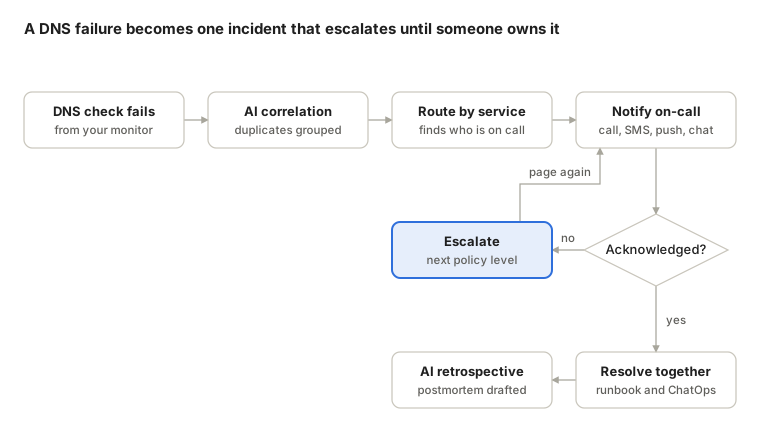
Related alerts from all your monitors are grouped by AI correlation into a single incident, routed to the on-call engineer for that service, and escalated to the next level if nobody acknowledges in time. Once someone owns it, the team resolves it in Slack or Microsoft Teams with the runbook attached, and ITOC360 drafts the retrospective from the incident timeline. Start free, with voice and SMS alerts included.
DNS monitoring checklist
Copy this list into your runbook and tick off each item for every production domain.
Resolution checks for every customer-facing name, every 1–5 minutes, from at least two regions
Value checks on A/AAAA, CNAME, MX and NS against the expected answer
Authoritative checks against each of your nameservers, not only a public resolver
TXT checks for SPF, DKIM and DMARC records
Domain expiry monitoring with warnings at 30, 14, 7, 3 and 1 days
Auto-renew enabled at the registrar, with a payment method that will not expire first
Registrar lock and, for critical domains, registry lock enabled
Multi-factor authentication on every registrar and DNS provider account
SSL certificate expiry and chain checks for every HTTPS name
DNSSEC signature monitoring, if DNSSEC is enabled
TTLs of 300 seconds or less on records you may need to change fast
Each check routed to an on-call schedule or a ticket queue, never to a personal inbox
An escalation step for expiry warnings nobody has acted on
A runbook link attached to every DNS alert
Frequently asked questions
What is DNS monitoring?
DNS monitoring is the continuous, automatic checking of a domain's DNS records to confirm they resolve and return the expected values. It alerts your team when a record fails, changes unexpectedly or stops propagating.
What is a domain name monitoring service?
The term covers two things. In operations, it means monitoring your own domain's DNS records, expiry date, nameservers and SSL certificates. In brand protection, it means watching for new registrations of domains that imitate your brand. Most teams need both, from different tools.
Which DNS records should I monitor?
At minimum A/AAAA, CNAME, MX, NS and TXT records for every production domain, plus SOA to confirm zone updates propagate. Add SRV and CAA if your services rely on them.
How often should DNS be checked?
Every 1–5 minutes for records behind customer-facing services, every 15–60 minutes for lower-risk records, and once a day for domain and certificate expiry.
What is the difference between DNS monitoring and uptime monitoring?
Uptime monitoring checks whether a website or API responds. DNS monitoring checks the step before it: whether the name resolves to the right place. A site can pass an uptime check from one region while DNS is broken or hijacked elsewhere.
How do I make sure DNS alerts reach the right person?
Send them to an incident management platform rather than an email list. ITOC360 groups related DNS alerts into one incident, routes it to the on-call engineer by phone, SMS, push, Slack or Microsoft Teams, and escalates if nobody acknowledges.