How to Reduce Alert Fatigue: A 10-Step Playbook for On-Call Teams
The first false alarm gets a full investigation. The tenth gets a quick look. By the hundredth, the on-call engineer glances at the title, recognizes it, and swipes it away. Then one night the same alert is real, and it gets swiped away too.
That's alert fatigue. It isn't laziness, and it isn't a training problem. It's what happens to any human who is asked to respond to more signals than are worth responding to. The good news is that you can reduce alert fatigue with a handful of changes, and you can measure every one of them.
Quick answer: To reduce alert fatigue, (1) measure pages per shift and how many alerts are acknowledged without action, (2) find and fix your noisiest alert rules, (3) page only for urgent, actionable problems, (4) deduplicate and correlate alerts before anyone is paged, (5) give every paging rule an owner, (6) match the notification channel to the severity, (7) silence planned work with end times, (8) keep on-call load sustainable, (9) review alerts after every incident, and (10) track trust, not just volume. Google's SRE guidance sets a useful target: no more than two incidents per 12-hour on-call shift.
This playbook walks through each step, then shows how to measure alert fatigue in your own data, a quick self-assessment for your team, and a 30-day plan. We build ITOC360, an incident orchestration platform for on-call, NOC, and SRE teams, so the patterns here come from watching real teams' alert streams and response times.
Key facts at a glance
What it is | Loss of trust and attention caused by too many non-actionable alerts |
Also called | Alarm fatigue (in healthcare), pager fatigue, notification fatigue |
Main risk | A real incident is ignored or acknowledged late |
How common | The top obstacle to faster incident response for 30% of 1,363 practitioners in Grafana Labs' 2026 survey |
Sustainable load | Google SRE targets a maximum of two incidents per 12-hour on-call shift |
Earliest warning sign | Alerts acknowledged quickly but with no follow-up action |
Fix | Better signals, clear ownership, sustainable on-call load |
What Is Alert Fatigue?
Alert fatigue is the desensitization of responders to alerts. When most alerts turn out not to matter, people learn, often without realizing it, that alerts can be safely ignored. Their attention drops, their response slows, and their trust in the alerting system erodes.
The term comes from healthcare, where it was first studied. The U.S. Agency for Healthcare Research and Quality describes alert fatigue as what happens when busy clinicians become desensitized to safety alerts and start ignoring or overriding them, sometimes with serious consequences (AHRQ PSNet). Hospitals call the bedside version alarm fatigue, and the mechanics are the same in a hospital ward and an on-call rotation.
In IT operations, alert fatigue shows up in on-call engineers, NOC analysts, and SRE teams who are paged far more often than real problems occur. The engineers aren't the cause. The alerting system is. As we put it in our guide to alert noise, it's a design problem, not an engineering discipline problem.
Alert Fatigue vs Alert Noise vs On-Call Burnout
These three are often used as if they mean the same thing. They're connected, but they describe different parts of the problem, and each needs a different fix.
Term | What it describes | Where it lives | Main fix |
|---|---|---|---|
Alert noise | Alerts that don't need action | In the alerting system | Tune, deduplicate, and correlate alerts |
Alert fatigue | People tuning out alerts because of the noise | In how responders react | Restore trust: fewer, better, owned pages |
On-call burnout | Long-term exhaustion from on-call duty | In the people and the team | Sustainable rotations, recovery time, fair load |
Think of it as a chain. Noise causes fatigue, and fatigue left alone for months turns into burnout. Alert fatigue is the middle link, and it's the one that directly causes missed incidents.
This guide focuses on that middle link. For the sources of noise and how to remove them, see what alert noise is and how to eliminate it. For the long-term human cost, see our guide to on-call burnout.
How Alert Fatigue Develops: The Four Stages
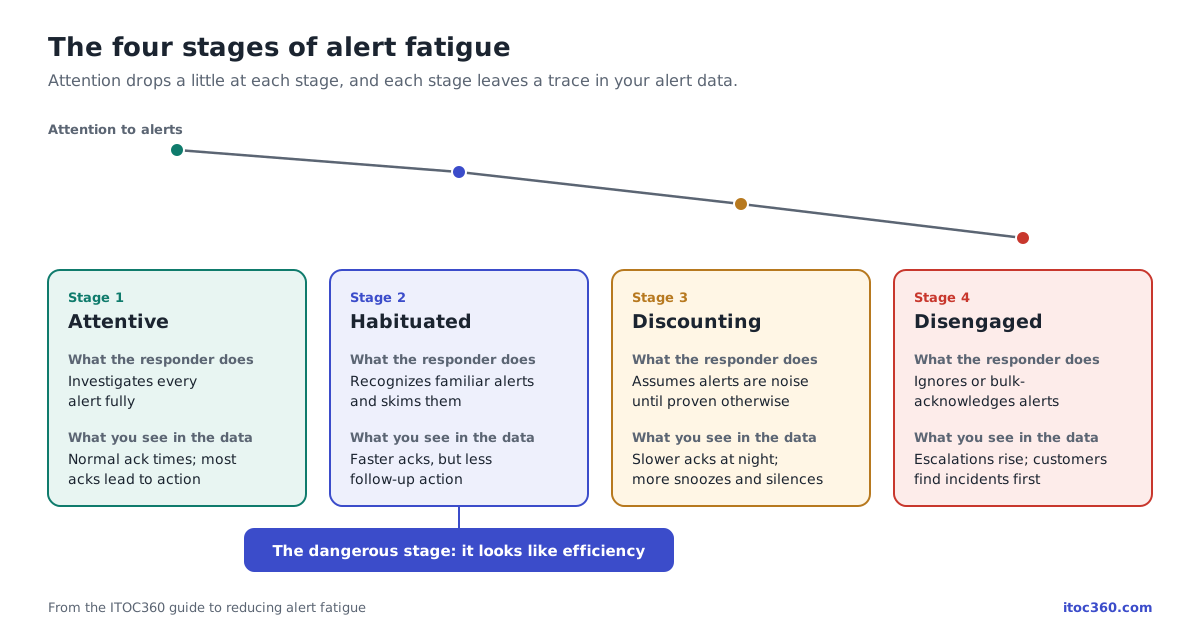
Alert fatigue doesn't arrive all at once. It builds in stages, and each stage leaves a trace in your data.
Stage | What the responder does | What you see in the data |
|---|---|---|
1. Attentive | Investigates every alert fully | Normal acknowledgment times; most acknowledgments lead to action |
2. Habituated | Recognizes familiar alerts and skims them | Acknowledgment gets faster for known alerts, but follow-up drops |
3. Discounting | Assumes alerts are probably noise until proven otherwise | Acknowledgment times rise, especially at night; more snoozes and silences |
4. Disengaged | Ignores or bulk-acknowledges alerts | Escalations rise; real incidents are found by customers or other teams |
The dangerous part is stage 2. It looks like efficiency. Responders acknowledge alerts quickly, dashboards look healthy, and nobody notices that alerts are being cleared, not handled. By the time acknowledgment times start rising in stage 3, the habit is already set.
The pattern is the same one psychologists call habituation: a repeated signal that never leads to anything gradually stops producing a response. It's a normal human reaction, which is exactly why the fix has to come from the system, not from asking people to try harder.
Why Alert Fatigue Is Dangerous
The cost of alert fatigue isn't the annoyance. It's the incident that slips through.
Missed outages. In Splunk's State of Observability 2025, 73% of 1,855 ITOps and engineering professionals said they had experienced outages due to ignored or suppressed alerts.
Slower response. Alert fatigue was the top obstacle to faster incident response in Grafana Labs' 2026 Observability Survey, cited by 30% of 1,363 respondents, nearly double the next answer.
More toil, not less. Catchpoint's SRE Report 2025 found that the median share of time SREs spend on operational work rose from 25% to 30%, the first increase in five years, despite wider use of AI tools.
Lost engineers. Fatigue that lasts long enough turns into burnout, and that's how teams lose their most experienced responders.
The underlying cause is volume. In our own analysis of 1 million alerts, 60 to 80 percent of the alerts fired in a month needed no meaningful human action. When most of what reaches a person doesn't matter, they eventually stop treating any of it as if it does.
How to Reduce Alert Fatigue: 10 Steps
Alert fatigue has three causes stacked on top of each other: too much noise, unclear ownership, and too much load on too few people. The ten steps below cover all three, in the order we'd tackle them. Fixing only the tooling is why many teams see a short improvement and then slide back.
Step 1: Measure before you change anything
Pull 30 days of alert and incident data. For each team, calculate pages per on-call shift, the share of alerts acknowledged without any follow-up action, and acknowledgment time at night versus during the day. Google's SRE book gives the benchmark: a maximum of two incidents per 12-hour shift, because handling one incident properly takes about six hours on average (Google SRE book). The full list of signals is in the measurement section below.
Step 2: Find your noisiest alert rules
Rank alert rules by how often they paged someone without leading to action. A small number of rules usually produces a large share of the noise, so this list tells you where to start. Scoring each rule this way is what we describe in our 1 million alerts analysis.
Step 3: Page only for urgent, actionable problems
For every rule on your noisy list, run it through three questions:
Is the problem real? If the rule fires on normal behavior, fix the threshold or delete the rule.
Does it need a human? If not, log it or show it on a dashboard. No notification at all.
Is it urgent? If yes, page someone. If not, create a ticket for working hours.
Two changes make rules much quieter without losing coverage. First, alert on symptoms users feel, like error rate, latency, or SLO burn rate, rather than on causes like CPU or memory. Second, replace fixed thresholds with ones based on history, so a server that always runs at 75% CPU doesn't page at 70%. And for every rule that stays, make sure the alert itself says what's wrong, where, how bad, and links to a runbook. Our alert management guide includes a full five-question test and a list of what every alert should include.
Step 4: Deduplicate and correlate before anyone is paged
One full disk shouldn't send 30 pages, and one database outage shouldn't page five teams. Deduplication merges repeats of the same alert, and correlation groups the symptoms of one failure into a single incident. This is usually the biggest single drop in page volume. Across 14 engineering teams on ITOC360 in Q2 2026, correlating alerts before paging cut pages per incident from 8.4 to 1.2 (source). If your current tool sells this as a separate add-on, compare the alert management tools that include it in the base price.
Step 5: Give every paging rule an owner
Alerts nobody owns are the fastest way to teach a team to ignore alerts. Map every paging rule to one service, one on-call rotation, and one runbook, and route by service rather than by monitoring tool. Where possible, the team that builds a service should also be on call for it. Developers who get paged for their own noisy alerts tend to fix them quickly. See our guide to alert routing.
Step 6: Match the channel to the severity
A minor issue should never ring a phone at 3 a.m. Use a shared severity matrix so critical incidents get a voice call and lower severities go to chat or a ticket queue. Hold non-urgent alerts until working hours instead of sending them overnight. Every page you move out of the night is sleep your on-call engineer gets back.
Step 7: Silence planned work, with end times
Deployments, migrations, and scheduled reboots produce predictable alerts. Schedule a maintenance window for each one, and give every silence an end time, so a temporary mute never turns into a permanently deleted alert. Other common noise sources, like stale thresholds and self-resolving alerts, are covered in our guide to alert noise.
Step 8: Keep on-call load sustainable
Even good alerts cause fatigue if the same few people carry them every week. Google's SRE guidance caps on-call at 25% of an engineer's time and recommends at least eight engineers for a single-site 24/7 rotation, or six per site for two sites (Google SRE book). Protect recovery time after a heavy night, and hand off cleanly at every shift change. Our on-call best practices and on-call schedule generator cover rotation design.
Step 9: Review alerts after every incident
Add one standing question to every post-incident review: "Which alerts fired that nobody needed?" Then review all paging rules at least once a quarter. Without this step, noise creeps back as systems change.
Step 10: Track trust, not just volume
Alert counts can fall while fatigue stays the same. Every month, track pages per shift, ack-without-action rate, night-time acknowledgment time, and how many incidents were found by customers before your alerts caught them. When pages per shift stay above two, treat it as a team and leadership issue, not something the on-call engineer fixes alone over a weekend.
AI can help with steps 2 and 4 by grouping related alerts and flagging noisy rules. It can't fix ownership or load, and on top of noisy rules it only reorganizes the noise.
Common mistakes when reducing alert fatigue
Muting instead of fixing. Silencing a noisy alert stops the pages, but the rule is still wrong, and so is the problem it was meant to catch.
Raising every threshold at once. It cuts noise fast, and it also cuts the early warnings. Tune rule by rule, using history.
Measuring only alert volume. Fewer alerts doesn't mean less fatigue if the ones left are still unowned or arrive at 3 a.m.
A one-time cleanup. Noise grows back as systems change. Without step 9, you'll be back where you started in six months.
Leaving it to the on-call engineer. The person being paged is the least able to fix the system while they're being paged. Give alert cleanup protected time in the sprint.
Signs of Alert Fatigue and How to Measure Them
Alert fatigue usually shows in people's behavior first:
Alerts are acknowledged within seconds, then nothing happens.
Engineers recognize alerts by name and say "that's just X again."
Phones get muted, or the on-call app gets turned off between shifts.
Real incidents are first reported by customers or another team.
People dread their on-call week, or quietly swap out of it.
You don't need a survey to confirm it. The same pattern shows up in your alerting data, usually months before anyone says it out loud. Track these signals per team, and look at trends over time rather than single numbers.
Signal | How to measure it | Warning sign |
|---|---|---|
Pages per shift | Paging incidents ÷ on-call shifts, per person | Regularly above 2 per 12-hour shift |
Ack-without-action rate | Acknowledged alerts with no comment, change, or follow-up ÷ acknowledged alerts | Rising month over month |
MTTA drift | Mean time to acknowledge, compared month to month | Rising, especially for repeat alerts |
Night-time MTTA | MTTA for pages between midnight and 6 a.m. vs daytime | Night MTTA several times higher than day |
Escalation rate | Incidents that escalated past the primary ÷ incidents | Rising without a change in team size |
Snooze and silence rate | Alerts snoozed or silenced ÷ alerts | Rising, or silences without end times |
Repeat alert rate | Alerts with the same cause within 30 days ÷ alerts | The same alerts firing week after week |
Found-by-others rate | Incidents first reported by customers or other teams ÷ incidents | Any upward trend |
The benchmark for the first signal comes from Google. Its SRE book sets a target of no more than two incidents per 12-hour on-call shift, because handling one incident properly, including root cause analysis, remediation, and the postmortem, takes about six hours on average (Google SRE book). Google's SRE Workbook adds that one incident means one problem, no matter how many alerts it fired (SRE Workbook).
The most telling signal, though, is the second one. A team with a fast MTTA and a high ack-without-action rate isn't responding well. It's clearing alerts. For more on the acknowledgment metric itself, see how to measure MTTA.
Quick Self-Assessment: Does Your Team Have Alert Fatigue?
Answer yes or no for your team over the last month.
Does the on-call engineer regularly get more than two paging incidents in a 12-hour shift?
Are there alerts everyone recognizes as "that one again"?
Do people acknowledge alerts just to stop the noise?
Is MTTA noticeably slower at night than during the day?
Has a real incident been found by a customer or another team before your alerts caught it?
Are there silences or snoozes with no end time?
Do alerts fire for services nobody clearly owns?
Do engineers mute their phones or leave the on-call app off outside of shifts?
Does anyone review which alerts led to no action?
Would your on-call engineers say they trust the pager?
Count a point for every yes on questions 1 to 8, and for every no on questions 9 and 10.
Score | What it means |
|---|---|
0 to 2 | Healthy. Keep reviewing rules so it stays that way |
3 to 5 | Early fatigue. Habituation has started; act on the noisiest rules now |
6 to 10 | Fatigued. Missed incidents are likely, if they haven't happened already |
What IT Teams Can Learn From Healthcare
Hospitals have studied alert fatigue for far longer than software teams, because there the cost of a missed alert can be a patient's life. Three lessons carry over directly.
1. Cut the alerts that don't matter, instead of asking people to pay more attention. Among the practices AHRQ highlights is increasing alert specificity by reducing or removing clinically inconsequential alerts (AHRQ PSNet). The IT equivalent is deleting or downgrading paging rules that rarely lead to action.
2. Measure behavior, not just volume. Clinical research has long inferred alert fatigue from observable behavior, such as how often alerts are overridden and how long responses take (JMIR, 2026). That's the same idea as tracking ack-without-action rate and MTTA drift instead of only counting alerts.
3. Treat it as a system and culture problem. Healthcare guidance points to human factors design and a culture of safety, not individual vigilance. The same 2026 study concluded that alert fatigue needs interventions tailored to its different causes and outcomes. In on-call terms: you can't fix fatigue with a reminder to "take alerts seriously." You fix it by changing what gets sent, to whom, and how often.
A 30-Day Plan to Reverse Alert Fatigue
Week 1: Measure
Pull 30 days of alert and incident data for each team.
Calculate pages per shift, ack-without-action rate, and day vs night MTTA.
Run the self-assessment above with the on-call engineers, not just their managers.
Week 2: Remove the worst noise
List the 10 alert rules that fired most often with no follow-up action.
Delete, retune, or downgrade each one to a ticket.
Turn on deduplication and correlation for your noisiest monitoring sources.
Week 3: Fix ownership
Make sure every paging rule maps to one service, one rotation, and one runbook.
Remove or reassign alerts for services with no clear owner.
Give every silence and snooze an end time.
Week 4: Fix the load and lock it in
Check rotation size and how often each person is on call.
Agree on recovery time after heavy shifts.
Add a standing question to every post-incident review: "Which alerts fired that nobody needed?"
Compare the week 1 numbers with today and share the result with the team.
Most teams see the clearest change in pages per shift and night-time MTTA. If those two move in the right direction, trust in the pager starts coming back.
How ITOC360 Helps Teams Recover From Alert Fatigue
ITOC360 works on all three layers at once.
Signal. Repeats are deduplicated and related alerts from Zabbix, Prometheus, Datadog, Grafana, and other tools are correlated into one incident using machine learning, so an alert storm reaches the on-call engineer as one page. ITOC360 also tracks a noise score for each alert rule, so you can see which rules page without leading to action.
Ownership. ITOC360 reads your live on-call schedule and pages the one engineer who can act, by voice call, SMS, push, Slack, or Microsoft Teams, and escalates automatically if nobody responds. Maintenance windows and alert silencing keep planned work from waking anyone up.
Load. Every alert, page, acknowledgment, and escalation is logged and visible in MTTA and MTTR dashboards, and a rotation fairness view shows when load is piling up on the same people.
ITOC360 teams see about 70% less alert noise. As one DevOps architect put it in a review: "Before ITOC360, our team was constantly woken up by non-critical notifications. Now, the de-duplication and correlation group them perfectly."
Frequently asked questions
How do you reduce alert fatigue?
Measure pages per shift and alerts acknowledged without action, fix your noisiest alert rules, page only for urgent and actionable problems, deduplicate and correlate alerts before paging, give every rule an owner, match the channel to the severity, silence planned work, keep on-call load sustainable, review alerts after every incident, and track trust metrics monthly.
What is alert fatigue?
Alert fatigue is the loss of trust and attention that happens when responders receive too many alerts that don't need action. People start acknowledging alerts without investigating, responding more slowly, or ignoring them, which leads to real incidents being missed.
What causes alert fatigue?
The main cause is alert noise: duplicate alerts, symptoms of one failure paging separately, stale thresholds, self-resolving alerts, and alerts for services with no owner. Too few people sharing on-call duty makes it worse.
What is the difference between alert fatigue and alert noise?
Alert noise is the alerts themselves that don't need action. Alert fatigue is how people react to that noise over time, by trusting and responding to alerts less.
What is the difference between alert fatigue and on-call burnout?
Alert fatigue is reduced attention to alerts. On-call burnout is long-term exhaustion from on-call duty. Alert fatigue that lasts for months is one of the main paths to burnout.
What are the signs of alert fatigue?
Look for more than two paging incidents per 12-hour shift, alerts acknowledged with no follow-up action, rising acknowledgment times at night, frequent snoozes or silences, and incidents found by customers before alerts caught them.
How many pages per on-call shift is too many?
Google's SRE guidance targets a maximum of two incidents per 12-hour on-call shift, counting one incident per problem, no matter how many alerts it fired.
Can AI fix alert fatigue?
AI helps by grouping related alerts and flagging noisy rules, but it can't fix fatigue alone. If the rules are still noisy and ownership is unclear, AI just reorganizes the noise. It works best on top of good alert design.
What is alarm fatigue?
Alarm fatigue is the healthcare term for the same problem, where clinicians become desensitized to frequent bedside alarms. Hospital research on alarm fatigue is where most of what we know about alert fatigue comes from.
Final Thoughts
Alert fatigue is a reasonable response to an unreasonable alerting system. Engineers who tune out the pager have usually learned, correctly, that most of what it sends doesn't matter. The way out isn't asking them to care more. It's earning their trust back: fewer pages, every one of them real, every one owned, and a load that one person can carry without dreading the next shift.
Start by measuring. Once you can see pages per shift and ack-without-action rate, the next steps tend to make themselves obvious. If you'd like to see those numbers for your own team, try ITOC360 free.
Related Reading
Alert Management: The Complete Guide for IT Operations and SRE Teams
On-Call Burnout: Causes, Signs, and How to Fix It Structurally
On-Call Best Practices in 2026: Rotations, Escalation, and Burnout
We Processed 1 Million Alerts. Here's What We Learned About Noise
Alert Correlation: How It Works, 5 Methods Compared, and How to Avoid Bad Groupings
Alert Deduplication: How It Works, How to Design Dedup Keys, and Mistakes to Avoid
Sources
AHRQ Patient Safety Network, Alert Fatigue primer
JMIR, Experiences of Alert Fatigue and Its Contributing Factors in Hospitals: Qualitative Study, February 2026
Grafana Labs, Observability Survey 2026
Splunk, State of Observability 2025
Catchpoint, The SRE Report 2025
ITOC360, We processed 1 million alerts: what we learned about noise