








Google’s Site Reliability Engineering book sets the ceiling at two incidents per 8–12 hour on-call shift — not two to three, as it is usually quoted. The reasoning is arithmetic, not opinion: Google measured that root-cause analysis, remediation, the postmortem and the follow-up fixes take about six hours per incident. Two incidents fills a twelve-hour shift. A third means something gets skipped, and the thing that gets skipped is always the learning.
That single number does more work than any other on-call best practice on this list, because it tells you which problem you actually have. If your rotation regularly exceeds two, you do not have a scheduling problem. You have an alerting problem, and no rotation model will fix it.
On-call is the operational backbone of any team running 24/7 services. For DevOps engineers, SRE teams, NOC operators and managed service providers it means formal responsibility for detecting, triaging and resolving production incidents outside business hours. It does not mean watching Slack after dinner. The difference between those two definitions is the difference between a program and a resentment.
This guide covers the on-call best practices that hold up under real paging load: rotation models by team size, escalation design, alert hygiene, compensation, and the metrics that tell you whether any of it is working — with copyable templates at the end.
What on-call actually is
On-call is a structured commitment to respond during defined shifts. It is distinct from three things it gets confused with:
- Support queues — non-emergency tickets processed in order during business hours
- Day-to-day operations — planned work, scheduled
- Incident management — the broader discipline of detecting, resolving and learning from failures
On-call is the immediate response layer inside that discipline. Vague expectations here are the root of most on-call resentment, so write them down.
Roles worth naming explicitly
| Role | Responsibility | Response target |
|---|---|---|
| Primary responder | Acknowledges, triages, applies initial mitigation | 5 min for P1 |
| Secondary responder | Steps in on missed acknowledgment or when help is needed | 15 min |
| Incident commander | Coordinates; authority to pause non-critical work | On declaration of a major incident |
| Comms lead | Status page and customer communication | Within 15 min of declaration |
| Subject-matter expert | Deep knowledge of a specific critical system | Escalation layer 3 |
Google’s SRE Workbook makes an additional point that most rotation guides skip: psychological safety is a prerequisite, not a nice-to-have. An engineer who is afraid of being blamed will hesitate before declaring, and hesitation before declaring is usually the largest segment of an incident timeline. We cover why in what is a SEV1 incident.
Rotation models, and the team size each one actually needs
This is where most guides give a number without qualifying it, and where two different numbers get quoted as if they agree. They do not:
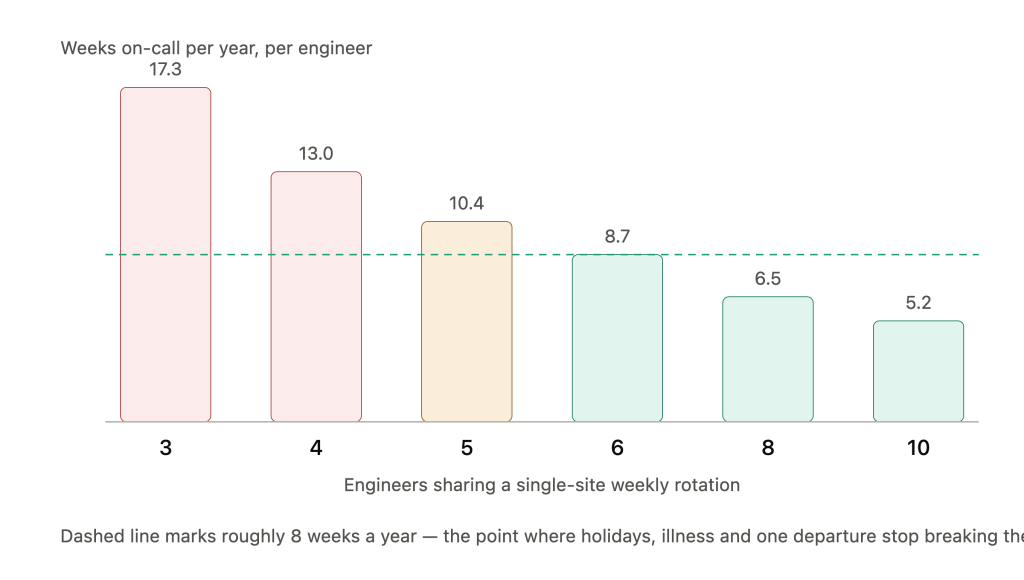
- Three engineers is the floor at which a weekly rotation is technically possible. Each person is on-call every third week — 17 weeks a year.
- Six to eight engineers is where a single-site rotation becomes sustainable. Each person carries roughly six to eight weeks a year, which leaves room for holidays, illness and departures without the schedule collapsing.
Both numbers are real. Publishing only the first one is how teams end up with a rotation that works on the spreadsheet and burns out in month four.
| Model | Pattern | Needs | Best when |
|---|---|---|---|
| Weekly | Mon 09:00 → Mon 09:00 | 3 minimum, 6–8 sustainable | Moderate volume; context across days matters |
| Daily | 24h or single daytime block | 5+ | Mature runbooks; strong handoff discipline |
| Week/weekend split | Different responders for weekends | 6+ | Weekend volume differs sharply from weekdays |
| Primary + secondary | Layered coverage | 6+ | Any production rotation — this is not optional |
| Follow-the-sun | Regional handoff | Real headcount in 3 regions | Genuinely distributed teams only |
Weekly versus daily: what you are actually trading
Weekly rotation gives the responder continuity — they see the system’s behaviour across several days, which shortens triage on recurring issues. The cost is concentration: several potential night disruptions in one stretch.
Daily rotation spreads the personal cost but multiplies handoff risk. Every handoff is a chance to drop context, so daily only works when runbooks are current and the written handoff is enforced rather than encouraged.
A hybrid that works for many teams: daily rotation for business hours, plus a separate overnight rotation restricted to genuine P1 incidents. Daytime stays responsive; the number of people whose sleep is at risk drops sharply.
Start with weekly. Move to shorter blocks only after your runbooks and monitoring integrations are mature enough for fast context transfer.
Follow-the-sun: prerequisites, not aspirations
Follow-the-sun hands responsibility between regions so engineers work daylight hours. It is the only model that structurally eliminates 3 a.m. pages, which is why it gets over-promised.
The prerequisites are non-negotiable:
- Actual headcount in multiple time zones — not the same three people with regional labels
- Consistent incident processes across all regions
- Shared runbooks and unified observability tooling
- A 30-minute overlap at each handoff for open incidents
A working handoff path for Europe / South America / Asia Pacific: Berlin 08:00–16:00 CET → São Paulo 12:00–20:00 BRT → Singapore 08:00–16:00 SGT.
Do not fake it. Three engineers across two time zones labelled as regional coverage does not eliminate night pages; it just makes the schedule harder to read. Build genuine regional capacity first, then adopt the model.
Building a schedule people can plan around
Variables that should drive the schedule, in order of weight:
- Incident volume by hour of day — pull the last 90 days before designing anything
- Team size and time zone spread
- Service criticality — customer-facing services justify tighter targets than internal tools
- Skill distribution — not every engineer can troubleshoot every service; a rotation that ignores this produces escalations, not coverage
Use round-robin or weighted rotation to prevent hero patterns where one person absorbs most of the night and weekend load. Track load per engineer explicitly; if one person carries three times the average, the rotation has a distribution problem regardless of how the schedule looks.
Publish four to six weeks ahead. This is the single cheapest intervention in on-call management. Engineers cannot book travel, medical appointments or childcare against a schedule that materialises a week out.
Swap rules should be written down: 24 to 48 hours notice where possible, manager approval for anything shorter, and swaps recorded in the same system as the schedule rather than agreed in DMs.
Escalation design: what happens when nobody answers
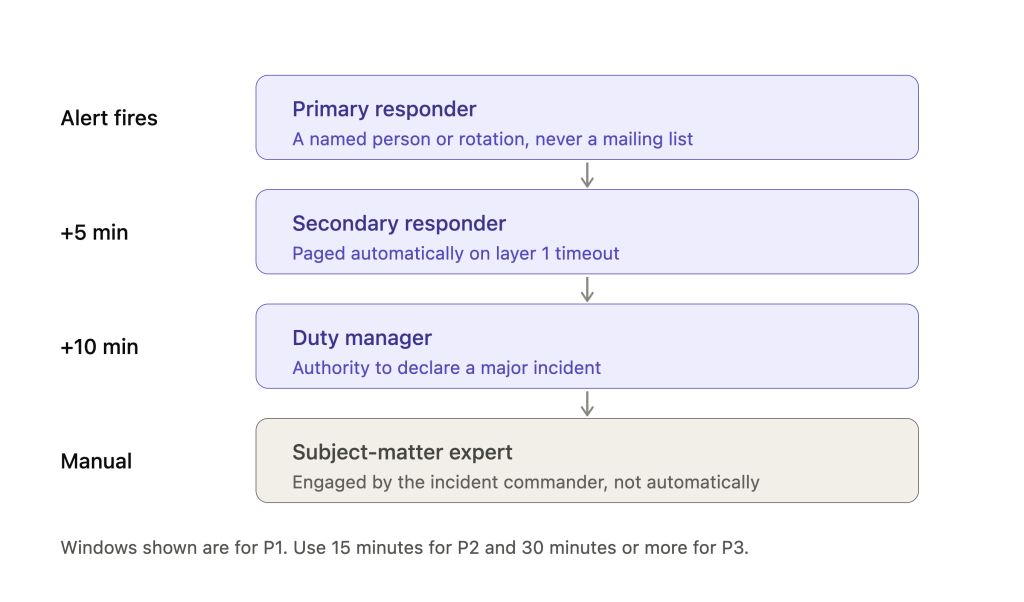
An escalation policy is a timed sequence defining who gets paged when the primary does not acknowledge or cannot resolve. Without one, incidents stall silently — and a stalled P1 is indistinguishable from an unnoticed P1 from the customer’s side.
Three layers minimum:
| Layer | Who | Triggers when |
|---|---|---|
| 1 | Primary responder | Alert fires |
| 2 | Secondary responder | No acknowledgment within window |
| 3 | Duty manager | Layer 2 also unacknowledged, or incident exceeds severity threshold |
| 4 | Subject-matter expert | Specific critical systems only |
Timing windows tied to severity:
- P1 — escalate at 5 minutes without acknowledgment
- P2 — 15 minutes
- P3 — 30 minutes or more
Set these against customer-facing impact, not internal convenience.
Every layer needs a named owner. A generic mailing list is a dead end with a plausible-looking address. If layer 3 resolves to “the platform team”, it resolves to nobody at 3 a.m.
More detail on structuring these in our escalation policy guide and on the routing side in alert routing for incident management.
Alert hygiene: the part that actually determines burnout
Here is the finding that reframes everything above. Google’s SRE book does not treat alert grouping as a tooling preference — it treats it as a requirement:
“It is also important to control the number of alerts that the on-call engineers receive for a single incident. Sometimes a single abnormal condition can generate several alerts, so it’s important to regulate the alert fan-out by ensuring that related alerts are grouped together by the monitoring or alerting system.” — Google SRE, Being On-Call
If one root cause generates forty pages, your two-incidents-per-shift ceiling is meaningless. You have not exceeded it — you have made it unmeasurable.
The data says most teams are well past that line. The Catchpoint SRE Report 2025 found the median time SREs spend on operations rose from 25% to 30% year over year — the first increase since 2020 — and roughly 70% of SREs said on-call stress had contributed to burnout or attrition on their teams. Forty-six percent responded to more than five incidents in the preceding 30 days.
The classification that should govern every alert
| Severity | Action | Delivery |
|---|---|---|
| P1 | Wake someone | Phone, SMS, push |
| P2 | Respond next business hour | Chat, email |
| P3 | Review during business hours | Dashboard or log only |
If an alert does not require a human action that the system cannot take itself, it does not page. That test comes straight from Google’s guidance and it eliminates more noise than any tuning exercise.
Four practices, in order of return
Deduplicate and correlate at ingest. Group alerts sharing a root cause into one incident before they reach a human. This is the highest-return change available to most teams and the one Google explicitly calls for.
Suppress during maintenance windows. Planned deploys should not page anyone for expected behaviour.
Tune thresholds against user impact. CPU at 80% for ten seconds is noise. Sustained 95% for five minutes with rising latency is actionable.
Enrich with context. Attach the runbook link, last deploy time, service owner and relevant dashboards to every page. Without these the responder spends the first five minutes finding out where to look.
Audit every four to six weeks. Delete non-actionable alerts, downgrade informational ones, consolidate duplicates. There is a checklist for this at the end of the article.
ITOC360 sits on top of existing monitoring tools, correlates raw alerts into incidents and routes them with full context attached. More on the mechanics in automated incident management and, for NOC environments, NOC monitoring.
Incident workflow and handoffs
A repeatable incident response lifecycle keeps responders from improvising:
Detection → Acknowledgment → Triage → Mitigation → Resolution → Review
Two things matter more than the sequence itself:
Mitigate before you diagnose. Restoring service and understanding root cause are separate goals with separate clocks. Roll back, fail over, or shed load first. Root cause belongs in the post-incident review, not the war room.
Runbooks are checklists, not manuals. A runbook answers “what do I do right now” — specific commands, specific dashboards, specific contacts. It does not explain the architectural history of the service. Identify your five most common incident types from last quarter and write one for each. That is a week of work with a permanent return.
Our incident management best practices guide covers the review side in depth.
Compensation and the parts most guides skip
Google compensates on-call with time off in lieu or cash, capped at a proportion of overall salary. The cap is deliberate: it removes the incentive to take on too many shifts for financial reasons.
Patterns that work:
- Availability pay — a fixed stipend for being reachable during a shift
- Active work pay — per-incident or hourly for time actually spent responding
- Time off in lieu — after heavy rotations, taken rather than accrued
Verify that pay matches actual burden using alert volume and after-hours response time per person, not impressions.
A note on the legal side
In several jurisdictions, whether on-call time counts as working time depends on how constrained the engineer is — response time requirements, geographic restrictions, frequency of calls. The EU Working Time Directive and US FLSA treat this differently, and case law in both has shifted. If your rotation requires a fixed response window, this is worth a conversation with employment counsel before you set the policy rather than after. We are not lawyers and this is not legal advice, but almost no on-call guide raises it, and it has caught teams out.
Cultural guardrails
- Post-incident recovery time as policy, not negotiation. If someone was paged between 22:00 and 06:00, they do not start at 09:00. Written policy, or engineers show up anyway and build quiet resentment.
- Caps on consecutive nights and weekends.
- Genuine off-call time. No expectation of Slack presence for people not on rotation.
- Managers own the intervention. When alert volume spikes on one responder, that is a management problem, not a personal resilience problem.
Metrics that tell you the truth
| Metric | What it exposes | Target |
|---|---|---|
| MTTA | Alert fired → human responding | Break out by severity and hour of day |
| MTTR | Detection → resolution | Use with MTTA to locate the delay |
| Actionable alert ratio | Share of pages requiring human action | 80%+ |
| Incidents per shift | Rotation health | 2 maximum (Google’s ceiling) |
| Alert volume per service | Where reliability investment should go | If one service is 80% of pages, fix the service |
| Escalation rate | Primary failing to acknowledge in window | Rising rate signals schedule, tooling or burnout |
| Load distribution | Hero patterns | No engineer above 1.5× the median |
Definitions and calculation methods in MTTR, MTTA, MTBF and MTTD explained.
Pair the numbers with responder feedback. After each rotation, ask three questions: which alerts were useless, which runbooks were wrong, and where did the handoff break. The answers change the schedule more usefully than the dashboard does.
Templates
Handoff summary
Fifteen minutes to write. Post it to a channel visible to the whole team, not a DM — context should not be trapped in one person’s head.
ON-CALL HANDOFF — [service/team] — [date]
Outgoing: [name]   Incoming: [name]

ACTIVE INCIDENTS
[open / mitigated-not-resolved / under investigation, with links]
FRAGILE RIGHT NOW
[systems behaving oddly but not yet alerting]
CHANGES IN THE LAST 7 DAYS
[deploys, config changes, infra changes worth knowing about]
DEFERRED ALERTS
[fired but not actioned — include reason and the threshold at which to escalate]
RUNBOOK GAPS FOUND [anything that proved incomplete or wrong this shift]
Escalation policy
SERVICE: [name]        SEVERITY: [P1 / P2 / P3]

Layer 1  [named person or rotation]     → page immediately
         escalate after [5 / 15 / 30] min without ack

Layer 2  [named person or rotation]     → page on layer 1 timeout
         escalate after [5 / 15 / 30] min without ack

Layer 3  [named duty manager]           → page on layer 2 timeout
                                          authority to declare major incident

Layer 4  [named SME]                    → engaged by IC, not automatically

Runbook: [link]     Dashboard: [link]     Service owner: [name]
Alert audit checklist
Run every four to six weeks, one service at a time:
- Did this alert fire in the last 90 days? If never — delete it.
- When it fired, did a human take action? If not — downgrade to P3 or delete.
- Does it duplicate another alert with the same root cause? If yes — correlate or merge.
- Does the alert name state the user-visible symptom? If it states an infrastructure condition — rewrite it.
- Is a current runbook linked from the alert itself?
- Is the service owner named on the alert?
- Does it fire during planned maintenance? If yes — add suppression.
- What is this alert’s actionable ratio over 90 days? Below 50% — tune the threshold.
A six-month rollout
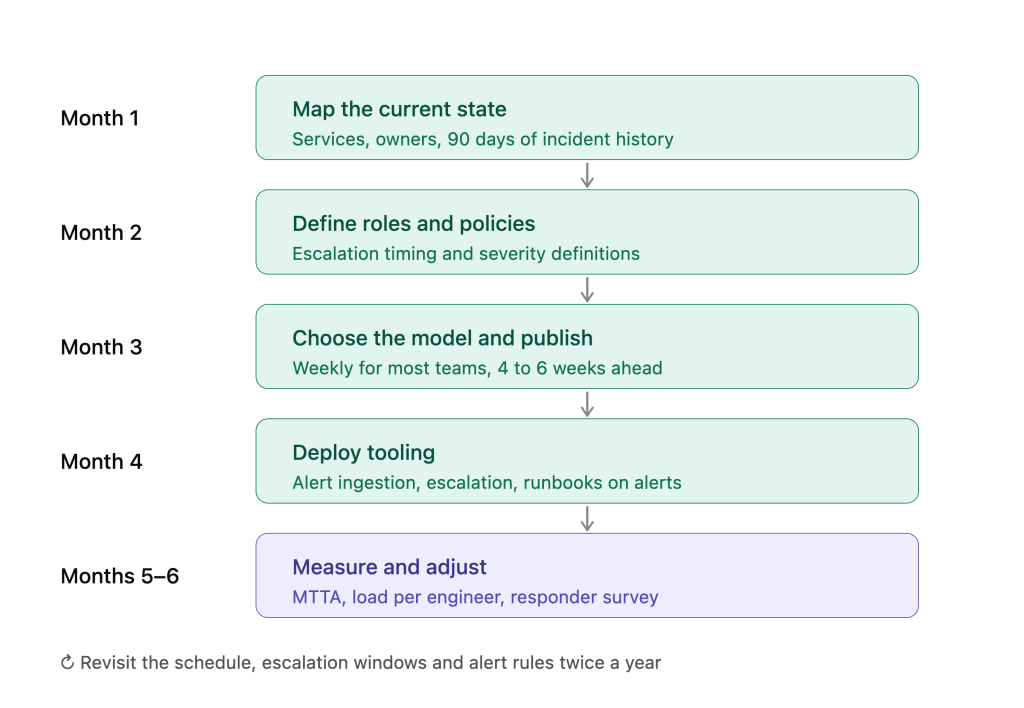
Month 1 — Map the current state. List every service, its owner, the existing schedule, and 90 days of incident history broken down by severity and hour. This step alone usually surfaces critical systems with no named owner.
Month 2 — Define roles and policies. Primary and secondary responsibilities, escalation timing, coverage hours, and a written P1/P2/P3 definition. Do this before you touch the schedule.
Month 3 — Choose the model and publish. Weekly for most teams. Integrate holiday calendars and time zones. Publish four to six weeks out and write the swap rules.
Month 4 — Deploy tooling. Configure alert ingestion from existing monitoring, set up escalation automation, link runbooks to alerts. See on-call management software for what to evaluate.
Months 5–6 — Measure and adjust. Collect MTTA, MTTR, escalation rate and per-engineer load. Survey the responders. Adjust alert rules and rotation before expanding to more services.
Then revisit twice a year. An on-call program that is not reviewed drifts back toward the state that made you build it.
Frequently asked questions
How many engineers do you need for a sustainable on-call rotation? Three is the minimum at which a weekly rotation is possible; six to eight is where it becomes sustainable at a single site. Below six, holidays, illness and a single departure will each break the schedule.
How many incidents per on-call shift is too many? Google’s SRE book sets the ceiling at two per 8–12 hour shift, based on a measured average of six hours of work per incident including the postmortem. The widely quoted “two to three” figure is a misreading of the source.
Should on-call be paid? Google compensates with time off in lieu or cash capped at a proportion of salary. Beyond fairness, whether on-call time counts as working time is a legal question in several jurisdictions and depends on how constrained the engineer is — worth confirming with employment counsel.
Weekly or daily on-call rotation? Weekly for most teams: fewer handoffs means more retained context. Daily works only where runbooks are current and written handoffs are enforced, since it multiplies the number of context transfers.
What is the difference between on-call and incident management? On-call covers scheduling, escalation and getting the right person to respond. Incident management covers the full lifecycle including triage, coordination, resolution and review. See on-call management for the scheduling side.
How do you reduce alert fatigue? Correlate alerts sharing a root cause before they reach a human, delete alerts that have never produced an action, tune thresholds against user-visible impact, and audit every four to six weeks. Grouping related alerts is explicitly recommended in Google’s SRE guidance, not just a vendor feature.
Start with one team, one rotation model, one set of escalation rules. Expand from there.
If alert volume is what is breaking your rotation, see how ITOC360 correlates alerts before they reach your on-call engineer.
Sources: Google SRE — Being On-Call · Google SRE Workbook — On-Call · Catchpoint SRE Report 2025