On-Call Management Software: The Complete 2026 Guide for Engineering Teams
On-call management software is a platform that automates responder scheduling, alert delivery, and escalation so the right engineer is notified the moment something breaks — without relying on spreadsheets, shared calendars, or manual call trees. It sits between monitoring tools (which detect problems) and incident management platforms (which coordinate the response), and it is the layer most engineering teams under-invest in until an outage exposes the gap.
This guide covers what on-call management software actually does, how it differs from incident management, the real cost of getting it wrong, and exactly what to require from a platform before you buy.
This article is part of our on-call management resource hub — see also our guides to on-call best practices and building a fair on-call schedule.
What Is On-Call Management Software?
On-call management software defines who is responsible for responding to an incident at any given moment, delivers that alert across the right channel, and enforces escalation automatically if nobody acknowledges it in time.
It typically maintains four things at once:
Live schedules with primary and secondary responders, updated automatically as shifts rotate
Escalation policies that promote an alert to the next person or team if it goes unacknowledged
Multi-channel notification — voice call, SMS, push, Slack, Microsoft Teams, email — so a missed channel doesn't mean a missed incident
Reporting on acknowledgment time, escalation frequency, and load distribution across the team
On call management is sometimes used interchangeably with "paging" or "alerting," but the modern category is broader: it also covers rotation fairness, alert noise reduction, and the analytics teams need to prove their on-call process is sustainable — not just functional.
On-Call Management vs. Incident Management Software
This is the single most common point of confusion for teams evaluating vendors, because most platforms today do some of both.
On-Call Management | Incident Management | |
|---|---|---|
Primary job | Get the alert to the right person, fast | Coordinate everyone once the incident is declared |
Core question it answers | Who should be notified right now? | How do we resolve this and communicate about it? |
Key features | Scheduling, rotations, escalation policies, multi-channel paging | Incident channels, timelines, status updates, postmortems |
When it activates | The moment an alert fires | The moment a human confirms it's a real incident |
Fails silently when... | Escalation logic is missing or a channel is unreliable | Communication and ownership break down mid-incident |
The two functions are sequential, not competing: on-call management gets a human involved; incident management takes over from there. If alerts never reach a responder, even the best incident management platform never gets a chance to run — which is why on-call management is usually the first thing engineering leaders fix.
How On-Call Management Software Works
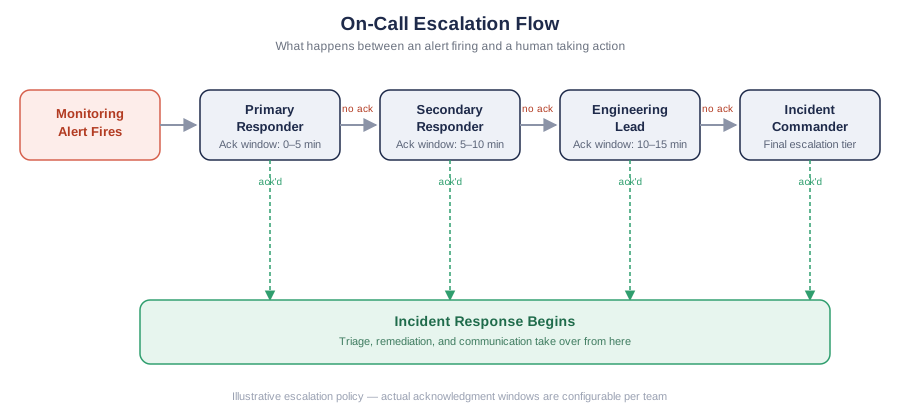
A modern on-call management workflow follows six stages, from detection to resolution:
1. Monitoring detects an issue. Observability and monitoring tools identify abnormal behavior — CPU spikes, failed deployments, latency increases, error-rate spikes — and fire an alert.
2. The alert enters the on-call platform. Alerts arrive via integration, API, or webhook. The platform deduplicates repeated alerts, suppresses low-priority noise, and groups related failures so one root cause doesn't generate a dozen separate pages.
3. The platform identifies the responsible responder. Based on the current schedule, service ownership, and escalation policy, the system determines exactly who should be notified — removing the ambiguity that stalls response during high-pressure incidents.
4. Notifications go out across multiple channels. Push, SMS, voice call, Slack, Microsoft Teams, or email — reliable delivery across a channel the responder actually monitors is what separates a functioning platform from a glorified phone tree.
5. Escalation triggers automatically if nobody responds. If the primary responder doesn't acknowledge within a defined window, the system escalates to the secondary, then to a manager or incident commander, without requiring anyone to notice the gap manually.
6. Incident response begins. Once acknowledged, the responder — or a broader incident response workflow — takes over triage, remediation, and communication.
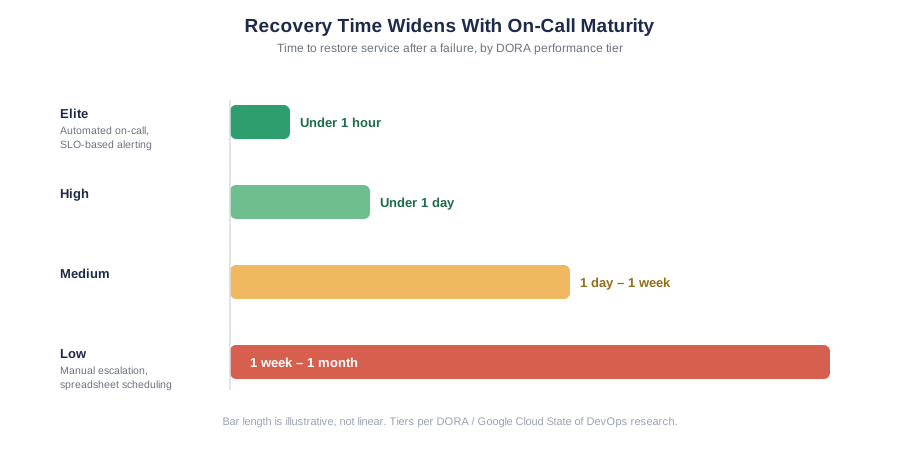
The goal across all six stages is straightforward: shorten Mean Time to Acknowledge (MTTA) — how fast someone confirms they're on it — and Mean Time to Resolution (MTTR) — how fast the issue actually gets fixed. The gap between teams that get this right and teams that don't is large: Google Cloud's DORA research puts elite teams' recovery time at under an hour, while low-performing teams can take anywhere from a week to a month to restore service after a failure. Every stage that runs on manual coordination instead of automation adds time to both metrics — and pushes a team further toward the slower end of that range.
The Real Cost of Poor On-Call Infrastructure
Teams running on-call off spreadsheets and improvised escalation pay for it in two ways: unreliable response, and attrition.
On the reliability side, alert noise is the root cause most teams underestimate. Google's own SRE Book is explicit about why this matters: a page should always be actionable, require real judgment, and represent a genuinely novel problem — anything else erodes the on-call engineer's ability to react with urgency when it actually counts. That's not a stylistic preference; it's a direct description of how alert fatigue develops. Once responders learn that most pages don't require action, they start responding more slowly — or missing — the ones that do.
On the retention side, the cost is well documented outside the incident-management industry entirely. Gallup and SHRM both put the cost of replacing a single employee at 50–200% of that person's annual salary once recruiting, onboarding, and lost productivity during ramp-up are counted — and that's before factoring in the institutional knowledge a senior engineer takes with them. On-call burnout is a well-recognized driver of that kind of voluntary departure: engineers who are paged for things outside their ownership, or who have no visibility into whether their on-call load is fair compared to teammates, are the ones most likely to leave first.
Structured on-call management software addresses both problems directly: alert deduplication and correlation keep pages aligned with Google's "actionable, urgent, novel" standard, and equitable rotation scheduling combined with load-distribution reporting keeps on-call burden visible and fair.
What to Require From Your On-Call Platform
Platform | Best For | AI / Noise Reduction | Escalation & Scheduling | Integrations | Starting Price |
|---|---|---|---|---|---|
PagerDuty | Large enterprises with complex, multi-team escalation logic | AIOps add-on (~$799/mo extra) | Mature escalation engine; unlimited schedules on paid tiers | 750+ | Free (5 users); $21/user/mo (Professional) |
Opsgenie | Not recommended for new adoption — Atlassian retired standalone sales June 2025, full shutdown April 5, 2027 | Being folded into Jira Service Management | Existing customers must migrate before EOL | 200+ (legacy) | No longer sold standalone |
xMatters | Regulated enterprises needing audit trails and business-continuity notification, not just engineering on-call | Limited compared to newer AI-native tools | Strong for ITSM-heavy, multi-department workflows | Enterprise-focused, deep Everbridge ties | Custom / enterprise pricing |
OnPage | Teams that need alerts to bypass Do Not Disturb and demand persistent acknowledgment | Alert filtering, not full AI correlation | Bi-directional Jira/ConnectWise sync | 200+ | Custom, positioned below PagerDuty |
Rootly | Slack-native teams that want incident response and on-call in one workflow | AI-generated postmortems | Shadow rotations, DND-bypass mobile app | Deep Slack/Teams integration | $20/user/mo (Essentials) |
Squadcast | Budget-conscious DevOps teams wanting SLO tracking alongside on-call | AI/ML deduplication and grouping | Free for up to 5 users | 175+ | Free (5 users); ~$9–12/user/mo (Pro) |
ITOC360 | Teams that want AI-driven correlation and on-call/escalation in one platform without enterprise-tier pricing | Up to 70% alert noise reduction via ML correlation | Multi-layer escalation, timezone-aware rotations, DND-bypass mobile app | Zabbix, Grafana, Datadog, New Relic, Prometheus, CloudWatch, Azure Monitor, Dynatrace, + dozens more | Free, $12/mo (3 users, flat) |
These are the foundational, vendor-agnostic requirements — the baseline any on-call platform should meet regardless of which era of tooling it was built in. (If you're specifically evaluating how AI and agentic automation are changing this checklist, see our look at where on-call is headed.)
When evaluating on-call management software, treat the following as non-negotiable for any team running production systems at scale.
Schedule flexibility. Support for primary/secondary layers, follow-the-sun rotations for distributed teams, override mechanisms for vacations and emergencies, and automatic handoffs at shift boundaries. Our on-call schedule generator covers how to build one of these without the spreadsheet overhead.
Escalation policy enforcement. If the primary responder doesn't acknowledge within a defined window, the platform must escalate automatically — without a human having to notice the gap. See our on-call best practices guide for how to structure escalation tiers correctly.
Alert noise reduction. Deduplication, suppression rules, and correlation of related alerts before they reach the on-call engineer. This is consistently the highest-leverage feature for reducing both MTTA and burnout — it's also the core of ITOC360's AI-driven alert correlation.
Multi-channel, reliable delivery. Voice, SMS, push, Slack, and Microsoft Teams, with retry logic so a single missed channel doesn't mean a missed incident.
Reporting and fairness metrics. Full visibility into on-call load distribution, acknowledgment times, and escalation rates — the data that turns "is our on-call sustainable?" from a guess into an answer.
Integration depth. Native, two-way integration with the monitoring and collaboration tools your team already uses (Slack, Teams, Datadog, Grafana, Prometheus) — not just inbound webhooks.
Quick evaluation checklist
Does escalation trigger automatically without manual intervention?
Can the platform deduplicate and suppress noisy or repeated alerts?
Does it support follow-the-sun and primary/secondary rotations natively?
Are load-distribution and fairness reports available out of the box?
Does the mobile app reliably wake a responder overnight?
Are there hidden costs (SMS, voice minutes, premium integrations) beyond seat price?
Common On-Call Rotation Models
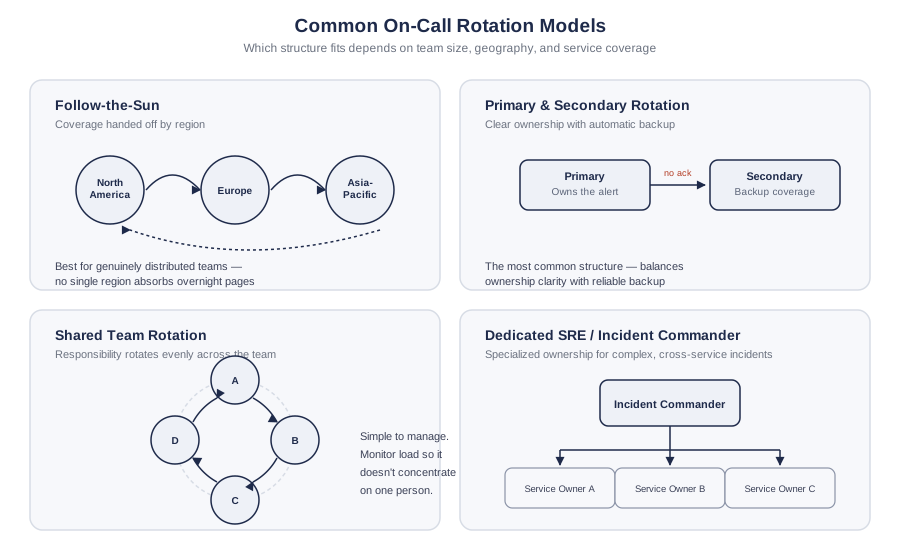
The right rotation structure depends on team size, geography, and how many services need ownership coverage.
Follow-the-sun. Global teams hand off coverage across regions (e.g., North America → Europe → Asia-Pacific) so no single region absorbs overnight pages. Best for organizations with genuinely distributed engineering presence.
Primary and secondary rotation. One responder owns the alert; a second is notified automatically if the first misses it. This is the most common structure because it balances clear ownership with reliable backup — see our guide to building smarter on-call schedules for how to set this up correctly.
Shared team rotation. Smaller teams rotate responsibility evenly across all members. Simple to manage, but requires active monitoring so on-call load doesn't quietly concentrate on one or two people.
Dedicated SRE / incident commander model. Larger organizations assign a specialized reliability team or rotating incident commander to own complex, cross-service incidents, with individual service owners escalated in as needed.
Frequently asked questions
What is the difference between on-call management and incident management software?
On-call management software controls who gets alerted and when escalation happens. Incident management software coordinates everything that happens after — communication, timelines, and postmortems. Many modern platforms combine both, but they solve different problems.
How long does it take to implement on-call management software?
Smaller teams with a single service and straightforward rotation can typically be onboarded within days. Larger organizations with multiple escalation tiers, custom routing rules, and several integrated monitoring tools should budget several weeks for a full rollout.
Does on-call management software reduce alert fatigue?
Yes, when it includes deduplication, suppression, and correlation features. Platforms that simply forward every alert without filtering do not solve alert fatigue — they just add another channel for the same noise.
Can on-call management software support remote or hybrid engineering teams?
Yes. Mobile-first alerting, follow-the-sun scheduling, and chat-native workflows (Slack, Microsoft Teams) are built specifically for distributed and remote teams.
How often should a team review its on-call schedule and escalation policy?
Quarterly is a reasonable default, and immediately after any team restructuring, major service launch, or noticeable rise in after-hours pages. We cover a full review checklist in our guide to sustainable on-call rotations.
The Bottom Line
The question worth asking is simple: does your current on-call infrastructure protect your engineers as reliably as it protects your systems? If schedules still live in a spreadsheet and escalation depends on someone happening to check Slack, the answer is probably no — and that gap gets more expensive, not less, as the team and the system surface area grow.
If you're ready to compare platforms directly, our on-call management software page breaks down ITOC360's scheduling, escalation, and AI correlation features in detail, and the OpsGenie alternatives comparison shows how it stacks up against what many teams are migrating away from.