Playbook vs. Runbook: The Guide to Incident Response Management
The playbook vs runbook debate is one of the most misunderstood distinctions in incident management — and getting it wrong costs your team time, clarity, and sanity during an outage.
When something breaks at 2 a.m., documentation quality is the difference between a 20-minute recovery and a four-hour war room. Both playbooks and runbooks live inside your incident response toolkit, but they operate at completely different altitudes.
A playbook is a high-level strategic document. It defines how your organization approaches a class of scenario — a data breach, a DDoS attack, a compliance violation. It answers who responds, why certain decisions are made, and what thresholds trigger escalation. Playbooks guide people.
A runbook — your incident response runbook — is the technical counterpart. It's a discrete, ordered set of steps to achieve one specific outcome: restart a database cluster, rotate an API key, flush a cache. Runbooks guide systems and the engineers operating them.
The scope distinction matters enormously. Think of a playbook as the strategic compass and a runbook as the turn-by-turn GPS. You need both, but confusing one for the other creates documents that are simultaneously too vague to execute and too granular to inform judgment. This pattern shows up even in platform-specific contexts — the Azure playbook vs runbook distinction, for example, reflects the same strategic-versus-operational split baked into cloud tooling.
Perhaps most importantly, both formats exist to reduce cognitive load for on-call engineers. When a system is failing, your team shouldn't be making foundational decisions from scratch. The right documentation pre-answers the right questions at the right level of detail. That principle shapes everything that follows — starting with how your organization structures the strategic layer itself.
Strategic Playbooks: The 'Who, What, and Why' of Incident Response
A strategic playbook answers the questions your team is too stressed to think through clearly at 2 a.m. — who owns communication, when to escalate, and what the business actually has at stake.
Unlike the granular, step-by-step nature of a runbook (more on that shortly), a playbook operates at a higher altitude. When sorting out the IT playbook vs runbook distinction, think of it this way: the playbook defines the shape of your response, while the runbook defines the execution.
Three core components typically define a well-structured playbook:
Communication protocols
— Who speaks to customers, legal, and executive stakeholders, and through which channels. Without this defined in advance, you'll waste critical minutes in a P1 incident figuring out who's drafting the status page update.
Decision trees and escalations
— The explicit criteria for moving an incident from P3 to P1 status. These aren't judgment calls made under pressure; they're pre-agreed thresholds that remove ambiguity when it's most costly.
Business impact mapping
— How the incident intersects with active SLAs, regulatory compliance obligations, and customer commitments. This is where the
runbook vs sop
conversation becomes relevant: a standard operating procedure might tell you what's compliant; a playbook tells you what's at risk
right now
.
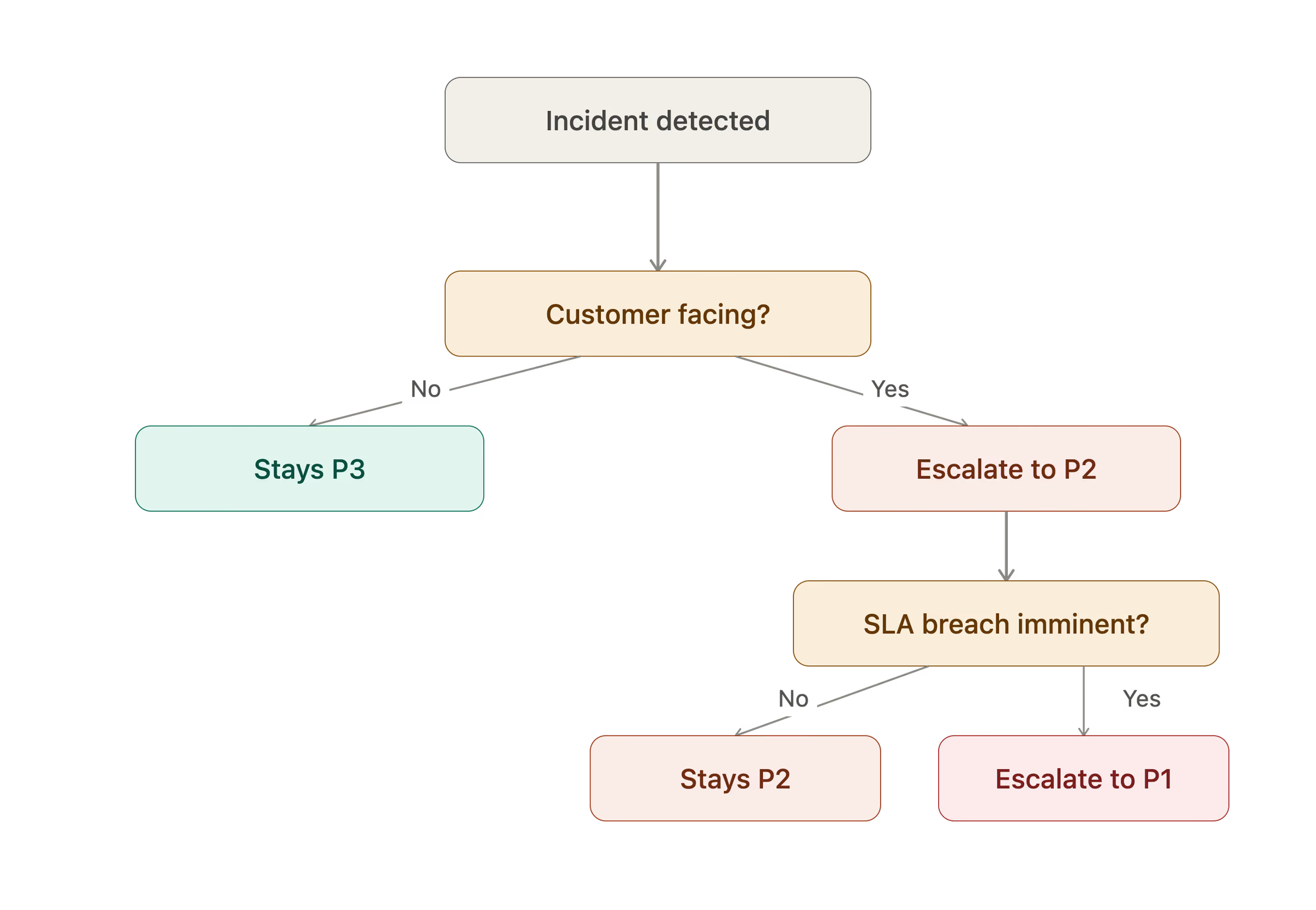
And this is where playbook automation is increasingly changing the game. Teams are embedding automated notification triggers and escalation routing directly into their playbooks, so the coordination layer kicks in without waiting for a human to read a document. The playbook becomes executable — not just a reference artifact.
The next logical question, then, is what happens once the playbook has fired: who does what, command by command? That's exactly where tactical runbooks take over.
Tactical Runbooks: The 'How-To' for System Restoration
Where playbooks vs runbooks diverge most sharply is at the execution layer — runbooks exist to eliminate guesswork when every second of downtime has a cost.
While an incident management playbook tells your team who escalates and why, a runbook tells the on-call engineer exactly what to type. That specificity is deliberate. Runbooks include exact CLI strings, API calls, and script paths — because ambiguity under pressure is how small incidents become major outages. In the playbook vs runbook in cyber security context especially, precise, pre-approved commands prevent well-meaning engineers from introducing new vulnerabilities mid-incident. Success validation is equally non-negotiable: a good runbook defines the exact observability metrics — error rate thresholds, latency p99, pod health checks — that confirm the fix actually worked, not just that the alerts stopped firing. And if the intervention fails, a rollback procedure tells the engineer precisely how to retreat to a known-good state without compounding the damage.
Those structural differences become even clearer when you lay playbooks and runbooks side by side — which is exactly what the next section does.
Comparison Table: Playbook vs. Runbook Features
The clearest way to understand the playbook vs. runbook distinction is to map each document against the dimensions that actually matter in production environments.
The playbook definition most teams work from centers on strategic guidance — who owns the incident, what communication goes out, and why certain escalation thresholds exist. The incident management runbook, by contrast, is a technical artifact built for hands-on responders under time pressure.
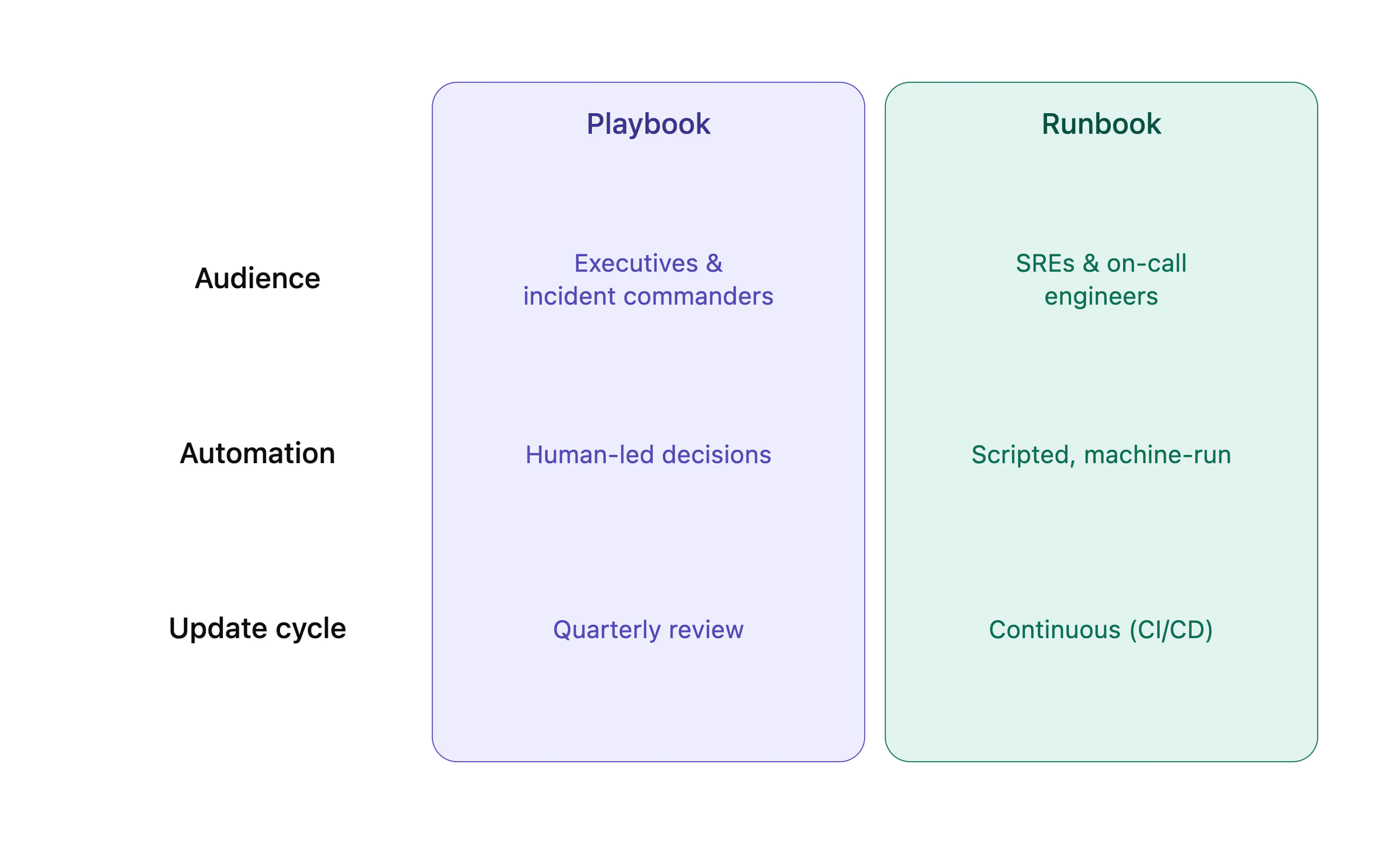
Three dimensions expose the gap most clearly:
Audience.
Playbooks serve executives and incident commanders — people making judgment calls about business impact, stakeholder communication, and resource allocation. Runbooks serve SREs and DevOps engineers who need exact commands and verified procedures.
Automation level.
Playbooks remain human-led; decisions require context only a person can provide. Runbooks are increasingly machine-executable — scripts, auto-remediation triggers, and, in the SOAR playbook vs runbook debate, AI agents that run steps autonomously and surface approval checkpoints.
Update frequency.
Playbooks follow quarterly strategic review cycles, aligned to policy or organizational changes. Runbooks update continuously — ideally inside CI/CD pipelines — because the systems they document change constantly.
Understanding where each document lives in your stack sets up a deeper question: how do these two artifacts actually interact when an incident fires?
What Most Guides Miss: The Hierarchy of Operational Excellence
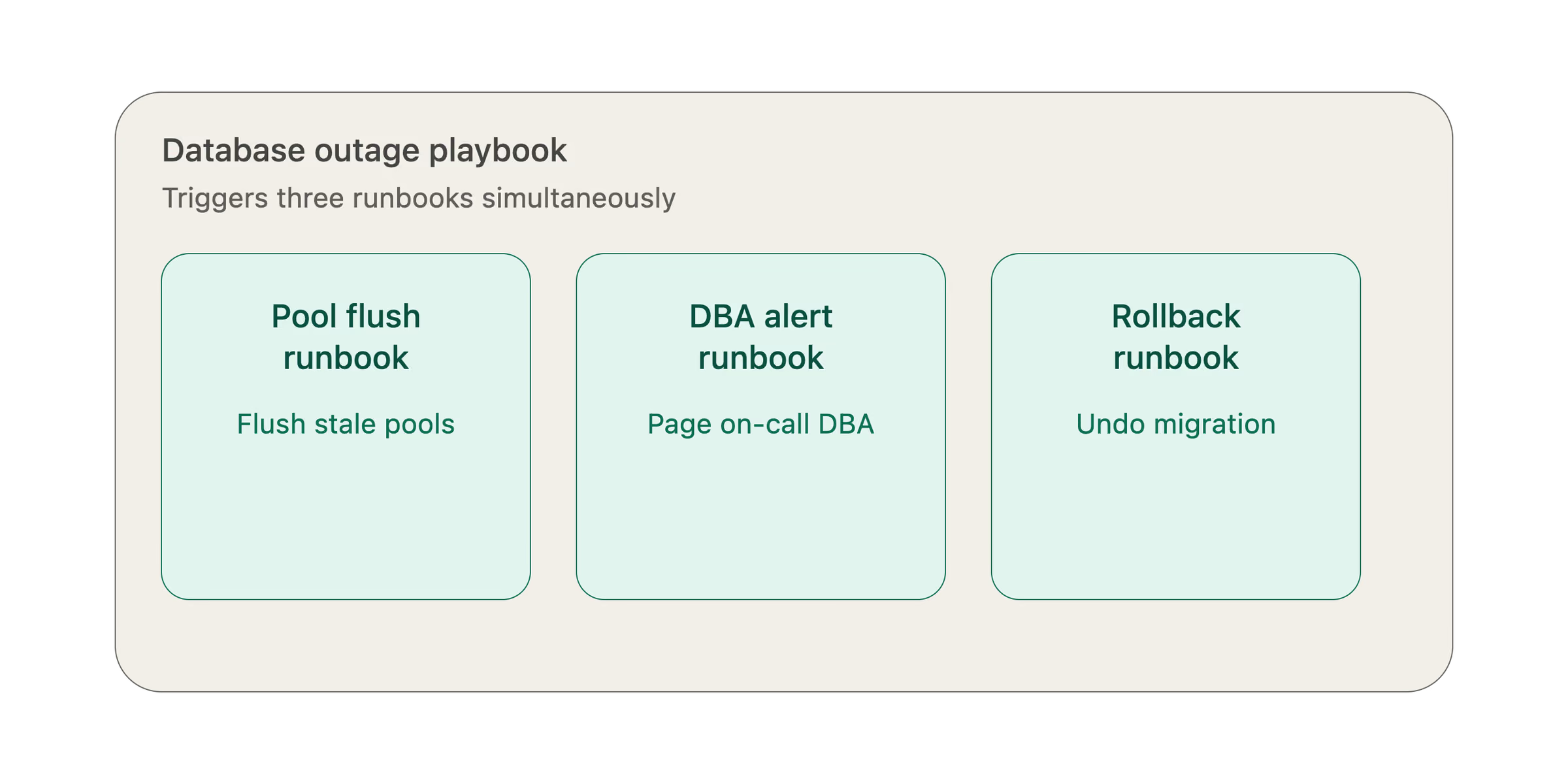
A single incident response playbook rarely operates in isolation — it typically triggers a cascade of highly specific runbooks, each handling one discrete slice of the recovery process.
Think of it as a Russian Doll effect. Your database outage playbook kicks off three or four runbooks simultaneously: one for flushing connection pools, one for alerting the on-call DBA, one for rolling back a failed migration. Each runbook answers the "what is a runbook" question in the most literal sense — it's a precise, executable script for a single task, not a broad strategy document.
Over-documentation is the industry secret nobody talks about. Teams that produce sprawling, exhaustively detailed documentation often create a different problem: engineers freeze during incidents because they can't locate the right document fast enough. Lean, well-organized documentation consistently outperforms volume.
And the landscape is shifting again. AI agents are increasingly executing runbooks autonomously, which moves your team's job from what to type to what to approve. That's a meaningful evolution in how operational knowledge gets applied under pressure.
What bridges the gap between alert and action is smart routing — surfacing the exact documentation the moment an alert fires, rather than leaving engineers to search for it. That's the operational model worth building toward, and it connects directly to a broader question: where do frameworks like NIST or ITIL fit into all of this?
What is the difference between a playbook and a framework?
A framework sets the rules of the game; a playbook is how your team actually plays it.
If you've been asking what is a playbook and hitting walls of jargon, this distinction cuts straight through. Frameworks like NIST or ITIL define philosophy — the standards, principles, and expectations an organization commits to. They answer "what should good look like?" A playbook translates that answer into the workflows your team runs on a Tuesday at 2 a.m.
Think of it this way: a framework says "contain incidents quickly and communicate with stakeholders." Your playbook says who calls whom, in what order, using which escalation path. Real playbook examples make this concrete — a security team's NIST-aligned playbook might map directly to the framework's "Respond" function, but the actual steps are entirely specific to your environment, your tools, and your team's structure.
Frameworks are "what we believe." Playbooks are "what we do." Neither replaces the other — and knowing where one ends and the other begins matters enormously when you're building documentation that actually holds up under pressure. That pressure extends to where you store these docs, which turns out to be its own critical decision.
Where do folks keep their on-call playbooks?
Where you store your incident documentation matters almost as much as what's in it — a playbook template no one can access during an outage is just decorative writing.
Two dominant storage patterns have emerged in practice. Internal wikis (Confluence, Notion, SharePoint) offer familiar interfaces and broad accessibility, but they tend to drift into disorganization over time. Git-based documentation — the Docs-as-Code approach — keeps runbooks version-controlled alongside the infrastructure they describe, which makes answering how to create a runbook that stays current dramatically easier. Engineers treat docs like code: pull requests, reviews, and changelogs included.
Accessibility is the non-negotiable constraint that most storage decisions undervalue. If your VPN goes down during an incident — and incidents have a way of taking down exactly the infrastructure you depend on — a wiki hosted behind that VPN becomes useless precisely when it's needed most. One practical approach is mirroring critical playbooks to a publicly accessible (but authenticated) endpoint, or maintaining a lightweight offline-readable copy for on-call engineers.
The most mature teams connect documentation directly to alert triggers inside centralized incident management hubs. Rather than hunting through a wiki mid-incident, the alert itself surfaces the relevant runbook link. That tight coupling between signal and response guide is where the playbook vs. runbook distinction becomes operationally meaningful — the runbook loads automatically; the playbook governs how the team responds.
Even the best storage strategy, though, can't save documentation that's gone stale or become ambiguous — which is exactly where things start to break down.
Common Failure Modes: When Documentation Becomes a Liability
Even the most carefully crafted runbook or playbook becomes a liability the moment it stops reflecting how your systems actually work.
The stale doc trap is the most common failure. Part of a solid runbook definition is that it describes current infrastructure — but runbooks have a nasty habit of referencing decommissioned services, deprecated CLI flags, or tools the team stopped using two quarters ago. Engineers following outdated steps during an active incident don't just waste time; they can make things worse.
Ambiguity in playbooks is a quieter but equally damaging problem. Instructions like "notify stakeholders" or "escalate if needed" feel complete when written, but they collapse under pressure. When learning how to create a playbook, specificity is non-negotiable — name the role, the channel, and the expected response time.
Tool sprawl compounds both issues. When runbook content lives across Slack threads, Jira tickets, Confluence pages, and GitHub wikis simultaneously, no single source of truth exists. Engineers waste precious minutes during outages just locating the right document.
And there's a limitation worth acknowledging honestly: documentation cannot replace skilled intuition during black swan events. Novel failure modes — the ones nobody anticipated — require experienced judgment that no playbook can fully encode.
Before addressing any of these failure modes, though, you first need a clear-eyed look at what your current documentation actually contains. That starts with knowing how to evaluate it.
Methodology: How to Evaluate Your Current Documentation
The fastest way to find gaps in your incident documentation is to put it in front of someone who didn't write it.
Whether you're assessing a runbook template or trying to understand the practical difference between playbook and runbook formats, three simple tests cut through the noise. The New Hire Test asks whether a junior engineer can execute a procedure without asking for help — if they're stuck, your documentation is the problem, not the engineer. Time-to-Locate (TTL) measures how many clicks it takes to surface the right doc after an alert fires; more than two or three clicks is a signal worth taking seriously. And scanning for automation potential reveals manual steps that are both error-prone and scriptable — the kind of drag that slows every incident response.
Those three lenses together give you a pragmatic audit framework. And they set up a harder question: once you know what's working and what isn't, which approach — manual, automated, or somewhere in between — actually fits your team's size and risk tolerance?
Trade-offs and Alternatives
Not every situation calls for a full playbook or runbook — and choosing the wrong documentation format can cost your team more time than having no documentation at all.
Manual vs. automated runbooks is the first fork in the road. Automated runbooks execute steps without human intervention, which sounds ideal until a script restarts the wrong service at 2 a.m. Human oversight matters, especially in ambiguous failure states. The right balance typically depends on blast radius: automate low-risk, high-frequency tasks; keep humans in the loop for anything touching production databases or customer data.
SOPs vs. runbooks is a distinction worth making for low-risk, repeatable tasks. A Standard Operating Procedure — a simpler, less technical document — is often enough when the stakes are low and the steps rarely change. Not every routine task needs the versioned, system-specific structure of a runbook. Forcing that format onto mundane procedures creates unnecessary overhead.
The cost of maintenance is where smaller teams feel the most pain. Every document you create is a document you have to keep current. A common pattern in lean engineering orgs is "just-in-time" documentation: write the runbook after the incident, not before, so it reflects how the system actually behaved. This also applies when comparing a security playbook vs runbook — security teams often need both, but maintaining two parallel document sets strains small teams fast.
Practical runbook examples from high-performing teams consistently show one thing: fewer, well-maintained documents outperform large libraries of stale ones. With that in mind, building the right documentation stack — rather than just more documentation — is exactly what the next section addresses.
Implementation Roadmap: Building a Resilient Documentation Stack
The fastest path from chaotic incident response to a resilient documentation stack is a four-step build that starts with what your incidents are already telling you.
Before writing a single runbook or playbook, audit your recent incidents. Look for recurring "how-to" patterns — the same database restart, the same SSL certificate renewal, the same cache flush appearing across multiple post-mortems. Those repetitions are your runbook backlog. Once you've mapped those needs, move to establishing playbook templates for your major incident categories (outages, security breaches, data loss). In the context of runbook vs playbook cyber security planning specifically, this two-layer structure is what separates teams that recover quickly from teams that improvise under pressure.
Next, integrate your documentation into the alert routing layer. When an alert fires, the relevant runbook or playbook should surface automatically — not sit in a wiki nobody remembers to check. This is where runbook automation delivers real MTTR reduction, linking documented procedures directly to the tools your on-call engineer already has open.
Finally, schedule Game Days. Run simulated incidents against your documentation before a real one exposes its gaps. That pressure-test mindset sets up exactly the kind of scenario worth walking through in detail — which is why a concrete database outage example comes next.
Example Scenario: A Database Outage Playbook
In the playbook vs. runbook devops debate, nothing clarifies the distinction faster than watching both documents work together during a real incident.
Picture a production database going dark at 2:00 AM. The IT playbook kicks in first — it tells the on-call engineer to page the frontend team, draft a customer-facing status update, and notify the CTO within 15 minutes. Those are judgment calls and communication responsibilities, not terminal commands.
The runbook takes over from there: connect to the standby node, verify replication lag, execute the failover script, confirm read/write restoration. Step by step, no ambiguity.
After the fix, the team discovers a new error log pattern that wasn't documented. That finding goes straight back into the runbook — exactly how a healthy documentation stack evolves. The tools that make that update seamless are worth knowing about.
What Tools Do You Use for Creating Playbooks and Runbooks?
The right toolchain determines whether your IT rrunbook stays a living document or becomes an outdated PDF nobody trusts. When teams debate runbook vs playbook vs SOP tooling, three categories consistently rise to the top.
Version control systems
(Git, GitHub, GitLab) treat documentation as code — every edit is tracked, reviewed, and reversible.
Markdown editors
(Confluence, Notion, Obsidian) enforce standardized formatting that stays readable across teams and time zones.
Incident response platforms
embed dynamic, interactive runbook execution directly inside the alert workflow. Platforms like ITOC360 take this further with AI-driven alert correlation — grouping duplicate alert storms into a single actionable incident — combined with automated escalation policies and ChatOps, so the right engineer is paged and the correct runbook surfaces the moment an incident fires.
And here's the honest caveat: no single tool wins every scenario. The best stack layers all three — version control for truth, markdown for clarity, and an AI-first response platform for execution. That combination is what the final takeaways ahead will help you lock in.
Key Takeaways: Optimizing Your Incident Response
The playbook vs. runbook distinction isn't academic — it's the structural difference between teams that recover fast and teams that scramble.
Whether you're building a SOC playbook for security incident coordination or mapping out an AWS playbook vs. runbook strategy for cloud infrastructure, the core principle holds: playbooks own the strategic "why" and "who," while runbooks own the tactical "how". Neither document works well in isolation.
Modern SRE teams are accelerating this further — using AI to route alerts directly to specific runbooks, cutting resolution times dramatically. And that only works when documentation is treated like code: versioned, tested, and regularly refactored rather than left to drift.
Effective incident management lives at both altitudes simultaneously. High-level coordination without low-level precision creates confusion. Low-level precision without strategic context creates tunnel vision. Build both, maintain both, and your team won't just survive incidents — they'll resolve them with confidence.