Major Incident Management: Process, Roles & Comms (2026)
Major incident management is the separate, faster process an organization uses for incidents with significant business impact: a declared emergency with a dedicated manager, pre-assigned roles, a single communication channel and a fixed update rhythm, running until service is restored and the cause is handed to problem management. ITIL defines a major incident as "an incident with significant business impact, requiring an immediate coordinated resolution."
Quick answer: Declare a major incident as soon as the impact meets your pre-agreed criteria, not when you are sure of the cause. Then follow eight steps: declare, mobilize, assess, communicate, stabilize, resolve, review and hand off to problem management. One person, the major incident manager, runs the response and never debugs; a communications lead sends updates on a fixed schedule, typically every 30 minutes for the worst incidents.
The stakes keep rising. In Uptime Institute's 2025 annual survey, reported in its Annual Outage Analysis 2026, 57% of operators said their most recent major outage cost more than $100,000. The same report found that failures to follow established procedures remain the leading driver of human-error outages, which is exactly what a rehearsed major incident process prevents.
Key facts at a glance
Definition (ITIL) | An incident with significant business impact, requiring an immediate coordinated resolution |
Typical trigger | SEV1, and usually SEV2: a critical service down or badly degraded for many customers |
Who runs it | A major incident manager (often called the incident commander) |
Core roles | Major incident manager, technical lead, communications lead, scribe; plus support, problem manager and executive sponsor as needed |
Update cadence | Every 30 minutes for SEV1 and every 60 minutes for SEV2 are common defaults |
Ends when | Business impact has ended; the post-incident review and problem record follow |
Key KPIs | Time to declare, time to mobilize, time to first update, MTTR, review completion rate |
Framework | ITIL incident management practice; ITIL (Version 5) keeps it in the Monitor, Support and Fulfil module |
What Counts as a Major Incident?
A major incident is defined by business impact, not by technical difficulty. A one-line configuration error that takes checkout offline is a major incident; a week-long investigation into a slow internal report is not.
Standard incident | Major incident | |
|---|---|---|
Impact | Limited users or a non-critical service | Critical service, many customers, revenue or safety |
Who handles it | The owning team or service desk | A cross-functional team led by a major incident manager |
Speed | Within the normal resolution target | Immediate, around the clock |
Communication | Updates to affected users | Scheduled updates to customers, leadership and support |
After it ends | Closed, sometimes reviewed | Mandatory post-incident review and problem record |
Declaration criteria: a checklist
Agree these triggers in advance, so nobody debates them at 3 AM. Declare a major incident if any one is true:
A customer-facing critical service is down or unusable for all or most customers.
Payments, logins, orders or another revenue path fail at a rate above an agreed threshold, such as 5% of requests.
Data loss, data corruption or a suspected security breach is possible.
An SLA or regulatory reporting deadline is at risk.
More than one team is needed to restore service.
Impact is uncertain but potentially severe, and growing.
Most teams map these criteria to severity: SEV1 is always a major incident, SEV2 usually is. Our incident severity levels guide explains how to define each level.
Two rules that save the most time
When in doubt, declare. Downgrading a major incident costs a few minutes of people's time; declaring late costs customer trust. Teams lose more time debating whether an incident is "major" than on almost any other step.
Anyone can declare. The on-call engineer, the service desk analyst and the support lead should all be able to start the process without asking permission. The major incident manager can downgrade it later.
Examples of major incidents
Example | Why it is major |
|---|---|
Card payments failing for a large share of customers | Direct revenue loss every minute |
Login or single sign-on down for all users | Blocks every customer and employee at once |
A cloud region or data center outage taking core services offline | Many services fail together; several teams needed |
Suspected data breach or ransomware | Legal, regulatory and reputational exposure; may require taking systems offline |
Corrupted or lost customer data after a failed migration | Impact may be permanent; recovery decisions need leadership |
A core API returning errors to partners | Breaks partners' products and contractual SLAs |
By contrast, a single user's email not syncing, a slow internal report or a failed nightly job with no customer impact are standard incidents, even if they take a long time to fix.
The Major Incident Management Process, Step by Step
The process below works for teams of any size. The time targets are starting points; agree your own and write them into your incident response plan.
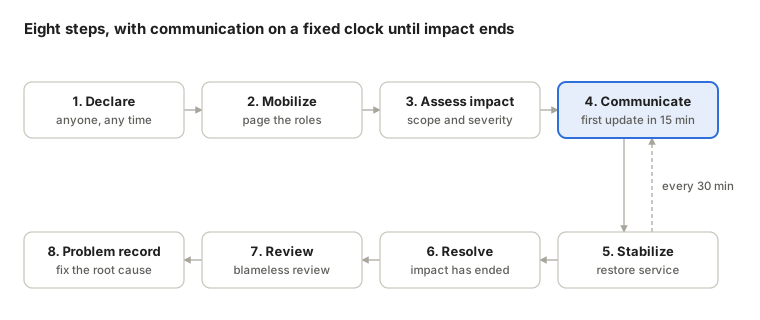
Declare (minute 0). Whoever sees the trigger declares the major incident and opens a single incident record and channel. Target: declared within 5 minutes of detection.
Mobilize (by minute 5). Page the major incident manager, the technical lead for the affected service and the communications lead. Escalation should be automatic if someone doesn't acknowledge; see our escalation policy guide.
Assess impact (by minute 10). Answer four questions: what are customers seeing, how many are affected, when did it start, and is it getting worse? Confirm or change the severity.
Communicate (by minute 15). Send the first internal and external update, even if it only says the problem is acknowledged and being investigated. Then repeat on a fixed cadence.
Stabilize. Restore service first; find the cause later. Rollback, failover, feature flags and traffic shifts come before deep debugging.
Resolve. Declare the incident resolved when the business impact has ended, not when the fix is perfect. Send a final update.
Review (within 5 business days). Run a blameless post-incident review with the full timeline.
Problem record. Hand the underlying cause to problem management, so it is fixed permanently, not just worked around. See ITIL 5 problem management.
The dashed loop in the diagram is the part most teams skip: communication is not a step you complete once, but a clock that keeps running until step 6.
Major Incident Roles and Responsibilities
The single most important rule: separate coordination from debugging. Google's SRE book describes the same split in its chapter on managing incidents, where incident command, operational work and communication are held by different people so nobody is pulled in two directions.
Together, these people form the war room: in most teams today a virtual one, made of a bridge call and a single incident channel in Slack or Microsoft Teams, rather than a physical room.
Role | Owns | Does not |
|---|---|---|
Major incident manager (incident commander) | Overall control: priorities, decisions, roles, cadence, when to escalate and when to resolve | Debug or type commands |
Technical lead | Diagnosis and the restoration plan; directs the engineers | Write customer updates |
Communications lead | Every internal and external update, on schedule | Join the technical debate |
Scribe | The timeline: what was seen, decided and done, with times | Make decisions |
Subject-matter engineers | Hands-on fixes for their component | Change the plan without the technical lead |
Support lead | Incoming tickets, calls and social mentions; feeds customer impact back | Promise fix times |
Executive sponsor | Approves extraordinary actions, such as public statements or spending | Run the response |
Problem manager | Takes over the root cause after resolution | Slow down restoration |
In small teams, one person may hold two roles; the communications lead and scribe are the easiest to combine. The major incident manager role should never be combined with the technical lead in a SEV1. For how to staff and train the role, see what an incident commander does.
Handovers. Long incidents need fresh people. Hand over any role after four to six hours, with a short verbal summary and a note in the timeline, so the response never depends on one exhausted person.
Major Incident Communication: Who, What and How Often
During a major incident, silence is read as "nobody is working on it." A fixed cadence removes the guesswork: every audience knows when the next update comes, even if there is nothing new.
Audience | Channel | SEV1 cadence | SEV2 cadence | What they need |
|---|---|---|---|---|
Responders | One incident channel (Slack or Teams) and a bridge call | Continuous | Continuous | Current hypothesis, who is doing what |
Leadership | Email or a leadership channel | Every 30 minutes | Every 60 minutes | Impact, ETA confidence, decisions needed |
Customers | Status page, in-app banner | Every 30 minutes | Every 60 minutes | What is affected, workarounds, next update time |
Support team | Support channel and a pinned summary | Every 30 minutes | Every 60 minutes | What to tell customers, what not to promise |
Regulators or key accounts | Agreed contact route | As contract or law requires | As required | Formal notice within the required deadline |
What every update should contain:
What is affected, in customer language.
What we know and what we are doing now.
Any workaround customers can use.
When the next update will come.
Never promise a fix time you can't keep; promise the next update time instead. Keep one source of truth: the communications lead publishes from the incident record, and nobody else posts status externally.
For ready-to-use wording, see our incident communication templates, and for the broader practice, incident communication best practices.
Worked Example: A Major Incident, Minute by Minute
An illustrative SEV1 at an online retailer: card payments start failing at night. The timeline is the kind the scribe would record.
Time | What happened | Who |
|---|---|---|
02:41 | Payment error rate rises; monitoring fires alerts for checkout and the payment API | Monitoring |
02:43 | Related alerts are grouped into one incident; the on-call engineer is paged and acknowledges | On-call engineer |
02:46 | Error rate passes the 5% threshold. Major incident declared as SEV1; incident channel and bridge opened | On-call engineer |
02:50 | Major incident manager, technical lead and communications lead joined | Major incident manager |
02:54 | Impact assessed: about 40% of card payments failing in all regions since 02:41 | Technical lead |
02:58 | First update to status page, leadership and support: payments degraded, investigating, next update 03:30 | Communications lead |
03:12 | Hypothesis: a payment-gateway certificate rotated at 02:40 is rejected by one provider | Technical lead |
03:24 | Traffic shifted to the backup payment provider; error rate falls below 1% | Subject-matter engineer |
03:30 | Second update: service restored via backup provider, monitoring continues, next update 04:00 | Communications lead |
03:55 | Certificate chain fixed on the primary gateway; traffic moved back gradually | Subject-matter engineer |
04:15 | Resolved: error rate normal for 20 minutes; final update sent | Major incident manager |
Next day | Problem record opened; blameless review scheduled within 5 business days | Problem manager |
What this timeline tells you:
Time to declare: 5 minutes after the first alert (02:41 to 02:46).
Time to first update: 12 minutes after declaration.
Time to restore service: 43 minutes from first alert (backup provider at 03:24).
Time to resolve: 94 minutes from first alert.
Restoring service through the backup provider came 31 minutes before the actual fix. That gap is the case for "stabilize first, fix later."
Major Incident Management KPIs
General incident metrics hide major incidents in averages. Track these separately for SEV1 and SEV2 only. The targets are practical starting points, not industry standards; set your own from your first quarter of data.
KPI | What it measures | Starting target |
|---|---|---|
Time to declare | First alert to major incident declared | Under 5 minutes |
Time to mobilize | Declaration to all core roles joined | Under 10 minutes |
Time to first update | Declaration to first external update | Under 15 minutes |
Cadence adherence | Share of updates sent on time | Above 95% |
Time to restore | First alert to customer impact ended (MTTR) | Improving quarter over quarter |
Major incident frequency | Major incidents per month or quarter | Falling over time |
Review completion | Major incidents with a review within 5 business days | 100% |
Action item closure | Review action items closed by their due date | Above 80% |
The first three are the ones most teams never measure, and the ones a process controls most directly. Restoration time depends on the failure; declaration, mobilization and the first update depend only on how well the process is rehearsed. For the wider metric set, see our guide to incident management KPIs.
Major Incident Management in ITIL 5
ITIL has never made major incident management a separate practice. It is a special path inside the incident management practice, triggered when an incident meets the major-incident criteria. That holds in ITIL (Version 5), released by PeopleCert in January 2026:
Incident management sits among the product and service management practices and is taught in the ITIL Monitor, Support and Fulfil (Version 5) module, together with service desk, problem management, service request management, and monitoring and event management.
The lifecycle view makes the hand-offs explicit: a major incident in the Operate and Support activities ends with a problem record whose fix flows through Build and Transition.
The revised Official Practice Guide for incident management is expected in the second half of 2026 and was not yet published as of October 14, 2026.
For what changed in the standard incident process, read ITIL 5 incident management; for the root-cause hand-off, ITIL 5 problem management.
Common Major Incident Management Mistakes
Debating severity instead of declaring. If the criteria are met, declare. You can always downgrade.
The incident manager starts debugging. The moment the coordinator joins the technical work, nobody is watching the clock, the roles or the customers.
Too many channels. Side chats and private calls split the facts. Keep one channel and one bridge, and summarise any side discussion back into the channel.
Updates only when there is news. Customers and leadership read silence as lost control. Send on schedule, even if the update is "no change."
Fixing before stabilizing. A rollback or failover that restores service in ten minutes beats a perfect fix in two hours.
No timeline. Without a scribe, the review becomes a debate about who remembers what.
Closing without a problem record. The same failure comes back. Every major incident should end with a problem record and an owner.
Never rehearsing. A process that only runs during real outages will fail the first time. Run a short game day each quarter: declare a fake SEV1 and walk through the first 15 minutes.
Free download: the one-page major incident checklist. Declaration criteria, roles, the 15-minute start, the update cadence and the close-out steps on a single page you can print or pin in your incident channel. Download the checklist (PDF)
How ITOC360 Supports Major Incident Management
The first 15 minutes of a major incident are mostly logistics: grouping alerts, finding the right people, opening a channel and starting the clock. ITOC360, an AI-first incident management platform, automates that part so the team can focus on restoring service:
One incident, not fifty alerts. AI alert correlation groups related alerts before anyone is paged.
The right people, fast. On-call schedules and escalation policies page the owner by phone, SMS or push, and escalate automatically if nobody acknowledges.
One place to work. The incident runs in Slack or Microsoft Teams through ChatOps, with responders and actions in a single channel.
A timeline without a typist. Alerts, actions and chat are recorded automatically, and an AI retrospective is drafted when the incident closes.
Start free or see how it works for IT operations teams.
Frequently asked questions
What is major incident management?
Major incident management is the separate, accelerated process for incidents with significant business impact. It uses a dedicated major incident manager, pre-assigned roles, one communication channel and a fixed update cadence until service is restored, followed by a post-incident review and a problem record.
What is the difference between an incident and a major incident?
An incident is any unplanned interruption or reduction in quality of a service. A major incident is one with significant business impact, such as a critical service down for most customers, that needs an immediate, coordinated, cross-team response. The difference is impact, not technical complexity.
Who declares a major incident?
Anyone who sees that the agreed criteria are met: the on-call engineer, a service desk analyst or a support lead. The major incident manager can confirm, downgrade or upgrade the severity once they join.
What does a major incident manager do?
The major incident manager coordinates the response: sets priorities, assigns roles, keeps the update cadence, decides when to escalate and declares the incident resolved. They do not debug; the technical lead directs the engineers.
How often should you communicate during a major incident?
A common default is every 30 minutes for SEV1 and every 60 minutes for SEV2, to customers, leadership and support. Each update should say what is affected, what is being done, any workaround, and when the next update will come.
Is a SEV1 always a major incident?
In most organizations, yes: SEV1 is always a major incident, and SEV2 usually is. The exact mapping should be written down in advance, together with the criteria for each severity level.
What happens after a major incident is resolved?
A final update goes out, a blameless post-incident review takes place within a few business days, and a problem record is opened so the underlying cause is fixed permanently through problem management.
Is major incident management part of ITIL 5?
Yes. In ITIL (Version 5), major incidents are handled within the incident management practice, which is taught in the Monitor, Support and Fulfil module. The revised Official Practice Guide is expected in the second half of 2026.
Sources
Uptime Institute, Annual Outage Analysis 2026 announcement (May 13, 2026)
Betsy Beyer et al., Site Reliability Engineering, Chapter 14: Managing Incidents (O'Reilly, 2016)
PeopleCert / ITIL: New ITIL explained (Version 5)
ITSM.tools, Stephen Mann: ITIL Version 5 management practices explained (updated October 7, 2026)
Web sources opened on October 14, 2026.