








Introduction: Why Incident Response Tools Matter in 2024–2025
Attackers move faster than most security teams expect. The Palo Alto Networks 2024 Incident Response Report found that in 45% of cases, attackers exfiltrated data in under a day after initial compromise. At the same time, the share of cases where exploitation of internet-facing vulnerabilities served as the initial access vector rose from 28% in 2022 to 39% in 2023. The financial pressure is just as sharp: the global average cost of a data breach now sits at USD 4.44 million, according to IBM’s Cost of a Data Breach Report 2025. Organizations with incident response plans can reduce breach costs by 23%, which makes proper tooling a direct line item in risk reduction.
Incident response tools are what stand between a detected anomaly and a contained threat. They underpin every phase of the response process: preparation, detection, containment, and recovery across hybrid, on-premises, and cloud-native environments. For SOC teams, these tools aggregate security data, correlate alerts, and surface indicators of compromise. For DevOps and SRE teams, they route production incidents to the right on-call engineer and track resolution in real time. Without them, handoffs between monitoring, response, legal, and communications teams are slow and error-prone.
The common pain points are well documented. Alert fatigue is one: SOCs receive an average of 4,484 alerts per day, roughly one every 6.4 seconds during an eight-hour shift. Fragmented tooling forces analysts to switch between consoles. Slow escalation procedures delay containment. Incident response plans minimize losses during security incidents, but only when backed by tools that execute those plans at speed.
ITOC360 is an AI-driven incident orchestration platform built to solve these problems. It transforms noisy alarms into meaningful, actionable incidents, routes them to the right engineer, and automates escalation. Here is what modern incident response tools deliver when properly deployed:
- Rapid response to active incidents, measured in minutes rather than hours
- Reduced alert fatigue through correlation, deduplication, and machine learning
- Proper evidence handling for compliance and legal proceedings
- Lower MTTA and MTTR through automated routing and escalation
- Unified visibility across monitoring, security, and ticketing systems
What Are Incident Response Tools? (Definition and Scope)
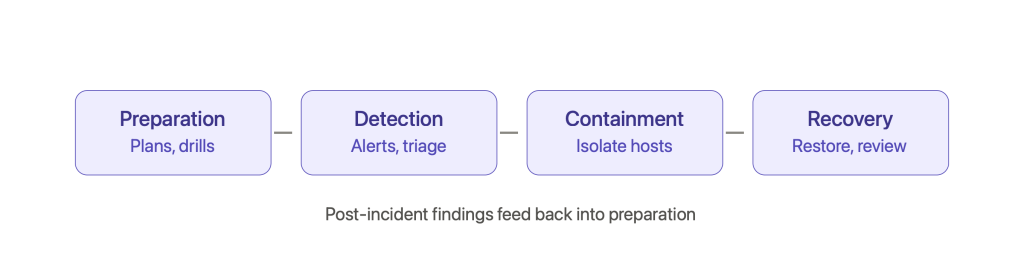
Incident response tools are software systems that support the detection, analysis, containment, eradication, recovery, and review of security incidents and operational disruptions. NIST published the incident handling lifecycle in SP 800-61 Rev. 2, identifying four phases: preparation, detection, containment, and recovery. SANS divides the incident response lifecycle into six phases: preparation, detection, analysis, containment, eradication, and recovery. The recovery phase involves restoring systems to normal operation after an incident. Tools map to one or more of these phases.
These tools serve different audiences. Security-focused tools include EDR (endpoint detection and response), SIEM (security information and event management), and XDR (extended detection and response). Reliability and availability tools include incident management platforms, on-call scheduling systems, and runbook engines. Both categories interact with security monitoring solutions, ticketing systems like Jira or ServiceNow, chat platforms like Slack or Teams, and observability stacks to form the broader security operations ecosystem.
Two scenarios illustrate the range:
Data breach: An employee’s credentials are phished. EDR detects an anomalous login. The SIEM aggregates logs showing lateral movement across affected systems. An orchestration tool isolates the compromised host. DFIR tools collect a memory dump. Legal and compliance teams use the preserved forensic data for breach notification.
Production outage: A monitoring system detects a latency spike. Observability tools trace it to a misconfigured microservice. The incident management platform pages the on-call SRE. The team collaborates through the tool, rolls back the change, and creates a post incident review.
Core capabilities of incident response tools break down into four functions:
- Detect: Ingest telemetry, apply detection rules, surface anomalies
- Investigate: Correlate events, enrich with threat intelligence, analyze root cause
- Coordinate: Route to owners, manage escalation, track tasks and timelines
- Automate: Execute playbooks, suppress noise, enforce containment strategies
Incident Response Tools in the Context of Incident Management
Incident management, from an ITIL or SRE perspective, covers identification, logging, categorization, prioritization, resolution, and review. Security incidents are a specialized subset that adds requirements: digital forensics, chain of custody, legal disclosure, and regulatory reporting. A solid incident response plan includes defined roles and responsibilities that span both operational and security domains.
Incident response tools act as the execution layer of an organization’s incident response process and playbooks. Without tooling, the gap between “alert fired” and “right person investigating” stretches from seconds to hours. Incident response teams include diverse roles for effective management: an incident response manager oversees the entire incident response process, security analysts detect, analyze, and respond to security incidents, and communications officers manage internal and external communications during incidents.
Key metrics tie directly to tooling. MTTA (Mean Time to Acknowledge) and MTTR (Mean Time to Recovery) reflect how fast teams recognize and resolve incidents. Breaches contained within 200 days cost 23% less to resolve. In cloud-native, microservices-based systems, these windows shrink further.
Consider a P1 incident: a compromised service account triggers rising error rates in a payments microservice. Monitoring catches the error spike. EDR flags abnormal behavior from that account. The incident management platform notifies on-call, auto-escalates when no acknowledgment arrives in five minutes, and the DFIR team begins investigation. Services are rolled back. Review reveals misconfigured IAM permissions. Cross-team collaboration is essential for effective incident response management in scenarios like this, where security operations and SRE work the same problem from different angles.
Here is how tools support each incident management step:
- Identify: Monitoring tools and detection tools surface anomalies in network traffic, logs, and endpoint behavior
- Log: Case management captures incident metadata, severity, and ownership
- Triage: Correlation and enrichment prioritize by business impact and threat level
- Resolve: Automated containment, manual intervention by response teams, rollback
- Review: Post incident timelines, evidence archives, and process improvement recommendations
Key Categories of Incident Response Tools
No single product covers every phase of the incident response lifecycle. Mature organizations build integrated stacks instead of relying on one monolithic solution. Cybersecurity incident response tools range from open-source to enterprise-grade solutions. Effective incident response tools include SOAR and case management platforms alongside detection systems.
Here are the major categories:
- SIEM (Security Information and Event Management): SIEM solutions consolidate event data for security analysis, aggregating logs from servers, network devices, cloud services, and applications. They apply rules, retain data for audit, and generate alerts.
- EDR (Endpoint Detection and Response): EDR systems analyze endpoint data to detect breaches by monitoring processes, connections, file operations, and logins. They offer containment actions like host isolation.
- XDR (Extended Detection and Response): XDR tools integrate multiple security capabilities for incident response, correlating telemetry across endpoints, network, cloud, email, and identity.
- SOAR (Security Orchestration, Automation, and Response): Automates response playbooks, connects SIEM, EDR, ticketing, and chat to execute known response routines.
- Threat Intelligence Platforms: Supply external data (IPs, hashes, domains, vulnerability information) for enrichment and feed into detection rules.
- DFIR Tools (Digital Forensics and Incident Response): Handle disk imaging, memory capture, timeline reconstruction, and evidence preservation for serious compromises.
- Incident Orchestration Platforms: Centralize incident tracking, automate routing and escalation, manage on-call schedules, and coordinate cross-team activity. ITOC360 falls into this category.
Security Monitoring and Detection: SIEM, EDR, XDR
SIEM tools perform log collection, normalization, correlation, and rule-based detection across infrastructure, applications, and cloud services. They serve as the backbone for security monitoring and compliance reporting. Security analysts use SIEMs daily to detect threats, investigate suspicious network traffic, and trace activity across systems. Leading IR teams achieve detection times under five minutes when SIEM rules are well-tuned and alert routing is automated.
EDR provides continuous monitoring on endpoints. It catches malware, lateral movement, suspicious process creation, and unauthorized data access. When an incident occurs on an endpoint, EDR can isolate the host, block a process, or collect artifacts for investigation. Its limitation: EDR is blind to network-level and cloud-native telemetry.
XDR unifies signals across domain boundaries. It correlates email phishing attempts, identity misuse, cloud activity, and endpoint anomalies into a single incident narrative. Microsoft Sentinel combines SIEM with SOAR capabilities for incident management, and its integration with ITOC360 allows teams to route Sentinel alerts into orchestrated workflows. UEBA tools identify unusual behavior to detect threats that signature-based rules miss, and many XDR platforms incorporate UEBA as part of their detection engine.
Drawbacks exist. SIEM tools generate large alert volumes that contribute to alert fatigue when not orchestrated. EDR coverage stops at the endpoint. XDR platforms often carry vendor lock-in and may have weaker log retention for compliance.
When evaluating these detection tools, look for:
- Real-time or near-real-time threat detection
- Native integration with your cloud providers and telemetry sources
- Support for threat intelligence feeds and custom detection logic
- Flexible retention policies and data export capabilities
- Contextual alerting that includes user, service, and asset information
Security Orchestration, Automation, and Response (SOAR) vs. Modern Orchestration Platforms
SOAR platforms automate threat response procedures by running predefined playbooks that connect SIEM, EDR, ticketing, and communication tools. A typical playbook might enrich an alert with threat intelligence, open a ticket, disable a compromised account, and isolate a host. Effective incident response tools automate routine tasks to reduce errors, and SOAR does this well for known, repeatable scenarios.
Legacy SOAR has limitations. Playbooks are rigid: when an incident deviates from the expected pattern, manual intervention is required. Building and maintaining dozens of playbooks as the environment changes demands high engineering overhead. Orchestration can break when upstream tools update their APIs or workflows shift.
Modern orchestration platforms take a different approach. They emphasize low-code or visual workflows, AI-assisted decision making, and dynamic routing based on context such as which team owns a service, the service’s criticality, and time of day. Automation reduces human error in incident management, and these platforms extend that automation beyond security into operational incidents like performance outages and degraded services.
Automated alert enrichment and containment are critical for effective incident response, and newer platforms handle both by pulling context from monitoring tools, enriching with threat intelligence, and routing to the correct responder without requiring a pre-built playbook for every scenario.
Consider adding orchestration on top of existing response tools when:
- Alert volume overwhelms analysts (thousands per day)
- Handoffs between teams are slow or poorly tracked
- Analysts switch between multiple consoles to investigate a single incident
- Your incident response strategy requires coordination across security, SRE, and operations
Threat Intelligence and Enrichment Tools
Threat intelligence tools supply feeds of indicators of compromise: malicious IPs, domain names, file hashes, and vulnerability data. They also provide intelligence on campaigns, adversary tactics, and advanced persistent threats. Threat hunters proactively search for hidden threats and advanced attacks using this intelligence alongside internal telemetry.
Security teams use threat intelligence during triage to decide whether an IP, domain, or hash is associated with known campaigns. Integrating threat intelligence into incident response tools reduces investigation time by giving analysts pre-correlated context rather than forcing manual lookups.
Intelligence comes from two sources. External feeds include commercial threat intelligence services and open-source feeds like abuse.ch or AlienVault OTX. Internal intelligence derives from an organization’s own logs, past incidents, and similar incidents seen before. Aligning feeds with the organization’s industry and geography improves relevance and reduces noise.
AI-driven platforms and orchestration systems can automatically enrich alerts before routing to humans, adding context that accelerates the incident response process.
Practical enrichment examples:
- Geo-IP lookup: Map source IPs to geographic origin for anomaly detection
- Reputation scoring: Score domains or URLs against known blocklists
- Malware family mapping: Link file hashes to known malware families for malware analysis
- Campaign correlation: Connect alerts to active threat campaigns
- Service ownership tagging: Identify which team owns the affected service
Digital Forensics and Incident Response (DFIR) Tooling
DFIR tools handle digital forensics and incident investigations: disk images, memory captures, log timelines, and evidence preservation. During serious security breaches, insider threats, and persistent compromises, DFIR is what produces the forensic data needed for legal proceedings and regulatory disclosure.
Forensic analysts collect and preserve digital evidence for investigations, operating under strict evidence handling protocols. Chain of custody records who collected evidence, when, and how it was stored. Cryptographic hashes verify integrity. These procedures matter when incidents lead to legal action or regulatory scrutiny.
Several open-source DFIR tools serve specific functions:
- Velociraptor: Live response and endpoint forensics at scale across thousands of machines
- Timesketch: Timeline visualization and collaborative forensic timeline building
- Plaso: Log timeline generation from multiple artifact sources
- Hayabusa: Windows event log analysis and threat detection
- DFIR-IRIS: Web-based incident response investigation system for case tracking
DFIR tools complement live incident response platforms. Investigation tools like these are usually operated by specialized teams who engage when incidents escalate beyond standard detection and containment. Their output feeds into post-incident analysis and regulatory reports.
Core DFIR capabilities:
- Collection: Acquire memory dumps, disk images, and remote collection tools for endpoint data across distributed environments
- Preservation: Maintain chain of custody, hash verification, tamper-evident storage
- Analysis: Timeline reconstruction, artifact correlation, identify indicators of compromise
- Reporting: Generate technical findings for legal, compliance, and executive audiences
Case Management and Incident Collaboration Platforms
Case management tools centralize incident records, timelines, tasks, and cross-functional communication. They support both IT incident management and security incident handling, connecting to SIEM, ticketing, and chat tools. Incident response includes tracking ownership, evidence, tasks, and timelines across the full lifecycle. Effective collaboration tools enhance the incident response process for security teams by putting all relevant information in one place.
Incident response plans help maintain customer trust during security breaches, and structured case management is how teams execute those plans consistently. TheHive is an open-source platform focused on collaborative incident management. Standardized incident tasks help ensure consistent analyst procedures across shifts, which is particularly valuable in regulated industries where audit trails are mandatory.
Prioritize tools that support real-time collaboration. Communications officers need to coordinate internal updates and external statements. Security professionals need to link digital evidence to cases. Engineers need to track remediation tasks.
ITOC360 serves as a modern incident orchestration and case management platform, turning raw alerts into actionable incidents with automated routing and coordinated response workflows.
A case management tool tracks:
- Incident metadata: ID, title, severity, current status
- Timeline: Chronological event log from detection through resolution
- Ownership: Primary responder, escalation contacts, cross-team participants
- Tasks: Assigned actions with deadlines and completion status
- Impact assessment: Affected systems, business operations impact, customer exposure
- Evidence artifacts: Logs, screenshots, memory dumps, linked forensic data
- Post incident documentation: Root cause, remediation steps, lessons learned
On-Call Management, Escalation, and Rapid Response
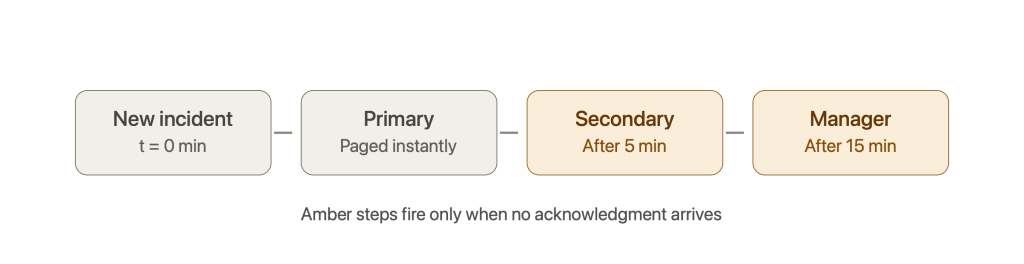
When an incident occurs at 3 AM, the difference between a five-minute response and a sixty-minute response often comes down to on-call management. Escalation procedures determine whether the right person gets paged, and automated escalation rules prevent incidents from sitting unacknowledged. For example: if the primary on-call does not respond within five minutes, the system escalates to secondary on-call; after fifteen minutes, it reaches the engineering manager.
Incident response tools integrate with paging and notification systems across SMS, voice, email, push notifications, and chat channels to reach the right engineer in seconds. Mean Time to Respond (MTTR) can be reduced by 5.5 hours when on-call management and escalation are automated rather than manual.
ITOC360 automates on-call management, escalation flows, and routing based on service ownership and context. When an alert arrives, the platform identifies the owning team, checks the current rotation, and pages the correct responder.
Typical on-call features to evaluate:
- Rotations: Primary, secondary, and tertiary on-call schedules
- Follow-the-sun: Routing based on time zones for global teams
- Overrides: Vacation handling, swap support, temporary reassignment
- Escalation chains: Configurable timeout and escalation rules per severity
- Load balancing: Distribution of on-call burden across team members
- Shadowing: Junior engineers can observe on-call without carrying the pager
Integration with Monitoring, Observability, and Ticketing
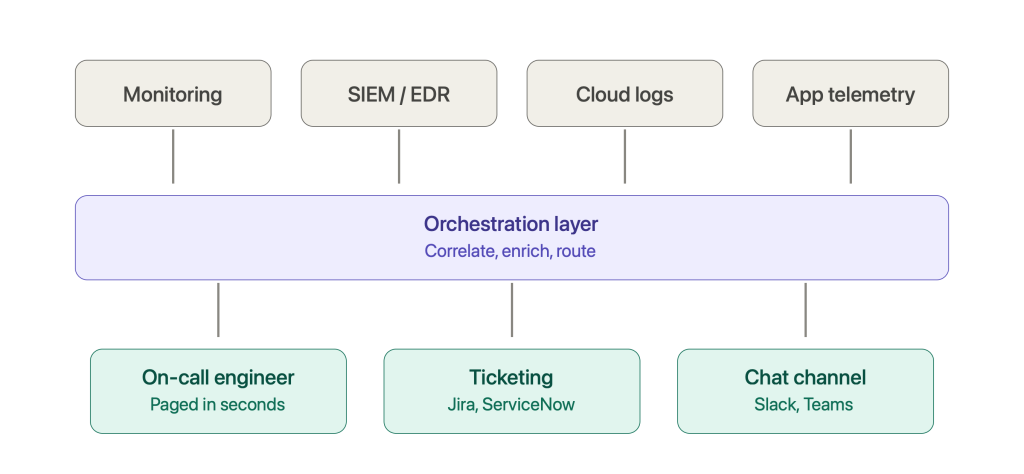
Incident response tools are only as effective as the data they ingest. Integration with monitoring tools like Prometheus, Grafana, Datadog, and New Relic is what turns raw signals into incidents. Organizations need to pull alerts from APM, infrastructure monitoring, synthetic checks, cloud security platforms, and continuous monitoring systems into a central orchestration layer.
Ticketing and ITSM systems (Jira, ServiceNow) handle long-running remediation and compliance tracking. Two-way sync between incident tools and ticketing systems keeps status current on both sides without requiring analysts to update multiple consoles. Strong API and webhook support enables bi-directional updates between monitoring, incident tools, and issue trackers.
ITOC360 uses these integrations to correlate related alerts into single, meaningful incidents. When three monitoring tools fire alerts about the same underlying database failure, the platform groups them into one case instead of creating three separate incidents.
Common integration patterns:
- One-way alert ingestion: Monitoring tool fires webhook to incident platform
- Two-way status sync: Incident platform updates ticket status; ticket closure resolves incident
- Enrichment callbacks: Incident platform queries CMDB or asset inventory for context
- Evidence attachment: Forensic artifacts or logs attached to incident record via API
- Notification fan-out: Incident platform pushes updates to Slack, Teams, email, and SMS simultaneously
Managing Alert Fatigue with Correlation and AI
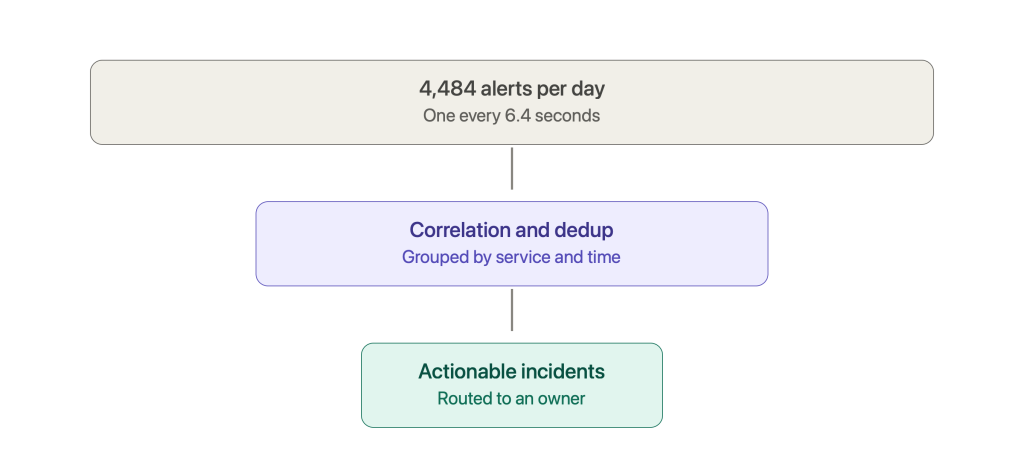
Alert fatigue occurs when analysts receive so many alerts that they become desensitized, causing real threats to slip through. SOCs receive approximately 4,484 alerts per day, and analysts spend about three hours per day, roughly 37.5% of their shift, just triaging alerts. Organizations with proactive detection reduce MTTD by 44% on average, which starts with reducing the noise that buries genuine threats.
Modern incident response tools use correlation, deduplication, and machine learning to cluster related alerts into single cases. Techniques include suppression of flapping alerts, baseline-aware detection that flags deviations from normal behavior, and separation of symptoms from root causes.
ITOC360’s AI-driven incident orchestration analyzes patterns across monitoring data to reduce noise and prioritize high-impact incidents. The platform’s correlation engine groups alerts by service, infrastructure dependency, and time window, routing only actionable incidents to human responders. For more detail on how this works at scale, see the analysis in 1 Million Alerts: What We Learned About Noise.
Reduced alert fatigue translates to better analyst decision-making, lower burnout, and fewer missed cyber attacks.
Configuration strategies for noise reduction:
- Tune detection thresholds quarterly based on false positive rates
- Route alerts by service criticality so that high-impact services get immediate attention
- Auto-close low-risk, self-resolving events after a defined window
- Suppress duplicate alerts from the same source within a correlation window
- Tag and review suppressed alerts weekly to catch emerging patterns
Cloud and SaaS Incident Response Tooling
Cloud-native environments change what incident response tools need to do. Resources are ephemeral: containers spin up and terminate in seconds, serverless functions execute and disappear, and autoscaling creates dynamic infrastructure that traditional security tools were not designed to handle.
Native cloud telemetry feeds into incident response pipelines: AWS CloudTrail for API activity, Azure Activity Logs for resource operations, VPC Flow Logs for network traffic analysis, and Kubernetes audit logs for cluster activity. CNAPP and CSPM tools monitor cloud security posture and feed findings into detection workflows.
Orchestration platforms like ITOC360 help correlate application-layer incidents (latency spikes, error rate increases) with underlying cloud infrastructure signals (CPU throttling, network partitions, IAM misconfigurations). This correlation is what turns a vague “something is slow” alert into an actionable incident with context.
Challenges unique to cloud incidents:
- Ephemeral resources: Short-lived containers and functions require log capture before termination
- Shared responsibility: Cloud providers secure the infrastructure; customers secure their configurations, data, and identities
- Multi-cloud sprawl: Different logging APIs, monitoring tools, and IAM models across AWS, Azure, and GCP
- Identity complexity: IAM policies, service accounts, and federated identities create large attack surfaces for remote access exploitation
- Autoscaling: Dynamic IP assignment and instance counts complicate forensic timelines
Evidence Handling, Compliance, and Reporting
Proper evidence handling separates a manageable security incident from a legal and regulatory crisis. When a data breach triggers notification obligations under GDPR, HIPAA, or PCI DSS, the quality of your evidence collection and documentation determines whether you can demonstrate due diligence. Effective incident response plans improve compliance with regulations like GDPR by ensuring that evidence is preserved, timestamped, and auditable.
Choose tools with analytics and reporting features that produce multiple report types for different audiences. Post-incident analysis helps preserve evidence and document lessons learned for both internal improvement and external accountability.
Best practices for evidence handling:
- Chain of custody: Record who collected evidence, when, storage location, and access history
- Integrity verification: Hash all artifacts at collection time; verify hashes before analysis
- Tamper-evident storage: Use write-once or append-only storage for logs and forensic artifacts
- Retention policies: Align with regulation (PCI DSS requires 1 year of log retention with 3 months online; other frameworks vary)
- Secure export: Define procedures for exporting sensitive data from cloud and SaaS tools
Key report types incident response tools should generate:
- Technical timeline: Second-by-second reconstruction of the incident for the incident response team
- Business impact summary: Affected systems, customer exposure, financial estimate for executives
- Regulator-facing report: Notification-ready documentation with evidence references and remediation steps
How to Choose the Right Incident Response Tools for Your Organization
Selecting the right incident response tool depends on team size, budget, and integration ecosystem. A ten-person startup with a single cloud provider has different needs than a financial services firm with 5,000 endpoints across three data centers.
Start with these steps:
- Inventory existing telemetry: List every monitoring, observability, and security tool currently deployed. Map what each one produces (alerts, logs, metrics).
- Assess risk profile: Industry, regulatory requirements, cloud footprint, number of endpoints, sensitivity of data.
- Evaluate security maturity: SOC staffing, current alert volume, ability to tune rules, existing incident response procedures.
- Map tools to lifecycle: Overlay candidate tools against the incident response steps (detect, analyze, contain, recover, review). Identify gaps.
Core evaluation criteria:
- Integration breadth: Number of supported monitoring tools, cloud providers, ticketing systems. Select tools that integrate with existing systems.
- Scalability: Throughput capacity, data retention, multi-tenant support. Scalability is crucial for handling increased incidents as infrastructure grows.
- Automation depth: Playbook support, AI-driven routing, low-code workflow builders
- Usability: Alert context quality, dashboard clarity, web interface design
- Evidence handling: Chain of custody support, secure storage, export capabilities
- Total cost of ownership: Licensing, storage, engineering overhead for maintenance and tuning
Trade-offs to weigh: all-in-one suites reduce integration work but risk vendor lock-in. Best-of-breed stacks give better function per domain but add operational complexity. Involve security, DevOps/SRE, legal, and compliance stakeholders in the decision.
Implementing and Operationalizing Incident Response Tools
Roll out incident response tools in phases rather than attempting a full-stack deployment on day one.
Pilot phase: Select a critical service (payments, authentication, or customer-facing API). Integrate key monitoring sources. Configure routing and escalation. Simulate incidents to test detection-to-resolution flow. Collect feedback from the incident response team members who use the tool.
Expansion phase: Add more services, import additional data sources, and train multiple teams. Refine playbooks and incident response workflows based on pilot learnings. Define severity levels, escalation policies, and on-call schedules for each service. For guidance on structuring this, see incident management best practices.
Assign clear ownership: who configures the tool, who maintains integrations, who responds when the tool itself fails during an incident.
Measure success post-implementation:
- MTTA and MTTR trending over time
- False positive rate (percentage of alerts that require no action)
- Incident volume by severity
- Percentage of incidents routed correctly on first touch
- Service availability impact
Operational best practices:
- Run in shadow mode first (tool processes alerts but does not yet page responders)
- Test integrations weekly (verify alert ingestion, ticket creation, notification delivery)
- Audit detection rules quarterly or when the environment changes
- Conduct tabletop exercises and simulations at least quarterly
- Update runbooks when tools, services, or team structures change
How ITOC360 Elevates Incident Response and Security Operations
ITOC360 is a SaaS incident orchestration platform built for engineering, DevOps, SRE, and security teams operating large, complex infrastructures. It ingests alerts from monitoring, SIEM, and security tools, correlates them into meaningful incidents, and routes them to the correct on-call engineer through automated incident management.
The platform addresses the specific problems that slow down an organization’s incident response:
- Alert correlation: Groups related alerts across tools and sources into single incidents, reducing the number of cases that require human attention
- On-call and escalation management: Configurable rotations, follow-the-sun scheduling, and automated escalation paths ensure rapid response around the clock
- NOC automation: Integrates operational alerts (network, infrastructure) alongside security alerts in a unified workflow, supporting NOC monitoring teams
- AI-based noise reduction: Machine learning classifies and suppresses low-value alerts, surfacing high-impact incidents first
- Observability alignment: Native integrations with monitoring tools eliminate console switching
- MSP and multi-tenant support: Designed for managed service providers running 24/7 environments with multiple customer environments
ITOC360 supports incident management KPIs like MTTA and MTTR by ensuring that the incident response process starts within seconds of alert arrival, not minutes or hours.
Best Practices for Continuous Improvement in Incident Response
Successful incident response is an evolving capability, not a one-time deployment. The threat landscape changes. Cloud infrastructure scales. Business priorities shift. Your incident response capabilities must keep pace.
Post-incident reviews should focus on process, tooling, and collaboration improvements. The goal is learning, not blame. Every review should produce at least one concrete action item that reduces the probability or impact of future incidents.
Track and review KPIs regularly:
- MTTD (Mean Time to Detect): How long from compromise to detection
- MTTA: How long from alert to human acknowledgment
- MTTR: How long from detection to normal operation restoration
- Containment time: Duration from detection to containment of compromised systems
- Recurrence rate: Number of similar incidents repeating within a quarter
Recurring activities that keep your incident response strategy current:
- Quarterly drills: Simulate cyber incidents including data breach scenarios and production outages
- Rule audits: Review detection rules, thresholds, and suppression logic
- Playbook updates: Revise automated incident response workflows when tools, services, or team structures change
- Training refreshers: Onboard new incident response team members; update existing staff on new tools and procedures
- Threat intelligence review: Assess whether external feeds still align with your organization’s risk profile and exposure to future attacks
Use ITOC360’s incident timelines and reports to feed directly into these improvement cycles, connecting operational data to process changes.
Conclusion and Next Steps
Modern incident response depends on an integrated set of response tools, orchestrated processes, and prepared teams. The data is clear: attackers exfiltrate data within hours, security breaches cost millions, and security professionals drown in thousands of daily alerts. Speed and coordination are not optional.
Effective use of incident response tools closes the gap between incident identification and containment. It preserves digital evidence for compliance. It protects business operations and sensitive data. And it turns every resolved incident into a lesson that prevents future attacks.
Here are concrete next steps:
- Audit your current stack: Map your existing tools against the categories above (SIEM, EDR, XDR, SOAR, DFIR, orchestration, case management). Identify coverage gaps.
- Identify a pilot project: Pick one critical service and deploy orchestration and on-call management around it. Measure MTTA and MTTR before and after.
- Organize cross-team stakeholders: Bring security, SRE/DevOps, legal, and compliance together to align on incident response procedures and tool requirements.
- Baseline your metrics: Record current alert volume, false positive rate, and mean resolution time so you can measure improvement.
- Explore ITOC360: Start free trial to see how AI-driven orchestration fits your security posture and operational needs.