








Every minute an incident goes unacknowledged, revenue leaks, SLAs crack, and customer trust erodes. Call scheduling is the operational backbone that determines whether your team responds in seconds or stumbles through a 15-minute paging delay at 2:45 AM. This guide walks you through building on-call schedules that actually work-covering rotation models, fairness, software features, and how modern incident orchestration platforms turn a simple calendar into intelligent infrastructure.
What Is Call Scheduling (And Why It Matters For Modern Ops)
Call scheduling in the context of 24/7 operations-IT, healthcare, managed service providers-means defining who is responsible for responding to incidents, at what hours, and via which channels. In 2026, with microservices complexity, cloud-scale workloads, and customer expectations at an all-time high, fast incident response is non-negotiable. On-call schedules define staff availability for emergencies, and on-call scheduling ensures minimum staffing requirements are met around the clock.
A call schedule specifies the primary and secondary responders for each shift, the hours they cover, and the communication tools they monitor: phone, SMS, push notifications, messaging apps, or dedicated incident platforms. Defining a call’s objective before scheduling-whether it’s reactive alerting or a planned review-is crucial for keeping operations clean. Effective call scheduling is ultimately about ease of attendance and purposefulness: the right person, the right alert, the right moment.
Consider three concrete examples:
- DevOps team supporting a payments platform. Latency matters. P1 incidents need acknowledgment within minutes. Channels include Prometheus or Datadog alerts routed via push notification, SMS, and fallback voice call.
- Hospital radiology team. Urgent stroke-case readings require 24/7 specialist availability. Healthcare organizations often use on-call schedules for emergency coverage, with secure messaging and pager fallback. A mis-schedule here can delay a diagnosis and compromise patient outcomes.
- MSP supporting multiple overnight clients. Different time zones, layered escalation (primary MSP engineer → tier-2 → vendor), and the need to avoid waking staff for non-urgent issues.
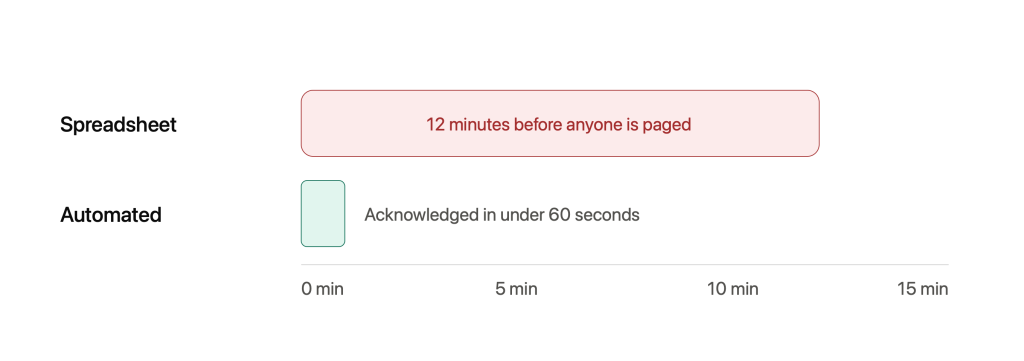
Poor on call scheduling leads directly to longer MTTA and MTTR, SLA breaches, and lost revenue. Imagine a database cluster goes down at 2:45 AM. The schedule is a shared spreadsheet. The primary engineer isn’t reachable because someone swapped shifts without updating the doc. Secondary escalation takes another 10 minutes of manual phone calls. That 15-minute delay on a high-volume payments platform translates into tens of thousands of dollars in lost transactions.
ITOC360 approaches call scheduling as part of a broader incident orchestration stack-not a standalone calendar. The schedule is a trigger point that feeds alert correlation, escalation, and analytics.
Core Components Of An Effective On-Call Schedule
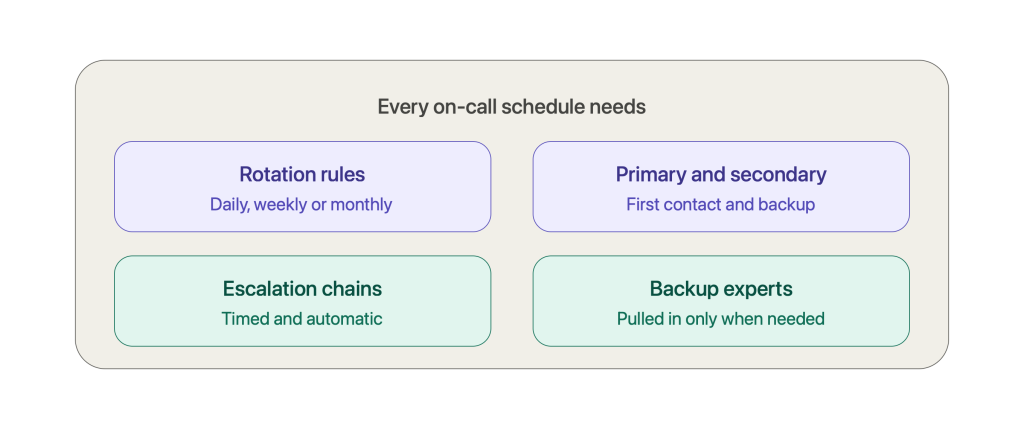
Whether you run a five-person startup or a global enterprise, every on-call schedule needs the same foundational building blocks. Think of this as a checklist before you publish your first rotation.
- Rotation rules. Daily, weekly, or monthly-choose based on team size and incident volume. Weekly rotations work well for teams of 5–20 employees. Establishing scheduling rules helps prevent common scheduling pitfalls like gaps or overloaded shifts.
- Primary and secondary responders. The primary person is first contact for every alert. A secondary backup handles overflow or takes over if primary doesn’t respond. Clear roles prevent alarm bouncing between other team members.
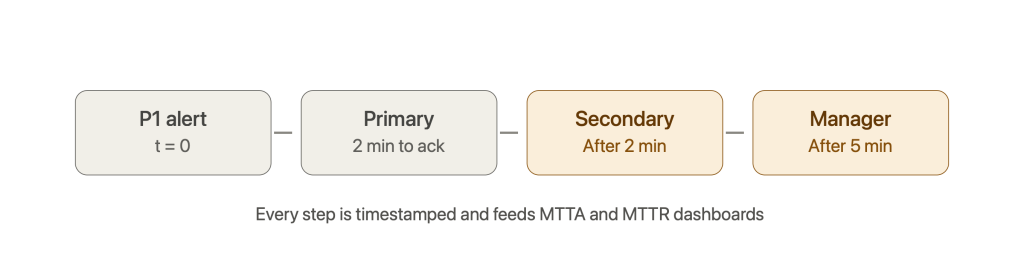
- Escalation chains. Define what happens when the primary doesn’t acknowledge within a set request time-for example, escalate to secondary after 2 minutes, then to a manager after 5. A well-designed escalation policy is what separates a 3-minute response from a 30-minute one.
- Backup experts. For complex subsystems (databases, networking, compliance), on-call experts are roped in only when needed-not for every alert.
Coverage patterns vary:
- Business-hours vs 24/7. Some teams only need after-hours coverage; critical systems require full weekly and monthly coverage.
- Weekday vs weekend. Weekend shifts typically have fewer staff and different rotation durations to manage fatigue.
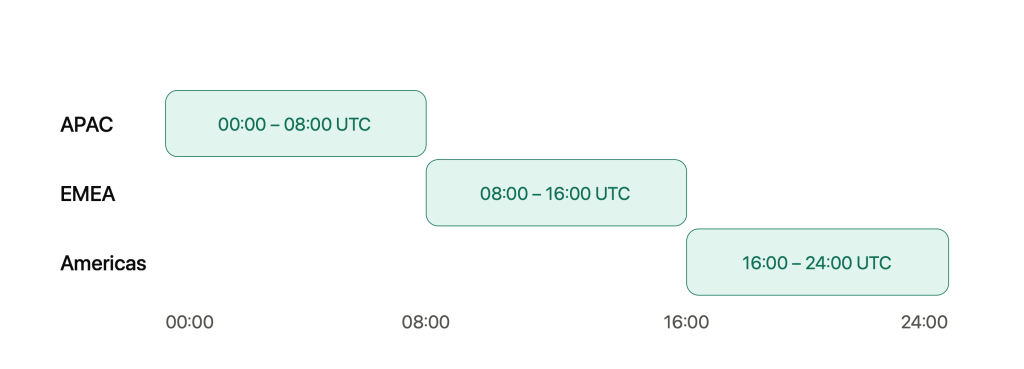
- Follow-the-sun. Global teams hand off coverage across regions so no single location works night shifts. A comprehensive scheduling process includes purpose, attendees, and time zone coordination.
Define clear expectations: acknowledge P1 alerts in 5 minutes, P2 in 15. Set quotas to ensure minimum staffing requirements are met. Specify which communication tools to watch. Creating clear call types-urgent vs informational-aids in effective scheduling.
Finally, include start dates and times in on-call schedules to avoid confusion, and publish schedules in advance so staff have predictability. On-call schedules should be visible to all team members, with version changes clearly marked so no one follows an outdated rotation.
Common Types Of On-Call Schedules (With Real-World Use Cases)
There is no single “best” schedule. Companies usually mix patterns based on team size, time zones, incident volume, and risk profile. Effective scheduling relies on accurate data forecasting and operational balance.
Follow-the-sun. US, Europe, and APAC engineering teams each cover their daylight hours and hand off to the next region. A SaaS platform using this model can reduce on-call night hours per engineer by up to 67% compared to a single-timezone 24/7 rotation. Handling time zones explicitly prevents scheduling confusion, and utilizing time zone functionalities is vital for remote collaboration. Time zone converters help find mutually respectful meeting hours during handoff windows.
Weekly and weekend rotations. One engineer covers Monday–Thursday as primary; another covers Friday–Sunday. This works best when incident volume is moderate and the entire team is cohesive. For a single day swap, clear override rules are essential.
Primary/secondary with expert escalation. A primary SRE handles general outages; a database specialist is brought in for data corruption. This structure avoids over-rotating every team member into every problem type.
Rigid vs flexible rotations. Monthly or semimonthly rotations are simpler to plan but risk uneven load during spikes. Flexible schemes-shorter shifts, easy swaps, PTO overrides-adapt better but need more tooling. Choose based on your incident volume data and burnout indicators.
Designing Fair, Sustainable On-Call Rotations
Burnout is the silent killer of on-call programs. Engineers, clinicians, and NOC analysts who consistently draw overnight or holiday shifts will eventually disengage-or leave. Respecting personal boundaries and working hours is essential for scheduling.
Distribute unpopular shifts fairly. For example, a rule that no person has more than 7 consecutive night shifts in Q4 2026 prevents fatigue from compounding. Rotate holiday coverage so the same employees aren’t always working New Year’s Eve. Buffer times between calls prevent fatigue and allow for note-taking, and building in buffer time allows for smoother transitions between meetings and shifts.
Factor in skills and seniority. Pair less experienced primary responders with a senior secondary backup so they aren’t alone during a critical event, but avoid always overloading the same experts. Protecting focus time during the day is important to prevent over-scheduling during non-on-call hours.
Capture and honor preferences where possible. A caregiver may need to avoid Friday nights; a student may need exam-week coverage swaps. Transparency matters-when the schedule is visible, people see fairness even when preferences can’t always be accommodated.
Use data to drive decisions. Analyzing call volume data predicts peak hours for staffing. Analyzing historical call volume helps identify peak hours for scheduling. Track incidents per shift, off-hours load, and MTTA per person to adjust the rotation every quarter. If alerts exceed 2–3 actionable incidents per shift, the model must be re-examined.
From Spreadsheets To Call Scheduling Software
Manual approaches-spreadsheets, whiteboards, group chats-work at small scale. They break the moment your business grows past a single team or time zone.
Typical pain points with manual scheduling:
- Version confusion: employees follow an outdated sheet
- No automatic escalation when primary misses an alert
- No integration with monitoring or communication tools
- No audit trails for compliance or postmortems
- Endless back-and-forth messages for swaps and time off requests
Modern call scheduling software should create rotations, sync availability, trigger alerts, route calls, and log responses-all in one system. On-call scheduling software automates alert routing to the right personnel. It can reduce response times significantly and reduce administrative overhead significantly. Automated tools eliminate back-and-forth emails in scheduling. Automated booking tools streamline the scheduling process, and standardizing call workflow can streamline operations further. Implementing structured workflows streamlines the process for teams and clients. On-call scheduling software costs $5–$25 per user monthly, with custom pricing available for enterprise deployments.
Mini-scenario: At 02:00 AM, a database alert fires. In the spreadsheet world, the primary engineer isn’t listed correctly after a shift swap last week. No one is paged for 12 minutes. In an automated system, the platform consults the live schedule, sends a push notification within 5 seconds, escalates to secondary after 2 minutes of silence, and the incident is acknowledged in under 60 seconds.
ITOC360 sits at the next step in this evolution-an AI-driven incident orchestration platform that embeds on call scheduling into alert correlation and escalation logic, rather than just replacing a calendar.
How On-Call Scheduling Software Works In Practice
The typical workflow is straightforward: configure teams, define rotations, integrate monitoring tools, then let the system handle routing. Here’s how it unfolds step by step.
- Onboarding. Managers add engineers, assign roles (primary, secondary, backup), tag skills (database, networking, frontend), and define coverage hours per shift. Many platforms offer drag-and-drop scheduling interfaces for ease of use-use a drag-and-drop interface for easy schedule adjustments. Workforce management software automates shift generation and tracks adherence.
- Escalation and notification rules. Set how long a primary has before escalation kicks in. Define notification channels in order: phone, SMS, mobile app push notifications, Slack or Teams. AI voice agents can route calls based on live schedules for voice-channel fallback.
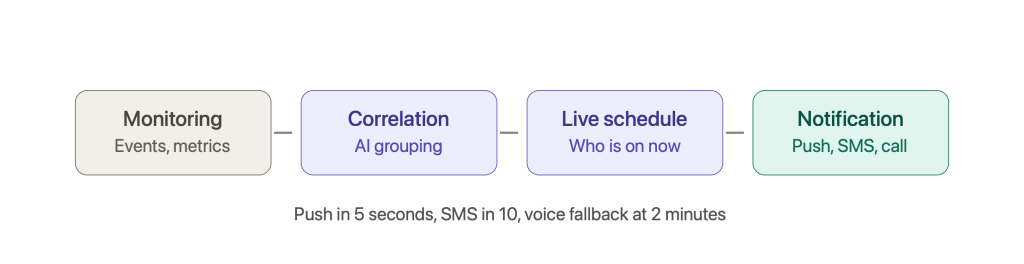
- Alert flow. Monitoring tools send events to the platform. The scheduler correlates them into incidents using rule based logic or AI grouping. The live on-call calendar decides who gets the first contact notification and who is next in the escalation chain. Automated systems route alerts to the right responders. Real-time shift calendars improve on-call staff management across different departments.
- Multi-channel delivery. Push notification within 5 seconds, SMS within 10, voice call fallback if unacknowledged in 2 minutes-concrete timing that ensures critical alerts reach the right person on mobile devices.
- Audit and analytics. Every alert, acknowledgment, and handoff is timestamped. Automated communication logs all activities for accountability. Automating reminders and confirmations can significantly improve scheduling efficiency. Automated email or SMS notifications reduce no-shows and late arrivals across the system. This data feeds MTTA/MTTR dashboards for schedule optimization.
Using Booking Links For Planned Calls And Stakeholder Meetings
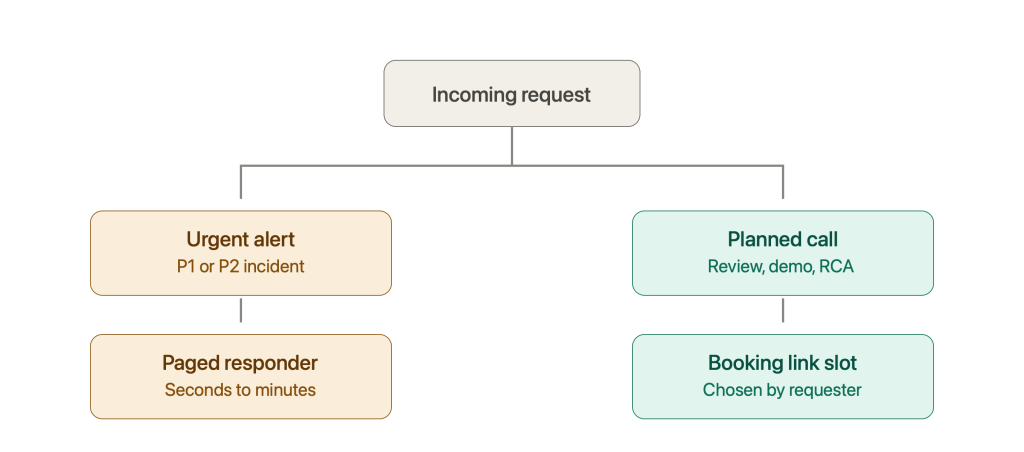
Not every call is an emergency response. Planned conversations-customer reviews, RCA sessions, CAB meetings, sales demos-need a different scheduling mechanism than paging. Effective call scheduling prevents calendar fatigue and reduces no-shows.
A booking link is a shareable URL where customers or colleagues see free slots and pick one, with just a few clicks. It complements on-call scheduling by separating urgent alerts from planned requests.
Concrete use cases:
- A customer uses a booking link to schedule a non-urgent support call next Tuesday at 14:00 instead of paging the on-call engineer at midnight.
- A department manager schedules a monthly postmortem review at a date and location that works across time zones.
- A sales team shares a booking link on the website for product demos, avoiding overlap with on-call shift hours.
- An event organizer sends a link with an agenda to confirm calendar invites for a CAB meeting, ensuring only necessary participants are invited-inviting only necessary participants increases meeting value.
Booking links can sync with engineers’ call schedule and calendar to avoid double bookings and protect quiet hours. Sending an agenda with invitations improves meeting efficiency, and collecting information before calls enhances call productivity. Shorter default meeting lengths encourage concise agendas. Proposing several concrete times simplifies scheduling for external stakeholders. Clear dedicated blocks for meetings prevent productivity fragmentation. Confirming and following up after calls ensures clarity on outcomes.
Key Features To Look For In Call Scheduling Software
Not all tools are built for incident-heavy environments. When evaluating software for IT operations, SRE, and MSP teams, prioritize these advanced features:
- Scheduling capabilities. Drag-and-drop rotations, rule-based recurring shifts, support for complex team structures (squads, pods, regions), instant updates across the app. Look for an on-call schedule template to accelerate setup.
- Communication tools integration. Slack, Microsoft Teams, email, SMS, voice, and ticketing systems like Jira Service Management or ServiceNow. A conversation between alert and response should flow without switching contexts.
- Incident-focused workflows. Alert correlation to reduce noise, escalation workflows, on-call overrides, “bat phone” numbers for handle emergencies scenarios, and runbook links embedded in every notification.
- Reliability and compliance. 99.9%+ service availability, data residency options, detailed logs for audits, and HIPAA-compliant communication features for healthcare organizations. Some software includes HIPAA-compliant features for hospital and clinical users. SOC 2 certification matters for enterprise customers.
- Analytics. Track incidents per team member, alert frequency by hour, coverage gaps, and burnout indicators across a monthly view or weekly breakdown. The system should help manage on-call rotations for emergency response teams with full access to historical data.
On cost: most platforms offer tiered pricing. Some provide a free tier for small teams, with paid plans scaling based on users and features.
How ITOC360 Turns Your On-Call Schedule Into Incident Infrastructure
ITOC360 is an AI-powered incident orchestration platform built for DevOps, SRE, NOC, and MSP teams. It goes beyond traditional on-call management software by embedding schedules into the full incident life cycle.
ITOC360 ingests alerts from monitoring and observability tools, correlates them into meaningful incidents using AI, and then uses the live on-call schedule to route them automatically. Instead of treating the schedule as a passive calendar, it becomes active infrastructure.
For example: if the primary on-call SRE does not acknowledge a P1 within 2 minutes, ITOC360 escalates to a secondary SRE, then to the engineering manager, following pre-defined rules. Every step-alert, notification, acknowledgment, escalation-is logged and visible in MTTA and MTTR dashboards. Teams can see the direct impact of schedule design changes, such as improvement after adding a follow-the-sun rotation or adjusting escalation timing.
Looking ahead, ITOC360 is investing in AI that predicts on-call overload, recommends schedule changes based on historical incident patterns, and reduces alert noise so engineers only receive actionable incidents. Walk through the incident management best practices to see how scheduling fits into the broader response framework.
Best Practices To Continuously Improve Your Call Schedule
A call schedule is never “done.” It’s a living system that must evolve with your team, your infrastructure, and your incident patterns.
- Review monthly or quarterly. Look at incidents per person, off-hours load, and overtime. Rebalance rotations before fatigue accumulates. Use control dashboards to spot trends early.
- Collect feedback after major incidents. Ask on-call staff what worked and what broke during postmortems. Adjust escalation times, notification channels, and rotation rules based on real experiences rather than assumptions.
- Run small experiments. Test a new weekend rotation for October–December 2026. Measure burnout indicators and MTTR before rolling it out permanently. Treat schedule design like you’d treat a line of code-iterate, test, deploy.
- Reduce noise continuously. If your on-call engineers are drowning in non-actionable alerts, no rotation design will save them. Invest in alert correlation and suppression so every page is worth waking up for.
Fair schedules, the right call scheduling software, and integrated incident management form the foundation of reliable 24/7 services. Start with a quarterly review of your current rotation, measure what matters, and let your data guide the next iteration.