








If you’re planning your incident management budget for 2026, PagerDuty is probably on your shortlist. But the sticker price on their pricing page tells only part of the story. This guide breaks down what PagerDuty actually costs, where invoices surprise buyers, and when a leaner platform delivers the same or better outcomes at a fraction of the spend.
TL;DR: PagerDuty Pricing vs. Value in 2026
PagerDuty remains a capable incident management platform, but in 2026, most organizations find that the real cost of ownership stretches well beyond the advertised per user rate. For finance and engineering leaders who want a straight answer: PagerDuty is worth the cost only if you will genuinely use the advanced features locked behind its higher tiers; otherwise, you are overpaying for basic alerting and on-call scheduling.
Here are the current public list prices under PagerDuty’s Operations Cloud as of early 2026 (note these may shift during the year):
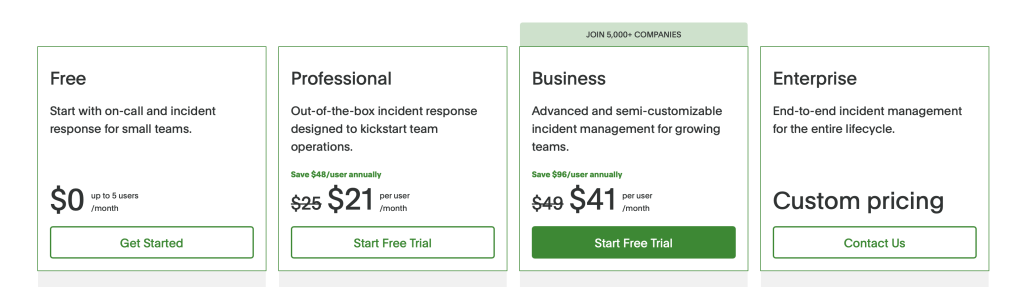
- Free plan: $0 for up to 5 users with limited features
- Professional plan: approximately $21 per user/month (~$252/user billed annually)
- Business plan: approximately $41 per user/month (~$492/user billed annually)
- Enterprise: custom pricing negotiated with sales
PagerDuty’s pricing ranges from roughly $5,000 to $70,000 annually depending on team size and feature needs, but core incident response capabilities like advanced automated workflows, event orchestration, and robust escalation policies often require the Business or Enterprise tier plus paid add ons. That means the real TCO is higher than the basic per user number.
Compared to leaner platforms like ITOC360, teams focused on reducing alert noise and automating escalation can usually achieve similar or superior functionality at a lower cost, without navigating a maze of tiered paywalls.
The bottom line: PagerDuty still makes sense for some large enterprises with complex digital operations requirements, but many teams now actively seek a better alternative with simpler pricing and less feature bloat.
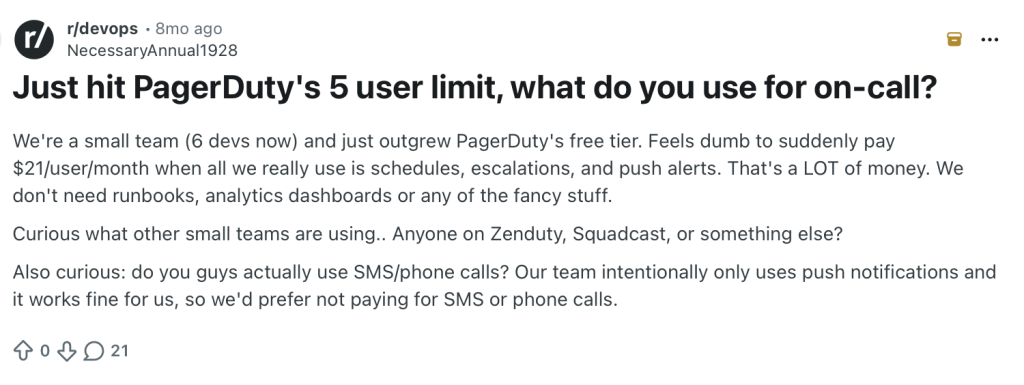
Free Plan and Entry-Level Options: What You Actually Get
Most teams start their PagerDuty evaluation through the free plan or the 14-day trial before committing budget to digital operations tooling.
PagerDuty offers a free plan for teams up to 5 users. In 2026, it typically includes:
- One on-call schedule and one escalation policy
- Push and email notifications (PagerDuty includes unlimited email and push notifications for all plans)
- Approximately 100 SMS/phone notifications per month
- Core integrations with common systems for monitoring and chat
What you will not get on the free plan: advanced event orchestration, AIOps, robust analytics, custom fields, full-feature call scheduling for multiple teams, or maintenance windows.
The 14-day free trial gives full-featured access with no credit card required. After the trial, you choose a paid plan or revert to Free. If you are evaluating PagerDuty, simulate real incident load during this window-run actual alerts, test escalation, and measure resolution times under conditions that match your production environment.
ITOC360 offers production-ready incident orchestration even for small teams, allowing real-world alarm correlation, escalation, and MTTR improvement testing without heavy sales friction or artificial feature gates.
What Drives PagerDuty Costs Up? Users, Events, Add Ons & AIOps
The headline per user price is just the starting point. Real-world PagerDuty cost is usually driven by four levers: user count, event volume, add ons, and service level.
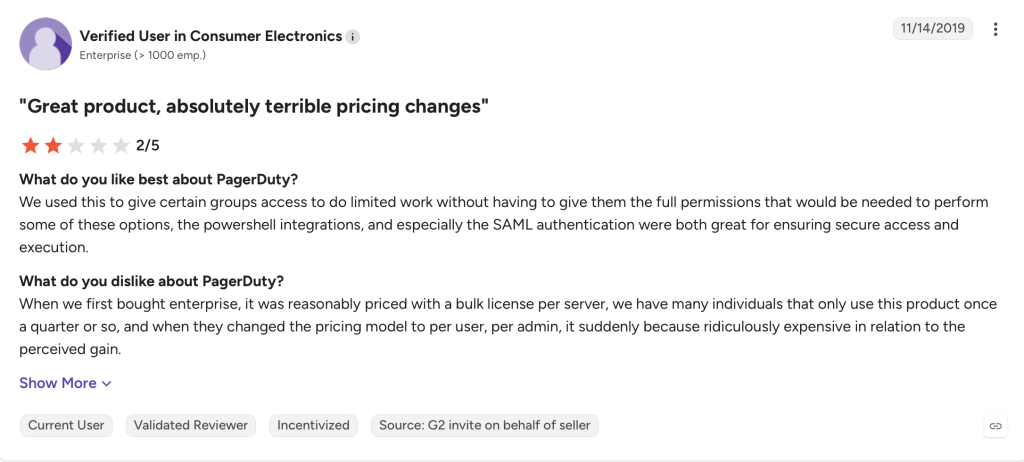
User count: Every engineer or responder on an on-call schedule or receiving notifications is a full-license user. Business stakeholders need lower-cost seats but are still billable. Costs can scale quickly based on user seat distribution and operational needs. When organizations license everyone “just in case” instead of mapping who must actually respond, they inflate their business plan.
Event volume: PagerDuty AIOps and event intelligence are licensed per accepted event-a valid signal processed via API or email that returns a 2xx response. As monitoring and observability tools multiply, event counts grow nonlinearly. Integration requirements can impact the selection of a plan based on existing tools, and spikes trigger overage warnings at 50%, 80%, 90%, 100%, and 150% of purchased volume.
Add ons: Typical paid extras in 2026 include advanced event orchestration, runbook automation, outbound call routing, advanced analytics, additional features for post-incident reviews, stakeholder licenses ($1,800 per 50 stakeholders/year), and upgraded status pages (~$1,068/year). Hidden fees and modular add ons can increase the total cost of ownership well beyond initial estimates. Features like AI capabilities and advanced automation are often offered as paid add ons, and automation needs such as runbook execution can significantly add to subscription costs.
Feature bloat: Many teams pay for modules they never fully adopt-complex runbooks, niche dashboards, or analytics that overlap with existing tools. This pushes TCO above expectations.
ITOC360’s incident orchestration model is designed to minimize event noise before it becomes billable overhead, aligning platform costs with real customer impact rather than raw alert counts.
Notifications, Call Scheduling, and Call Management Limits
Many buyers underestimate the cost impact of notification channels and telephony-based call management when modeling PagerDuty pricing.
PagerDuty’s typical notification policy: unlimited email and push notifications across all plans, but SMS and phone notifications are only unlimited on Professional, Business, and Digital Operations tiers. The free plan caps SMS/phone at about 100 per month. Evaluating PagerDuty requires analyzing notification channel volumes to avoid overages.
Call scheduling and phone-based on-call routing lets responders be contacted via SMS, voice calls, and mobile app. Heavy use of phone trees, IVR, and external call management features often requires add on purchases or higher-tier plans. Each user can register up to three phone numbers for SMS and three for voice, with a maximum of ten notification methods total.
For global or 24/7 support organizations running a large team of on-call responders, voice channel usage can drive significant annual spend. Understanding notification entitlements is essential before signing a contract.
ITOC360 focuses on smart alarm correlation and targeted escalation, so teams detect and respond to fewer, higher-quality alerts. This reduces the operational burden of round-the-clock calls rather than simply adding more notification volume.
Digital Operations & AIOps Pricing: Where It Gets Complex
PagerDuty’s Digital Operations Management and AIOps tiers promise powerful automation, but their pricing structure is the most complex to budget for.
Digital Operations plans typically cover advanced dashboards, service health views, incident workflows across business units, and governance for large-scale operations. However, some capabilities-such as Global Event Orchestration-are explicitly not included in base Digital Operations plans. This requires add on licensing that creates confusion for buyers evaluating the platform offers.
The AIOps pricing mechanism works like this: you are billed per accepted event, where an accepted event is a successfully processed signal from tools like Datadog, Prometheus, or custom observability pipelines. Invalid or rate-limited events are not counted. PagerDuty’s pricing model has hidden costs beyond advertised rates here, because as organizations roll out more monitoring, log analytics, and synthetic checks, AIOps event counts can grow faster than headcount-quickly inflating budgets.
ITOC360 is an AI-first incident orchestration platform that reduces noise at the source by correlating alarms into meaningful incidents. Customers are not penalized for investing in better observability; instead, improved monitoring actually reduces cost rather than increasing it.
Hidden Costs and Feature Bloat: Where Teams Overpay
Beyond list pricing, many engineering and SRE teams run into hidden costs tied to implementation, process changes, and underused modules.
Common hidden costs include:
- Professional services engagements to customize event orchestration and configure routing rules
- Ongoing maintenance overhead: updating schedules, thresholds, and integrations as services change
- Training multiple IT teams on overlapping features and PagerDuty advance capabilities
- OnPage, another alerting tool, costs $28.99 per user/month compared to PagerDuty’s $41 per user/month Business tier-illustrating that the market offers a range of price points
Feature bloat is real. Dashboards, analytics, and collaboration tools that overlap with existing platforms like Microsoft Teams, Slack, Jira, or ServiceNow still inflate the perceived need for higher PagerDuty tiers. Most companies end up paying for a chat experience or advanced admin dashboard they rarely open.
Consider the operational cost of incidents themselves: a SaaS company with 50 engineers handling 200 monthly incidents should model MTTA, MTTR, and the hourly cost of an on-call engineer to understand the true business impact. If resolution times don’t improve meaningfully, the premium is wasted.
When much of PagerDuty’s advanced functionality goes unused, buyers effectively pay a premium for basic alerting and call scheduling-capabilities that a better alternative such as ITOC360 delivers more efficiently.
Run an internal audit: list essential capabilities (on-call management, escalation, alarm correlation, customer impact reporting) and compare them against the actual PagerDuty modules you pay for. Most organizations find significant overlap and waste.
How Many Users Do You Really Need? Rightsizing Your Business Plan
Over-licensing is one of the fastest ways to overspend on PagerDuty, especially across multiple product teams. Teams should evaluate user needs to avoid unnecessary licensing costs.
PagerDuty user categories break down as:
- Full responders: on-call engineers who receive and act on incidents. These are full-cost seats.
- Stakeholders: business stakeholders with read-only or subscribe access. Cheaper, but still contribute to total spend.
- Admins: platform administrators managing account settings, services, and policies.
To estimate the right number of full users, map to actual responders per service, number of teams, and rotation depth-instead of licensing everyone in engineering “just in case.” Stakeholder or read-only licenses should only be added for departments like Marketing or Customer Success when their customer impact visibility needs justify it.
ITOC360 supports flexible role-based access without forcing every collaborator into a high-cost responder seat, making it easier to share incident context across the business without inflating your invoice.
When PagerDuty Makes Sense-and When a Better Alternative Like ITOC360 Wins
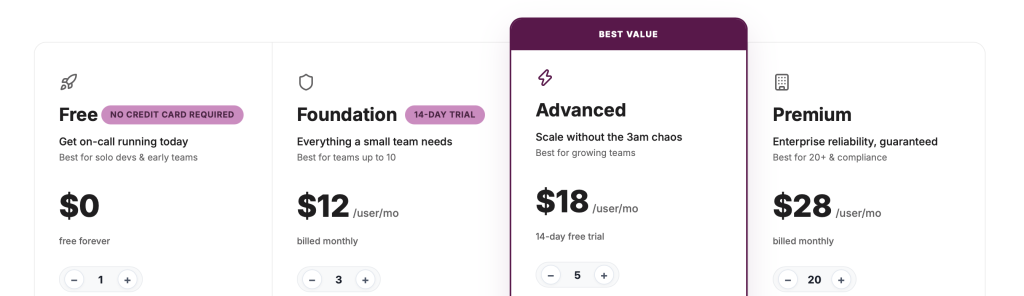
ITOC360 pricing ( no add-on)
Everyone asking the same question is there any alternative? PagerDuty remains a strong fit for very large enterprises with global operations, mature process frameworks, and budget for custom digital operations initiatives. Scenarios where PagerDuty is often justified include hundreds of services, dozens of teams, tight ServiceNow integration, and compliance-heavy environments tied to established vendor relationships. PagerDuty’s Professional plan starts at $21 per user/month, and the Business plan costs $41 per user/month when billed annually-pricing that large enterprises can absorb when the feature depth matches their needs.
Scenarios where the best PagerDuty alternative like ITOC360 is usually preferable:
- Organizations that need fast time-to-value without months of configuration
- Teams that want AI-driven alarm correlation to cut noise and keep systems running
- Groups needing simpler on-call management and a lower, more predictable TCO
- IT teams tired of paying for professional business tier features they never touch
ITOC360 turns raw monitoring alerts into meaningful incidents, automatically routes to the right engineer, handles escalations, and improves MTTA and MTTR without drowning teams in configuration overhead.
Run a side-by-side evaluation: export incident data for a recent 30–90 day period, replay it into both PagerDuty and ITOC360, and compare not only license costs but also responder load and customer impact metrics.
How to Evaluate PagerDuty Pricing for Your 2026 Roadmap
Making the right incident management decision in 2026 starts with honest internal analysis-not vendor marketing.
Build a simple internal model that includes:
- Number of responders and stakeholder licenses needed
- Forecasted incident and event volume for the next 12–24 months
- Expected notification mix (email vs. SMS/voice) and additional costs for telephony
- Desired add ons like event orchestration, AIOps, and runbook automation
Evaluate total cost over at least a 12–24 month horizon. Account for likely growth in digital operations, new services, and observability tooling that may drive more events into PagerDuty. Custom pricing is available based on user count and features, so get a formal quote rather than relying on list prices alone.
Alternatives like ITOC360 in parallel. Compare not only the subscription price but also qualitative outcomes: reduced alert fatigue, faster resolution, superior functionality in alarm correlation, and lower customer impact during incidents.
Ready to see the difference? Book a demo with ITOC360 or Start Free Trial and bring your current PagerDuty invoice and incident metrics. We will show you a concrete side-by-side cost and performance comparison-so your 2026 budget goes toward outcomes, not overhead.