Error Budget: Definition, Calculation & Policy (2026)
Quick answer: An error budget is the amount of unreliability a service is allowed before it breaks its service level objective (SLO). The formula is error budget = 1 − SLO. A 99.9% availability SLO over 30 days gives an error budget of 0.1%, which is about 43 minutes of downtime or 1 failed request in every 1,000. While budget remains, teams can ship features and take risks. When it runs out, an error budget policy shifts the team's effort from new features to reliability work.
Every engineering organization has the same argument. Product wants to ship faster. Operations wants fewer changes, because changes cause outages. Without a shared number, the argument is decided by whoever is loudest, or by whoever was paged last night.
An error budget replaces that argument with arithmetic. Google's SRE teams popularized the idea: 100% reliability is the wrong target. Users can't tell the difference between 99.99% and 100%, and chasing the last fraction costs more than it returns. So you pick a target below 100%, and the gap becomes a budget the team is free to spend.
This guide covers the definition, the calculation (time-based and request-based), a downtime table for common SLOs, burn-rate alerting, and an error budget policy you can adapt. If SLIs, SLOs and SLAs are new to you, start with SLA vs SLO vs SLI.
What is an error budget?
An error budget is the share of requests, or the amount of time, that a service is allowed to fail within a measurement window without violating its SLO. It's the SLO turned upside down: an SLO says how reliable the service must be, and the error budget says how unreliable it's allowed to be.
The idea comes from Google's Site Reliability Engineering practice. Two ideas underpin it. First, perfect reliability is neither achievable nor desirable. Second, reliability and feature velocity trade off against each other, so the trade should be explicit and measured.
The error budget is the last link in a chain of four terms:
Term | What it is | Example |
|---|---|---|
SLI (service level indicator) | A measurement of user experience | Share of HTTP requests that return a non-5xx response within 300 ms |
SLO (service level objective) | The internal target for that SLI over a window | 99.9% of requests succeed over a rolling 30 days |
Error budget | 1 − SLO: the failure the target allows | 0.1% of requests, about 43 minutes of full downtime |
SLA (service level agreement) | An external contract with penalties | 99.5% monthly uptime, or service credits apply |
The SLO should always be stricter than the SLA. The gap between them is a safety margin: the team runs out of error budget, and changes its behavior, well before customers can claim penalties.
How to set an SLO before you set an error budget
An error budget is only as good as the SLO behind it. A target picked from habit ("let's do three nines") produces a budget that's either never touched or always exhausted. Five steps produce a better one:
Pick the user journey. Start with the two or three actions that matter most to users and revenue: logging in, searching, checking out. Don't start with servers or components.
Choose the SLI type. Match the indicator to what users notice on that journey:
SLI type | Measures | Good for | Example SLI |
|---|---|---|---|
Availability | Share of requests that succeed | APIs, web pages, login | Non-5xx responses ÷ all responses |
Latency | Share of requests faster than a threshold | Search, checkout, interactive UIs | Requests under 300 ms ÷ all requests |
Freshness | Share of data updated within a time limit | Dashboards, feeds, data pipelines | Records updated in the last 10 min ÷ all records |
Correctness | Share of outputs that are right | Payments, billing, calculations | Correct results ÷ all results |
Durability | Share of stored data that remains readable | Storage, backups | Objects readable ÷ objects written |
Measure the baseline. Collect four weeks of SLI data before committing to a target. The SLO should sit slightly below what the service achieves on a normal month, so the team has budget to spend.
Set the target at the point users notice. If support tickets and churn don't change between 99.9% and 99.95%, choose 99.9%. Every extra nine roughly multiplies cost while users may not see the difference.
Review every quarter. Tighten the SLO if the budget is never touched. Loosen it, or invest in reliability, if the team is frozen most months.
For how SLOs relate to contracts and indicators, see SLA vs SLO vs SLI.
How to calculate an error budget
The base formula is the same for every service:
Error budget = 1 − SLO target
What changes is the unit you measure in. There are two ways to express the budget, and most teams should use the second.
Time-based error budget
Multiply the error budget by the length of the window:
Allowed downtime = (1 − SLO) × window length
For a 99.9% SLO over 30 days: 0.001 × 43,200 minutes = 43.2 minutes.
SLO | Error budget | 30 days | 90 days (quarter) | 365 days |
|---|---|---|---|---|
99% | 1% | 7 h 12 min | 21 h 36 min | 3 d 15 h 36 min |
99.5% | 0.5% | 3 h 36 min | 10 h 48 min | 1 d 19 h 48 min |
99.9% | 0.1% | 43 min 12 s | 2 h 9 min 36 s | 8 h 45 min 36 s |
99.95% | 0.05% | 21 min 36 s | 1 h 4 min 48 s | 4 h 22 min 48 s |
99.99% | 0.01% | 4 min 19 s | 12 min 58 s | 52 min 34 s |
99.999% | 0.001% | 26 s | 1 min 18 s | 5 min 15 s |
Time-based budgets are easy to explain, but they treat every minute the same. A full outage at 3 a.m. and a full outage during peak traffic cost the same number of minutes, even though one hurts far more users.
Request-based error budget
Count failed requests instead of minutes:
Allowed failed requests = (1 − SLO) × total requests in the window
A service handling 10 million requests a month with a 99.9% SLO can fail 10,000 requests before breaching. This version automatically weights incidents by traffic. It also captures partial failures, which time-based budgets miss.
Partial outages. If 20% of requests fail for 30 minutes, the impact equals 6 minutes of full downtime (0.2 × 30). Against a 43.2-minute monthly budget, that one incident consumes about 14% of the budget.
Latency error budget
Error budgets aren't only about errors. A request that succeeds in 8 seconds has failed the user just as surely as a 500 response. Latency SLOs treat slow requests as "bad events" and give them their own budget:
Latency SLO: 99% of checkout requests complete in under 300 ms, over a rolling 30 days.
Latency error budget: 1% of requests may be slower than 300 ms. At 20 million requests a month, that's 200,000 slow requests.
The calculation, burn rate and policy work exactly as they do for availability. If a cache failure pushes 6% of requests over 300 ms, the burn rate is 6 (0.06 ÷ 0.01). That crosses the 6-hour paging threshold even though no request returned an error.
Two practical points:
Count fast requests, don't average them. An average latency of 200 ms can hide a slow tail where 5% of users wait several seconds. Count the share of requests under the threshold instead.
Track latency and availability separately. Each SLO gets its own budget. A service can be healthy on one and frozen on the other, and the policy should say which budget triggers a freeze.
Remaining budget
Track what's left, not just what was spent:
Remaining budget (%) = 1 − (actual failures ÷ allowed failures)
If 4,000 of the allowed 10,000 requests have failed so far this month, 60% of the budget remains.
Pick a rolling window. A rolling 28 or 30 days is the most common choice: the budget recovers gradually as old failures age out. Calendar months reset to full on the first of the month, which encourages risky releases at the start of the month and freezes at the end. For the related availability math, see MTBF and availability and what is downtime.
Burn rate: alerting on error budget, not on symptoms
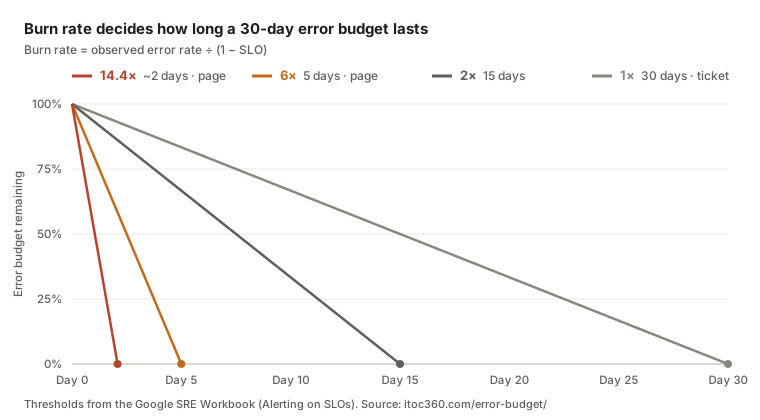
Knowing how much budget is left tells you where you stand. Knowing how fast it's being spent tells you whether to wake someone up. That speed is the burn rate:
Burn rate = observed error rate ÷ (1 − SLO)
A burn rate of 1 spends the budget exactly over the window. A burn rate of 2 exhausts a 30-day budget in 15 days. At a burn rate of 14.4, a 30-day budget is gone in about 50 hours.
For a 99.9% SLO, an observed error rate of 1.44% means a burn rate of 14.4 (0.0144 ÷ 0.001).
Multi-window, multi-burn-rate alerts
The Google SRE Workbook recommends alerting on burn rate over two windows at once. A long window confirms the problem is significant; a short window confirms it's still happening, so the alert clears quickly once the issue is fixed. The baseline for a 30-day SLO:
Severity | Burn rate | Long window | Short window | Budget consumed at trigger | Action |
|---|---|---|---|---|---|
Page | 14.4 | 1 hour | 5 minutes | 2% | Wake the on-call engineer |
Page | 6 | 6 hours | 30 minutes | 5% | Page during or outside hours |
Ticket | 1 | 3 days | 6 hours | 10% | Fix in normal working hours |
This approach does two things that threshold alerts on CPU or latency can't. It pages only when users are actually affected, and it scales urgency with impact. A brief spike that burns 0.1% of the budget never wakes anyone. It's one of the most effective ways to reduce alert fatigue without missing real incidents.
Route the two page-level alerts through your normal escalation policy, and map them to severity: a 14.4× burn is usually SEV1 or SEV2 under most incident severity levels.
Error budget policy: what happens when the budget runs out

An error budget without a policy is just a dashboard. The policy is a short document, agreed in advance by engineering, product and leadership, that says what the team does at each level of budget consumption. Agreeing on it before an incident is the whole point: nobody has to negotiate a release freeze in the middle of an outage.
Google's published example policy sets three rules:
Freeze. If the service has exceeded its error budget over the preceding four-week window, all changes and releases stop except P0 fixes and security patches, until the service is back within its SLO.
Postmortem. If a single incident consumes more than 20% of the budget over four weeks, the team runs a postmortem that must include at least one P0 action item.
Planning. If one class of outage consumes more than 20% of the budget in a quarter, fixing it becomes a P0 item in the next quarter's plan.
Error budget policy template
Copy this and adapt the thresholds to your service.
Budget remaining (rolling 30 days) | Status | What the team does |
|---|---|---|
More than 50% | Healthy | Normal release cadence. Experiments, migrations and chaos tests are allowed. |
25–50% | Caution | Releases continue. Each release needs a tested rollback plan. Review the top budget consumers weekly. |
0–25% | At risk | High-risk changes (schema migrations, infrastructure changes) need SRE sign-off. At least one engineer per team moves to reliability work, such as toil reduction. |
Exhausted (0% or below) | Frozen | Feature releases stop. Only P0 fixes and security patches ship until the budget recovers above 0%. |
Add these clauses to make the policy enforceable:
Scope. The service names and SLOs the policy covers, and the SLI each SLO uses.
Owners. Who decides a freeze, who can grant an exception, and who reports budget status each week.
Single-incident rule. Any incident consuming 20% or more of the budget gets a postmortem with at least one tracked action item.
Exclusions. Which failures don't count. Typical examples are an outage caused by a dependency outside the team's control, or a load test the team ran on purpose. Keep this list short; every exclusion weakens the policy.
Exceptions. How a business-critical release can ship during a freeze, and who must approve it in writing.
Review. Revisit the SLO and the thresholds every quarter. If the budget is never touched, the SLO may be too loose; if the team is always frozen, it may be too strict.
The policy also connects reliability to how you ship: see release management best practices for gating releases on budget status.
Worked example: one service, one month
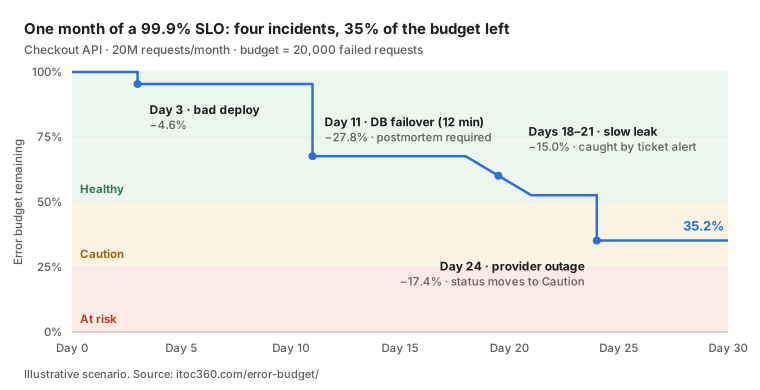
An illustrative scenario. A checkout API has a request-based SLO of 99.9% over a rolling 30 days. It handles about 20 million requests a month, roughly 463 requests a minute.
Monthly error budget: 0.001 × 20,000,000 = 20,000 failed requests.
Day | Event | Failed requests | Budget used | Budget remaining | Policy status |
|---|---|---|---|---|---|
3 | Bad deploy: 5% of requests fail for 40 minutes, then rolled back | ~926 | 4.6% | 95.4% | Healthy |
11 | Database failover: full outage for 12 minutes | ~5,556 | 27.8% | 67.6% | Healthy, but the single-incident rule triggers a postmortem |
18 | Slow connection leak: 0.15% error rate for 3 days | ~3,000 | 15.0% | 52.6% | Healthy |
24 | Payment provider partial outage: 30% of requests fail for 25 minutes | ~3,472 | 17.4% | 35.2% | Caution |
What the policy and alerts did at each step:
Day 3: At a 5% error rate the burn rate is 50, so the 1-hour average crosses the 14.4× threshold after about 17 minutes and the on-call engineer is paged. The rollback stops the burn after spending less than 5% of the budget.
Day 11: A full outage is a burn rate of 1,000. It pages immediately. Because the incident used more than 20% of the budget, the policy requires a postmortem with a P0 action item: automate the failover health check.
Day 18: A 0.15% error rate is a burn rate of 1.5. It never crosses a paging threshold, but the 3-day ticket alert catches it. Without burn-rate alerting, this leak would have quietly consumed 15% of the budget.
Day 24: The status moves to Caution. Releases continue, but each one now needs a tested rollback plan. Whether the dependency outage counts against the budget depends on the policy's exclusions clause. Decide that in advance, not during the incident.
The lesson: the quiet three-day leak cost more than three times as much budget as the noisy bad deploy. Threshold alerts catch the loud incidents; only burn-rate alerting catches both kinds.
Common error budget mistakes
Setting the SLO at the current reliability. If the service already achieves 99.98%, a 99.98% SLO leaves no room to ship. Set the SLO at the level users actually notice, then let the gap become budget.
Measuring the server, not the user. CPU, memory and pod restarts aren't SLIs. Measure what the user experiences: successful requests, latency, correct responses.
No policy, or a policy nobody signed. If product leadership hasn't agreed to the freeze rule in advance, the first freeze becomes a political fight and the budget loses its meaning.
Treating the budget as a target to avoid. An untouched budget at the end of every window means the team is moving too cautiously, or the SLO is too loose. The budget exists to be spent on releases and experiments.
Calendar windows. A budget that resets on the 1st encourages risky releases early in the month and freezes late. Rolling windows recover gradually.
Too many SLOs. Three to five SLOs on critical user journeys are enough. Fifty SLOs per service means nobody watches any of them.
Alerting on raw error rate. A 1% error threshold pages for harmless spikes and misses slow leaks. Alert on burn rate instead.
Ignoring partial failures. A time-based budget that only counts full outages misses the 20%-of-requests incidents that do most of the damage. Use request-based SLIs where you can.
Tools for tracking error budgets
Most teams calculate error budgets in the observability tool they already run. The options fall into three groups:
Tool | Type | What it does | Best for |
|---|---|---|---|
Prometheus + Sloth | Open source | Generates SLO recording rules and multi-window burn-rate alerts from a short YAML spec | Teams already on Prometheus |
Prometheus + Pyrra | Open source | SLO definitions as Kubernetes resources, with a UI for budget and burn rate | Kubernetes-native teams |
OpenSLO | Open specification | A vendor-neutral YAML format for defining SLOs, SLIs and alert policies | Avoiding lock-in to one tool |
Grafana SLO | Observability platform | SLO dashboards and burn-rate alerts inside Grafana Cloud | Teams using Grafana for dashboards |
Datadog SLOs | Observability platform | Metric- and monitor-based SLOs with error budget and burn-rate alerts | Teams already on Datadog |
New Relic service levels | Observability platform | SLIs and SLOs built on New Relic telemetry | Teams already on New Relic |
Google Cloud Service Monitoring | Cloud provider | SLOs and burn-rate alerting for services on Google Cloud | GCP workloads |
Nobl9 | Dedicated SLO platform | Aggregates SLIs from many data sources, with budget reporting across teams | Large organizations with many services and tools |
Whichever tool calculates the budget, the burn-rate alerts it produces still need to reach a human: deduplicated, routed to the right owner and escalated if nobody answers. That's the job of an incident response platform.
Where ITOC360 fits
Error budgets are calculated in your monitoring stack: Prometheus with recording rules, Grafana SLOs, Datadog SLO monitors or a similar tool. ITOC360 is AI-first platform for on-call, escalation and incident response. 70% less alert noise for IT operations and SRE teams that can't afford a missed page. Handles what happens when the budget starts burning:
Burn-rate alerts become incidents. SLO alerts from Prometheus, Grafana, Datadog, New Relic and other integrations arrive in ITOC360 Alerting, where they're deduplicated and correlated with the infrastructure alerts behind them.
Severity matches the burn. Route 14.4× and 6× alerts as pages and 1× alerts as tickets, each to the service's on-call engineer through On-Call escalation policies.
Every minute of budget has a story. The incident timeline in Incident Response records when the burn started, who acknowledged it and when it stopped. That record is what the single-incident rule's postmortem needs.
Faster acknowledgment saves budget. Every minute between the first page and the first action is budget spent. Cutting MTTA is often the cheapest way to protect the error budget.
Frequently asked questions
What is an error budget?
An error budget is the amount of failure a service can have within a time window without breaking its SLO. It equals 1 minus the SLO: a 99.9% SLO allows a 0.1% error budget, about 43 minutes of downtime or 1 in 1,000 failed requests over 30 days.
What is an error budget in SRE?
In site reliability engineering, the error budget is the tool that balances reliability against release speed. While budget remains, teams ship freely. When it's spent, an agreed policy shifts effort to reliability work until the service recovers.
How do you calculate an error budget?
Subtract the SLO from 100% and apply it to the window. For time: (1 − SLO) × window length. For requests: (1 − SLO) × total requests. A 99.95% SLO over 30 days allows 21.6 minutes of downtime.
What is the difference between an SLO and an error budget?
The SLO is the reliability target, such as 99.9% successful requests. The error budget is the failure that target permits, here 0.1%. They describe the same line from opposite sides.
What is the Google SRE definition of an error budget?
Google's SRE books define the error budget as 1 minus the SLO of a service, used as a shared, objective measure of how much risk a team can take. Its example policy freezes releases, apart from P0 and security fixes, when the budget is exceeded over the previous four weeks.
What happens when the error budget is exhausted?
Whatever the error budget policy says. Most policies stop feature releases, allow only critical fixes, and move engineers to reliability work until the budget recovers. Incidents that consumed a large share usually require a postmortem.
What is error budget burn rate?
Burn rate is how fast the budget is being spent, relative to the rate that would exactly exhaust it by the end of the window. A burn rate of 1 is on pace; a burn rate of 14.4 empties a 30-day budget in about two days.
Should every service have an error budget?
Every user-facing service with an SLO should. Internal tools and batch jobs often don't need one. Start with the two or three user journeys that matter most to revenue or trust.
Sources
Google SRE Workbook: Alerting on SLOs (multi-window, multi-burn-rate thresholds)
Google SRE Book: Embracing Risk (origin of the error budget concept)
Google Cloud Blog: SRE error budgets and maintenance windows