Opsgenie End of Life: 2027 Shutdown Timeline & Migration Checklist
Atlassian is retiring Opsgenie. If you run on-call schedules, escalation policies, or alert routing through it, you have a fixed deadline: April 5, 2027, when Atlassian stops supporting the product and deletes any data left behind.
This guide is written for the person who actually has to plan and execute that migration — not just read about it. It covers every date you need, what Atlassian's own migration tooling does and doesn't handle, a worked cost comparison, the mistakes teams keep making, and how to pick a destination that fits how your team actually works.
Quick answer: New Opsgenie purchases stopped June 4, 2025. Full shutdown is April 5, 2027. Atlassian's recommended path is Jira Service Management (JSM), but it has real gaps — phone number porting, SSO, Terraform-managed configs, and some third-party integrations don't move automatically. Whether JSM is right for you depends on whether Opsgenie was mainly a Jira extension for your team, or a purpose-built on-call tool you'd choose again on its own merits.
In this guide: the shutdown timeline, what JSM migration doesn't cover, a decision framework, alternatives compared, a real cost example, a step-by-step migration checklist, common mistakes, and FAQ.
What Actually Happened
Atlassian acquired Opsgenie in 2018 for $295 million and ran it as a standalone incident alerting and on-call product. In March 2025, Atlassian announced it was phasing Opsgenie out as a separate product — folding its alerting and on-call capabilities into Jira Service Management, and moving service cataloging into Compass.
This isn't a company shutting down; it's a product being discontinued and merged into a larger platform. That distinction matters for how you plan: your data and workflows have an official landing spot if you want it (JSM), but "official landing spot" and "seamless transition" aren't the same thing, and the gap between them is where most migration pain happens.
Opsgenie End-of-Life Timeline
Date | What happens | Source |
|---|---|---|
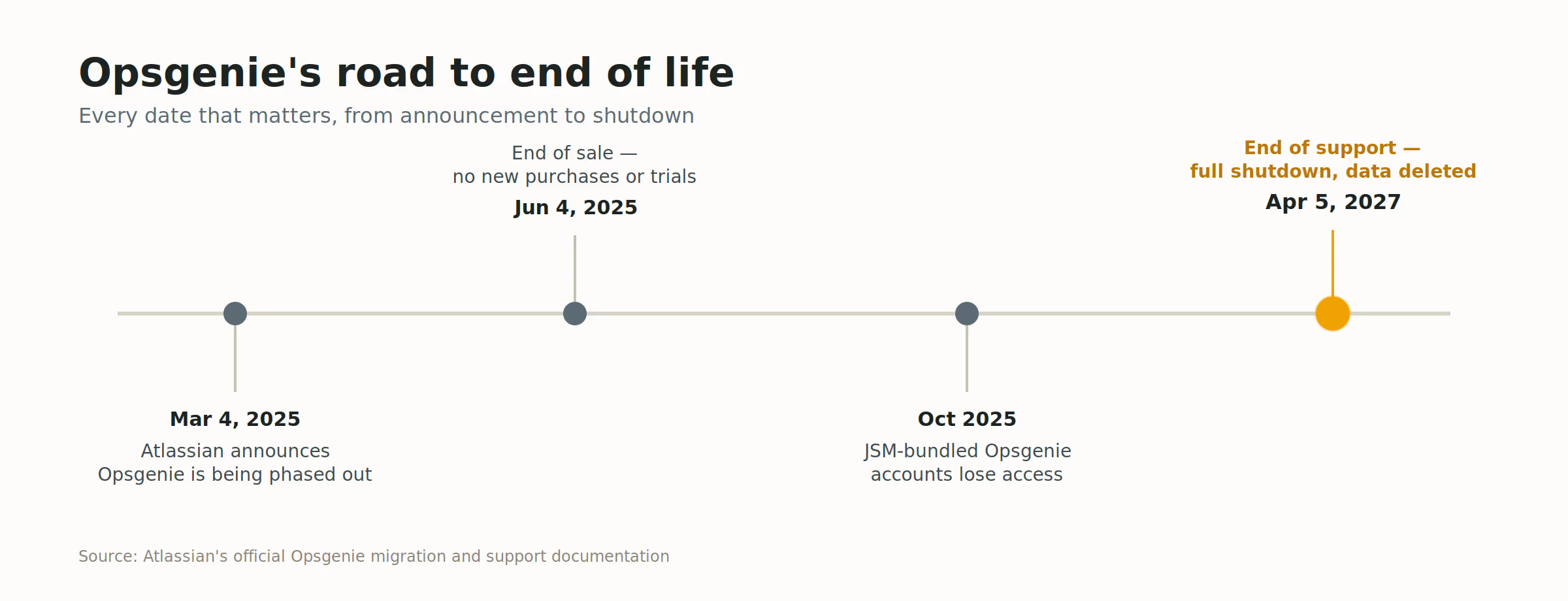
March 4, 2025 | Atlassian announces Opsgenie will be phased out as a standalone product | Atlassian announcement |
June 4, 2025 | End of sale — no new purchases or trials. Existing customers can still renew and add seats, but can't switch editions | Atlassian Support |
October 2025 | Customers on the JSM-bundled version of Opsgenie lose access | Atlassian Community |
April 5, 2027 | End of support — full shutdown. Platform access ends and unmigrated data is permanently deleted | Atlassian's official migration page |
Two years between announcement and shutdown sounds generous until you map it against how long a real migration takes for a team with more than one rotation — see the migration checklist and effort estimate further down this guide.
End of Sale vs. End of Support — Why the Difference Matters
These two terms get blurred across the web, and the mix-up causes teams to relax too early.
End of sale (already passed, June 4, 2025): New customers can't buy Opsgenie. If you're already a customer, nothing changes day-to-day — you can still renew and add seats.
End of support (April 5, 2027): This is the real deadline. Opsgenie stops functioning entirely: no alerts fire, no schedules run, no historical data is reachable.
In between, Opsgenie is in maintenance mode — critical bugs may get patched, but there's no new feature development. You're running production alerting on a product that has already stopped moving forward, even though it technically still works.
What Happens to Your Data If You Miss the Deadline
Everything left in Opsgenie after April 5, 2027 — alert history, schedules, escalation policies, integration configs — is deleted. There's no grace period. If you need historical alert data for compliance, SOC 2 evidence, DORA metrics, or postmortem records, export it via the Opsgenie REST API well before the deadline, not the week of it.
What Atlassian's JSM Migration Doesn't Tell You
Atlassian's automated migration tool (Settings → Plan your move, inside Opsgenie) moves alerts, schedules, escalation policies, and integrations, and gives you up to 120 days of parallel access to validate the new setup before fully cutting over. For teams already living inside Jira and Confluence day to day, this is genuinely the lowest-friction path.
But "automated" doesn't mean "complete." Based on Atlassian's own migration documentation and reports from teams who've already gone through it, here's what doesn't carry over cleanly:
Phone numbers don't migrate automatically. You have to manually port Opsgenie phone numbers to Twilio to keep them active.
Bidirectional integrations require JSM or Compass Premium/Enterprise. They're not included on lower tiers, which changes the real price of migrating "for free."
Compass doesn't support MS Teams or Zoom, and Slack only connects to a single workspace at a time.
Opsgenie SSO is retired after migration. You'll need to set up Atlassian Guard separately, which is its own project if you're not already using it.
The Opsgenie-to-Opsgenie sub-account integration, used by MSPs managing multiple client accounts, has no direct replacement.
There's no Terraform provider equivalent. If your on-call configuration is managed as infrastructure-as-code, plan to rebuild it manually — Atlassian hasn't published IaC migration tooling as of this writing.
Billing splits into two products. JSM and Compass are priced and packaged separately, so "consolidating into Atlassian" can mean paying for more surface area, not less.
None of this means JSM is the wrong call for your team. It means the honest scope of "migrate to JSM" is bigger than the in-app wizard suggests, and you should budget for it as a project, not a button click.
A Decision Framework: 5 Questions Before You Pick a Destination
Most Opsgenie-shutdown content jumps straight to "here are the alternatives." That skips the part that actually determines the right answer. Work through these first:
Was Opsgenie mainly a Jira extension for you, or a purpose-built on-call tool that happened to be Atlassian-owned? If your team lives in Jira daily and used Opsgenie mostly for ticket-linked alerting, JSM keeps the ecosystem simple. If the reason you chose Opsgenie originally was rotations, escalation depth, and multi-channel notification — independent of Jira — evaluate on-call-first tools before defaulting to JSM.
How much of your config is infrastructure-as-code? If your escalation policies and schedules are Terraform-managed, JSM's missing IaC tooling is a real cost you should price in now, not discover mid-migration.
Do you need SSO day one? Opsgenie SSO doesn't carry over to JSM automatically. If your security team requires SSO for any tool touching production alerting, this becomes a parallel project, not a migration checkbox.
What's your actual per-seat cost trajectory? Per-agent and per-user pricing models compound differently as headcount grows — model your team size in 18 months, not just today. (See the worked cost example further down this guide.)
Who owns the decision, and what's their bias? If your Atlassian account rep is driving the conversation, you're hearing the JSM pitch by default. That's not wrong, but it's one input — get an SRE or on-call lead's opinion on the actual day-to-day experience before committing.
If your migration spans multiple teams with formal compliance requirements, our enterprise incident management software guide covers the additional evaluation criteria that apply at that scale.
Opsgenie Alternatives Compared
Deciding where to move? We compare five platforms, with real costs for a 10-person team, in our guide to the best Opsgenie alternatives.
For the wider field beyond these four — including ITOC360, FireHydrant, Grafana Cloud IRM, Rootly, and Squadcast — see our best incident management software comparison.
Migrate from Opsgenie to ITOC360.
A Real Cost Example
Numbers are more useful than adjectives here, so: take a 12-person engineering team currently on Opsgenie Essentials, growing to 20 people over the next 18 months.
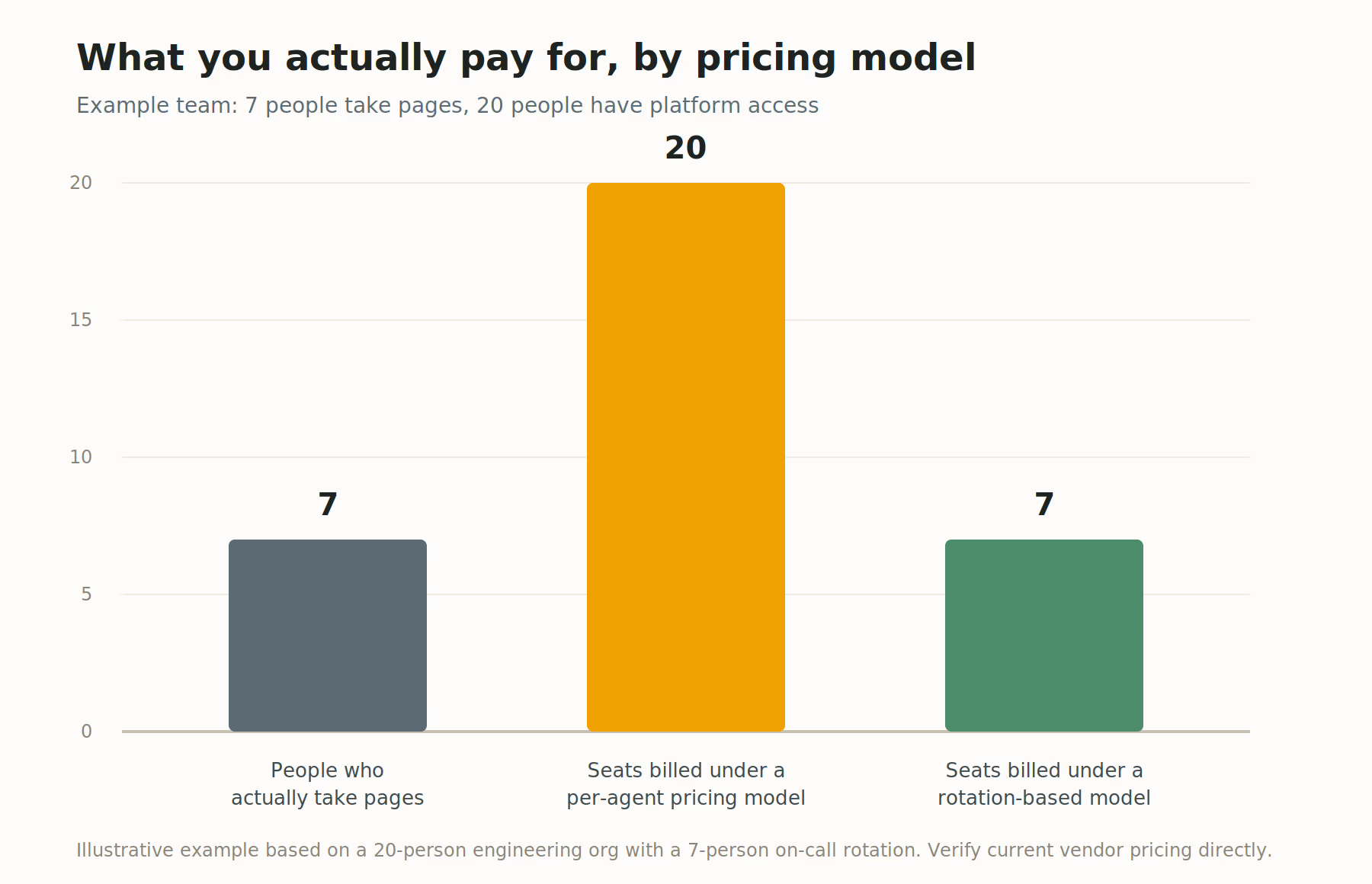
Per-agent JSM model: if your JSM tier requires agent seats for anyone who might touch an incident (not just responders), a 12-to-20 person growth path can roughly 1.7x your seat count even though your actual on-call rotation might only be 6–8 people.
Per-user on-call tools: cost scales with total users on the platform, which is usually closer to your engineering headcount than your rotation size — same growth pressure, different vendor.
Flat or rotation-based pricing: cost tracks the number of people actually taking pages, not everyone with platform access — this matters most for teams where "who can see an incident" and "who gets paged" are very different-sized groups.
The point isn't that one model is universally cheaper — it's that per-seat pricing models compound with headcount growth in ways a monthly quote at today's team size won't show you. Model your team size 18 months out before comparing sticker prices.
Step-by-Step Migration Checklist
Audit your current setup. Document team count, number of escalation policies, active integrations, and peak daily alert volume via the Opsgenie API (
GET /v2/teams,GET /v2/escalations,GET /v2/integrations) rather than estimating.Export everything now. Full alert history, schedules, and rotations via the REST API, stored somewhere durable (S3, GCS, your data warehouse). You'll want this for compliance and metric continuity regardless of where you land.
Document escalation logic in full detail. Responder order, delay between steps, repeat settings, notify type per policy. Most destination tools won't import Opsgenie's format directly — plan to translate it by hand or by script.
Shortlist 2–3 destinations using the decision framework above, not a vendor comparison page alone.
Run a real parallel period. Route live alerts to both the old and new system simultaneously before fully cutting over. This single step is the biggest predictor of a clean migration versus a missed page during an actual incident.
Migrate integrations one service at a time, validating each against live traffic rather than a synthetic test alert.
Set a hard internal cutover date well before April 5, 2027 — so you have room to recover if something breaks or the first tool turns out to be the wrong fit.
Effort estimate: teams with a single rotation and a handful of integrations can realistically migrate in a few weeks. Teams with multi-team escalation trees, custom integrations, or Terraform-managed configuration should budget 6 to 16 weeks. Starting in Q1 2027 — three months before shutdown — leaves no room for a second attempt.
Common Migration Mistakes
Patterns worth watching for, based on how similar SaaS-sunset migrations tend to go wrong:
Treating the deadline as a calendar reminder instead of a project. Two years feels far away until the actual work — auditing, exporting, testing, running parallel — starts eating sprint capacity.
Skipping the parallel run to save time. This is where missed pages during a real incident happen. It's also the step most tempting to cut when a migration is already behind schedule — which is exactly when you need it most.
Assuming feature parity without checking. SSO, phone numbers, and IaC support are the three gaps most likely to surprise teams who assumed "migrate" meant "identical."
Picking a destination based on a single stakeholder's preference. The account rep's recommendation, the CTO's favorite tool, and the on-call engineer's day-to-day experience are three different inputs — weigh all three before deciding.
Renewing Opsgenie on autopilot instead of negotiating the term. If your contract renews before 2027, a shorter renewal avoids paying for time you won't use once you've migrated.
Frequently asked questions
When does Opsgenie officially shut down?
April 5, 2027 — Atlassian's published end-of-support date. After this, the platform is inaccessible and unmigrated data is deleted.
Can I still buy Opsgenie today?
No. New purchases and trials ended June 4, 2025. Existing customers can renew and add seats until the 2027 shutdown, but can't switch editions.
What happens to my data if I don't migrate in time?
It's permanently deleted after April 5, 2027. Export alert history, schedules, and escalation policies via the Opsgenie API well before the deadline.
Do I have to migrate to Jira Service Management?
No. JSM is Atlassian's recommended and most automated path, particularly if you're already deep in the Atlassian ecosystem — but PagerDuty, incident.io, ITOC360, and others are all legitimate destinations depending on what you actually need from an on-call tool.
Does Opsgenie SSO carry over to JSM?
No. Opsgenie SSO is retired after migration; you'll need to configure Atlassian Guard separately.
How long does an Opsgenie migration actually take?
Simple setups: a few weeks. Complex, multi-team environments with custom integrations or infrastructure-as-code configurations: 6 to 16 weeks. Start well before Q1 2027 to leave room for course correction.
Will my Opsgenie phone numbers still work after migration?
Not automatically — they don't migrate to JSM by default. You need to manually port them to Twilio to keep them active.
Is Opsgenie's Terraform provider supported after migration to JSM?
No equivalent has been published. If your on-call config is managed as code, budget time to rebuild it manually or script the translation yourself.
Sources
Atlassian: Migrate from Opsgenie (official migration page)
Atlassian Support: How Opsgenie features change after migration
Looking for a straightforward on-call and incident management setup? ITOC360 offers a full incident timeline, clear on-call and escalation visibility from a mobile app built for 3 a.m. pages, and pricing that scales predictably as your team grows. Explore ITOC360 →