Opsgenie Alternatives in 2026: Where to Migrate Before April 5, 2027
The short version:
June 4, 2025 — Opsgenie end of sale. No new purchases, trials, or edition upgrades.
October 2025 — Teams whose Opsgenie came bundled with Jira Service Management already lost access.
April 5, 2027 — End of support. Access is cut off, the REST API stops responding, and unmigrated data is permanently deleted.
The 120-day trap — If you migrate using Atlassian's own tool to JSM or Compass, your Opsgenie instance is switched off automatically 120 days after the migration date. That can land well before April 2027.
Atlassian announced the wind-down in March 2025. This is not a rebrand and not a rumour — it is a hard deadline with a data-deletion clause attached. Teams that have already been through it report the migration taking six to sixteen weeks depending on integration count, which means anyone planning to start in Q1 2027 is starting late.
This guide covers what Atlassian is actually offering you, the alternatives worth evaluating, and how to move without dropping a page.
What Atlassian is actually offering (and why teams are pushing back)
Atlassian's recommended path is Jira Service Management for incident response and Compass for service cataloguing. That is the part that surprises people: Opsgenie was one product with one bill. The replacement is two products.
For teams that live inside the Atlassian ecosystem, that consolidation genuinely makes sense. For SRE and DevOps teams, the friction shows up fast. On-call scheduling, escalation logic, alert correlation and rapid triage are not bolt-on features — they are the core of incident response. Inside a broader ITSM platform shaped by ITIL workflows, they behave differently.
The open-source escape hatch has also narrowed. Grafana OnCall OSS entered maintenance mode in March 2025 and was archived on March 24, 2026.
So the migration is compulsory, and the default option is not automatically the right one. That makes this a genuine evaluation moment rather than a paperwork exercise.
For more details on OSPGenie's sunsetting and the migration process, check out our latest blog post.
Four criteria that actually separate these platforms
Every tool below does paging and rotations. That is table stakes and it is not where your evaluation should spend its time. Four things genuinely differ, and they are what the rest of this guide scores against:
Does it reduce alert volume, or just route it? The volume problem is what burns out on-call engineers. A platform that pages faster but pages just as often has solved nothing. AI-assisted triage and correlation is the difference between a rota tool and an incident platform.
Does anything happen before a human is paged? Automated runbook execution and response workflows are where mean time to resolution actually moves. Escalation policies only decide who gets woken up.
What does the complete stack cost? Almost every platform in this category prices on-call, status pages and AI features as separate add-ons. The number on the pricing page is rarely the number on the invoice — we have worked out the real totals for each option below.
How many products are you buying? Opsgenie was one tool with one bill. Atlassian's replacement is two. Some alternatives push you toward a third for monitoring. Count the pieces before you count the price.
Comparison at a glance
Platform | Entry price | Full-featured tier | Cost for a 10-engineer team | On-call | Noise reduction / AI grouping | Add-ons required |
|---|---|---|---|---|---|---|
Free forever (1 user) | $18/user/mo (Advanced) | $2,160/yr | Included, unlimited rotations | Included | None | |
Free (5 users) | $41/user/mo (Business) | $5,988/yr (with status page; AIOps extra) | Included | AIOps add-on, from ~$699/mo | Status page $89/mo, AIOps, Advance ~$415/mo | |
Free (3 agents) | $51.42/agent/mo (Premium) | $6,170/yr | Included from Standard | Premium tier only | Compass, Atlassian Guard for SSO | |
Free (5 users) | $19/user/mo + on-call add-on | $3,720/yr | Add-on, +$10–20/user/mo | Pro tier and above | On-call add-on, status pages above 1 | |
Quote-based | Not published | Not published | Included | Limited | Not published |
List prices as published in 2026. The 10-engineer column uses each vendor's own published rates on monthly billing, including the add-ons a production team realistically needs. Verify before budgeting.
Read that table by column, not by row. Every platform here does paging. The gap opens on what you have to buy separately to get a working incident stack — and at ten engineers, the spread between the cheapest and most expensive complete setup is roughly $4,000 a year for the same core job.
ITOC360: automated triage, not just rotation
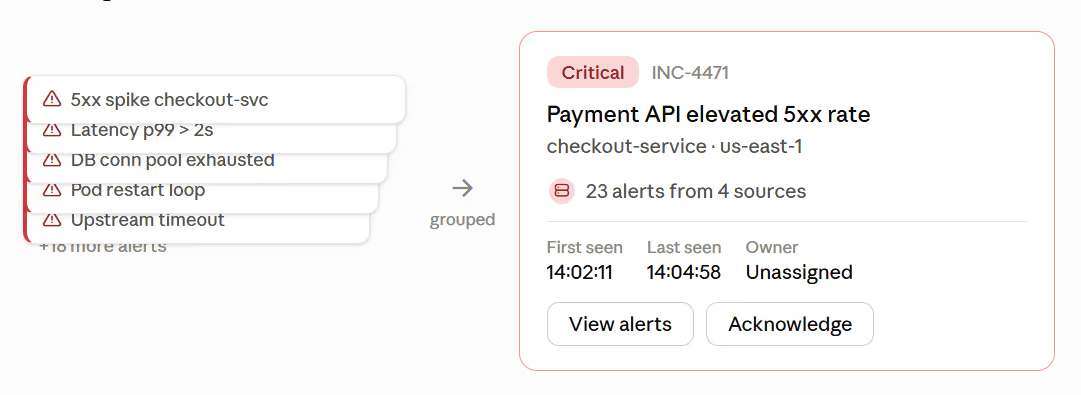
ITOC360 is an AI-first incident management platform that combines detection, triage and response in one workflow rather than stitching together separate tools. It is built around the assumption that the on-call problem is alert volume, not alert delivery.
Best for: DevOps, SRE and IT operations teams that want to automate investigation — not simply rotate on-call duty between engineers watching dashboards.
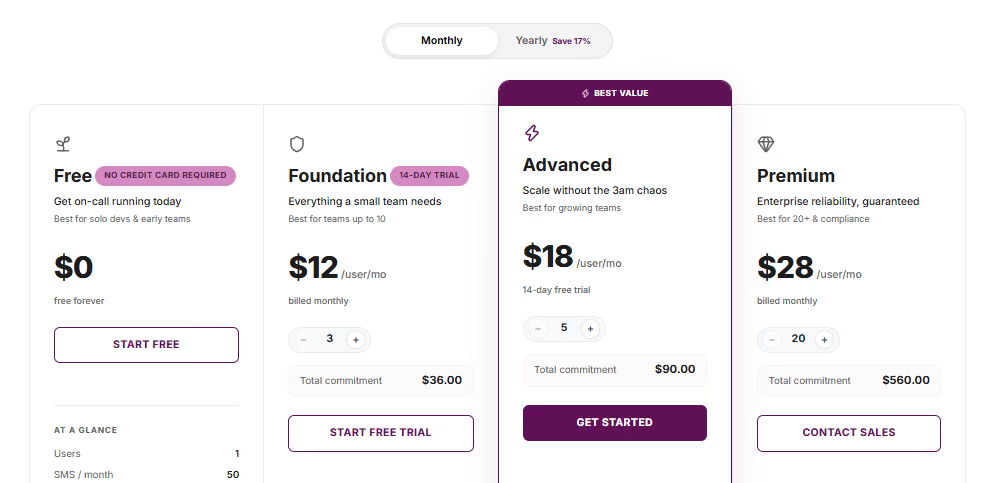
Pricing: Free forever for a single user. Foundation is $12/user/month (up to 10 users, 3-user minimum), Advanced is $18/user/month with unlimited users and unlimited SMS and voice calls, and Premium is $28/user/month with a written 99.99% uptime SLA, custom integrations and sub-2-hour 24/7 support. Annual billing saves 17%. There are no separate charges for on-call scheduling, alert grouping or AI features — the tier price is the price.
Pros
Alert noise reduction is the product, not an add-on. Sliding-window grouping correlates alerts by labels, resources and timestamps to collapse alert storms into a single incident. On PagerDuty the equivalent capability is the AIOps add-on starting around $699/month; here it is included from the $18 tier. 68.4% of companies now practice proactive incident management, and this is the layer that makes that possible.
Automated response workflows. Custom workflows and runbook execution fire without manual intervention from the Advanced tier, which is where mean time to resolution actually moves. Escalation policies only decide who gets woken up.
50+ monitoring integrations out of the box, including Datadog, Prometheus, Grafana, Zabbix, New Relic, Dynatrace, Sentry, Elastic, AWS CloudWatch, Azure Monitor, Google Cloud Monitoring, PRTG, Site24x7, SolarWinds and Pingdom, plus two-way ITSM sync with Jira and ServiceNow.
Unlimited SMS and voice from $18/user/month. Paging volume is not metered on Advanced and Premium, which removes the most unpredictable line in an incident tooling budget. Competitors either meter these or bundle them into higher tiers.
Multi-channel paging in 29+ languages with AI speech. Voice and alert language is set per person, which matters for distributed teams and for non-English-first engineering organisations — a gap most US-built platforms in this category simply do not address.
Mobile-first response. iOS and Android apps with full triage, acknowledgment and escalation, MFA via TOTP, encrypted on-device credential storage and role-based access control.
Rated 5.0/5 on G2 with a Users Love Us badge.
Cons
Minimum seat commitments of 3 on Foundation, 5 on Advanced and 20 on Premium.
Annual cost | What you get | |
|---|---|---|
$2,160 | Unlimited paging, on-call management, custom workflows, ITSM sync, status pages, post-mortems, AI SRE | |
incident.io Team + on-call | $3,720 | Incident response + on-call; 1 status page; AI on Pro only |
PagerDuty Business + status page | $5,988 | Noise reduction still costs ~$699/mo on top |
JSM Premium | $6,170 | ITSM-first workflows; Compass sold separately |
The saving is real. The more useful number is the one that never appears on an invoice: the alerts that stop paging anyone at 3am.
PagerDuty: the enterprise standard, at enterprise cost
PagerDuty is the established market leader in digital operations management, and the name most teams encounter first when working through the Opsgenie vs PagerDuty question.
Pricing: Free for up to five responders. Professional runs $21/user/month and Business $41/user/month on annual billing (roughly $25 and $49 month-to-month). Enterprise is custom-quoted.
The list price is the starting line, not the total. Status pages are a paid add-on on every plan below Enterprise at around $89/month. AIOps — the alert-grouping and noise-reduction layer that most high-volume teams actually want — is a separate purchase starting in the high hundreds per month. PagerDuty Advance, the generative AI layer, runs roughly $415/month once the included credits are exhausted. A team that needs all three is not paying $41 a head.
Best for: Large enterprises with dedicated NOC teams, complex legacy infrastructure, and the budget to match.
Pros
An exceptionally deep integration library covering effectively every monitoring, ticketing and observability tool in a modern stack.
Industry-standard reporting and audit trails that satisfy compliance-heavy organisations with strict SLA obligations.
Reliability that is battle-tested at genuine scale.
Cons
Total cost draws consistent criticism from mid-market and startup teams once add-ons are included.
Configuration complexity is substantial; teams without a dedicated tooling engineer often struggle to operationalise it properly.
Alert fatigue remains a documented concern — the platform's breadth works against teams that have not invested in tuning notification policies.
PagerDuty is genuinely powerful. The overhead is genuinely real. If you do not need enterprise compliance reporting or a legacy integration catalogue, that overhead is hard to justify.
Check out our article for detailed pricing alternatives
Jira Service Management: the default path
JSM is the most obvious landing spot for teams migrating off Opsgenie, and that familiarity is both its strength and its trap.
Pricing: Free for up to three agents, Standard at $20/agent/month, Premium at $51.42/agent/month, Enterprise custom-quoted. Pricing is per agent — people who submit requests are free, which makes JSM comparatively cheap at scale for service-desk-shaped teams.
One correction worth knowing: alerts, on-call schedules and incident escalation are available from the Free and Standard tiers. You do not need Premium for basic on-call. What Premium buys is AI-powered service, asset and configuration management, advanced alert integrations and 24/7 critical support — and it is a 2.5x jump from Standard.
Best for: Teams already running Jira Software and Confluence who value consolidated tooling over specialised capability.
Pros
Native Jira integration removes the context switching that plagues cross-tool workflows, keeping incident timelines linked to related tickets.
Consolidated billing and unified user management, which procurement teams like.
Atlassian's commissioned Forrester Total Economic Impact study reports a 275% three-year ROI for enterprises switching to JSM. Worth reading with the usual caveat that the study is vendor-commissioned.
Cons
JSM is an ITSM platform with incident features added, not a purpose-built incident response platform. Pure DevOps teams often find the ITIL-shaped workflows slow down fast-moving response cycles.
Status pages are Enterprise-only, with no add-on available below that tier.
SSO requires Atlassian Guard, which is not included on Free, Standard or Premium.
The migration can feel less like a decision and more like a managed handoff.
If your primary pain is tool sprawl inside Atlassian, JSM consolidates well. If you need on-call depth, keep evaluating.
incident.io: Teams-first incident response
incident.io builds incident management directly into Microsoft Teams. Rather than routing engineers to a separate dashboard mid-crisis, alerts, timelines, status updates and postmortems stay in the workspace your team already has open.
Pricing: Free for up to five users. Team is $19/user/month ($15 billed annually), Pro is $25/user/month, Enterprise custom. The number to watch: on-call scheduling is a separate add-on, at roughly +$10/user/month on Team and Pro. A ten-person team on Team plus on-call lands near $310/month, not $190.
Best for: Startups and fast-moving engineering teams operating in a ChatOps model who want on-call management without a steep onboarding curve.
Pros
Good user experience with minimal context switching — responders act directly from Slack.
Cons
On-call is priced as an add-on on every paid tier, so the advertised price understates the real cost.
Heavy Slack dependency means a Slack outage degrades your incident response capability.
Status pages are limited below Enterprise: Team includes one public page, Pro adds one internal page.
At large incident scale — dozens of concurrent responders across multiple streams — chat-based coordination becomes hard to track.
AlertOps: the flexible enterprise contender
AlertOps positions itself as a high-flexibility incident management and alerting platform, and has actively targeted enterprise teams migrating off Opsgenie.
Pricing: Tiered by features and user count, with custom enterprise quotes. Not published as list pricing.
Best for: Organisations needing highly customised escalation workflows and simultaneous multi-channel alerting across email, SMS, phone and Slack.
Pros
Flexible tiers make it accessible to mid-market teams without a bloated enterprise contract on day one.
A robust API allows deep integration with existing toolchains.
Technical support is a recurring differentiator in user feedback — responsive and knowledgeable rather than a ticket queue.
Cons
Complex configurations carry a steeper learning curve; teams without platform engineering resources struggle during setup.
If your workflows are straightforward, the flexibility becomes overhead rather than advantage.
AlertOps rewards teams with the internal expertise to exploit it.
Also worth a look
The five above cover most evaluations, but three more come up often enough to mention:
Squadcast — SRE-oriented, with reliability workflows and postmortems built in; competitive per-user pricing.
Rootly — incident management with workflow automation, entry pricing around $20/user/month.
Better Stack — combines uptime monitoring with on-call, which suits teams currently paying for both separately.
If your shortlist contains only vendors that market themselves at Opsgenie refugees, you are seeing a filtered view of the market. For the fuller category view — not just Opsgenie migration targets — see our best incident management software comparison.
Which one should you pick?
Every platform here beats Opsgenie in at least one dimension. None wins on all of them.
Choose ITOC360 if your priority is eliminating manual alert triage rather than routing it faster, and you want the noise-reduction layer included rather than sold as a $699/month add-on. At $18/user/month with unlimited paging, it is also the lowest complete-stack cost in this comparison — roughly a third of JSM Premium for the same ten-engineer team.
Choose PagerDuty if you specifically need its enterprise integration catalogue for a tool ITOC360 doesn't yet cover — otherwise ITOC360 covers the core integrations most teams actually use, at a fraction of PagerDuty's per-seat cost.
Choose Jira Service Management if workflow unity inside Atlassian is non-negotiable for you — ITOC360 also connects natively to Jira, without requiring the rest of the Atlassian stack or Premium pricing to get incident-specific depth.
Choose incident.io if you need a Slack-native tool live this week — ITOC360 sets up in Slack just as fast, and the noise-reduction layer ships in the base price instead of a $699/month add-on.
Choose AlertOps if you want full custom-escalation configuration and have the engineering time to build it — ITOC360 gives you the same custom escalation logic out of the box, with less setup work.
The successful platform is rarely the most feature-rich one. It is the one your team uses consistently under pressure. Looking beyond Opsgenie replacements? Our comparison of eight alert management platforms covers the wider market.
Migration roadmap: moving off Opsgenie without downtime
The deadline is the catalyst, but a rushed migration causes more damage than the shutdown would. Budget six to sixteen weeks depending on integration count — teams with straightforward setups still report six to eight.
Audit your alerting rules and escalation policies. Export everything and document which rules are actively firing versus dormant for months. This is where you learn the true scope of the migration, and it is usually smaller than expected.
Clean up stale alerts before you migrate. Dead rules and orphaned schedules become noise in any new system. Removing them now stops you importing technical debt into the replacement.
Watch the 120-day clock if you use Atlassian's tool. Migrating to JSM or Compass via Atlassian's automated migration switches Opsgenie off 120 days later — not in April 2027. Know your real deadline.
Run the new tool in parallel for at least one full on-call cycle. Shadow mode catches routing gaps and misconfigured escalations before they surface during a live incident. One team we know of ran both for eleven weeks after finding integration gaps mid-migration.
Verify CSV exports map cleanly. Schedule exports do not always translate to the new platform's data model. Test with one team before committing all of them.
Prioritise platforms with intelligent rule import. Rebuilding escalation policies by hand is the single largest line item in migration effort and the place teams most often run over. Automated policy templates and rule suggestions collapse it. ITOC360's free tier requires no credit card, which makes step 4 above cost nothing to run — you can stand up a parallel instance against your live monitoring sources before committing to a seat count. ITOC360 makes switching from Opsgenie straightforward with a streamlined migration process that automatically maps teams, users, schedules, escalation policies, integrations, and alerting configurations.
The goal is not to replicate your old setup. It is to migrate deliberately and build something better than what you are leaving.
Frequently asked questions
When exactly does Opsgenie shut down?
April 5, 2027. On that date Atlassian ends support, access is cut off, the REST API stops responding, and unmigrated data is permanently deleted. New sales ended June 4, 2025.
Can I still buy Opsgenie?
No. New purchases and trials ended June 4, 2025. Existing customers can add seats and renew, provided the term ends before April 5, 2027, but cannot change editions.
Is there an extended support window?
No. There is no extension beyond April 5, 2027.
What is Atlassian replacing Opsgenie with?
Jira Service Management for incident response and Compass for service cataloguing — two products where Opsgenie was one.
Do I have to move to Jira Service Management?
No. Atlassian recommends it and provides a migration tool, but any incident management platform can take over your on-call schedules and escalation policies. The forced migration is a reasonable moment to evaluate the wider market.
How long does an Opsgenie migration take?
Typically six to sixteen weeks, driven mostly by integration count. Plan for at least one full on-call cycle running both platforms in parallel.
Do I have to rebuild all my escalation policies by hand?
Not necessarily. Some platforms import Opsgenie schedules and escalation rules automatically rather than making you recreate them. Ask every vendor on your shortlist directly — it is the difference between a two-week migration and a two-month one.
What is the cheapest way to replace Opsgenie without losing capability?
For most mid-sized teams, ITOC360's Advanced tier at $18/user/month is the lowest complete-stack cost in this comparison, because on-call scheduling, alert grouping, custom workflows and unlimited SMS and voice paging are included rather than sold as add-ons. A ten-engineer team pays $2,160/year against $3,720 on incident.io with its on-call add-on and $6,170 on JSM Premium.
What happens to my data if I do nothing?
It is deleted after April 5, 2027. Export before then regardless of where you land.