What Is a Status Page? Definition, Examples and Best Practices (2026)
Quick answer: A status page is a web page that shows the real-time health of a company's services, such as its website, app, API or payment system, along with any ongoing incidents and planned maintenance. It breaks the service into components, each with a status like operational, degraded performance, partial outage or major outage, and lets users subscribe to updates by email, SMS or chat. Public status pages keep customers informed and cut support tickets during outages; private status pages do the same for employees or partners behind a login.
When something breaks, the first thing customers want to know isn't why. It's whether the problem is on their side or yours, whether you know about it, and when it will be fixed. Without a status page, they find out by opening a support ticket, posting on social media or emailing their account manager, all at the same time, during the outage.
A status page answers those questions in one place, before anyone has to ask. For the company, it turns hundreds of identical support conversations into one update, and turns an outage from a trust problem into a communication task.
This guide explains what a status page is, why teams use one, the different types, what a good status page includes, examples for different kinds of businesses, how to set one up, and how to use it well during an incident.
What is a status page?
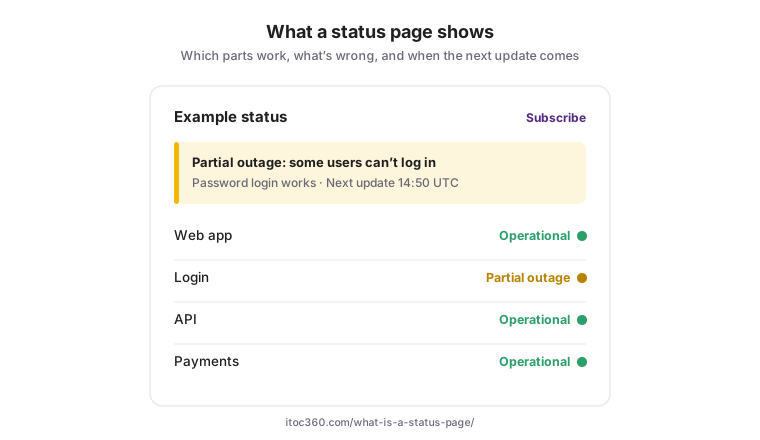
A status page, sometimes called a system status page or service status page, is a dedicated page that communicates the operational state of a service to the people who depend on it. It's usually hosted at an address like status.yourcompany.com, and it's hosted separately from the main product, so it stays online when the product itself is down.
Most status pages show the same five things:
Element | What it shows | Example |
|---|---|---|
Components | The parts of the service users care about, each with its own status | Website · Mobile app · API · Payments · EU region |
Current incidents | What's wrong right now, with timestamped updates | "Investigating: some users can't log in" |
Scheduled maintenance | Planned work, announced in advance | "Database upgrade, Sunday 02:00–03:00 UTC" |
Uptime history | Past availability per component, often for the last 90 days | A bar for each day: green, yellow or red |
Subscriptions | A way for users to get updates without checking the page | Email, SMS, Slack, Microsoft Teams, webhook or RSS |
"Statuspage", written as one word, is also the name of Atlassian's status page product, which is why some searches for status pages return Atlassian results. We cover that product separately in our guide to Atlassian Statuspage features and pricing. This page is about status pages in general, whichever tool runs them.
Why you need a status page
A status page is cheap to run and pays for itself during the first serious outage. The benefits fall into four groups:
Benefit | How it works |
|---|---|
Fewer support tickets during incidents | Customers check the page or get a notification instead of contacting support. The same update reaches everyone at once. |
Trust | Saying "we know, here's what's happening" early is far better for the relationship than silence. Uptime history also shows how much downtime the service has had, which B2B buyers increasingly expect to see before signing. |
Less pressure on the response team | When stakeholders know updates come on a fixed schedule, they stop messaging the engineers fixing the problem. |
Evidence for SLAs | A public record of incidents and uptime supports conversations about service level agreements and credits, and keeps internal reporting honest. |
It also forces a useful discipline. To keep a status page accurate, a team has to define its components, agree what "partial outage" means, and decide who posts updates. Those are exactly the decisions that make incident communication work.
Do you need one? If customers rely on your service to do their own work, if outages generate support tickets, or if you sell to businesses that ask about uptime during procurement, the answer is yes. Very small or purely internal products can start with a private page or a pinned channel.
Types of status pages
Status pages differ mainly in who can see them:
Type | Who sees it | Access | Typical use |
|---|---|---|---|
Public | Anyone on the internet | Open URL | SaaS products, APIs, consumer apps, any customer-facing service |
Private (internal) | Employees | Login, single sign-on or IP allowlist | Internal tools, VPN, HR systems, CI pipelines, office networks |
Audience-specific | Different customers or partners see different components | Login, with each group mapped to its own components | B2B platforms, managed service providers, dedicated customer environments |
Third-party aggregated | Your own team | An internal dashboard | Tracking the status of vendors you depend on: cloud providers, payment processors, email services |
Many companies run more than one: a public page for customers and a private page for employees, so internal systems can be reported honestly without exposing them publicly.
Which one first? If your customers notice your outages, start with a public page. If most of your incidents affect employees, such as an IT team running internal systems, start with a private one.
What a good status page includes
1. Components that match how users think. List what users do, not how your infrastructure is built. "Checkout" and "Login" mean something to customers; "payments-svc-eu-2" doesn't. Five to fifteen components is usually enough; group them by product or region if you need more.
2. Clear component statuses. Most tools use the same five:
Status | Meaning |
|---|---|
Operational | Working normally |
Degraded performance | Working, but slower than normal or impaired in a minor way |
Partial outage | Completely broken for some users or regions, or one part of the component is down |
Major outage | Unavailable for all, or nearly all, users |
Under maintenance | Planned work in progress |
Map each status to your internal incident severity levels in advance, so nobody debates the color during an outage. As a rule of thumb, a major outage on a core component is usually SEV1, and a partial outage SEV2.
3. Incident updates with a fixed structure. Each update says what's affected, what users can do in the meantime, and when the next update will be posted. Incidents typically move through four stages: investigating, identified, monitoring and resolved.
4. Scheduled maintenance, announced in advance. Post planned work days ahead, and notify subscribers before it starts. On the monitoring side, pair it with a maintenance window so the expected alerts don't page anyone.
5. Uptime history. 90 days per component is common. It shows customers your track record, good or bad.
6. Subscription options. Email at minimum; SMS, Slack, Teams, webhooks or RSS for customers who integrate your status into their own tools. Let subscribers choose the components they care about, so a customer who only uses your API isn't notified about a problem with your mobile app.
7. Hosting that survives your outage. If the status page runs on the same infrastructure as the product, it goes down with it. Host it separately, on a different domain or provider.
8. A status widget or banner in your own product. Many users never visit the status page itself. A small banner inside the app, or an embedded status widget on your help center, shows the same information where users already are, and catches the people who would otherwise open a ticket.
Status page examples by type of business
The right components depend on what your customers do with your product. These examples show a sensible starting set for four common cases.
Business | Components to list | What customers care about most | Example update |
|---|---|---|---|
SaaS application | Web app · Mobile app · Login and SSO · Notifications · Integrations · Reporting | Can they log in and do their daily work? | "Partial outage: some users in the EU can't log in via SSO. Password login works. Next update 14:30 UTC." |
API or developer platform | REST API · Webhooks · Dashboard · Authentication · Each region separately | Error rates and latency per endpoint and region | "Degraded performance: elevated latency on the Payments API in us-east. Requests are succeeding. Next update 10:15 UTC." |
E-commerce | Storefront · Search · Checkout · Payments · Order tracking · Customer accounts | Can they buy, and did their order go through? | "Major outage: checkout is unavailable. Orders placed before 09:40 are unaffected. Next update 10:00 UTC." |
Internal IT (private page) | Email · VPN · Wi-Fi by office · HR system · Ticketing · Video conferencing | Which tools are down and what to use instead | "Partial outage: VPN unavailable in the Istanbul office. Use the backup gateway. Next update 11:00 local time." |
Three patterns are common to good examples:
Every update says what still works. "Password login works" or "requests are succeeding" tells users whether they can keep going.
Every update promises the next one. A time, not "soon".
Regions and plans are separated where it matters. A global SaaS with one "App" component will either overstate a regional problem or understate a global one.
For ready-made wording at each stage of an incident, see our incident communication templates.
Real status pages worth studying
Some of the most widely used services run public status pages that are good references for structure. Each one shows a different idea worth borrowing
Status page | What to notice |
|---|---|
GitHub (githubstatus.com) | Components named after what developers do, such as Git operations, Actions, Pages and Codespaces, rather than internal systems |
Slack (status.slack.com) | Features users recognize, such as messaging, calls and notifications, each with its own status and incident history |
Stripe (status.stripe.com) | Separate statuses for API, dashboard and individual products, which matters when a developer needs to know whether their integration is affected |
Cloudflare (cloudflarestatus.com) | Status by region and location, so customers can see whether an issue affects where their traffic is served |
Google Cloud (status.cloud.google.com) | Status by product and region together, useful for platforms with many services across many locations |
AWS Health Dashboard | Service-by-region status, plus account-specific events for logged-in customers, an example of combining a public page with audience-specific information |
The common thread: none of them lists servers or internal service names. Every component is something a customer can recognize and act on.
How to create a status page
Setting up a status page takes an afternoon. Keeping it useful takes a few decisions made up front.
Choose public, private or both. See the types above. Most customer-facing products start with a public page.
List your components. Start from what users do, not from your architecture. Ask support which parts of the product customers mention when something breaks.
Decide who can post updates. Usually the incident commander or communications lead, plus a backup for nights and weekends. Make sure they all have access before the first incident.
Define what each status means for you. Write one sentence per status with an example from your own product, and map it to your severity levels.
Set an update cadence. For example, every 30 minutes for a major outage and every 60 minutes for a partial outage, even if there's nothing new to say.
Prepare templates. One for each incident stage and one for scheduled maintenance, so the first update takes seconds rather than minutes to write.
Connect it to your incident process. Link status updates to incident declaration, so opening a SEV1 or SEV2 prompts, or automatically creates, the first public update.
Use your own domain (
status.yourcompany.com) and host the page independently of your product.Publish the link where customers will look for it: your website footer, help center, app error screens and support auto-replies.
Test it. Post a test incident during a planned game day, check that subscribers receive it, then delete it.
The status page is one part of incident response, not a separate project. Our incident management checklist shows where it fits among the other preparation steps.
Status page best practices during an incident
A status page is only as good as its updates. These are the habits that separate a page customers trust from one they ignore:
Practice | Why |
|---|---|
Post within 15 minutes of confirming customer impact, even if you only know that something's wrong | Customers already know. Silence suggests you don't. |
Update on a fixed schedule: about every 30 minutes for a major outage, every 60 for a partial one | Predictable updates stop people refreshing the page and contacting support |
Say what still works and what users can do instead | It's the most useful sentence in any update |
Separate facts from guesses. "We've identified the cause" only once you have | Walking back a wrong cause costs more trust than saying "still investigating" |
Don't promise a fix time unless the incident commander has approved it | Missed estimates are remembered longer than the outage |
Use one time zone and say which | UTC for global audiences; local time for internal pages |
Avoid internal jargon | Customers don't know your service names or what a "failover" is |
Resolve only when it's verified, and say what happened in one or two sentences | A premature "resolved" followed by a new incident is worse than a long one |
Publish an incident report after major outages: what happened, the impact window, and what you're changing, based on your postmortem | Customers who were affected want to know it won't happen again; a short public report answers that once, for everyone |
Don't hide incidents | Customers notice outages that never appear in the history, and the uptime record stops meaning anything |
Make the page accessible: sufficient color contrast, text labels next to every color, readable fonts, and markup that works with screen readers | Status colors alone don't work for color-blind users, and a status page is exactly where people need information quickly |
For SEV1 incidents, the status page is usually one of several channels, alongside executive and support updates; see major incident management for the full communication plan.
Status page vs. uptime monitoring vs. incident management
The three are often sold together and easily confused, but each does a different job:
Uptime monitoring | Incident management | Status page | |
|---|---|---|---|
Question it answers | Is the service up right now? | Who is fixing it, and how? | What do we tell users? |
Audience | Engineering | The response team | Customers, employees, stakeholders |
Output | Checks, metrics, alerts | Pages, roles, a timeline, a postmortem | Component statuses, incident updates, maintenance notices |
Works automatically? | Yes | Partly: routing and escalation are automatic, decisions aren't | Partly: statuses can update automatically, but the words usually need a person |
The strongest setups connect all three. Monitoring detects a problem, often through the four golden signals; incident management pages the right person and opens an incident; and the status page update starts from the same incident record, so customers and the response team see the same facts.
Should a status page update automatically from monitoring? For simple, clear-cut checks such as "the API isn't responding", automatic updates are fast and useful. For anything ambiguous, a human should confirm the status first; an automated "major outage" caused by a broken health check alarms every customer for nothing. A common compromise: automation sets the component status, and a person writes the message.
The takeaway: a status page is most useful when it's part of the incident response process rather than a separate tool. When updates start from the incident record, the first customer update goes out faster, the facts match what the response team knows, and nobody has to copy information between two systems in the middle of an outage.
Free vs. paid status pages
You can run a status page for free, but the options differ in what they cost later:
Option | What you get | The catch |
|---|---|---|
Free plan of a hosted tool | A working public page in minutes | Low limits on subscribers, components and team members; email-only notifications; often no custom domain |
Open-source, self-hosted (for example, Cachet or Uptime Kuma) | Full control, no license fee | You host and maintain it, and it must run on infrastructure separate from your product or it fails with it |
Paid standalone status page | Higher limits, custom domain, SMS, private pages | Price usually grows with subscriber count; a second tool to keep in sync with incident response |
Status page built into an incident management platform | One record for the incident and the customer update; no second tool | Depends on the platform's status page features matching what you need |
Is Atlassian Statuspage free? It has a free public-page plan with 100 subscribers, 25 components and two team members; paid plans start at $29 a month. The full breakdown is in our Atlassian Statuspage guide.
What drives the cost of status page software: number of subscribers, whether you need private or audience-specific pages, SMS and webhook notifications, single sign-on for the team, and how many people need to post updates. If you're choosing between tools, price the plan you'll need in a year, not the one you need today.
Where ITOC360 fits
ITOC360 Status Pages are part of the same platform that handles alerting, on-call and incident response, so the customer update and the internal response start from one incident record:
Updates from the incident. When an incident is declared, the status page update starts from the same record, with the affected components and severity already known.
Components mapped to services. The services that alerts are routed by are the same services customers see as components.
Scheduled maintenance. Announce planned work on the page and suppress the matching alerts for the same window.
One tool for the whole incident. Detection, paging, coordination and customer communication in one place, rather than a separate status page product to keep in sync.
Status pages are included from the Advanced plan.
Frequently asked questions
What is a status page?
A status page is a web page that shows the real-time health of a company's services, broken into components, along with current incidents, scheduled maintenance and uptime history. Users can subscribe to updates by email, SMS or chat.
What does "status page" mean?
It means a dedicated page, usually at an address like status.company.com, where a company publishes whether its services are working. "Statuspage" written as one word is also the name of Atlassian's status page product.
What is a status page used for?
To tell customers or employees about outages, slowdowns and planned maintenance, so they don't have to contact support to find out. It also shows a record of past incidents and uptime.
What is an incident management status page?
It's a status page connected to the incident management process, so that declaring an incident prompts or creates the public update and the same record drives both the internal response and the customer communication.
What should a status page include?
Components with clear statuses, current incidents with timestamped updates, scheduled maintenance, uptime history, subscription options, and hosting that stays online when your main service is down.
Sources
Atlassian Statuspage pricing, checked 26 October 2026: free plan limits
Google SRE Book: Managing Incidents (communication as a separate incident role)