The Four Golden Signals of Monitoring: Latency, Traffic, Errors, Saturation (2026)
Quick answer: The four golden signals are latency, traffic, errors and saturation: the four metrics Google's Site Reliability Engineering book recommends measuring for every user-facing system. Latency is how long requests take. Traffic is how much demand the system is handling. Errors is the rate of requests that fail. Saturation is how full the system is. The book's guidance is that if you measure all four and page a human when one of them is problematic, or, for saturation, nearly problematic, your service will be at least decently covered by monitoring.
Most monitoring setups grow by accident. Every incident adds a new alert, every new tool adds a new dashboard, and after a few years nobody can say which of the 400 graphs matters at 3 a.m.
The four golden signals are the opposite approach: start with the smallest set of measurements that tells you whether users are being served well, and build everything else around them. The idea comes from the "Monitoring Distributed Systems" chapter of Google's Site Reliability Engineering book, and it has become the default starting point for monitoring services of almost any kind.
This guide explains each signal, how to measure it with example Prometheus queries, how golden signals compare with the RED and USE methods, what the four signals mean for databases, queues, batch jobs and Kubernetes, and how to turn them into alerts that page only when users are affected.
What are the four golden signals?
The four golden signals were introduced in Chapter 6 of Google's Site Reliability Engineering book (2016), "Monitoring Distributed Systems", written by Rob Ewaschuk. They describe a user-facing system from the outside: what users experience and how close the system is to its limits.
Signal | Question it answers | Typical measurement | Example |
|---|---|---|---|
Latency | How long does it take to serve a request? | Request duration as a distribution (p50, p95, p99), split by success and failure | p99 checkout latency: 420 ms |
Traffic | How much demand is the system handling? | Requests per second; for other systems, transactions, sessions or bytes per second | 1,200 HTTP requests/second |
Errors | How many requests fail? | Failed requests ÷ total requests, including wrong or too-slow responses | 0.3% of requests return 5xx |
Saturation | How full is the system? | Utilization of the most constrained resource, plus how soon it will run out | Connection pool 85% used; disk full in 6 hours |
Two ideas from the chapter explain why these four were chosen.
They measure symptoms, not causes. The book distinguishes between what's broken (the symptom users feel) and why (the cause). Latency, traffic and errors describe symptoms directly. Saturation is the one forward-looking signal: it warns that a symptom is about to appear.
They cover most failure modes with very few metrics. A system can be slow, overloaded, broken or nearly full. Each golden signal catches one of those. Together they give an on-call engineer a reliable first answer to "are users OK?" before any deeper observability work begins.
Why the golden signals matter
Four metrics sounds like too few for a modern system. The value comes from what that small set makes possible:
Benefit | How the golden signals deliver it |
|---|---|
Faster detection | Alerts based on user-facing symptoms fire when users are affected, not when an internal metric happens to cross a line. That shortens time to detect. |
Faster diagnosis | Seeing all four together narrows the cause in seconds: slow but not failing points somewhere different from failing fast. |
Capacity planning | Traffic and saturation trends together show how much headroom is left and when it will run out, before an outage forces the decision. |
A shared language | Every service reports the same four things, so on-call engineers can read an unfamiliar team's dashboard during an incident. |
Less noise | Four symptom-based signals per user journey replace dozens of cause-based alerts, which is one of the most direct ways to reduce alert fatigue. |
A basis for SLOs | Latency and errors map directly to service level indicators, so the same data drives dashboards, alerts and reliability targets. |
The four signals in detail
The example queries below use Prometheus with common metric names (http_requests_total, http_request_duration_seconds). Adapt the names and labels to your own instrumentation; the logic carries over to Datadog, Grafana, New Relic or any other tool.
1. Latency
What it is: the time it takes to serve a request.
How to measure it: as a distribution, not an average. Track percentiles such as p50, p95 and p99 over short windows. The average hides the slow tail: if 1% of requests take ten seconds, the mean barely moves, but one user in a hundred is having a bad experience.
histogram_quantile(0.99,
  sum by (le) (rate(http_request_duration_seconds_bucket{job="checkout"}[5m])))
The trap: mixing the latency of successful and failed requests. A request that fails fast with a 500 error can make your latency graph look better during an outage. The SRE book's advice is to track error latency separately, because a slow error is even worse than a fast one.
2. Traffic
What it is: the demand placed on the system, in whatever unit fits it.
How to measure it: requests per second for web services; transactions or queries per second for databases; messages per second for queues; concurrent sessions or bytes per second for streaming and network systems. Break it down by endpoint or request type where the mix matters.
sum(rate(http_requests_total{job="checkout"}[5m]))The trap: watching only for spikes. A sudden drop in traffic is often the clearest sign of an outage, because users can't reach you at all and so stop generating requests, or errors upstream stop requests from arriving.
3. Errors
What it is: the rate of requests that fail.
How to measure it: as a ratio of failed to total requests. The SRE book names three kinds of failure:
Explicit: the request returns an error, such as an HTTP 500.
Implicit: the request returns success but the wrong content, such as an HTTP 200 with an empty or incorrect body.
By policy: the request succeeds but breaks a commitment, such as a response slower than the one second you promised.
sum(rate(http_requests_total{job="checkout", code=~"5.."}[5m]))
  /
sum(rate(http_requests_total{job="checkout"}[5m]))
The trap: counting only explicit errors. Implicit errors don't appear in status codes, so they need end-to-end checks or application-level validation to catch them.
4. Saturation
What it is: how "full" the system is, measured against its most constrained resource: memory for a memory-bound service, I/O for a database, connections for a service behind a fixed pool.
How to measure it: current utilization of that resource, plus a prediction of when it will run out. The SRE book's example is a database that will fill its disk in four hours.
predict_linear(node_filesystem_avail_bytes{mountpoint="/var/lib/postgresql"}[6h], 4 * 3600) < 0The trap: alerting at 100%. Most systems degrade well before full utilization, and rising latency is often the first sign of saturation. Set targets below 100%, and treat a sharp rise in p99 latency as a saturation warning too.
Reading the four signals together
Each signal on its own is ambiguous. High traffic can be good news, and rising saturation can be normal growth. The diagnostic power comes from the combination. These are the patterns on-call engineers see most often:
Latency | Traffic | Errors | Saturation | Likely meaning | First place to look |
|---|---|---|---|---|---|
↑ | ↑ | → | ↑ | The system is under more load than it can serve comfortably | Capacity: scale out, or check autoscaling |
↑ | → | → | ↑ | Something is consuming resources without more demand: a leak, a heavy query, a noisy neighbor | Recent deploys, long-running queries, memory growth |
↑ | → | → | → | A slow dependency: database, cache, third-party API | Latency of downstream calls |
↓ | → | ↑ | → | Requests are failing fast, which can make latency look better | Error logs, recent config changes, dependency health |
→ | ↓ | → | → | Users can't reach the service, or something upstream stopped sending traffic | DNS, load balancer, CDN, client releases |
↑ | ↑ then ↓ | ↑ | ↑ | Overload followed by retries, then users giving up | Saturated resource; retry storms |
→ | → | → | ↑ steadily | Slow growth toward a limit, such as disk or connections | Time-to-exhaustion prediction; capacity plan |
The most useful single habit is to check traffic before reacting to saturation. Saturation rising with traffic is load. Saturation rising without traffic is a bug.
Golden signals vs. the RED and USE methods
Two other monitoring frameworks are often mentioned alongside the golden signals. They overlap, but each is designed for a different layer of the system.
Four golden signals | RED method | USE method | |
|---|---|---|---|
Origin | Google SRE book (2016) | Tom Wilkie, for microservices (2015) | Brendan Gregg, for system performance |
Signals | Latency, traffic, errors, saturation | Rate, errors, duration | Utilization, saturation, errors |
Point of view | The user's experience of a service, plus its headroom | The user's experience of a request-driven service | Each hardware or software resource |
Best for | Any user-facing system: services, databases, queues | Microservices and APIs | Hosts, disks, network interfaces, memory, CPU |
What it misses | Resource-level detail behind a saturation problem | Saturation, so it warns late | Whether users are actually affected |
In practice, RED is the four golden signals without saturation: rate is traffic and duration is latency. USE works one layer down, on each resource rather than each service.
The frameworks work best together, not as alternatives:
Golden signals or RED for every service: these are what you alert on, because they describe user impact.
USE for the infrastructure under those services: this is what you open during diagnosis, once a golden signal has told you something is wrong. Both sit inside a wider IT monitoring strategy that also covers logs, traces and uptime checks.
Some teams remember the four signals by the acronym LETS: latency, errors, traffic, saturation.
Golden signals vs. SRE KPIs
The golden signals are often listed alongside metrics like MTTR and MTBF, but they measure different things. Golden signals describe how a service is behaving right now. Reliability KPIs describe how well the team detects, responds to and prevents problems over time. You need both, and the first feeds the second.
Metric | What it measures | How the golden signals affect it |
|---|---|---|
SLIs and SLOs | Whether a service meets its reliability target | Latency and errors usually are the SLIs; see SLA vs SLO vs SLI |
MTTD (mean time to detect) | How long problems go unnoticed | Symptom-based golden-signal alerts, plus early warning from saturation, shorten it most |
How fast the team acknowledges and resolves incidents | Clear signals and correlated alerts reduce time lost to triage and diagnosis | |
How often failures happen | Saturation trends reveal recurring capacity problems before they become outages | |
Change failure rate (DORA) | Share of deployments that cause problems | Comparing golden signals before and after each release shows which changes hurt users |
MTTD, MTTA, MTTR and MTBF, how to calculate them and their benchmarks are covered in our guide to MTTR, MTTA, MTBF and MTTD. For the wider set of incident metrics, see incident management KPIs.
Golden signals for different kinds of systems
The four signals were written with request-serving systems in mind, but they translate to almost anything. What changes is the unit of work and the resource that fills up first.
System | Latency | Traffic | Errors | Saturation |
|---|---|---|---|---|
Web service or API | Request duration (p95, p99) | Requests per second | 5xx rate, plus wrong-content and too-slow responses | CPU, memory, connection or thread pool usage |
Database | Query duration | Queries or transactions per second | Failed queries, deadlocks, replication errors | Connections in use, disk space, I/O wait, replication lag |
Message queue or stream | Time from publish to consume (end-to-end lag) | Messages published and consumed per second | Failed or dead-lettered messages | Queue depth and its growth rate, consumer lag |
Batch or scheduled job | Run duration against its deadline | Runs and records processed per run | Failed runs, records rejected | Time left before the job misses its window |
Kubernetes workload | Request duration at the ingress or service | Requests per second per service | 5xx rate, pod restarts and crash loops | CPU throttling, memory against limits, pending pods |
Server or VM (server monitoring) | Response time of the service it hosts | Network throughput, connections | Hardware and kernel errors, failed health checks | CPU, memory, disk, network utilization (use USE here) |
For queues and batch jobs, the most useful latency measure is usually freshness: how old is the newest data a user can see? A queue can process thousands of messages per second and still be hours behind.
How to implement the four golden signals
Start from user journeys, not services. List the three to five things users most need to do: log in, search, check out, load the dashboard. Each journey gets its own set of golden signals.
Instrument at the edge first. Measure latency, traffic and errors where requests enter the system, at the load balancer, API gateway or ingress. That's closest to what users experience. Add per-service signals behind it afterwards.
Use histograms for latency. Record request duration in buckets so you can calculate any percentile later. Averages and pre-computed percentiles can't be combined across instances.
Define what counts as an error. Agree on explicit, implicit and policy errors for each journey before you build alerts, or each team will count differently.
Find the constrained resource for saturation. For each service, ask what runs out first: CPU, memory, connections, disk, a rate limit at a third-party API. Measure that one, and add a time-to-exhaustion prediction where it grows steadily.
Build one dashboard per journey. Four panels, one per signal, at the top. Everything else goes below or on a second dashboard. During an incident, the first screen should answer "are users OK?" in five seconds.
Turn the signals into SLOs. Latency and errors become service level indicators, each with a target. That target gives you an error budget and the basis for alerting, covered in the next section.
Test the signals before you need them. Run a chaos experiment or game day, such as adding latency to a dependency or exhausting a connection pool in staging, and check that the right signal moves and the right alert fires.
Review after every incident. Did a golden signal show the problem before customers did? If not, the signal is measured at the wrong place or with the wrong threshold, and fixing it belongs on the list of postmortem action items.
Where the data comes from
Golden signals are categories, not specific metrics, so the same signal can be collected in several ways. Most teams combine three or four sources:
Source | Best for | Notes |
|---|---|---|
Application metrics (Prometheus client libraries, StatsD) | All four signals for services you own | Histograms for latency; counters for traffic and errors |
OpenTelemetry | Vendor-neutral instrumentation across languages | Standard HTTP metrics such as |
Load balancer, gateway and ingress logs or metrics | Latency, traffic and errors at the edge | Closest to what users experience; no code changes |
Distributed traces | Latency per dependency, and where errors start | Useful for diagnosis; usually sampled, so less suited to alerting |
Infrastructure agents and exporters (node exporter, cloud provider metrics) | Saturation | CPU, memory, disk, network, connection pools |
eBPF-based collection | All four signals without changing application code | Captures requests at the kernel level; useful for services you can't instrument |
Synthetic checks | Latency and errors when real traffic is low | Scheduled test requests from outside; essential for low-traffic or overnight periods |
Real user monitoring (RUM) | Latency and errors as browsers and apps experience them | Includes network and front-end time that server-side metrics miss |
A note on low-traffic services. With only a few requests a minute, a single failure can swing the error rate from 0% to 50%, and percentiles become meaningless. For these services, alert over longer windows, add synthetic checks so there's always a steady baseline, and consider request counts rather than ratios.
How to alert on the golden signals
Not every signal should wake someone up. The guiding rule from the SRE book is to page on symptoms users can feel, and to treat everything else as a ticket or a dashboard. Applied to the four signals:
Signal | Page when… | Ticket when… | Good alert style |
|---|---|---|---|
Latency | The latency SLO's error budget is burning fast | Slow burn over days, or p99 creeping up week over week | Burn-rate alert on a latency SLO |
Errors | The availability SLO's error budget is burning fast | Error rate elevated but within budget | Burn-rate alert on an availability SLO |
Traffic | Traffic drops sharply against the same time last week | Sustained growth that will need capacity | Comparison with a baseline, not a fixed threshold |
Saturation | A critical resource is predicted to run out within hours | Utilization trending toward its limit over weeks | Time-to-exhaustion prediction |
For latency and errors, multi-window burn-rate alerts are the most reliable approach: they page when users are being hurt fast enough to matter and ignore short spikes. The thresholds and the math are in our guide to error budgets.
For traffic, a fixed threshold rarely works, because normal traffic changes by hour and day. Compare against the same window a week earlier:
sum(rate(http_requests_total{job="checkout"}[10m]))
  < 0.5 * sum(rate(http_requests_total{job="checkout"}[10m] offset 1w))
Expect signals to fire together. A saturated database raises latency, then errors, then drops traffic as clients give up. Without grouping, that's three or four pages for one problem. Alert correlation groups them into a single incident, and good golden-signal alerting is one of the most effective ways to reduce alert fatigue: fewer, more meaningful pages that each describe user impact.
When a golden-signal alert does fire, it also makes incident triage faster, because the alert already answers the first triage question: is this affecting users?
Worked example: golden signals for a checkout API
An illustrative setup for a checkout API serving about 300 requests per second at peak, behind a fixed database connection pool of 200 connections.
The dashboard and the alerts:
Signal | What's measured | Normal | Alert |
|---|---|---|---|
Latency | p99 duration of successful checkout requests | 250–400 ms | Page on fast burn of the SLO "99% of checkouts under 800 ms" |
Traffic | Checkout requests per second | 120–300, following the daily curve | Page if below 50% of the same 10 minutes last week |
Errors | 5xx plus checkouts that return no order ID, over all requests | Under 0.1% | Page on fast burn of the SLO "99.9% of checkouts succeed" |
Saturation | Database connections in use, out of 200 | 60–110 | Ticket above 150 for 15 minutes; page above 180 |
Note the error definition: it includes the implicit error of a "successful" checkout with no order ID, which a status-code-only metric would miss.
How an incident shows up across the four signals:
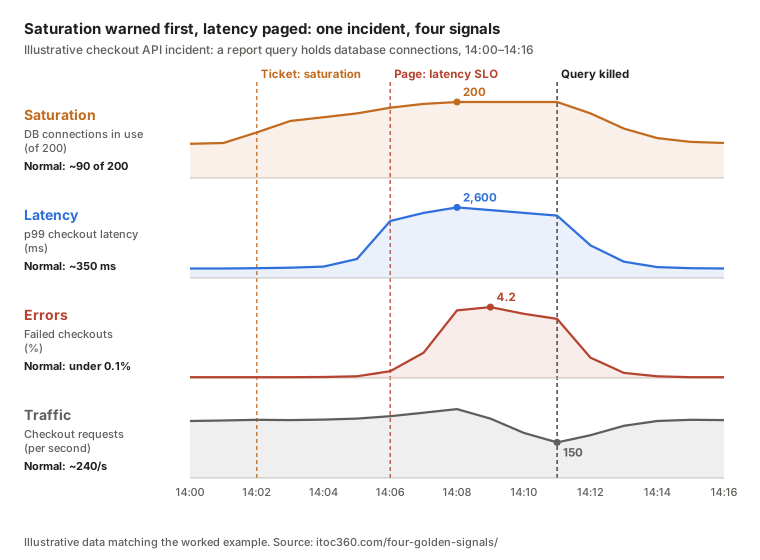
Saturation gave four minutes of warning before users noticed anything, and latency paged before errors began. Measured from the first latency impact to the page, the time to detect was under a minute. Without the saturation and latency signals, the first page would have come from the error rate, or from customers.
Common golden signals mistakes
Averaging latency. The mean hides the slow tail users actually complain about. Use percentiles from histograms.
Mixing success and error latency. Fast failures pull the latency graph down during an outage. Track them separately.
Counting only HTTP 5xx as errors. Implicit errors, such as a 200 response with the wrong content, and policy errors, such as responses slower than promised, are invisible to status-code metrics.
Measuring saturation on the wrong resource. CPU is easy to graph, but the resource that runs out first is often a connection pool, a queue, a file-descriptor limit or a third-party rate limit.
Alerting on raw thresholds. "Page if p99 > 500 ms" fires on every short spike. Alert on SLO burn rate for latency and errors, and on prediction for saturation.
Ignoring traffic drops. Teams alert on spikes but not on silence. A sudden drop is one of the fastest outage signals there is.
Monitoring only the servers. Golden signals measured inside one service can look healthy while users fail at the load balancer, DNS or a dependency. Start at the edge.
Dozens of "golden" signals. The point is to have four, per user journey. A dashboard with forty panels labelled "golden" has lost the idea, and is a common source of monitoring toil.
Where ITOC360 fits
Golden signals are measured in your monitoring stack. ITOC360 handles what happens when one of them fires:
Golden-signal alerts from every tool in one place. ITOC360 Alerting receives alerts from Prometheus, Grafana, Datadog, New Relic, Zabbix and 50+ other sources, so latency alerts from one tool and saturation alerts from another arrive in the same queue.
One incident when the signals move together. AI-driven correlation groups the latency, error and saturation alerts caused by the same problem, as in the checkout example above, into a single incident instead of four paes.
Routed by service. Each alert reaches the on-call engineer for the service it describes, through ITOC360 On-Call schedules and escalation policies.
Detection time you can measure. Every alert, page and acknowledgment is timestamped, so you can see whether your golden signals catch problems before customers do. For how these timestamps feed the core reliability metrics, see the MTTR, MTTA, MTBF and MTTD guide.
Frequently asked questions
What are the four golden signals of monitoring?
Latency, traffic, errors and saturation. Latency is how long requests take, traffic is how much demand the system handles, errors is the rate of failed requests, and saturation is how close the system is to its limits.
Where do the four golden signals come from?
They come from Chapter 6, "Monitoring Distributed Systems", of Google's Site Reliability Engineering book, published in 2016. The book recommends them as the minimum set of measurements for any user-facing system.
Why are they called "golden" signals?
Because they're the few measurements that matter most. Google's SRE book argues that if you can only measure four things about a user-facing system, these are the four, and that alerting on them gives decent coverage on their own.
What is saturation in the golden signals?
Saturation is how full the system is, measured on its most constrained resource, such as memory, disk I/O, a connection pool or a rate limit. It's the one forward-looking signal: it warns before latency and errors are affected, often as a prediction of when the resource will run out.
What is the difference between the golden signals and the RED method?
The RED method measures rate, errors and duration, which correspond to traffic, errors and latency. It leaves out saturation, so it describes user experience but warns later. Golden signals add saturation as an early warning.
What is the difference between the golden signals and the USE method?
The USE method measures utilization, saturation and errors for each resource, such as CPU, memory, disks and network. Golden signals describe a service from the user's side. Teams typically alert on golden signals and use USE during diagnosis.
Are the golden signals the same as observability?
No. The golden signals are a monitoring practice: four metrics that tell you whether users are served well. Observability is the broader ability to understand why, using metrics, logs and traces together. Golden signals are usually the first layer of an observability setup.
Should every golden signal trigger a page?
No. Page on latency and errors when an SLO's error budget is burning fast, on traffic when it drops sharply against its baseline, and on saturation when a critical resource is predicted to run out within hours. Slower trends should open tickets.
What are examples of the four golden signals?
For a web API: p99 request duration (latency), requests per second (traffic), share of requests returning 5xx or wrong content (errors), and connection pool or memory usage (saturation). For a queue: end-to-end message lag, messages per second, dead-lettered messages, and queue depth.
How do the golden signals relate to SLIs and SLOs?
Latency and errors are usually the service level indicators themselves, measured as the share of requests that are fast enough and succeed. An SLO sets a target for them, such as 99.9% of requests succeeding over 30 days, and the gap between the target and 100% is the error budget used for alerting.
Do the golden signals work for low-traffic services?
Yes, with adjustments. With few requests, ratios and percentiles swing wildly, so use longer alert windows, add synthetic checks to create a steady baseline, and alert on counts of failed requests rather than percentages.
Sources
Google SRE Book, Chapter 6: Monitoring Distributed Systems (the four golden signals, symptoms vs causes, latency tails)