ITIL Event Management: What It Is and How to Run It in ITIL 5 (2026)
Quick answer: ITIL event management is the practice of detecting, filtering and responding to events, meaning changes of state that matter to an IT service or one of its components. Events are classified as informational (normal activity worth recording), warning (a threshold is approaching) or exception (something is wrong). Most events need no action; a few become alerts, and a few alerts become incidents. In ITIL 5 the practice is called monitoring and event management, sits in the Operate and Support activities of the Product and Service Lifecycle, and is explicitly connected to observability.
A medium-sized IT environment generates millions of events a day: a backup finished, a disk crossed 80%, a login failed, a pod restarted, a certificate renewed. Almost all of them are normal. A handful mean something is about to break, and one or two mean it already has.
Event management is the discipline of telling those apart, automatically and consistently, so that the right events reach the right people and everything else is recorded without interrupting anyone. In IT service management terms, it's where incident management begins: an incident that's detected late is usually an event that was handled badly.
This guide covers what ITIL event management is, how it differs from alerting and incident management, the three types of events, the process step by step, how an event becomes an incident in practice, the tools involved, the KPIs to track, and what changed in ITIL 5.
What is ITIL event management?
In ITIL, an event is any change of state that has significance for the management of a service or one of its components, which ITIL calls configuration items. Event management is the practice of systematically observing services and their components, recording the changes of state that matter, and deciding what to do about each one.
The ITIL 4 and ITIL 5 name for the practice is monitoring and event management, because the two are inseparable: monitoring observes, event management interprets and decides. Most people still search for and talk about "ITIL event management", and the terms are used interchangeably.
Event vs. alert vs. incident
The three words are often mixed up, but each is a different stage:
Term | Definition | Example | Who acts |
|---|---|---|---|
Event | Any significant change of state | Disk usage on db-02 crossed 80% | Usually nobody; it's recorded |
Alert | An event that needs someone, or something, to act | Disk usage crossed 95% and is still growing | On-call engineer or an automated action |
Notification | The message that tells a person about an alert or incident | A phone call, push notification, SMS, email or chat message | The person receiving it |
Incident | An unplanned interruption to a service, or a reduction in its quality | The database stopped accepting writes; checkout fails | Incident response team |
Two rules follow from this. Not every event is an alert: most events are informational and should never notify anyone. Not every incident starts as an event: some are reported by users through the service desk before monitoring sees them, and every one of those is a signal that event management has a gap.
Why event management matters
The problem event management solves is scale. The number of signals modern systems produce has grown far faster than the number of people available to read them:
Most alerts are ignored. Vectra AI's 2023 State of Threat Detection report, a survey of 2,000 security analysts, found the average security operations center receives 4,484 alerts a day and doesn't get to 67% of them. IT operations teams face the same flood from service telemetry.
Most alerts don't need a person. In ITOC360's analysis of one million production alerts, 60–80% needed no human action at all.
Late detection is expensive. IBM's Cost of a Data Breach Report 2025 puts the average breach at USD 4.44 million, and breaches that take longer to identify and contain cost more.
Good event management attacks all three at once. Filtering and correlation cut the volume, classification makes sure what remains is worth a person's attention, and a clear hand-off to incident management shortens the time between the first warning and a managed response, which is mean time to detect.
What changed for event management in ITIL 5
ITIL (Version 5), released by PeopleCert in 2026, keeps the practice's name and purpose. What changed is where it sits and what it's connected to.
Area | ITIL V3 | ITIL 4 | ITIL 5 |
|---|---|---|---|
Name | Event management (a process) | Monitoring and event management (a practice) | Monitoring and event management (a practice) |
Where it sits | Service Operation stage | Service Value Chain | Operate and Support activities of the Product and Service Lifecycle |
Practice group | — | Service management practices | Product and service management practices |
Focus | Infrastructure events and thresholds | Services and service components | Digital products and services, explicitly linked to observability |
Automation and AI | Automated responses to known events | "Optimize and automate" principle | AI capabilities with a dedicated AI governance module |
Certification | — | ITIL 4 Practitioner: Monitoring and Event Management | Monitor, Support and Fulfil (MSF) module, with incident, problem, service desk and service request management |
Three changes matter for teams running the practice:
Observability is now part of the vocabulary. ITIL 5 connects monitoring and event management to observability: metrics, logs and traces, not only threshold checks. In practice, that means monitoring the four golden signals of each service, not just the health of each server.
It's bundled with the practices it feeds. The MSF module groups event management with incident management, problem management, the service desk and service request management, because detection quality decides how well the other four work. Our guides to ITIL 5 incident management and ITIL 5 problem management cover the next steps in that chain.
AI needs guardrails. Event correlation and noise reduction are among the most common uses of AI in IT operations. ITIL 5's AI governance guidance means deciding in advance which event decisions automation may take alone.
PeopleCert's detailed Official Practice Guides for ITIL 5 are expected in the second half of 2026; the essentials of the practice described here are unchanged from ITIL 4.
Types of events in ITIL
ITIL classifies events into three types. The classification decides what happens next, so getting it right is most of the practice.
Type | Meaning | Examples | Typical response |
|---|---|---|---|
Informational | Normal operation; worth recording, needs no action | A scheduled backup completed · a user logged in · a deployment finished · a batch job started | Log it; use it for reporting and as context during incidents |
Warning | Something is approaching a limit or behaving unusually, but service isn't affected yet | Disk at 85% and rising · response time above normal for 10 minutes · a certificate expires in 14 days · one of three replicas unhealthy | Notify the owning team or open a ticket; act before it becomes an exception |
Exception | A service or component is failing, or a limit has been breached | Database unreachable · error rate above the SLO · disk full · a failed backup · a security control disabled | Raise an alert; open an incident if users are or will be affected |
The same metric can produce all three types at different thresholds. Disk usage is the classic example: 70% is informational, 85% is a warning, 98% is an exception. Defining those thresholds per service, rather than once for every server, is where most event management setups improve fastest.
A useful test for each event rule: if this event fired at 3 a.m., what should happen? If the answer is "nothing", it's informational and should never notify anyone. If the answer is "look at it tomorrow", it's a warning and belongs in a ticket. Only if the answer is "someone needs to act now" is it an exception that should page.
Where events come from
ITIL's scope is wider than infrastructure. The practice covers four broad sources of events:
Source | Examples |
|---|---|
Infrastructure | Servers, storage, network devices, cloud resources, containers: CPU, disk, memory, link state, node health |
Applications and services | Error rates, response times, failed transactions, queue depth, health checks, synthetic tests |
Business | Orders per minute dropping, payment approvals failing, a nightly settlement job not finishing |
Security | Failed logins, disabled controls, suspicious processes, policy violations |
Business events are the most often forgotten and often the most useful: a sudden drop in orders per minute catches problems that no infrastructure metric shows.
ITIL event management vs. SIEM
Security information and event management (SIEM) tools, such as Splunk Enterprise Security or Microsoft Sentinel, also handle "events", but a narrower set: security events, analyzed for threats, investigated by a security team and kept as evidence. ITIL event management covers every kind of service event. In practice the two run side by side: security exceptions from the SIEM are passed into the same alerting and on-call flow, so a detection at 3 a.m. still reaches a person, while the investigation stays with the security team.
The ITIL event management process, step by step
ITIL V3 described event management as a detailed process; ITIL 4 and ITIL 5 describe it as a practice and leave the exact steps to each organization. The classic sequence is still the clearest way to implement it, and modern tools automate most of it:
Event occurs. A component changes state: a threshold is crossed, a job finishes, a service stops responding.
Detection and notification. A monitoring tool detects the change, either by polling the component or by receiving a notification from it, and creates an event record.
Logging. The event is recorded with its source, time, type and the configuration item it belongs to, even if no one will act on it. The log is the history you'll need during an incident.
Filtering. Events that need no further handling, such as most informational events, stop here. This is the single biggest source of noise reduction.
Classification. The remaining events are classified as informational, warning or exception, and given a significance level.
Correlation. Related events are grouped: duplicates are merged, and events from different components that share a cause are linked. Forty "connection refused" events from the API and one "database down" event become one problem. See alert deduplication and alert correlation.
Enrichment. Context is attached before anyone sees the event: the affected service and its owner from the configuration management database, the runbook, recent changes to the component, and links to dashboards. An event that arrives with this context saves the responder the first ten minutes of an incident.
Response selection. The practice decides what to do with each correlated event:
Automated response: restart a service, scale out, run a runbook step, with the action logged.
Alert: notify the owning team, by ticket for warnings or by page for exceptions.
Open an incident: when users are affected, the event becomes the first record of an incident and hands over to incident management.
Open a problem or a change: for recurring events, or events that need a planned fix.
Review. Check that the response worked: the automated action succeeded, the alert was acknowledged, the incident was opened with the right severity.
Close the event. Mark the event resolved once its state returns to normal, often triggered by a matching "recovered" event.
Two things often go missing in real setups. Maintenance windows: events caused by planned work should be suppressed from notification but still logged; see alert suppression and maintenance windows. Closing the loop: events that open incidents should be linked to them, so the postmortem can see exactly which signal fired first.
Mapping event severity to incident priority
Monitoring tools label events with their own severity scales: critical, error, warning, info, or numbered levels. Decide once how those labels translate into alerts and incident priority, and apply the same mapping to every tool:
Event type and tool severity | Alert | Incident priority if users are affected |
|---|---|---|
Exception · critical | Page immediately | P1 / SEV1 or P2 / SEV2, depending on scope |
Exception · error | Page the owning team | P2 / SEV2 or P3 / SEV3 |
Warning | Ticket to the owning team, no page | Usually none; P3 / SEV3 if impact appears |
Informational | None; logged only | None |
The final incident priority still comes from impact and urgency, not from the tool's label; the ITIL 5 incident management guide includes the full impact × urgency matrix and a P1–P5 to SEV mapping.
From event to alert to incident: a worked example
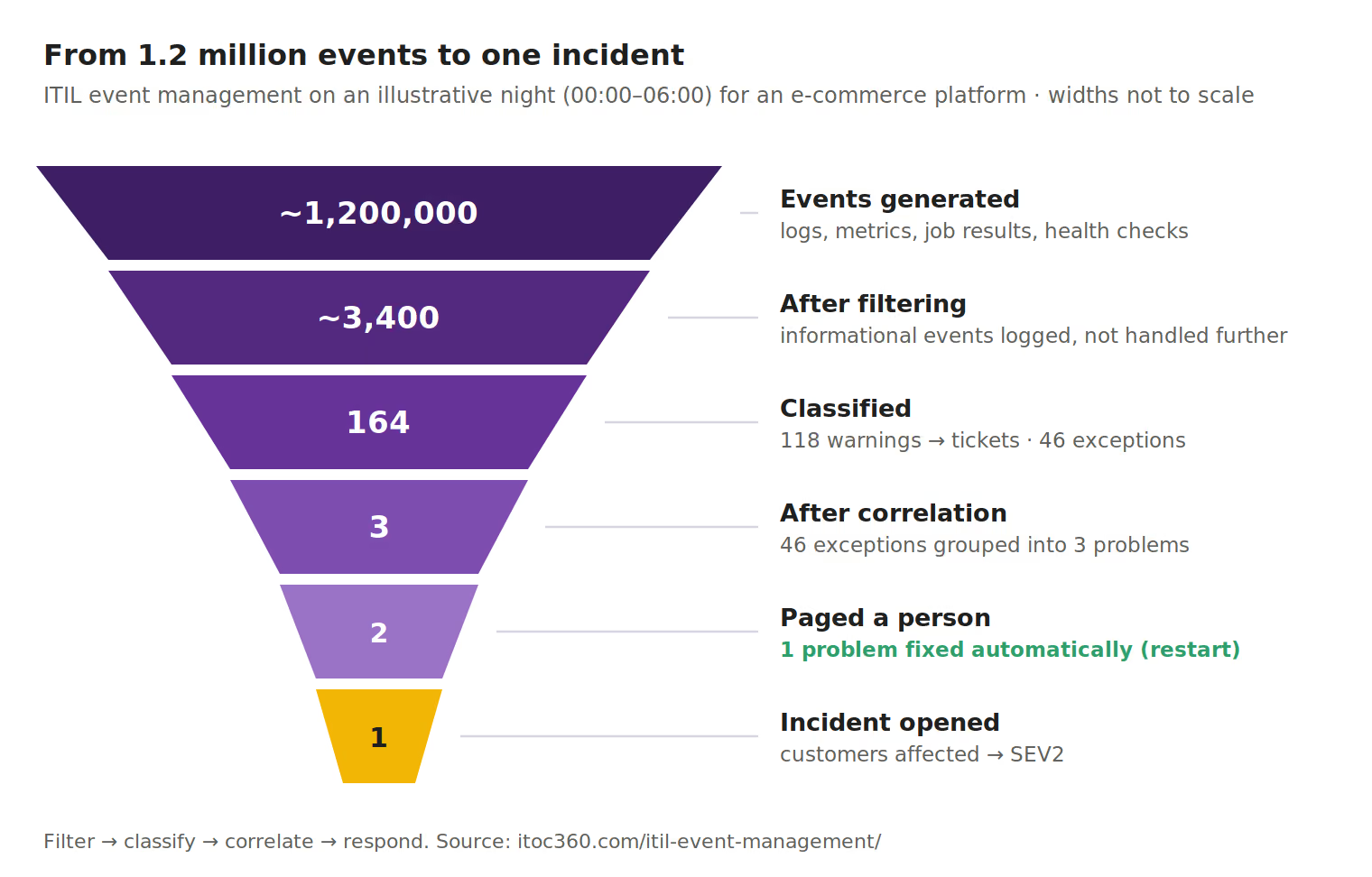
An illustrative night for an e-commerce platform, to show how few events should ever reach a person.
The funnel, 00:00 to 06:00:
Stage | Count | What happened |
|---|---|---|
Events generated | ~1,200,000 | Logs, metrics crossing thresholds, job results, health checks across all services |
After filtering | ~3,400 | Informational events logged and dropped from further handling |
Classified as warnings | 118 | Mostly capacity trends and slow responses; sent to team queues as tickets |
Classified as exceptions | 46 | Failures and breached thresholds |
After correlation | 3 | The 46 exceptions grouped into three underlying problems |
Alerts that paged someone | 2 | One problem was handled by an automated restart |
Incidents opened | 1 | One problem affected customers |
The incident, step by step:
Time | Event | Event management decision |
|---|---|---|
02:10 | Payment database: connections at 80% of the pool | Warning → ticket to the database team |
02:24 | Connections at 95%; query latency rising | Exception → correlated with the 02:10 warning |
02:26 | Checkout API: 31 "database timeout" errors in two minutes | Exception → correlated with the database events into one problem |
02:27 | Checkout error rate breaches its SLO | User impact confirmed → page the payments on-call engineer; open a SEV2 incident linked to all correlated events |
02:41 | A long-running report query is stopped; connections drop | Recovery events close the correlated events; the incident moves to resolution |
Without filtering and correlation, the on-call engineer would have received 31 timeout alerts plus the database alerts, and would have had to work out for themselves that they shared a cause. With them, one page arrived with the full chain of events attached, and the warning at 02:10 gave the triage a head start.
How event management connects to other ITIL practices
Event management is usually the first practice to notice that something has changed, so almost every other operational practice depends on what it produces:
Practice | What event management gives it | What it gives back |
|---|---|---|
Incident management | Exception events that open incidents, with correlated events attached | Confirmation of which events actually mattered |
Problem management | Recurring and correlated events that point to an underlying cause | Known errors and workarounds that change how events are handled |
Change enablement | Spikes in exceptions after a deployment, as evidence to review or roll back | Change schedules, so expected events during planned work can be suppressed |
Service configuration management | Changes of state that update configuration records | The configuration items and service relationships that give events their context |
Service level management | Availability and performance data behind SLA reporting | Targets that set warning and exception thresholds |
Availability and capacity management | Trends that show where limits are approaching | Thresholds and forecasts |
Information security management | Security exceptions shared with the security team | Detection rules and security event sources |
Continual improvement | Patterns that show where monitoring or services should change | Improved thresholds, rules and automation |
The two most important links are with incident management and problem management. In ITIL 5 both sit in the same Monitor, Support and Fulfil module as event management.
Who owns event management?
The practice needs a named owner, often the head of IT operations, a NOC manager or an SRE lead. The owner is accountable for monitoring coverage, the event classification policy, alert quality and the hand-off to incident management. Without one, thresholds drift, nobody removes noisy rules, and the alert count grows every quarter.
A second question is where the rules live. When a central operations team writes every rule for every service, the rules lag behind the systems and the people writing them don't know what each event means. Most teams do better with a split:
Owned centrally | Owned by each service team |
|---|---|
Integrations with monitoring tools, the classification policy, global filtering and maintenance-window rules, the severity mapping | Thresholds and correlation rules for their own services, runbooks, the on-call rotation that receives their alerts |
This keeps the policy consistent while putting each decision with the people who understand the service.
Monitoring vs. event management
ITIL puts the two in one practice, but they answer different questions:
Monitoring | Event management | |
|---|---|---|
Question it answers | What is the state of this component right now? | Does this change of state matter, and what should happen? |
Output | Metrics, logs, traces, health checks | Classified, correlated events with a chosen response |
Typical tools | Prometheus, Datadog, Zabbix, cloud monitoring, synthetic checks | Event correlation and alerting platforms, AIOps, the event console of an ITSM suite |
Failure mode | Blind spots: something breaks and nothing records it | Noise: everything is recorded and everything alerts |
A simple way to remember it: monitoring tells you; event management decides. Most organizations have plenty of monitoring and too little event management, which is why alert fatigue is so common. In ITIL 5 terms, strong observability improves what monitoring can see; event management determines whether any of it reaches the right person at the right time.
If you're building monitoring from scratch, start with our guide to IT monitoring.
ITIL event management tools
No single tool covers the whole practice. Most organizations combine three or four categories:
Category | Role in event management | Examples |
|---|---|---|
Monitoring and observability | Generate events: detect changes of state and send them on | Prometheus with Alertmanager, Zabbix, Nagios, Datadog, Dynatrace, New Relic, Grafana |
ITSM event management modules | Receive events into the service management platform and link them to configuration items and incidents | ServiceNow Event Management (ITOM), BMC Helix Operations Management |
AIOps and event correlation | Filter, deduplicate and correlate events from many sources | BigPanda, Splunk ITSI, Dell APEX AIOps (formerly Moogsoft) |
Alerting and incident response platforms | Correlate, route to the on-call owner, escalate, and open incidents | ITOC360, PagerDuty, incident.io |
When choosing tools for event management specifically, check five things:
Ingestion: can it receive events from every monitoring tool you run, by native integration, webhook or email?
Correlation: how many separate alerts does one simulated failure produce?
Classification rules: can thresholds and event types be set per service, not just per host?
Suppression: are maintenance windows scoped and time-limited, with suppressed events still logged?
Hand-off: does an exception open an incident with the correlated events attached, and can it reach your ITSM tool?
For how event correlation works in more depth, see what is AIOps and how to reduce alert fatigue.
Event management KPIs
The practice works when the right events reach people quickly and the rest don't reach them at all. Six metrics capture both sides:
KPI | What it measures | Healthy direction |
|---|---|---|
Monitoring-detected rate | Share of incidents first detected by monitoring rather than reported by users | Rising; aim for most incidents to be caught before users report them |
Event-to-alert ratio | How many events it takes to produce one alert | Rising, as filtering improves |
Alert-to-incident ratio | How many alerts fire per real incident | Falling toward 1, as correlation improves |
Non-actionable alert rate | Share of alerts closed with no action taken | Falling; ITOC360's analysis of one million alerts found 60–80% needed no action |
Time from first exception event to incident | How long a real problem takes to become a managed incident | Falling; directly shortens MTTD |
Automated response success rate | Share of automated responses that resolved the event without a person | Stable or rising, with every failure reviewed |
Review them monthly, alongside the incident metrics in our MTTR, MTTA, MTBF and MTTD guide. The monitoring-detected rate is the most important single number: every incident users report first is a gap in event management.
Common event management mistakes
Every event becomes an alert. Without filtering and classification, informational events reach people, and the real exceptions get lost among them. Most alert fatigue starts here.
Monitoring servers instead of services. Every host looks healthy while users can't check out. Add service-level and business events, not just infrastructure ones.
One threshold for everything. An 85% disk warning makes sense for a database and none for a log volume that rotates hourly. Set thresholds per service.
No correlation. One failure produces forty alerts, and the on-call engineer has to work out by hand that they share a cause.
Events without context. An alert that doesn't say which service it affects, who owns it or where the runbook is costs the responder the first minutes of every incident. Keep the configuration data that enrichment depends on up to date.
Suppressing by switching monitoring off. Planned work should suppress notifications, not stop collecting events; see alert suppression and maintenance windows.
No owner for the rules. Rules are added after every incident and never removed. Review the noisiest rules every month and delete the ones that never led to action.
Not checking what users reported first. Every incident that users reported before monitoring did is evidence of a missing event rule, and it should be reviewed as such.
Where ITOC360 fits
ITOC360 works at the event-to-incident step of the practice: after monitoring tools generate events, and before an engineer starts working on an incident.
Process step | What ITOC360 does |
|---|---|
Detection and logging | Receives events from 50+ monitoring sources, including Prometheus, Zabbix, Datadog, Grafana and cloud monitoring, and keeps a record of each one |
Filtering and correlation | Deduplicates repeated events and uses machine learning to group related events into a single incident, in ITOC360 Alerting |
Suppression | Holds back notifications for planned work with scoped maintenance windows |
Response selection | Routes each alert to the on-call owner of the affected service and escalates if nobody acknowledges, through ITOC360 On-Call |
Hand-off to incident management | Opens the incident with the correlated events and a timestamped timeline in ITOC360 Incident Response |
It complements, rather than replaces, the monitoring tools that generate events and the ITSM platform that keeps the long-term record.
Frequently asked questions
What is event management in ITIL?
Event management is the ITIL practice of detecting changes of state that matter to an IT service, filtering and classifying them, and choosing a response: log the event, take an automated action, raise an alert or open an incident. In ITIL 4 and ITIL 5 it's called monitoring and event management.
What is an event in ITIL?
An event is any change of state that has significance for the management of a service or a configuration item, such as a threshold crossed, a job completed or a component that stopped responding. Most events are informational and need no action.
What are the three types of events in ITIL?
Informational events record normal activity, such as a completed backup. Warning events signal that something is approaching a limit, such as disk at 85%. Exception events signal a failure or a breached limit, such as a database that's unreachable.
What is the difference between an event and an incident?
An event is any significant change of state; an incident is an unplanned interruption or reduction in quality of a service. Many incidents start as exception events, but most events never become incidents, and some incidents are reported by users before any event is detected.
What is ITSM event management?
ITSM event management is the same practice seen from the service management side: events are linked to configuration items and services, and exceptions open incident records in the ITSM platform, so detection connects to incident, problem and change management.
Which is not a feature of ITIL event management?
Resolving incidents and removing root causes aren't part of event management. Event management detects, filters, classifies and correlates events and chooses a response; restoring service belongs to incident management, and fixing underlying causes belongs to problem management.
Is alert management the same as ITIL event management?
Alert management is part of it. Event management covers every significant change of state, including the many that never notify anyone; alert management covers the subset that needs action: routing, escalation, acknowledgment and noise reduction.
What is monitoring and event management in ITIL 5?
It's the ITIL 5 name for the practice. It sits in the Operate and Support activities of the Product and Service Lifecycle, connects explicitly to observability, and is part of the Monitor, Support and Fulfil module alongside incident management, problem management, the service desk and service request management.
What is the difference between ITIL event management and SIEM?
SIEM tools collect and analyze security events to detect threats and support investigations. ITIL event management covers all service events, including infrastructure, application and business events as well as security. Security exceptions from a SIEM are usually passed into the same alerting and on-call flow so they reach a person quickly.
Who is responsible for event management?
A named practice owner, often the head of IT operations, a NOC manager or an SRE lead, is accountable for monitoring coverage, the classification policy, alert quality and the hand-off to incident management. Thresholds and rules for each service are best owned by the team that runs it.
Sources
PeopleCert / ITIL: New ITIL explained (Version 5)
PeopleCert: ITIL 4 Practitioner: Monitoring and Event Management
ITSM.tools: ITIL Version 5 management practices explained
ITSM.tools: 20 important changes from ITIL 4