Incident Triage: How to Assess and Prioritize Incidents (2026)
Quick answer: Incident triage is the first, fast assessment of a new incident. It answers four questions: is it real, how bad is it, who owns it, and what happens next. In IT operations, triage confirms the alert, measures user impact, assigns a severity level, routes the incident to the right owner, and decides whether to escalate or open a major incident. It should take minutes, not hours: the goal is a correct first decision, not a diagnosis. Security teams use the same word for SOC alert triage, where analysts decide whether a detection is a true positive and how urgently to investigate it.
The word comes from emergency medicine. When more patients arrive than doctors can treat at once, triage decides who is seen first, based on how urgent each case is, not on who arrived first or who is shouting loudest.
Incidents work the same way. At 3 a.m., an on-call engineer may face a dozen alerts at once. Some are noise, one is a slow leak, and one is about to take checkout offline. Triage is the step that tells them apart, and it decides everything that follows: who gets paged, how fast, and whether the response is one engineer or a full incident team.
It's also where response time is most often lost. Most teams measure how long it takes to fix an incident. Fewer measure how long it took to decide it was serious. This guide covers both: what triage is, a step-by-step process with time targets, a triage checklist and decision matrix, how security triage differs, and how to automate the parts that don't need a human.
What is incident triage?
Incident triage is the process of rapidly evaluating a newly detected incident to decide its validity, its severity and its owner, so the right response starts as quickly as possible. It sits between detection and response in the incident response lifecycle: monitoring raises the signal, triage decides what the signal means, and the response team acts on that decision.
Triage is deliberately shallow. It isn't root cause analysis, and it isn't the fix. A triage engineer who starts debugging has stopped triaging, and any other incident waiting in the queue is now waiting longer.
Three kinds of triage that share the name
Kind | What's being triaged | Who does it | Key decision |
|---|---|---|---|
Incident triage (IT operations, SRE) | A confirmed or suspected service disruption | On-call engineer, service desk, NOC | Severity, owner, and whether to escalate or declare a major incident |
Alert triage | Individual alerts before they become incidents | On-call engineer, or automation | Is this alert actionable, a duplicate, or noise? |
Security incident triage (SOC) | Security detections from SIEM, EDR and other tools | SOC analysts | Is this a true positive, and how urgently must it be investigated or contained? |
In practice the first two blur together, because one incident usually arrives as many alerts. Good alert triage, mostly done by alert correlation and deduplication, is what makes incident triage fast: it turns forty alerts into one incident before a human looks at it.
Triage vs. severity vs. priority
These three terms are easy to mix up. Triage is the activity. Severity is one of its outputs: how much the incident is hurting users and the business, using your incident severity levels. Priority is another output: how urgently it must be worked on relative to everything else, which can change with business context. A triage decision always produces both, along with an owner.
The incident triage process, step by step
Triage has six steps. The time targets below are measured from the moment the alert is acknowledged, and they're starting points: tighten them as your process matures.
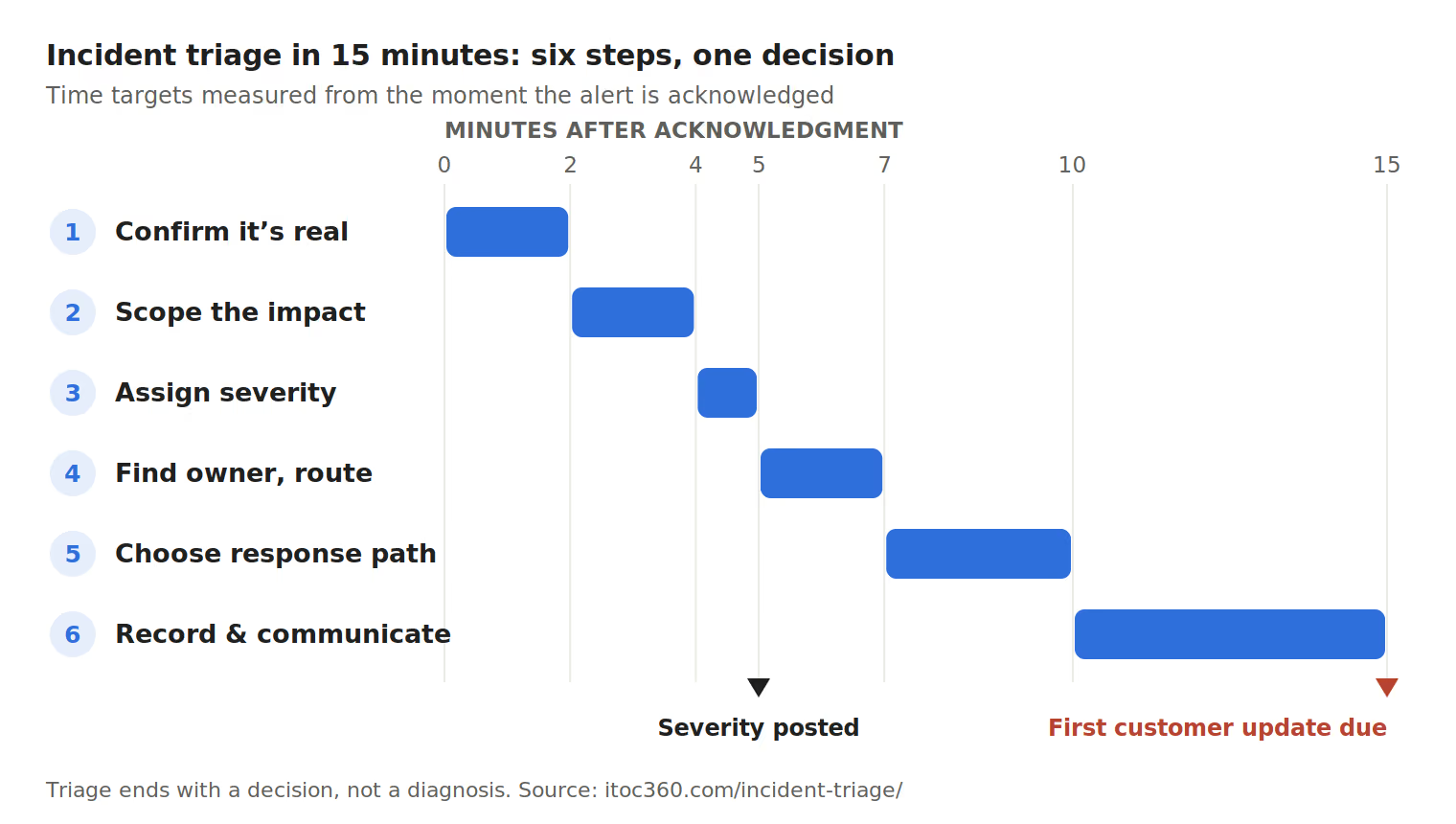
Confirm it's real (minutes 0–2). Check whether the signal reflects real user impact or a monitoring artifact. Look at the dashboard behind the alert, check for a planned maintenance window, see whether other alerts for the same service fired, and check the status pages of your cloud provider and key vendors. If it's noise, close it and note why, so the alert can be tuned later.
Scope the impact (minutes 2–4). Answer four questions: what are users seeing, how many are affected, since when, and is it getting worse? "Checkout errors for about 30% of EU users since 02:41, rising" is a triage answer. "Something's wrong with the payments service" isn't.
Assign severity (by minute 5). Use the decision matrix below, based on scope and impact, not on how alarming the alert looks. When in doubt, pick the higher severity: downgrading later is cheap, under-reacting isn't.
Identify the owner and route it (by minute 7). Find the team that owns the affected service and page whoever is on call for it, through your normal alert routing and escalation policy. Check the deployment log too: a release or configuration change in the last few hours is the most common trigger, and its author is often the fastest person to involve.
Choose the response path (by minute 10). Triage ends with one of five decisions: close it as noise, downgrade it to a ticket, handle it as a single responder, open an incident with named incident response roles, or declare a major incident.
Record and communicate (by minute 10–15). Post a short triage summary in the incident channel, using the template below. If customers are affected, the first status update should go out within 15 minutes, even if it only says the issue is acknowledged.
The triage summary. One message that anyone joining later can read:
Triage summary (02:49 UTC) · Severity: SEV2 · Impact: ~30% of EU checkout requests failing since 02:41, rising · Owner: payments on-call (Priya) · Suspected trigger: payment-gateway config change at 02:38 · Next step: rollback being evaluated · Next update: 03:05
Triage doesn't happen only once. Re-triage whenever the facts change: if impact spreads, a workaround appears, or a SEV2 is still unresolved after an agreed time, revisit the severity and the response path. Many teams make re-triage automatic, for example escalating any SEV2 that's still open after two hours.
Incident triage checklist
Pin this in your incident channel or attach it to every page. Each question has a short answer; if one takes longer than a minute to answer, note "unknown" and move on.
Is it real?
Does the dashboard behind the alert show a real change, not a gap in data?
Is there a planned maintenance window or a load test running?
Did other alerts for the same service or its dependencies fire at the same time?
Is a cloud provider, CDN, DNS or payment vendor reporting an outage?
How bad is it?
What are users unable to do, in plain language?
Roughly what share of users, requests or regions are affected?
When did impact start, as opposed to when the alert fired?
Is it stable, getting worse, or recovering on its own?
Is there a workaround users can use?
Is data loss, data corruption or a security breach possible?
Who owns it?
Which service is failing, and which team owns it?
Who is on call for that team right now?
Was anything deployed or changed in the last few hours, and by whom?
Is there a runbook for this alert or service?
What happens next?
Severity assigned and posted in the channel
Response path chosen: noise, ticket, single responder, incident with roles, or major incident
Owner paged and acknowledged
Triage summary posted, with the next update time
The question teams skip most often is "when did impact start?" Alerts fire after thresholds are crossed, often minutes after users first saw errors. Recording the real start time matters for the customer update, for SLA reporting and for the postmortem timeline.
Triage decision matrix: from impact to severity to response
The matrix turns two answers from the checklist, how many users are affected and how badly, into a severity. It's the same model used in our SEV1 guide, so triage and severity definitions never disagree.
Scope ↓ / Impact → | Blocked (can't complete the task) | Degraded (slow or partial) | Cosmetic |
|---|---|---|---|
All or nearly all users | SEV1 | SEV2 | SEV3 |
A large subset | SEV2 | SEV2 | SEV4 |
A small subset | SEV3 | SEV3 | SEV4 |
Internal only | SEV3 | SEV4 | SEV5 |
Two modifiers override the grid. Possible data loss or a security breach is SEV1, whatever the user count. And timing can raise the severity by one level: a SEV2 during a launch or peak sales window may need SEV1 handling.
The severity then decides the response path:
Severity | Response path | Who is paged | Escalate if… |
|---|---|---|---|
SEV1 | Major incident, all roles filled | Service on-call, incident commander, communications lead | Not acknowledged within 5 minutes |
SEV2 | Incident with named roles | Service on-call and incident commander | Not acknowledged within 15 minutes, or unresolved after 2 hours |
SEV3 | Single responder, updates in the incident channel | Service on-call, business hours or 24/7 by service tier | Impact spreads or a workaround fails |
SEV4–SEV5 | Ticket in the normal queue | Nobody paged | Recurs or grows |
The acknowledgment windows match common defaults for paging; set your own in your escalation policy. For how many people each severity needs and which roles can be combined, see incident response roles.
Triage playbooks for common scenarios
The checklist works for any incident, but most incidents fall into a handful of recurring patterns. A short playbook for each pattern tells the responder what to check first, so triage starts from the most likely cause instead of a blank page.
Full outage of a core service
Trigger: health checks or synthetic tests failing, error rate near 100%, a sudden drop in traffic or orders.
First 5 minutes:
Confirm from outside your own network, using synthetic checks or a second region, to rule out a monitoring failure.
Check the deployment and configuration change log for the last few hours.
Check cloud provider, DNS and CDN status pages.
Declare SEV1 and open a major incident; don't wait for the cause.
Key questions: one region or all? Did anything change? Are dependencies such as the database, identity provider or message queue healthy?
Performance degradation
Trigger: latency above the SLO threshold, timeouts, rising error budget burn rate.
First 5 minutes:
Find out which user journeys are slow and for whom: all users, one region, one customer tier.
Compare traffic against normal levels; a spike points to load, a flat line points to a dependency or a bad change.
Check saturation: CPU, memory, connection pools, queue depth.
Assign SEV2 if a core journey is badly slow for many users, SEV3 if a workaround exists.
Key questions: is it getting worse? Is one dependency slow, or everything? Does the error budget burn rate justify a page or a ticket?
A bad deploy or configuration change
Trigger: errors or latency starting within minutes of a release, feature flag change or infrastructure change.
First 5 minutes:
Line up the impact start time against the change log.
Page the author of the change and the service owner.
Decide on rollback early: if rolling back is safe and fast, do it before diagnosing.
Pause other deployments to the same service until the incident is resolved.
Key questions: what exactly changed? Is rollback safe, or does the change include a one-way database migration? Did the change go to all users at once or progressively?
A third-party or upstream outage
Trigger: failures concentrated on calls to one external provider: payments, email, maps, authentication, a cloud API.
First 5 minutes:
Check the vendor's status page and your own dashboards for that dependency.
Measure what your users can and can't do while the vendor is down.
Check for a fallback: a backup provider, a queue that can hold requests, a degraded mode.
Set severity on your users' impact, not on the vendor's own rating.
Key questions: is there a failover? Is the vendor acknowledging the problem? What should customers be told? Your users still see it as your outage.
A suspected security incident
Trigger: a security detection alongside operational symptoms, such as unusual traffic, unexpected processes, or a spike in failed logins.
First 5 minutes:
Bring in the security team immediately; don't investigate alone.
Preserve evidence: avoid restarting or rebuilding affected systems until security agrees.
Treat possible data exposure as SEV1, whatever the user count.
Agree who decides on containment steps such as taking a system offline.
Key questions: is this an attack or a coincidence? Which accounts and systems are involved? Is data at risk? See the security triage section below for how SOC teams classify detections.
Security incident triage
In a security operations center (SOC), triage happens before most of the steps above. Detections from SIEM, EDR, email security and identity tools arrive in large numbers, and analysts first decide which ones are real. The vocabulary is different:
Speed matters more here than almost anywhere else. IBM's Cost of a Data Breach Report 2025 puts the average breach lifecycle, from identification to containment, at 241 days, the shortest in nine years, and credits faster detection for the improvement. Triage is the first place that time is won or lost.
Outcome | Meaning | Typical next step |
|---|---|---|
True positive | Malicious activity really happened | Escalate to investigation and containment |
Benign true positive | The detection is correct, but the activity is authorized (an admin running a scanner, a penetration test) | Close, and consider an exception for that source |
False positive | The detection fired on harmless activity | Close, and tune the detection rule |
Undetermined | Not enough information yet | Gather more context, or escalate to a senior analyst |
Security triage weighs different factors from operations triage:
Asset criticality: is the affected host a laptop or a domain controller?
Identity and privilege: whose account is involved, and what can it access?
Confidence and corroboration: do several signals point the same way?
Attack stage: is this early reconnaissance, or does it look like data exfiltration?
Containment urgency: will waiting minutes allow the attacker to spread?
The NIST SP 800-61 Rev. 3 guidance frames this within the detect and respond functions of the NIST Cybersecurity Framework 2.0.
Where the two triage processes meet. A security incident often becomes an operations incident when containment means taking a system offline. When that happens, the security lead and the operations incident commander agree on the decision together, and the operations team triages the resulting outage as its own incident. Security detections that need a human after hours are usually routed through the same on-call and escalation tooling that operations uses.
Automated and AI-enabled incident triage
Most of triage is gathering facts, and machines are faster at that than people. Automated incident triage handles the repeatable parts before a human sees the incident, so the on-call engineer starts at step 3 with the context already in front of them. AI-enabled triage goes a step further and uses patterns from past incidents to suggest severity, likely cause or the right owner.
Triage step | What automation can do | What still needs a human |
|---|---|---|
Confirm it's real | Suppress alerts during maintenance windows; drop flapping and self-resolving alerts; check vendor status feeds | Judging an alert that looks real but doesn't match user reports |
Group the signals | Deduplicate repeats and correlate related alerts into one incident | Spotting that two "unrelated" incidents share a cause |
Scope the impact | Pull error rates, affected regions and traffic data into the incident | Translating it into what users can and can't do |
Assign severity | Suggest a severity from rules or from similar past incidents | Confirming it, especially for SEV1 and SEV2 |
Route to the owner | Map the service to its owning team and page the current on-call | Deciding to pull in another team when the cause is unclear |
Add context | Attach recent deploys, the runbook, related past incidents and dashboards | Deciding which context matters |
Choose the path | Escalate automatically when acknowledgment windows expire | Declaring a major incident and making business trade-offs |
The payoff is concentrated in the first two rows. In ITOC360's analysis of one million production alerts, 60–80% needed no human action at all. Removing them before triage starts is the single biggest gain.
How to automate incident triage in an SRE workflow
Measure first. Record time from alert to severity assigned for a month, and how often severity is changed afterward.
Fix the inputs. Make sure every alert carries a service name and that every service has an owner. Routing can't be automated without a service catalog.
Remove noise. Turn on deduplication, correlation and maintenance-window suppression before anything else.
Enrich every incident. Attach the runbook, recent changes and the service's dashboard automatically.
Suggest, then confirm. Let rules or AI propose a severity, but keep a human confirmation for SEV1 and SEV2 until the suggestions prove accurate.
Track accuracy. Compare suggested severity with final severity each month. Raise automation's authority only where it's consistently right.
This is where AIOps earns its place in incident management: not by replacing the triage decision, but by making sure the human who makes it has everything they need within the first minute.
Incident triage tools
No single tool does all of triage. Most teams combine three or four of the categories below, and the important question is how well they hand information to one another.
Category | Role in triage | Examples |
|---|---|---|
Incident response and on-call platforms | Group alerts, suggest severity, route to the on-call owner, escalate, open the incident with roles and a timeline | ITOC360, PagerDuty, incident.io, Rootly, FireHydrant |
AIOps and event correlation | Correlate events across many monitoring tools and suppress noise before alerts reach a human | BigPanda, ServiceNow ITOM / AIOps |
Monitoring and observability | Detect the problem and provide the dashboards, traces and logs triage relies on | Datadog, Grafana, Prometheus, New Relic, Zabbix |
SOAR and AI SOC platforms | Enrich and triage security detections, run containment playbooks | Splunk SOAR, Palo Alto Networks Cortex XSOAR, Torq |
ITSM and service desk | Record the incident for audit, link it to problem and change records | ServiceNow, Jira Service Management |
When comparing tools for triage specifically, test five things in a trial:
How many separate pages does one simulated failure produce?
Does every incident arrive with a service, an owner and a suggested severity?
Are recent changes, the runbook and dashboards attached automatically?
Can responders acknowledge, change severity and escalate from Slack, Teams or a phone?
Can you report on time to triage, severity changes and reassignments without building your own dashboards?
For a side-by-side comparison of operations platforms, see the best incident management software in 2026.
Incident triage metrics
Triage is rarely measured on its own, which is why its delays stay invisible inside MTTR. Five metrics make it visible:
Metric | What it measures | Starting target |
|---|---|---|
Time to acknowledge (MTTA) | Alert fired → a human responds | Under 5 minutes for paging alerts |
Time to triage | Acknowledged → severity and owner assigned | Under 10 minutes |
Time to declare | Impact began → incident (or major incident) declared | Under 5 minutes for SEV1 |
Severity change rate | Share of incidents whose severity changed after triage | Track the trend; some change is healthy |
Reassignment rate | Share of incidents handed to a different team after triage | Falling over time |
Read the last two together. A high severity change rate means your criteria are vague or applied inconsistently. A high reassignment rate means routing or service ownership is unclear, and every reassignment adds a second wait to the response. Both are fixed upstream of the incident: better severity definitions, a current service catalog, and alerts tagged with the service they belong to.
Common incident triage mistakes
Diagnosing instead of triaging. The first responder starts debugging before assigning severity or paging the owner. Ten minutes later the cause is still unknown, and nobody else knows there's an incident.
Triaging by alert volume. The noisiest alert gets attention first. Severity comes from user impact, not from how many alerts fired or how red the dashboard looks.
Under-classifying out of hope. The responder hopes it's small and labels it SEV3. Declare high and downgrade later.
Debating severity for too long. If two people disagree for more than a minute, take the higher severity and move on. The matrix exists so this argument doesn't happen at 3 a.m.
Recording when the alert fired, not when impact started. It skews customer updates, SLA reporting and the postmortem.
Never re-triaging. An incident that started as SEV3 spreads, but nobody raises its severity, so the right people are never paged.
No owner for the service. Triage stalls when nobody knows which team owns the failing component. Keep the service catalog current.
Leaving triage entirely to humans. Without deduplication and correlation, the on-call engineer triages forty alerts instead of one incident, and slows down on exactly the night it matters most.
Where ITOC360 fits
ITOC360 automates the fact-gathering half of triage, so the on-call engineer spends their first minutes deciding, not searching:
One incident, not forty alerts. ITOC360 Alerting deduplicates and correlates alerts from 50+ monitoring sources and suppresses them during maintenance windows, so triage starts from a single incident.
A suggested severity. Automatic severity tagging proposes a level from impact patterns, which the responder confirms or changes.
The owner, paged first time. Service-based routing and on-call schedules page the team that owns the failing service, and escalation policies move the page on if nobody acknowledges.
Context attached. ITOC360 Incident Response opens the incident with its runbook and a timestamped timeline, so the real impact start time and every triage decision are recorded for the postmortem.
Frequently asked questions
What is incident triage?
Incident triage is the first, fast assessment of a new incident: confirming it's real, measuring its impact, assigning a severity, routing it to the right owner and choosing the response path. It should take minutes and ends with a decision, not a diagnosis.
What is triage in incident response?
In the incident response lifecycle, triage is the step between detection and response. It turns a raw alert into a classified incident with a severity, an owner and a plan, so the response starts with the right people at the right urgency.
Who performs incident triage?
Usually the first responder: the on-call engineer, a service desk analyst or a NOC operator. In security, SOC analysts triage detections. Increasingly, automation performs the first pass by deduplicating alerts, enriching them with context and suggesting a severity.
What is automated incident triage?
Automated incident triage uses rules and tooling to handle the repeatable parts of triage without a human: suppressing noise, grouping related alerts, attaching context, suggesting severity and routing to the on-call owner. AI-enabled triage adds pattern matching against past incidents to suggest severity, likely cause or owner.
How do you automate incident triage for SRE workflows?
Measure your current time to triage, tag every alert with a service and owner, turn on deduplication and correlation, enrich incidents with runbooks and recent changes, and let automation suggest severity while humans confirm SEV1 and SEV2. Expand automation's authority only where its suggestions prove accurate.
What is the difference between triage and escalation?
Triage decides how serious an incident is and who should handle it. Escalation moves it to more people or more senior people when the first responder doesn't acknowledge, can't resolve it, or the severity rises. Triage often triggers escalation, but they're separate steps.
What are the 5 stages of triage?
The phrase comes from emergency medicine, where five-level systems such as the Emergency Severity Index sort patients from most to least urgent. Incident management borrows the same idea: five severity levels, SEV1 to SEV5, assigned during triage.
What are the three types of triage?
In mass-casualty medicine, patients are commonly sorted into immediate, delayed and minor categories. The IT equivalent is the triage outcome: incidents that need an immediate response, those that can wait for a single responder or business hours, and minor issues that become tickets.