Incident Management Process: 7 Steps, Flow Diagram and Template (2026)
Quick answer: The incident management process is the sequence of steps a team follows to restore a disrupted service as quickly as possible and learn from what happened. It has seven steps: 1. detect and log the incident, 2. categorize and prioritize it by impact and urgency, 3. assign and escalate it to the right responder, 4. investigate and diagnose the cause, 5. resolve and recover the service, 6. communicate with stakeholders throughout, and 7. close and review it with a postmortem. ITIL describes the same flow in five steps and NIST in four; the activities are the same, grouped differently.
Every team has an incident management process, whether or not it's written down. In some teams it's a defined flow with owners and time targets. In others it's whoever notices first, a group chat and a lot of guessing about who should be doing what.
The difference shows up in the numbers. A defined process means the right person is paged in minutes, severity is set the same way every time, customers hear from you before they open tickets, and the same incident doesn't happen twice. Without one, every incident is improvised, and the time lost between steps is usually larger than the time spent fixing the problem.
This guide walks through the seven steps with a flow diagram, the owner, inputs, outputs and time target for each step, how the steps map to ITIL, NIST and SANS, the ITIL and security variants of the process, how to implement and improve it, and a free template for documenting your own.
What is the incident management process?
The incident management process is the defined set of activities used to handle an incident, meaning an unplanned interruption to a service or a reduction in its quality. Its goal is simple: restore normal service as quickly as possible and minimize the impact on users and the business.
Two things are deliberately outside that goal. Finding and removing the underlying cause belongs to problem management, and making planned changes belongs to change management. Incident management is about getting users working again, even with a workaround.
Process | Question it answers | Typical output |
|---|---|---|
Incident management | How do we restore service now? | Service restored, often with a workaround |
Problem management | Why did it happen, and how do we stop it recurring? | Root cause, known error, permanent fix |
Change management | How do we make the permanent fix safely? | An approved, tested change |
Incident response | Often used for the same activity; in security, the specific process for handling breaches and attacks | Containment and recovery |
The difference between the first two is covered in incident management vs problem management.
Who uses it? IT service desks and operations teams, SRE and DevOps teams running production systems, managed service providers, and security teams for security incidents. The steps below apply to all of them; the ITIL and security variants are covered further down.
Incident management process flow
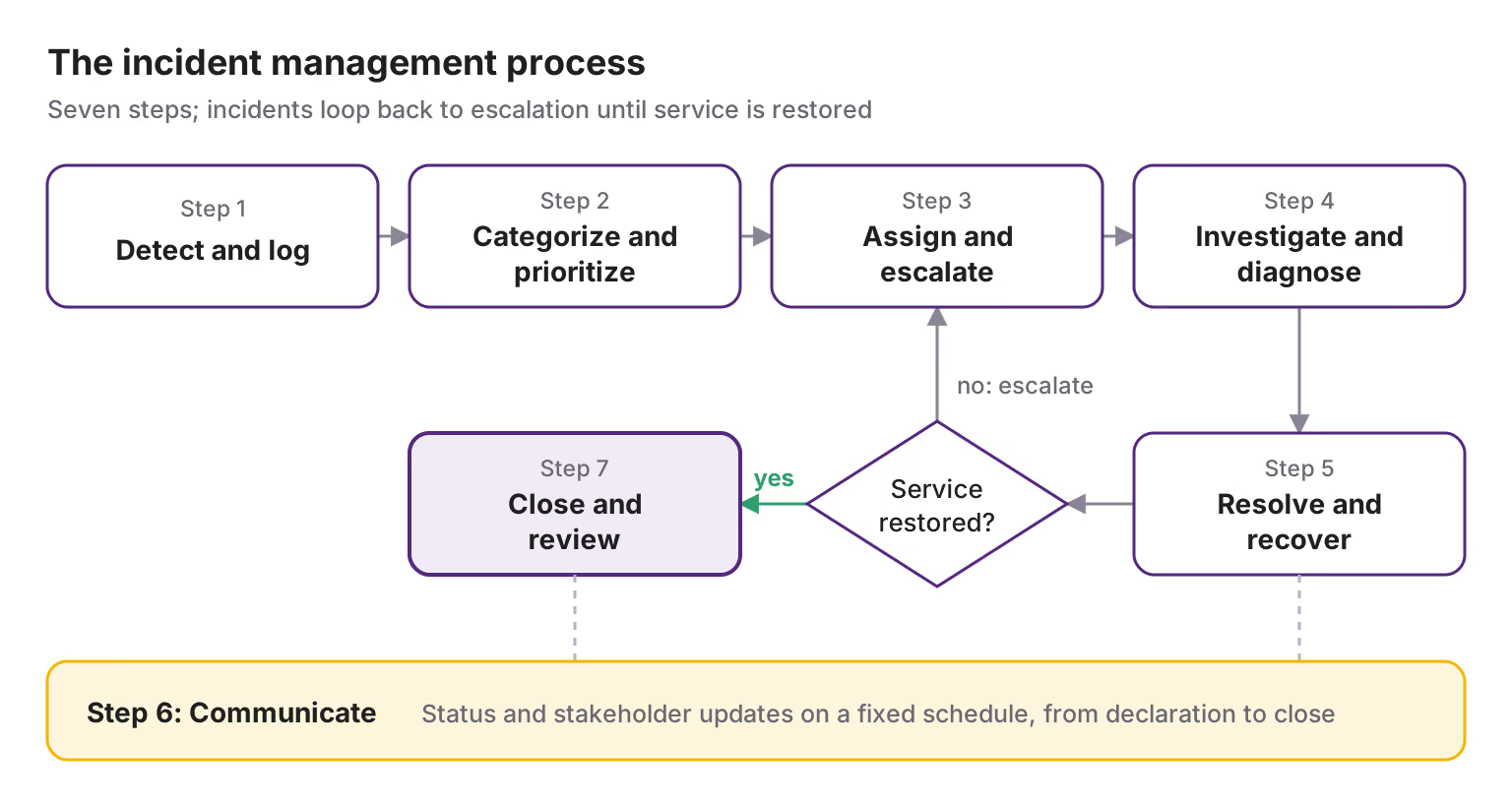
The process runs left to right, then back: if a fix doesn't restore service, the incident returns to step 3 and is escalated to someone who can. Communication isn't a single step but a track that runs from the moment the incident is declared until it's closed. If the incident meets your major incident criteria at step 2, it switches to the major incident management procedure, which adds roles and a tighter communication cadence to the same steps.
Step 1: Detect and log the incident
An incident enters the process in one of three ways: monitoring raises an alert, a user reports a problem to the service desk, or an engineer notices something wrong. However it arrives, it becomes an incident record, the single place every later step refers to.
Owner | Input | Output | Time target |
|---|---|---|---|
On-call engineer or service desk analyst; automated for monitoring alerts | An alert, a user report or an observation | An incident record with an ID | Logged within minutes of detection; automatically for alerts |
What to record: an incident ID, when it was detected, when users were first affected if known, who or what reported it, the affected service, a one-line description and links to the triggering alerts. These fields become the first entries of the incident timeline.
How to do it well:
Detect from symptoms users feel, such as error rates and latency, not only from server health. The four golden signals are a good starting point.
Merge duplicates before logging. One failure can fire dozens of alerts; alert correlation turns them into one incident record instead of forty.
Let monitoring create the record. Every minute between an alert and a human typing up a ticket is a minute added to the incident.
Common mistake: logging only what users report. If most of your incidents start as customer tickets, detection is the weakest part of your process.
Step 2: Categorize and prioritize
Categorization says what kind of incident it is; prioritization says how urgently it must be handled. Together they decide who is paged, how fast, and whether the incident becomes a major incident.
Owner | Input | Output | Time target |
|---|---|---|---|
First responder (on-call engineer or service desk) | The incident record | Category, priority or severity, and the decision on whether it's a major incident | Within 5–10 minutes of logging |
Categorize by affected service and incident type, for example "checkout · availability" or "VPN · access". Consistent categories make routing automatic and show, over time, where incidents cluster.
Prioritize by impact (how many users and how badly) and urgency (how fast the damage grows). A common matrix:
Impact ↓ / Urgency → | High | Medium | Low |
|---|---|---|---|
High (many users or a critical service) | P1 / SEV1 | P2 / SEV2 | P3 / SEV3 |
Medium (a group of users or a degraded service) | P2 / SEV2 | P3 / SEV3 | P4 / SEV4 |
Low (one user or a minor issue) | P3 / SEV3 | P4 / SEV4 | P5 / SEV5 |
Two modifiers override the grid: possible data loss or a security breach is always top priority, and an incident during a peak business period can move up a level. Our incident severity levels guide has definitions and examples for each level, and the incident triage guide covers the first ten minutes in detail.
Common mistake: debating priority for too long. If two people disagree for more than a minute, choose the higher level. Downgrading later is cheap; under-reacting isn't.
Step 3: Assign and escalate
The incident goes to the person or team who can fix it, and the response gets the roles it needs. If the first assignee can't resolve it or doesn't respond, it's escalated.
Owner | Input | Output | Time target |
|---|---|---|---|
Routing rules and the on-call schedule; the incident commander for major incidents | A prioritized incident | An acknowledged owner, and for serious incidents named roles | Acknowledged within 5 minutes for P1/SEV1 and 15 minutes for P2/SEV2 |
Two kinds of escalation:
Type | When | Example |
|---|---|---|
Functional | The current assignee lacks the skills or access to fix it | The service desk passes a database incident to the database team |
Hierarchical | The impact needs more authority, people or attention | A SEV1 brings in an incident commander and informs leadership |
Automated escalation covers a third case: nobody acknowledges. If the primary on-call doesn't respond within the window, the page moves to the secondary, then to a manager. Define these steps in an escalation policy rather than relying on someone remembering to chase.
Assign roles early. For P1/SEV1 and P2/SEV2, name an incident commander and a communications lead within the first ten minutes. On smaller incidents one person can hold several roles. See incident response roles.
Common mistake: routing by guesswork. Without a service catalog that maps every service to an owning team and on-call rotation, incidents bounce between teams, and every reassignment adds another wait.
Step 4: Investigate and diagnose
The assigned responder works out what's wrong well enough to stop the impact. The goal here isn't the full root cause; it's enough understanding to choose a fix or a workaround.
Owner | Input | Output | Time target |
|---|---|---|---|
The assigned engineer or team; the operations lead on major incidents | The incident record, alerts and dashboards | A working theory and a proposed fix or workaround | Depends on priority; a first theory within 15–30 minutes for P1/SEV1 |
Where to look first:
What changed? A deploy, configuration change or feature flag in the last few hours is the most common trigger. Check the change log before anything else.
What does the runbook say? If the alert or service has a runbook, follow it.
Is it us or a dependency? Check cloud provider, DNS, CDN and vendor status pages.
Has this happened before? Search past incidents and known errors from problem management.
How far does it reach? Confirm which users, regions and features are affected; this may change the priority set in step 2.
Record findings in the incident record as you go, including theories that turned out wrong. They save time if the incident is handed over, and they matter in the review.
Common mistake: chasing the root cause while users wait. If a rollback or failover would restore service, do it and investigate afterwards. The root cause analysis belongs in step 7.
Step 5: Resolve and recover
The team applies a fix or workaround, confirms that users are no longer affected, and returns the service to normal operation.
Owner | Input | Output | Time target |
|---|---|---|---|
The assigned engineer; the incident commander decides on risky actions | A working theory and a proposed fix | Service restored and verified | As fast as the priority demands; see your SLA or SLO |
Mitigate first, fix properly later. Most incidents are ended by one of a handful of moves:
Move | Use when |
|---|---|
Roll back a recent deploy or configuration change | A change lines up with the start of the impact |
Fail over to a healthy replica, zone or region | One component or location is failing |
Disable a feature with a feature flag | A single feature is causing the damage |
Scale out or add capacity | The system is overloaded |
Apply a workaround for users | A permanent fix will take longer; users need a way to keep working |
Verify before declaring it resolved. Check the user-facing signals, such as error rate, latency and a synthetic transaction, not just that a process restarted. Watch for 15–30 minutes on major incidents before closing the response.
If the fix doesn't restore service, the incident goes back to step 3 and is escalated. If a workaround is in place but the cause remains, the incident can be resolved while a problem record carries the permanent fix forward.
Common mistake: declaring resolution too early. A premature "resolved" followed by a relapse costs more trust, and often more time, than waiting a few more minutes to confirm.
Step 6: Communicate throughout
Communication isn't a step that happens after the fix. It starts when the incident is declared and continues until it's closed, in parallel with steps 3 to 5.
Owner | Input | Output | Time target |
|---|---|---|---|
The communications lead; the incident commander on smaller incidents | The incident record and the responders' updates | Updates to users, support and leadership on a fixed schedule | First update within 15 minutes for P1/SEV1 and customer-facing P2/SEV2 |
Who needs what:
Audience | Channel | What they need |
|---|---|---|
Customers and users | Status page, in-app banner, email | What's affected, what still works, when the next update comes |
Support and customer success | Internal channel | Talking points and a link to the status page, before customers ask |
Leadership | Direct update for P1/SEV1 | Business impact, decisions needed, expected next steps |
Responders | Incident channel | Current state, who is doing what, the next checkpoint |
A common cadence: every 15 minutes internally and every 30 minutes on the status page for P1/SEV1; every 30 and 60 minutes for P2/SEV2. Send the update even when there's nothing new; silence makes people chase the responders for news.
Ready-to-use wording for each stage is in our incident communication templates, and the reasoning behind cadence and tone is in incident communication best practices.
Common mistake: waiting for the cause before the first update. Customers already know something is wrong; the first message only needs to say that you know too.
Step 7: Close and review
An incident is closed when service is stable, the record is complete and the follow-up is assigned. For significant incidents, closure includes a review that turns what happened into changes.
Owner | Input | Output | Time target |
|---|---|---|---|
The incident commander or incident owner; a postmortem facilitator for major incidents | The resolved incident, its timeline and the responders | A closed record, a postmortem and action items with owners | Postmortem within 5 working days for P1/SEV1 and P2/SEV2 |
Before closing, confirm:
The service has been stable for an agreed period, and the user or reporter agrees the problem is solved.
The record is complete: category, priority, timestamps, resolution and the workaround if one is in place.
Any underlying cause that isn't fixed has a problem record, so it isn't forgotten.
Customers have received a final update.
Review significant incidents. A blameless post-mortem meeting reconstructs what happened from the incident timeline, identifies contributing causes and agrees on changes. Give each change an owner and a due date, and track it in the normal backlog; see postmortem action items. Recurring causes across incidents are handed to problem management.
Common mistake: closing the record and moving on. If action items aren't tracked to completion, the same incident returns, and the process has only measured the problem rather than reduced it.
How many steps are in the incident management process?
Depending on the source you'll see five, six or seven steps, and NIST uses four phases. They describe the same work at different levels of detail:
This guide (7 steps) | ITIL-based 5-step version | SANS (6 steps) | NIST SP 800-61 Rev. 2 (4 phases) |
|---|---|---|---|
1. Detect and log | 1. Identification and logging | 2. Identification | 2. Detection and analysis |
2. Categorize and prioritize | 2. Categorization and prioritization | 2. Identification | 2. Detection and analysis |
3. Assign and escalate | 3. Response: assignment and escalation | — | 3. Containment, eradication and recovery |
4. Investigate and diagnose | 3. Response: investigation and diagnosis | 3. Containment · 4. Eradication | 3. Containment, eradication and recovery |
5. Resolve and recover | 4. Resolution and recovery | 5. Recovery | 3. Containment, eradication and recovery |
6. Communicate | Runs throughout | Runs throughout | Runs throughout |
7. Close and review | 5. Closure | 6. Lessons learned | 4. Post-incident activity |
— (before any incident) | — | 1. Preparation | 1. Preparation |
Three differences are worth knowing:
Preparation. SANS and NIST count it as a phase; process guides usually treat it as a prerequisite. This guide covers it under implementation, and our incident response plan guide covers it in full.
Containment and eradication. SANS and NIST separate them because they were written for security incidents, where isolating a threat and removing it are distinct jobs.
Communication. Most frameworks treat it as part of every step. It's listed separately here because it's the activity teams most often forget under pressure.
NIST published SP 800-61 Rev. 3 in April 2025, which aligns incident response with the functions of the NIST Cybersecurity Framework 2.0; the four-phase model above is from Rev. 2 and is still widely used. For more on the frameworks themselves, see the incident response lifecycle.
Who does what across the process
A process without owners becomes a list of good intentions. This RACI matrix shows who is Responsible (does the work), Accountable (owns the outcome; exactly one per row), Consulted or Informed at each step:
Step | First responder (service desk or on-call) | Resolver team | Incident commander | Communications lead | Problem manager |
|---|---|---|---|---|---|
1. Detect and log | A, R | I | I | — | — |
2. Categorize and prioritize | A, R | C | C (for major incidents) | I | — |
3. Assign and escalate | A, R | I | R (assigns roles on major incidents) | I | — |
4. Investigate and diagnose | C | A, R | I | I | C |
5. Resolve and recover | I | R | A | I | — |
6. Communicate | I | C | A | R | — |
7. Close and review | C | R | A | C | R (recurring causes) |
On smaller incidents, the first responder often acts as incident commander, and some columns collapse into one person. On major incidents, every role should be a separate person. The roles themselves, and how to staff them by severity, are covered in incident response roles and responsibilities and what an incident commander does.
The ITIL incident management process
ITIL is the most widely used framework for IT service management, and many organizations base their process on it. The classic ITIL incident flow, from ITIL V3 and still used in most service desks, runs:
Identification: an incident is detected by monitoring, reported by a user or noticed by staff.
Logging: a record is created with a unique ID and the details needed to work on it.
Categorization: the incident is classified by service and type.
Prioritization: priority is set from impact and urgency.
Initial diagnosis: the service desk tries to resolve it at first contact, often using a knowledge base or incident model.
Escalation: functional escalation to a specialist team, or hierarchical escalation to management, if needed.
Investigation and diagnosis: the resolver team finds what's wrong.
Resolution and recovery: the fix or workaround is applied and service is restored.
Closure: the user confirms, the record is completed and the incident is closed.
The seven steps in this guide group these activities slightly differently and add communication as an explicit track; the flow diagram shows the same path.
Concepts ITIL adds:
Concept | What it means |
|---|---|
Incident models | Predefined handling for recurring incident types, so the same incident is handled the same way every time |
Major incident procedure | A separate, faster path with dedicated roles for the highest-impact incidents |
Swarming (ITIL 4) | Bringing the right people together on a complex incident, instead of passing it up support tiers one by one |
Links to other practices | Recurring incidents go to problem management; permanent fixes go through change enablement |
In ITIL 4 and ITIL 5, incident management is a practice rather than a fixed process, which means organizations are expected to adapt the flow to their context. ITIL 5 groups it with monitoring and event management, problem management, the service desk and service request management. What changed, and how to run it today, is covered in our guides to ITIL 5 incident management and ITIL event management.
The security incident management process
Security incidents, such as breaches, ransomware or unauthorized access, follow the same broad flow but change three of the steps:
Step | What changes for security incidents |
|---|---|
Detect and log | Detections come from SIEM, endpoint and identity tools; analysts first confirm whether an alert is a true positive |
Categorize and prioritize | Possible data exposure is top priority whatever the number of users affected; legal and privacy teams may need to be involved from the start |
Investigate and diagnose | Evidence must be preserved before systems are rebuilt, with a record of who collected what and when |
Resolve and recover | Split into containment (isolate systems, revoke credentials), eradication (remove the cause) and recovery (restore and monitor for re-entry) |
Communicate | Regulatory deadlines may apply: the GDPR, for example, expects notification to the supervisory authority within 72 hours of becoming aware of a personal data breach, where feasible |
Close and review | The review covers how the attacker got in as well as how the response went |
Security teams often run this process in their own tools, but route urgent detections through the same on-call and escalation system as operational incidents, so they reach a person at any hour. For the tooling on both sides, see incident response tools, and for the security-specific checklist, the security section of our incident management checklist.
How to implement an incident management process
Most teams don't need a long programme. Six steps get a working process in place, roughly in this order:
Define what an incident is and who can declare one. Anyone should be able to.
Write priority or severity levels with examples from your own services.
Map every service to an owner and an on-call rotation, with an escalation policy for each.
Name the roles: at minimum an incident commander and a communications lead for serious incidents.
Prepare templates: for the incident record, status updates and the postmortem.
Run a drill. Walk a simulated incident through all seven steps before a real one tests the process.
For a week-by-week order and the full list of items, use our incident management checklist, and for the principles behind each step, the incident management best practices.
How to improve the incident management process
Improve the step that's slowest, not the one that's easiest to change. These measures show where time goes:
Metric | Step it measures | If it's high, look at |
|---|---|---|
Time to detect (MTTD) | 1 | Monitoring gaps; incidents first reported by users |
Time to acknowledge (MTTA) | 3 | Routing, on-call coverage and escalation timeouts |
Reassignment rate | 3 | Service ownership; incidents bouncing between teams |
Time to resolve (MTTR) | 4–5 | Runbooks, rollback speed, access for responders |
Reopened incidents | 5 | Resolutions declared too early |
Repeat incidents | 7 | Action items not completed; problems not handed to problem management |
First-contact resolution (service desks) | 2–4 | Knowledge base and incident models |
Review these monthly, and review the process itself every quarter and after every major incident. How to calculate the core metrics is covered in the MTTR, MTTA, MTBF and MTTD guide.
Incident management process document template
A written process document is what lets a new engineer, an auditor or the person on call at 3 a.m. follow the same steps. Download the template as a Google Doc or Word file, or copy the structure below.
Section | What to write |
|---|---|
1. Purpose and scope | The goal (restore service quickly, minimize impact), which services and teams the process covers, and what it doesn't cover (problems, changes, service requests) |
2. Definitions | What counts as an incident and a major incident; who can declare one |
3. Priority or severity levels | Each level with its definition, two or three examples from your own services, and response and update targets |
4. Roles and responsibilities | Service desk, on-call engineers, incident commander, communications lead, problem manager; the RACI for each step |
5. Process steps | The seven steps, each with owner, inputs, outputs and time target, and the flow diagram |
6. Escalation | Functional and hierarchical escalation paths, acknowledgment timeouts, contact lists |
7. Communication | Audiences, channels, update cadence by priority, links to templates |
8. Major incident procedure | Declaration criteria, extra roles, executive updates |
9. Closure and review | Closure criteria, postmortem rules, how action items are tracked |
10. Metrics and reporting | Which metrics are tracked, where, and how often they're reviewed |
11. Tools | Where incidents are logged, how alerts are routed, where the status page lives |
12. Document control | Owner, review date, version history |
Keep the document short enough to read in ten minutes. Detailed procedures for specific services belong in runbooks, and the wider plan for preparation and rehearsal in your incident response plan. Review the document every quarter and after every major incident.
Where ITOC360 fits
A process document says what should happen; tooling decides whether it happens at 3 a.m. ITOC360 automates the steps where time is usually lost:
Step | ITOC360 |
|---|---|
1. Detect and log | ITOC360 Alerting receives alerts from 50+ monitoring sources, groups related alerts and opens one incident record |
2. Categorize and prioritize | Alerts are tagged with service and severity so routing and priority are consistent |
3. Assign and escalate | ITOC360 On-Call pages the service owner and escalates automatically if nobody acknowledges |
4–5. Investigate and resolve | ITOC360 Incident Response opens the incident with roles, linked runbooks and a shared channel in Slack or Microsoft Teams |
6. Communicate | ITOC360 Status Pages keep customers updated from the same incident record |
7. Close and review | A timestamped timeline for the postmortem, and MTTA and MTTR for every incident |
The process stays yours; the tool makes sure each step starts without waiting for someone to remember it.
Frequently asked questions
What is the incident management process?
It's the defined sequence of steps a team follows to restore a disrupted service as quickly as possible: detect and log the incident, categorize and prioritize it, assign and escalate it, investigate and diagnose, resolve and recover, communicate throughout, and close and review it.
What are the 5 steps of incident management?
A common five-step version, based on ITIL, is: identification and logging, categorization and prioritization, response (assignment, escalation and diagnosis), resolution and recovery, and closure.
What are the 6 steps in the incident management process?
The six-step model usually cited is SANS: preparation, identification, containment, eradication, recovery and lessons learned. It was written for security incidents but is often applied more widely.
What are the 7 stages of incident management?
Detect and log, categorize and prioritize, assign and escalate, investigate and diagnose, resolve and recover, communicate, and close and review. This version separates communication because it's the step most often neglected under pressure.
What is the ITIL incident management process?
ITIL's classic flow is identification, logging, categorization, prioritization, initial diagnosis, escalation, investigation and diagnosis, resolution and recovery, and closure. ITIL 4 and ITIL 5 describe incident management as a practice that organizations adapt, and add concepts such as swarming.
What is the difference between incident management and problem management?
Incident management restores service as quickly as possible, often with a workaround. Problem management finds and removes the underlying cause so the incident doesn't happen again.
What is the ITIL incident management process?
ITIL's classic flow is identification, logging, categorization, prioritization, initial diagnosis, escalation, investigation and diagnosis, resolution and recovery, and closure. ITIL 4 and ITIL 5 describe incident management as a practice that organizations adapt, and add concepts such as swarming.
What is the difference between incident management and problem management?
Incident management restores service as quickly as possible, often with a workaround. Problem management finds and removes the underlying cause so the incident doesn't happen again.
What is the security incident management process?
It follows the same flow but splits resolution into containment, eradication and recovery, requires evidence to be preserved during investigation, and adds legal and regulatory notification deadlines to communication.
What is the ITIL incident management process?
ITIL's classic flow is identification, logging, categorization, prioritization, initial diagnosis, escalation, investigation and diagnosis, resolution and recovery, and closure. ITIL 4 and ITIL 5 describe incident management as a practice that organizations adapt, and add concepts such as swarming.
What is the difference between incident management and problem management?
Incident management restores service as quickly as possible, often with a workaround. Problem management finds and removes the underlying cause so the incident doesn't happen again.
What is the security incident management process?
It follows the same flow but splits resolution into containment, eradication and recovery, requires evidence to be preserved during investigation, and adds legal and regulatory notification deadlines to communication.
Who is responsible for the incident management process?
A process owner, often the head of IT operations or service management, is accountable for the process as a whole. During each incident, the incident commander is accountable for the response, and resolver teams are responsible for the fix.
How do you improve the incident management process?
Measure each step, find the slowest one and fix that first: monitoring for slow detection, routing and escalation for slow acknowledgment, runbooks and rollback for slow resolution, and action item tracking for repeat incidents.