








Quick Answer
An on-call schedule template defines which engineer is responsible for responding to incidents during each time window. It maps team members to shifts, sets rotation frequency, and links to escalation contacts and runbooks. A well-structured template eliminates coverage gaps, distributes the on-call burden fairly, and gives every engineer clarity on exactly when they are – and are not – responsible.
Key Takeaways
- An on-call schedule template is the foundation of any reliable incident response workflow.
- The three most practical rotation formats are weekly, follow-the-sun, and layered (primary + secondary).
- Every shift must define a primary and a secondary – a schedule with only a primary is one sick day away from a coverage gap.
- Spreadsheet templates work well for small teams; dedicated on-call scheduling software becomes necessary as team and service counts grow.
- Always connect the on-call schedule to a documented escalation policy – a schedule without escalation rules is incomplete.
What Is an On-Call Schedule?
An on-call schedule is the operational document that defines who responds to system alerts and incidents at any given time. For engineering teams running production systems, it answers three questions that cannot be left ambiguous:
- Who gets paged when a service degrades at 2 AM?
- Who escalates if the primary engineer does not acknowledge within the SLA window?
- Who is the backup when someone is on leave or unavailable?
Without a documented IT on-call schedule, most teams fall into the “loudest person gets paged” pattern. Senior engineers absorb a disproportionate share of incidents, burnout accumulates quietly, and coverage gaps only surface during a P1 outage.
An on-call schedule template gives teams a starting point to build this structure systematically rather than improvising it under pressure.
On-Call Rotation Types Every Engineering Team Should Know
Choosing the right on-call rotation type before filling in the template saves significant restructuring later. The format should match your team size, service complexity, and geographic distribution.
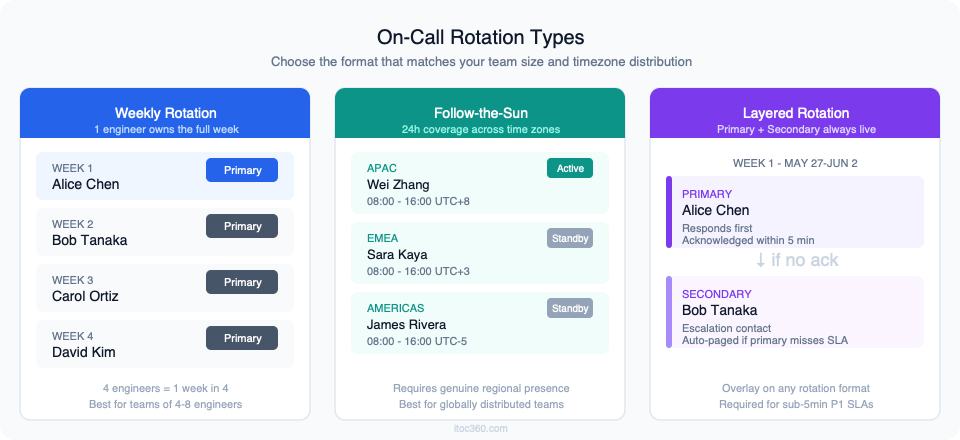
1. Weekly rotation
One engineer owns the full week – Monday 00:00 to Sunday 23:59. Simple to communicate and easy to plan around. Recommended for teams of four to eight engineers, where each person carries on-call responsibility one week in every four to eight weeks.
The main risk is concentration: a week with multiple incidents and repeated night interruptions falls entirely on one person. Mitigate this with a strict post-shift health check and a rule that any week exceeding a defined incident threshold triggers a mandatory rest period.
2. Daily rotation
Shifts rotate every 24 hours. Burden is distributed more evenly, but handoff friction increases. This format only works reliably when runbooks are comprehensive and incident types are well-understood – if every incident requires tribal knowledge, daily handoffs become expensive. Best suited for mature teams with high runbook coverage.
3. Follow-the-sun
Three regional rotations – typically APAC, EMEA, and Americas – each covering their business hours. The result is 24-hour coverage by engineers who are awake and alert for their shift. This is the right format for engineering organisations with genuine regional presence across at least two continents.
4. Layered (primary + secondary)
Two engineers are always on-call simultaneously: a primary who responds first and a secondary who is engaged automatically if the primary does not acknowledge within the SLA window. This is less a rotation type and more an escalation layer that should sit on top of any of the above formats. Standard practice for production systems with P1 response SLAs under five minutes.
5. Follow-the-moon
Two 12-hour shifts per day – a day shift and a night shift. High burden per person; only justified for regulated environments or teams with unusually high incident volume. Most engineering teams should start with weekly rotation and move here only if the data shows it is necessary.
On-Call Schedule Template
The template structure below covers a four-week rotation cycle with a primary and secondary defined for every shift. Four weeks is the minimum window for fair burden distribution – planning shorter cycles makes it harder to track cumulative on-call load per engineer.
[Download on-call schedule template – Google Sheets | Excel]
What the template includes
| Field | Description |
| Week | ISO week number and date range |
| Primary on-call | Engineer responsible for first response |
| Secondary on-call | Escalation contact if primary does not acknowledge |
| Timezone | Primary engineer’s local timezone (essential for follow-the-sun teams) |
| Services owned | Comma-separated list of services this engineer is responsible for |
| Runbook link | Direct URL to the runbook for each service covered this shift |
| Shift health check | Post-shift field: incident count, night pages, fatigue rating (1-5), action items |
How to fill it in
- List every engineer in the on-call rotation on the Team tab. Include their timezone and emergency contact number.
- Set rotation frequency. Weekly is the default; adjust to daily or follow-the-sun if your team structure requires it.
- Assign primary and secondary for every shift. Never leave secondary blank – this is the single most common scheduling error.
- Add service ownership per shift. Engineers who do not own a service should not be primary on-call for it.
- Link the runbook for each service covered. If no runbook exists, create a stub before the shift begins.
- After each shift, complete the health check column. This data directly feeds your on-call performance metrics.
Monthly and Weekly On-Call Schedule Template Formats
The four-week rotation template is the operational baseline. Two additional views support planning and reporting.
Monthly on-call schedule template – A calendar view showing the full month at a glance. Useful for communicating coverage to leadership, identifying public holiday conflicts, and planning around major releases or maintenance windows. Engineers can see their upcoming obligations four or more weeks ahead, which reduces last-minute swap requests.
Weekly on-call schedule template – A shift-level breakdown that shows hour-by-hour coverage within the week. Useful for follow-the-moon and follow-the-sun teams where handoff times matter and overlap windows need to be explicitly scheduled. The weekly view is also the right format for communicating shift times to the monitoring and alerting layer – so alerts route to the right engineer automatically based on the current time.
Both formats are included in the downloadable template above.
On-Call Schedule Best Practices
These practices separate engineering teams with sustainable on-call culture from those that treat attrition as a normal cost of operations.
Define a maximum consecutive shift limit. Google’s Site Reliability Engineering book recommends that on-call engineers spend no more than 50% of their time on reactive operational work. In scheduling terms, five consecutive on-call days is the practical ceiling before a mandatory handoff. Beyond that, cognitive load degrades and incident response quality drops.
Always assign both a primary and a secondary. A schedule with only a primary is one sick day, one poor signal area, or one missed notification away from zero coverage. The secondary must be listed explicitly in the schedule and linked in the alerting system – not just stored in someone’s memory.
Distribute shifts by service ownership, not just headcount. Rotating engineers through services they do not own increases MTTA because responders spend the first minutes of an incident orienting themselves. Schedule engineers against the services they own wherever possible.
Block public holidays and planned leave four weeks ahead. A schedule that ignores these is a draft, not an operational document. Use the monthly view to identify conflicts before they create last-minute scrambles.
Run a post-shift health check after every on-call week. Ask the engineer: how many incidents, how many pages, how many night interruptions? Log the fatigue rating. This feeds your incident management KPIs and surfaces burnout signals before they become resignations. Teams that skip this step consistently discover the problem too late.
Connect the schedule to your escalation policy before it goes live. An on-call schedule without a linked escalation policy is incomplete. The escalation policy defines what happens when the primary does not acknowledge within the SLA window – without it, the secondary is never automatically engaged and the schedule provides false confidence.
Review and update the schedule quarterly. Team composition changes. Services are added, deprecated, or reassigned. A schedule that has not been reviewed in six months is almost certainly outdated in at least one material way.
How to Create an On-Call Schedule in Excel or Google Sheets
For teams starting from scratch on an engineer on-call schedule, this is the minimum viable spreadsheet structure:
Sheet 1 – Team roster
| Column | Description |
| Name | Full name |
| Timezone | Local timezone (UTC offset) |
| Services owned | Comma-separated list |
| Emergency phone | For SMS and voice alerts |
| Max consecutive shifts | Team-agreed limit |
Sheet 2 – Rotation schedule
One row per shift period. Columns: Week number | Start date | End date | Primary | Secondary | Services covered | Runbook links | Notes
Sheet 3 – Monthly calendar view
A date grid with engineer names in each cell. Colour-code by engineer for readability. This is the view to share with leadership and other teams.
Sheet 4 – Post-shift health log
| Column | Description |
| Shift week | ISO week number |
| Engineer | On-call engineer name |
| Total pages | Number of alerts received |
| P1 incidents | Count of critical incidents |
| Night pages | Pages received outside 08:00-22:00 local time |
| Fatigue rating | 1 (no impact) to 5 (significant sleep disruption) |
| Action items | Runbook gaps, threshold issues, tooling problems identified |
The health log is the most overlooked sheet – and the most valuable. Teams that fill it in consistently are the ones that catch burnout signals three months before they turn into attrition.
When a Spreadsheet Is Not Enough
An on-call rotation schedule template in Excel or Google Sheets works well for teams of four to eight engineers managing two to four services. As scale increases, the limitations compound into operational risk.
No automatic escalation. A spreadsheet cannot page the secondary if the primary does not respond. Someone has to notice the missed acknowledgement and act manually – which defeats the purpose of having a secondary listed at all.
No integration with monitoring. Alerts from your monitoring stack cannot read a spreadsheet. The routing layer has to be configured separately and kept in sync with the schedule manually. When an engineer swaps shifts at short notice, the monitoring tool does not automatically update. The alert goes to the wrong person.
No mobile-native response workflow. Engineers on-call at 2 AM respond from a phone. A shared Google Sheet is not built for acknowledging an alert, assessing severity, and initiating a response workflow from a mobile device in under two minutes. The speed and reliability of the mobile experience matters more than most teams realise until they are in the middle of a P1 at 3 AM.
No audit trail. Compliance-driven organisations need a record of who was on-call, when they acknowledged, what action was taken, and when the incident was resolved. Spreadsheets do not generate this automatically.
High maintenance overhead. Every team change, service change, or schedule adjustment requires a manual edit across multiple sheets and the alerting system. At scale, keeping the schedule accurate becomes a part-time job.
Dedicated on-call scheduling software addresses these gaps by combining the schedule with alert routing, escalation policies, and incident response workflows in one connected system. If you are evaluating tools for your team, see our guide to the best incident management platform for SRE teams (https://www.itoc360.com/best-incident-management-platform-sre-teams/) for a side-by-side breakdown. When an engineer is paged, the platform already knows who is on-call from the schedule, routes the alert automatically, and escalates after the defined timeout – without any manual intervention required.
The incident management KPIs that matter most – MTTA and MTTR – are only measurable reliably when the schedule, the alerting layer, and the response workflow are connected in one place rather than spread across a spreadsheet, a Slack channel, and a monitoring tool.
Frequently Asked Questions
What is an on-call schedule template?
An on-call schedule template is a structured document that maps engineers to shifts, defines rotation frequency, and records escalation contacts and service ownership for each coverage period. It is the starting point for any reliable incident response workflow and ensures every production system has a named, reachable human responsible for it at all times.
How do I create an on-call rotation schedule in Excel?
Create four sheets: a team roster (name, timezone, services, emergency contact), a shift-level rotation grid (one row per shift with primary, secondary, services, and runbook links), a monthly calendar view, and a post-shift health log. Assign both a primary and secondary for every shift before it goes live.
What is the best on-call rotation type for engineering teams?
Weekly rotation with a layered primary and secondary is the most practical format for teams of four to twelve engineers. Follow-the-sun becomes necessary when your team spans multiple continents. Daily rotation works when runbooks are comprehensive and incident types are well-understood. Start with weekly and adjust based on post-shift health log data.
How many engineers do you need for a sustainable on-call rotation?
A minimum of four engineers allows for a one-in-four weekly rotation, giving each engineer three weeks off for every week on-call. Below four, on-call burden becomes unsustainable and is a documented cause of engineering attrition. Six to eight engineers is a healthier baseline for continuous 24/7 coverage.
What should a monthly on-call schedule template include?
A monthly template should show: assigned primary and secondary for each week (or day for daily rotation), public holidays and planned leave overlaid on the schedule, services covered per period, and a link to the escalation policy. It should be in a format that is shareable with the wider engineering organisation and leadership.
What is the difference between an on-call schedule and an escalation policy?
The on-call schedule defines who is responsible during each time window. The escalation policy defines what happens when the responsible engineer does not respond – who is paged next, after how long, and through which channel. Both are required components. A schedule without an escalation policy provides a false sense of coverage.
Conclusion
A structured on-call schedule template is the operational foundation every engineering team running production systems needs before its next on-call shift begins. Download the template, choose the rotation format that matches your team size and timezone distribution, and link it to a documented escalation policy before it goes live.
As your team grows beyond four to eight engineers and two to four services, the spreadsheet will show its limits. The natural next step is a dedicated on-call platform that combines the schedule, the alerting layer, and the incident response workflow in one place – so engineers spend their on-call hours resolving incidents rather than managing a shared spreadsheet.
For the foundational framework behind on-call scheduling best practices, see the Google Site Reliability Engineering book (sre.google/sre-book/being-on-call/).