Incident Response Template for Engineering Teams
Quick Answer
An incident response template is a structured document that gives every on-call engineer the same starting point when a production incident fires. It removes decision fatigue at the worst possible moment. A complete, free production engineering template covers seven sections: severity classification, first response checklist, on-call roles, stakeholder communications, escalation path, mitigation log, and post-incident review.
Key Takeaways
Only 51% of organizations have a consistently applied incident response plan (Ponemon/Optiv 2025, n=620). The other 49% are improvising under pressure.
DORA 2024: Elite engineering teams restore service in under 1 hour. Low performers take between 1 month and 6 months. The gap is process, not skill.
Detecting an incident in under 200 days costs $3.61M on average; over 200 days it costs $5.49M — a $1.88M penalty for slow detection (IBM Cost of a Data Breach 2025).
41% of enterprises say one hour of unplanned downtime costs between $1M and $5M (ITIC 2024, n=1,000+ firms).
A production incident response template has 7 sections: severity classification, first response checklist, on-call roles, communications, escalation path, mitigation log, and post-incident review.
Free Download
Incident Response Template (Excel)
All seven sections in a single Excel file: severity classification, first response checklist, on-call roles, communication templates, escalation path, mitigation log, and post-incident review. Pre-formatted with P1–P4 color coding and 15 pre-built mitigation log rows — ready to use during a live incident.
Download the free Excel template →
Incident Response Template (Excel)
All seven sections in a single Excel file with eight pre-formatted sheets: severity classification, first response checklist, on-call roles, communication templates, escalation path, mitigation log, and post-incident review. Pre-formatted with P1–P4 severity color coding, fillable SLA fields, 15 pre-formatted mitigation log rows, and a structured post-incident review agenda — ready to use during a live incident.
What Is a Production Incident Response Template?
A production incident response template is a pre-built document that engineers fill in during a live incident rather than creating from scratch under pressure. It defines who does what, in what order, and how to communicate status to everyone who needs it — before the adrenaline hits.
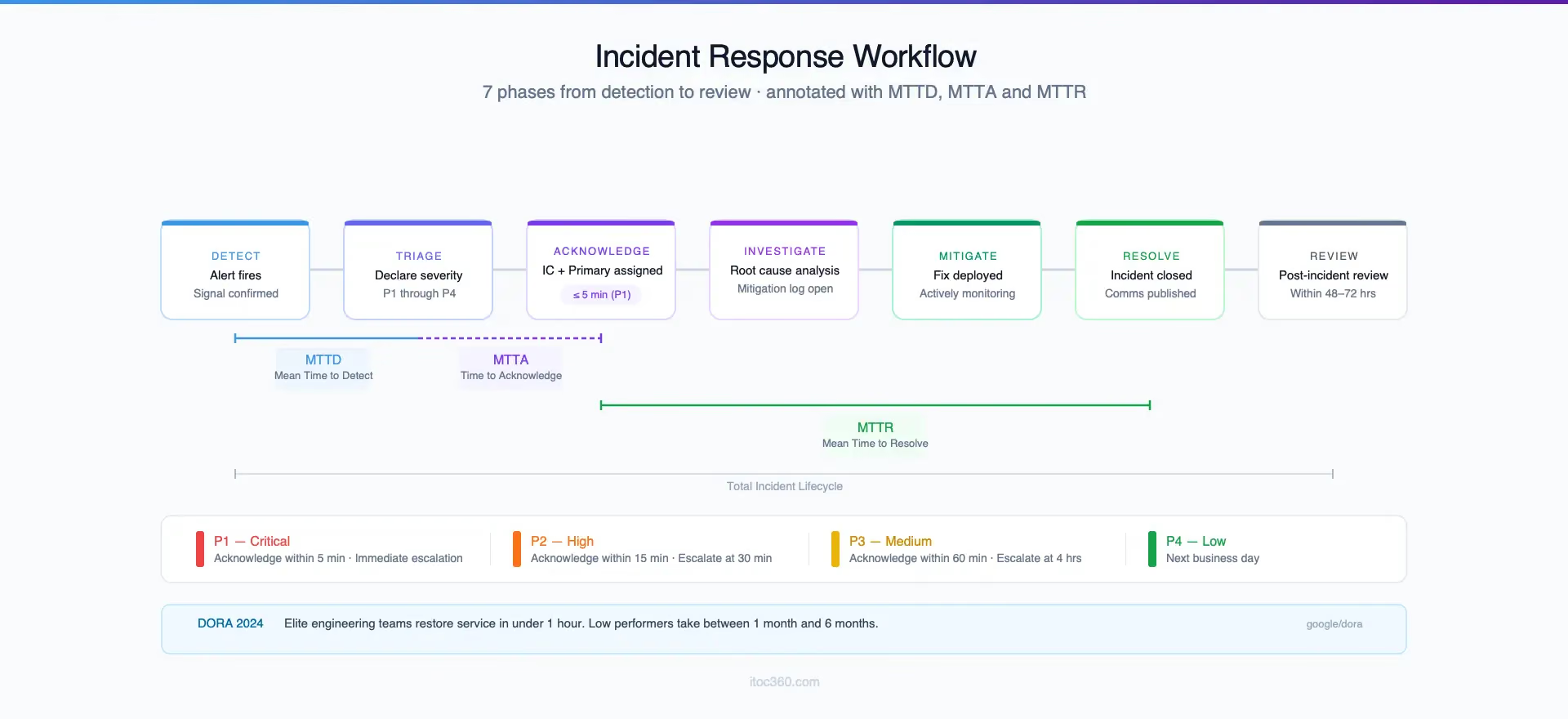
This is different from a cybersecurity incident response template in a fundamental way. Security templates follow the NIST SP 800-61r3 framework — Preparation, Detection, Containment, Eradication, Recovery, Post-Incident — and are designed for data breaches, malware investigations, and compliance-driven scenarios. Production engineering templates follow a faster, operations-focused workflow: detect, triage, acknowledge, investigate, mitigate, close, review.
The distinction matters because the audience is different. A security analyst has hours or days to document a response. An on-call SRE has minutes. The template must work under pressure, on a phone, at 3 AM, by an engineer who may be facing that specific failure mode for the first time.
Most engineering teams that lack a documented incident response process rely on institutional knowledge. Whoever is on-call knows roughly what to do because they have done it before. This creates three compounding risks. First, coverage gaps appear the moment a senior engineer is unavailable. Second, response quality varies by individual. Third, there is nothing to measure or improve after the incident closes — the team is condemned to rediscover the same failure modes.
Why the Numbers Demand a Template
The MTTA and MTTR data is unambiguous. According to Google's DORA 2024 Accelerate State of DevOps report, elite engineering teams restore service in under one hour. Low-performing teams take between one month and six months. The 100x performance gap between elite and low performers is not explained by technical skill. It is explained by process — specifically, whether a team has a documented, practiced incident response workflow they follow every time.
The cost of not having that workflow is measurable in dollars. ITIC's 2024 Hourly Cost of Downtime survey of more than 1,000 enterprises found that 41% of respondents report a single hour of unplanned downtime costs between $1M and $5M. Ninety percent say the hourly cost exceeds $300,000. A poorly managed 90-minute incident that a prepared team would have resolved in 20 minutes carries a direct seven-figure cost.
Detection speed compounds the economics. The IBM Cost of a Data Breach 2025 report found that incidents identified in under 200 days cost an average of $3.61M to resolve. Incidents that take over 200 days to detect cost an average of $5.49M — a $1.88M penalty for slow detection. IBM's 2025 analysis reports the average breach lifecycle has dropped to 241 days, a nine-year low, and credits faster detection practices. A template that tells engineers exactly how to triage and escalate in the first five minutes of an incident is the most direct operational lever for shortening that lifecycle.
The readiness gap is real and wider than most teams assume. The 2025 Ponemon/Optiv Cybersecurity Threat and Risk Management Report surveyed 620 IT and security practitioners and found that only 51% of organizations have an incident response plan applied consistently across the enterprise. Among high-performing organizations, 60% have a consistent plan. Among the rest, only 45%. Consistency at the plan level — not the existence of a document — is the first dividing line between teams that handle incidents predictably and teams that do not.
The Complete Engineering Incident Response Template
The template below is built for production engineering and SRE teams responding to service degradation, outages, and performance incidents. Copy each section into your incident management platform or a shared document accessible to every on-call engineer in under ten seconds.
Section 1 — Incident Severity Classification
Severity must be declared within the first two minutes of an incident opening. Without a declared severity, the escalation path, communication cadence, and response SLA are all undefined — the most common root cause of slow MTTA.
Severity | Condition | Response SLA | Escalation Trigger |
P1 — Critical | Full service outage, data loss risk, or security breach | Acknowledge within 5 min | Immediate — page Incident Commander |
P2 — High | Significant degradation, more than 20% of users affected | Acknowledge within 15 min | Escalate if unresolved at 30 min |
P3 — Medium | Partial degradation, workaround available, SLA not yet breached | Acknowledge within 60 min | Escalate if unresolved at 4 hours |
P4 — Low | Non-user-facing issue, no SLA impact, monitoring anomaly | Next business day | Team lead notification only |
Severity is declared by the first engineer who acknowledges the alert. It can be revised upward as investigation reveals scope. Revise downward only after mitigation is confirmed stable.
Replace the SLA thresholds above with your actual contractual or SLO-defined response windows before the first use.
Section 2 — First Response Checklist
Run these steps in sequence. Skipping step 3 or 4 to investigate faster almost always causes duplicate effort when a second engineer joins the incident thread.
Within 5 minutes of alert acknowledgment:
Declare severity using the table in Section 1
Announce the incident in the designated incident channel with: severity, affected service, first observed symptom, time of first detection, and your name as primary responder
Check whether this is a known upstream dependency issue — status pages for cloud providers, CDN, and DNS should be opened before investigating internal systems
Check the deployment log for the affected service — was there a release in the past two hours?
Check alert routing configuration — are related downstream alerts being suppressed or grouped under this incident?
Within 15 minutes of acknowledgment:
Assign an Incident Commander for P1 and P2 incidents
Open a dedicated war room channel or incident thread
Post the first stakeholder update using the template in Section 4
Begin the mitigation log in Section 6
Section 3 — On-Call Roles and Responsibilities
Define roles before the incident, not during it. Four roles cover the majority of production incidents without creating coordination overhead.
Incident Commander (IC)
Required for P1 and P2. Owns the overall response — coordinates between roles, makes the decision to escalate or declare mitigation, and owns the status communication cadence. The IC does not investigate directly. They manage.
Primary Responder
The on-call engineer who acknowledged the alert. Leads technical investigation, owns the mitigation steps, and updates the IC every 10 to 15 minutes during active P1 and P2 incidents. For P3 and P4, the Primary Responder fills both the investigator and coordinator roles.
Communications Lead
For P1 incidents with external user impact: drafts and publishes status page updates, drafts executive summaries, and handles inbound stakeholder queries so the IC and Primary Responder can focus on resolution. In teams below 10 engineers, the IC typically fills this role.
Subject Matter Expert (SME)
On-call for the specific service or layer where the incident originates. Paged by the IC when the Primary Responder exhausts their own diagnostic options or when a second domain of expertise is required. SME involvement is not expected for P3 and P4 unless the Primary Responder requests it.
Fill in the name and contact method for each role from your on-call schedule at the start of each rotation week.
Section 4 — Stakeholder Communication Templates
Every P1 and P2 incident requires three communication artifacts: an initial acknowledgment, rolling status updates, and a resolution notification. Use the templates below verbatim, then fill in the bracketed fields.
Initial acknowledgment — post within 5 minutes of severity declaration:
[P1 INCIDENT OPEN] — [Service Name]
Time detected: [HH:MM UTC]
Severity: P1
Symptom: [One sentence: what is broken and who is affected]
Incident Commander: [Name]
Primary Responder: [Name]
Next update in: 20 minutes
Status update — post every 20–30 minutes while incident is open:
[P1 UPDATE — HH:MM UTC]
Status: Investigating / Mitigating / Monitoring
Current hypothesis: [One sentence]
Actions taken since last update: [Bullet list]
Next update in: [X] minutes
Resolution notification — post immediately on resolution:
[P1 RESOLVED — HH:MM UTC]
Total duration: [X hours Y minutes]
Preliminary root cause: [One sentence — note that full analysis follows in post-incident review]
Action taken to resolve: [One sentence]
Post-incident review scheduled: [Date/link]
For external status page communications: use the same timeline structure but remove internal technical detail. Keep the language in plain terms — "service is degraded for a subset of users" rather than "pod scheduling failure in the EU-WEST-2 cluster."
Section 5 — Escalation Path
Your escalation policy document defines the full escalation logic. This section is the quick-reference card for the current rotation.
Condition | Action |
P1 not acknowledged within 5 minutes | Auto-page secondary on-call engineer |
P1 not mitigated within 30 minutes | Page engineering lead |
P1 not mitigated within 60 minutes | Page VP Engineering, activate full incident commander protocol |
P2 not mitigated within 2 hours | Escalate to P1 severity, apply P1 escalation path |
Any incident where data loss is confirmed or possible | Immediately notify Security and Legal |
Update the names and contact methods in this table from the current on-call rotation before each rotation week begins.
Section 6 — Mitigation Log
The mitigation log is a timestamped record of every action taken during the incident. It serves two purposes: it keeps all active responders aligned on what has already been attempted, and it becomes the primary input for the post-incident review.
Time (UTC) | Engineer | Action Taken | Result / Observation |
[HH:MM] | [Name] | [Description of action] | [What changed or what was observed] |
[HH:MM] | [Name] | [Description of action] | [What changed or what was observed] |
Minimum logging standard: every action that changes system state — rollback, configuration change, restart, traffic shift, scaling event — must be logged with a timestamp before it is executed, not reconstructed afterward. Memory degrades fast during high-pressure incidents.
Section 7 — Post-Incident Review
A post-incident review is a structured analysis of what happened, why it happened, and what systemic changes prevent recurrence. The blameless format, documented in Google's Site Reliability Engineering practices, focuses on systems and processes rather than individuals — because an engineer making the best decision available with the information they had at the time is not a root cause. The system that failed to surface better information is.
Run the review within 48 to 72 hours for P1 incidents. Within one week for P2 incidents. P3 incidents that reveal a previously unseen failure mode should receive a lightweight review within two weeks.
Review agenda (60 minutes for P1, 30 minutes for P2):
1. Timeline reconstruction — 15 minutes
Build the complete incident timeline from the mitigation log. Identify three gaps: the time between when the incident started and when it was first detected (MTTD), the time between detection and acknowledgment (MTTA), and the time between acknowledgment and resolution (MTTR). These three numbers, tracked across incidents, are the incident management KPIs that reveal whether the team is improving.
2. Impact analysis — 10 minutes
Quantify user impact: affected users, percentage of degraded requests, error budget burn against current SLOs. Connecting incident outcomes to SLO data grounds the review in business impact rather than technical narrative.
3. Five Whys — 20 minutes
Ask "why did this happen?" five times in sequence, starting from the first observable symptom and ending at the systemic root cause. Stop when the answer points to a process, monitoring gap, or architectural pattern — not a human decision. A human decision is never a root cause in a blameless review; it is a signal that the system lacked a guardrail.
4. Contributing factors — 10 minutes
What made the incident worse or longer than it needed to be? Common factors: insufficient monitoring coverage, unclear escalation ownership, alert noise that buried the first detection signal, or a runbook that was out of date.
5. Action items — 10 minutes
Each action item must have: a named owner, a priority level (use the same P1–P4 scale), and a due date. No action item without an owner is a real action item — it is a good intention with no mechanism for completion.
6. Template update — 5 minutes
Did this incident reveal a gap in the template itself? A missing escalation condition, an ambiguous severity threshold, a communication step that was skipped? Update the template before the review meeting closes. The most effective templates are the ones that evolve with the team's failure catalog.
How to Use This Template in Practice
Store the template inside your incident management platform, not in a wiki page that requires three tabs and a search to reach. Engineers responding to a P1 at 2 AM will not open a browser, log into a knowledge base, and search for a document. They open whatever fires on their phone first. The template must be reachable in the same environment as the alert.
The most effective deployment pattern is to use the template as a pre-filled incident channel topic. When an incident opens, the severity table, first response checklist, and communication templates auto-populate in the incident thread. Engineers fill in the bracketed fields directly in the channel. The mitigation log becomes the thread itself.
Three mandatory customizations before first use:
1. Replace severity SLA thresholds with your actual SLOs.
The P1-through-P4 SLAs in Section 1 are starting points. They must match your customer-facing SLAs or error budget commitments. A P1 with a 15-minute acknowledgment window is not a P1 — it is a P2 with an inflated label.
2. Fill in the escalation path with current names and contact methods.
Update Section 5 at the start of every rotation cycle. An escalation path that points to an engineer who is on leave is worse than no escalation path — it creates false confidence.
3. Adapt the communication templates to your organization's tone.
The templates in Section 4 are functional, not stylistic. Some organizations use formal language in incident communications; others use direct and abbreviated formats. The structure should stay consistent; the language should match what your teams and stakeholders already expect.
For teams tracking on-call performance metrics over time: run the first five incidents through this template without modification, then review what sections engineers consistently skipped or rewrote. Those are the customization points that will make the template more durable.
Common Mistakes Engineering Teams Make With Incident Response Plans
Copying a cybersecurity template verbatim.
Security incident response plans are designed for breach forensics, evidence preservation, and legal holds. A production engineering team does not need a chain-of-custody section. It does need a mitigation log that works in five minutes and an escalation path that fires automatically when the primary responder's SLA expires.
Defining severity labels without attaching SLAs.
P1, P2, P3, P4 labels carry no operational meaning without defined response windows. If the team cannot answer "how fast does a P2 need to be acknowledged?" from memory, the severity classification will collapse into subjective judgment under pressure. Every label needs a number attached.
Storing the template where it is inaccessible during a live incident.
A template in a shared drive folder is functionally inaccessible during a P1. The template must live inside the tooling that fires when the incident starts — specifically in the platform that routes the alert and opens the incident channel.
Skipping the mitigation log during the incident.
Engineers resist timestamping actions in the moment because it feels slower than just fixing the problem. The resistance is wrong. The mitigation log cuts investigation time when a second engineer joins mid-incident, eliminates duplicate actions, and makes post-incident reviews accurate instead of based on reconstructed memory. Make it a required field, not an optional good practice.
Running post-incident reviews only for P1 incidents.
P2 and P3 incidents surface the same systemic patterns that drive P1s. Teams that only review P1s miss the early warning signals. A P3 that recurs three times in one month without a review will eventually present as a P1 at 2 AM on a Friday.
Treating the template as a finished document.
An incident response template that has not been updated in six months is almost certainly wrong. The infrastructure has changed. The on-call rotation has changed. The SLAs have changed. The template must be a living document with a named owner and a scheduled review cadence — or it becomes the document that was accurate when it was written and misleading when it is needed.
Explore ITOC360: Start free trial to see how AI-First Incident Response Software fits your operational needs.
Frequently asked questions
What is an incident response template?
An incident response template is a pre-built document that defines how an engineering team detects, responds to, and learns from production incidents. It covers severity classification, on-call roles, communication, escalation paths, and post-incident review — eliminating the need to improvise under pressure. A template built for engineering teams is distinct from a cybersecurity incident response template, which follows the NIST SP 800-61r3 framework and is designed for breach and compliance scenarios.
What is the difference between an incident response template and a runbook?
A runbook is a step-by-step troubleshooting guide for a specific known failure mode — for example, the exact steps to restart a degraded database cluster or drain traffic from a failing node. An incident response template is the outer framework that governs any incident regardless of type. Runbooks nest inside the template: the template tells you when to reach for a runbook, which runbook, and who owns the execution.
What severity levels should an incident response template include?
Most production engineering teams use four levels: P1 (critical — full outage or data loss risk, acknowledge within 5 minutes), P2 (high — significant user-facing degradation, acknowledge within 15 minutes), P3 (medium — partial degradation with a workaround, acknowledge within 60 minutes), and P4 (low — non-user-facing, next business day). The labels have no operational value without attached SLA response windows. Calibrate the windows to your actual customer-facing SLOs or contractual obligations.
How is an engineering incident response template different from a security incident response template?
Cybersecurity templates follow the NIST SP 800-61r3 framework and are designed for breach response, forensic preservation, and compliance documentation. Production engineering templates are optimized for speed: fast triage, fast escalation, fast stakeholder communication — with the primary goal of restoring service rather than preserving evidence. The audience is also different: a security analyst working a breach has hours to document; an SRE getting paged at 3 AM has minutes.
What is a blameless post-incident review?
A blameless post-incident review is a structured analysis of an incident that focuses on system and process failures rather than individual mistakes. The framework, documented in Google's Site Reliability Engineering practices, operates on the principle that engineers make the best decisions available with the information they had at the time. The system failed to prevent the error. Action items target process, monitoring, and tooling gaps — not individuals. Organizations practicing blameless reviews report higher willingness to surface near-misses and smaller incidents before they escalate.
How often should an incident response template be updated?
Update the template after every P1 and P2 post-incident review. The template should evolve with the team's growing catalog of failure modes. At minimum, review the template quarterly: check that severity thresholds still match current SLAs, that the escalation path reflects the current rotation structure, and that the communication templates still match how the organization actually communicates during incidents. A template unchanged for 12 months is almost certainly out of date.
What tools should an incident response template integrate with?
The template should live inside the incident management platform so it auto-populates when an incident fires. At minimum, it connects to the alert routing system so severity is declared from the first alert rather than as a separate step, the on-call schedule so the escalation path is always current, and the status page so communication templates can be published without leaving the incident workflow. A purpose-built incident management platform connects all three and executes escalation automatically when SLA windows expire — removing the human latency from the escalation path.
How do I measure whether our incident response process is improving?
Track four metrics after every incident: MTTD (mean time to detect), MTTA (mean time to acknowledge), MTTR (mean time to resolve), and incident recurrence rate — the percentage of incidents that are repeat occurrences of a previously closed root cause. Improve all four over rolling 30-day windows and the template is working. A rising MTTA typically indicates an escalation path or alert routing gap. A rising recurrence rate typically indicates post-incident reviews are not producing executed action items.
Conclusion
An incident response template is not a compliance document. It is the operational foundation that determines whether an on-call engineer at 3 AM knows exactly what to do in the first five minutes — or spends those minutes improvising.
The seven-section template in this guide gives every engineering team a starting point built for production incidents: severity classification, first response checklist, on-call roles, stakeholder communications, escalation path, mitigation log, and post-incident review. Customize the severity thresholds to your SLOs, fill in the escalation path from your current on-call rotation, and store the template inside the tooling your engineers use during incidents, not adjacent to it.
Teams that want to move beyond a static document can connect this template structure to an incident management platform that auto-populates it when an incident fires, escalates automatically when SLA windows expire, and feeds the mitigation log directly into post-incident review workflows. That is the difference between a document your team follows and a system your team relies on.