Deployment Strategies: 7 Types Compared and How to Choose

Quick answer: A deployment strategy is the method a team uses to replace a running version of software with a new one in production. The seven most common are recreate, rolling, blue-green, canary, A/B testing, shadow and feature flags. They differ in two things that matter most: how many users a bad release can reach, and how fast you can undo it. Canary and feature flags limit exposure; blue-green makes rollback almost instant; rolling is the default in Kubernetes.
Most outages don't start with hardware failures or traffic spikes. They start with a change. Google's SRE book estimates that roughly 70% of outages are caused by changes to a live system. So the way you put a new version into production is one of the biggest decisions you make about reliability.
The right strategy depends on your architecture, your budget and how quickly you can tell that something is wrong. A small team running a single service can do well with rolling updates and good monitoring. A payments platform may need canaries with automated analysis, and feature flags on top.
This guide explains what a deployment strategy is, compares the seven main strategies side by side, explains each one in plain terms, clears up the difference between blue-green and canary, shows how to choose, covers how each works in Kubernetes, and ends with the part most guides skip: how to watch a rollout and decide when to roll back.
What is a deployment strategy?
A deployment strategy is a defined way of moving users from the current version of an application to a new one. It decides which servers run the new code, when traffic reaches them, how many users see the change at first, and how you go back if something breaks. In DevOps, the strategy is usually automated in the CI/CD pipeline.
Deployment vs release
The two terms are often used as one, but separating them is what makes most modern strategies possible:
Deployment puts new code on production servers.
Release makes that code available to users.
With recreate and rolling deployments, the two happen at the same moment. With blue-green, canary and feature flags, you can deploy first and release later, to a few users at a time, which is what makes them safer. Our guide to release management best practices covers the wider process around a deployment.
Why the choice matters
Every strategy is a trade-off between four things:
Factor | The question it answers |
|---|---|
Blast radius | If the new version is broken, how many users are affected before you notice? |
Rollback speed | How quickly can you go back to the old version? |
Cost | Do you need extra servers while both versions run? |
Complexity | How much tooling, routing and monitoring does it take? |
The safest strategies limit blast radius and roll back fast, but they cost more and need better monitoring. That's why there's no single best strategy, only the best fit for a given service.
The 7 main deployment strategies compared
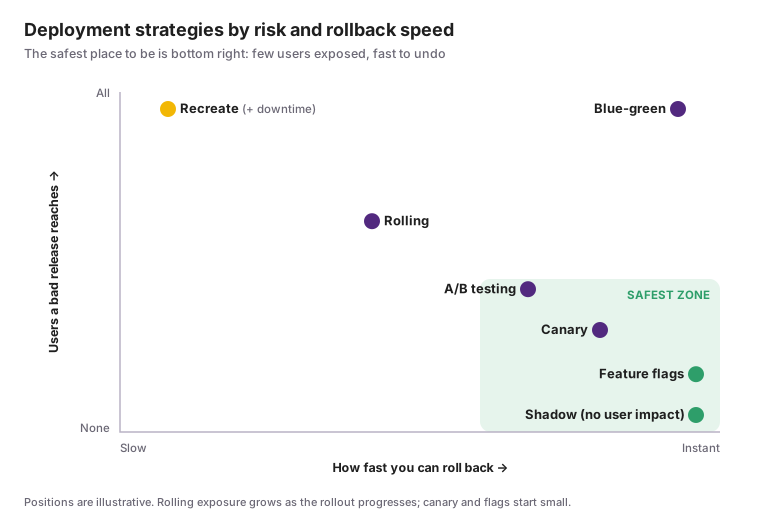
Strategy | How it works | Downtime | Blast radius | Rollback | Extra cost | Best for |
|---|---|---|---|---|---|---|
Recreate | Stop the old version, start the new one | Yes | All users | Slow: redeploy the old version | None | Dev and test environments, apps that can't run two versions at once |
Rolling | Replace instances a few at a time | No | Grows as the rollout progresses | Medium: roll back instance by instance | Little | Stateless services; the Kubernetes default |
Blue-green | Run the new version beside the old, then switch all traffic | No | All users, briefly | Instant: switch traffic back | Double capacity during the switch | Critical services that need fast, clean rollback |
Canary | Send a small share of traffic to the new version, then increase | No | The canary share only | Fast: route traffic back | Small | High-traffic services with good monitoring |
A/B testing | Route specific users to different versions to compare outcomes | No | The test group | Fast | Small | Testing a product change, not just stability |
Shadow | Copy live traffic to the new version; users only see the old one | No | None | Not needed | High: duplicate processing | Risky backend changes, performance testing |
Feature flags | Deploy code everywhere, turn features on for chosen users | No | Users with the flag on | Instant: turn the flag off | Little | Releasing features gradually, separating deploy from release |
In practice teams combine them. A common pattern is a canary or rolling deployment for the code, with the new feature behind a flag, so a bad deploy affects few users and a bad feature can be switched off in seconds.
Each deployment strategy explained
What is a recreate deployment?
A recreate deployment stops every instance of the old version, then starts the new version. It's the simplest strategy and needs no extra infrastructure, but users see downtime between the two, and rolling back means deploying the old version again.
Use it when: downtime is acceptable, such as in development environments, or when two versions can't safely run side by side, for example during an incompatible database change.
What is a rolling deployment?
A rolling deployment replaces instances of the old version with the new one a few at a time, so the service stays up throughout. At any moment both versions are running. It's the default strategy for Kubernetes Deployments and most cloud auto-scaling groups.
Pros: no downtime, little extra capacity, built into most platforms.
Cons: users may hit either version during the rollout; a bad version reaches more users the longer the rollout runs; rollback is gradual too.
Use it when: the service is stateless, old and new versions are compatible, and you have health checks that stop the rollout if new instances fail.
What is a blue-green deployment?
A blue-green deployment runs two identical production environments. "Blue" serves users on the current version while "green" gets the new one. Once green is tested, a router or load balancer switches all traffic to it. If something goes wrong, traffic switches back to blue in seconds.
Pros: near-instant rollback, the new version can be tested in production before users see it, no mixed versions.
Cons: needs double capacity during the switch; all users move at once, so a problem missed in testing hits everyone; databases shared by both environments need careful handling.
Use it when: fast, clean rollback matters more than infrastructure cost. Martin Fowler's description of the pattern remains the classic reference.
What is a canary deployment?
A canary deployment sends a small share of live traffic, often 1% to 5%, to the new version while the rest stays on the old one. If error rates, latency and business metrics look healthy, the share increases step by step until the new version takes all traffic.
Pros: a bad release affects only the canary group; real production traffic tests the change; rollback just means routing traffic back.
Cons: needs traffic-splitting and good monitoring; low-traffic services may not get enough canary traffic to judge; both versions run for a while.
Use it when: the service has steady traffic and you can compare the canary against the baseline automatically.
What is A/B testing in deployment?
A/B testing routes different groups of users to different versions based on rules such as location, device or account type, then compares business outcomes like conversion. The mechanics look like a canary, but the goal is different: A/B testing measures which version users prefer, not whether the new one is stable.
Use it when: you're testing a product change and need statistically meaningful results, usually alongside a feature flag platform.
What is a shadow deployment?
A shadow deployment, also called traffic mirroring, copies live requests to the new version in parallel with the old one. Users only ever see responses from the old version, so a broken new version has no user impact. Teams compare the new version's responses, errors and performance against the old.
Pros: tests with real traffic and zero user risk.
Cons: doubles the processing load; requests that change data, such as payments or emails, must be stubbed so they don't happen twice.
Use it when: you're replacing a critical backend component, such as a new search engine or pricing service, and want to see how it behaves under real load first.
What are feature flags and dark launches?
A feature flag is a switch in the code that turns a feature on or off without a new deployment. A dark launch uses flags to put a feature into production hidden from users, then exercises it with real traffic before revealing it. Together they separate deployment from release.
Pros: instant off-switch, gradual release to chosen users, deploys become routine.
Cons: flags pile up and add complexity unless each one has an owner and is removed after full rollout.
Use it when: you want to deploy continuously and control exposure feature by feature, on top of any of the strategies above.
Blue-green vs canary: what's the difference?
Blue-green switches all traffic to the new version at once; canary moves traffic gradually. Both run the old and new versions side by side and both roll back quickly. The difference is how users are exposed: with blue-green, a problem missed in testing reaches everyone, but only briefly; with canary, it reaches a small group first.
Blue-green | Canary | |
|---|---|---|
Traffic shift | All at once | Step by step, for example 1% → 10% → 50% → 100% |
Who sees a bad release | Everyone, until you switch back | Only the canary share |
Rollback | Switch the router back; seconds | Route the canary traffic back; seconds |
Infrastructure | A full second environment | A few extra instances |
Testing before users | Yes, on the idle environment | Partly; the canary is the test |
Needs | Load balancer or DNS switching | Weighted traffic routing and metric comparison |
Works best for | Releases you want to test fully, then flip | High-traffic services where real usage is the best test |
Which should you use? Choose blue-green when you need to verify the new version thoroughly before any user touches it, and can afford the extra environment. Choose canary when real production traffic is the only reliable test and you can measure health automatically. Many teams combine them: deploy to a green environment, then shift traffic to it in canary steps.
How do you choose a deployment strategy?
Choose the strategy that keeps the damage from a bad release within what your users and business can tolerate, at a cost and complexity your team can run. In practice that comes down to five questions, answered in order:
Can you afford downtime? If yes, and only for this environment, recreate is fine. If not, rule it out.
Can the old and new versions run at the same time? If not, for example because of an incompatible database change, you need recreate or blue-green with a carefully planned data migration.
How fast must rollback be? If seconds matter, use blue-green or feature flags. If minutes are acceptable, rolling or canary works.
How many users can a bad release safely reach? If the answer is "very few", use canary or feature flags so exposure starts small.
Can you detect a bad release automatically? Canary and progressive rollouts only work if you can compare error rates and latency against a baseline. Without that monitoring, start with rolling updates and invest in observability first.
Quick decision guide
Situation | Good starting strategy |
|---|---|
Small team, stateless service, basic monitoring | Rolling |
Critical service, need instant rollback, budget for extra capacity | Blue-green |
High traffic, strong metrics, want minimal exposure | Canary |
Frequent feature releases, want to separate deploy from release | Feature flags on top of rolling or canary |
Replacing a risky backend component | Shadow first, then canary |
Testing which version users prefer | A/B testing |
Dev or test environment, incompatible versions | Recreate |
Your choice can differ per service. A payment API and an internal admin tool don't need the same strategy, and most mature teams run several.
Deployment strategies in Kubernetes
Kubernetes Deployments support two strategies natively: RollingUpdate, the default, and Recreate. Blue-green, canary, shadow and A/B testing need extra tooling, such as Argo Rollouts, Flagger, a service mesh or Gateway API traffic splitting.
Rolling update (the default)
Two settings control how fast a rolling update moves. maxSurge is how many extra pods can run above the desired count; maxUnavailable is how many can be down during the update. Both default to 25%.
apiVersion: apps/v1
kind: Deployment
metadata:
  name: checkout
spec:
  replicas: 10
  strategy:
    type: RollingUpdate
    rollingUpdate:
      maxSurge: 25%        # up to 3 extra pods during the update
      maxUnavailable: 0    # never drop below 10 ready pods
Setting maxUnavailable: 0 keeps full capacity throughout, at the cost of needing room for the extra pods. Rolling updates are only as safe as your readiness probes: Kubernetes moves on when new pods report ready, so a probe that says "ready" too early lets a broken version roll out.
Two commands matter during a rollout:
kubectl rollout status deployment/checkout   # watch progress
kubectl rollout undo deployment/checkout     # roll back to the previous version
Recreate
  strategy:
    type: Recreate
All old pods are terminated before new ones start, so there's downtime. Use it when two versions can't run together.
Other strategies on Kubernetes
Strategy | Built into Deployments? | Common ways to do it |
|---|---|---|
Rolling | Yes (default) |
|
Recreate | Yes |
|
Blue-green | No | Two Deployments and switch the Service selector; Argo Rollouts |
Canary | No | Argo Rollouts or Flagger with automated analysis; weighted routing with a service mesh or Gateway API |
A/B testing | No | Flagger or a service mesh routing by header or cookie |
Shadow | No | Traffic mirroring in a service mesh such as Istio |
Feature flags | No, done in the application | A feature flag service or the OpenFeature standard |
A basic canary is possible without extra tools by running a small second Deployment behind the same Service, but the traffic split then depends on pod counts, and there's no automatic analysis. For production canaries, a progressive delivery controller is worth the setup.
Zero-downtime deployment strategies
Which deployment strategies give zero downtime? Rolling, blue-green, canary, shadow and feature flags can all deploy without downtime; only recreate stops the service. But the strategy alone isn't enough. Zero downtime also depends on what happens inside the application during the switch.
Four practices make the difference:
Graceful shutdown. Old instances should stop accepting new requests, finish the ones in progress, then exit. In Kubernetes, that means handling the termination signal and setting a sensible grace period.
Honest health checks. New instances should only receive traffic once they can actually serve it, including connections to databases and caches.
Backward-compatible changes. During any rollout, old and new versions run together and talk to the same APIs and data. Each version must work with the other.
Database changes in stages. Schema changes are the most common reason a "zero-downtime" deployment isn't.
How to change a database without downtime
Use the expand and contract pattern, also called parallel change, which splits one breaking change into several safe ones:
Expand: add the new column or table without removing the old one.
Migrate: deploy code that writes to both, then backfill existing data.
Switch: deploy code that reads from the new structure.
Contract: once nothing uses the old structure, remove it in a later release.
Each step can be rolled back on its own, and at no point do the running versions disagree about the schema.
Deployment strategies for microservices
Microservices make deployments smaller but more numerous, and they add one new risk: a change in one service can break the services that call it. Three habits keep that risk down:
Deploy each service independently, with its own pipeline and strategy matched to its risk.
Keep APIs backward compatible, or version them, so callers don't have to deploy at the same moment.
Test the contracts between services before release, so a breaking change is caught in the pipeline rather than in production.
Canary and feature flags work especially well for microservices, because a problem shows up in one service's metrics before it spreads to others.
How do you know when to roll back a deployment?
Roll back when a signal you agreed on before the release crosses its threshold, not when someone feels uneasy. The safest strategies only work if you watch the right signals during the rollout and act on them automatically. A canary nobody is watching is just a slower way to break production.
What to watch during a rollout
Signal | Example rollback trigger | Why it matters |
|---|---|---|
Error rate | Above 2× the baseline for 5 minutes | The clearest sign the new version is broken |
Latency | p95 above the SLO for 5 minutes | Slow is often the first symptom of a problem |
Saturation | CPU, memory or connection pools far above the old version | Catches leaks and inefficient code before they cause errors |
Business metric | Checkouts or sign-ups per minute drop by more than 10% | Finds problems that technical metrics miss |
Synthetic checks | A critical journey fails from two regions | Tests the main user paths even when traffic is low |
The first three are part of the four golden signals; synthetic checks on the most important journeys catch problems right after a deploy, before real users find them.
How to set up safe rollouts
Define the triggers before the release, and write them into the pipeline or the progressive delivery tool.
Compare against the old version, not a fixed number. A canary that shows 1% errors is fine if the old version also shows 1%, and a problem if it shows 0.1%.
Pause or roll back automatically when a trigger is crossed. Humans decide later whether to try again.
Page someone when a rollout halts. An automatic rollback that nobody hears about hides a problem that may come back. Treat it as the start of an incident.
Tie release pace to reliability. If the service's error budget is nearly spent, use smaller canary steps or pause risky releases.
When a rollout does cause an incident, the first question in every investigation is "what changed?". A good deployment record answers it in seconds; see the incident management process.
Where ITOC360 fits
Every deployment strategy has the same weak point: the moment a rollout goes wrong and someone needs to know. ITOC360 handles that moment:
Halted rollouts and failed pipelines reach a person. Alerts from CI/CD and deployment tools such as Argo CD, Jenkins, GitHub Actions and GitLab, and from monitoring tools such as Prometheus, Grafana and Datadog, are routed to the on-call owner of the affected service through ITOC360 On-Call.
Escalation doesn't wait. If nobody acknowledges, the page moves to the next responder automatically.
One bad deploy, one incident. Related alerts from the canary, the backend and the synthetic checks are grouped instead of arriving as twenty separate pages.
The strategy limits how far a bad release can spread. ITOC360 makes sure the right person starts working on it within minutes.
Frequently asked questions
What are deployment strategies?
Deployment strategies are methods for replacing a running version of software with a new one in production. The main types are recreate, rolling, blue-green, canary, A/B testing, shadow and feature flags. They differ in downtime, how many users a bad release reaches, how fast you can roll back and how much extra infrastructure they need.
What are the top 5 deployment strategies?
The five most widely used are rolling, blue-green, canary, recreate and feature flags. A/B testing and shadow deployments are used for more specific goals: comparing user behaviour and testing with real traffic at no user risk.
What is the best deployment strategy?
There's no single best one. Canary with automated analysis is the safest choice for high-traffic services with good monitoring; blue-green is best when you need instant rollback; rolling is a solid default for stateless services, especially on Kubernetes.
What is the difference between blue-green and canary deployment?
Blue-green switches all traffic from the old environment to the new one at once and can switch back in seconds. Canary moves a small share of traffic to the new version first and increases it step by step, so a problem reaches fewer users.
What is the default deployment strategy in Kubernetes?
RollingUpdate. Kubernetes replaces pods gradually, controlled by maxSurge and maxUnavailable, which both default to 25%. Recreate is the other built-in option; blue-green and canary need tools such as Argo Rollouts or Flagger.
What is the difference between blue-green and canary deployment?
Blue-green switches all traffic from the old environment to the new one at once and can switch back in seconds. Canary moves a small share of traffic to the new version first and increases it step by step, so a problem reaches fewer users.
What is the default deployment strategy in Kubernetes?
RollingUpdate. Kubernetes replaces pods gradually, controlled by maxSurge and maxUnavailable, which both default to 25%. Recreate is the other built-in option; blue-green and canary need tools such as Argo Rollouts or Flagger.
What is a rolling deployment?
A rolling deployment replaces instances of the old version with the new one a few at a time, so the service stays available throughout. Both versions run side by side until the rollout finishes.
What is a shadow deployment?
A shadow deployment copies live traffic to the new version without showing its responses to users. It lets teams test a new version with real requests and no user risk, at the cost of duplicate processing.
What is a dark launch?
A dark launch puts a new feature into production but keeps it hidden from users, usually with a feature flag, so it can be tested with real traffic before it's released.
Which deployment strategies avoid downtime?
Rolling, blue-green, canary, shadow and feature flag releases can all deploy without downtime, provided the application shuts down gracefully, health checks are accurate and database changes are backward compatible. Recreate always involves some downtime.
How do you choose a deployment strategy?
Work through five questions: can you afford downtime, can two versions run together, how fast must rollback be, how many users can a bad release reach, and can you detect a bad release automatically. The answers point to a strategy, and the choice can differ per service.
Sources
Google SRE Book: Introduction (roughly 70% of outages are due to changes in a live system)
Kubernetes documentation: Deployments (RollingUpdate and Recreate; maxSurge and maxUnavailable defaults)
Martin Fowler: ParallelChange (expand and contract)